
A high-end battlestation gets built with zero corners cut — the fastest GPU you can get, a premium OLED or mini-LED panel, top-shelf peripherals, and a desk that says you take this seriously and you care how it looks. For 2026, that means NVIDIA’s RTX 5090 or RTX 5080 at the core, a 1440P OLED or 4K HDR display, and a complete premium peripheral kit around it. Here’s how I’d break down every part of the decision at the top tier.
As an Amazon Associate we earn from qualifying purchases at no extra cost to you.


| Component | Product | Price |
|---|---|---|
| PC | ZOTAC MEK RTX 5090 32GB | $4,999 |
| Monitor (1440P OLED) | ASUS ROG Strix QD-OLED 26.5″ | $599 |
| Monitor (4K Alt) | ASUS ROG Strix 32″ 4K HDR | $599 |
| Mouse | Logitech G305 Lightspeed Wireless | $30 |
| Setup Total | ~$5,800 |
🛒 Best Price Today on Amazon
Prime members get fast, free shipping on everything above, plus member-only deals. New members get a 30-day free trial — cancel anytime.
Start 30-Day Prime Free Trial →See Today’s Amazon DealsRTX 5090 as the Core: What It Enables
The RTX 5090’s 32GB GDDR7 framebuffer and 575W TDP make it the most capable consumer GPU ever built. In a battlestation it unlocks: native 4K path-traced Cyberpunk 2077 at 80–100fps, 1440P/144fps+ in everything with zero upscaling, local AI inference (7B–13B parameter LLMs running at usable speeds), 8K texture mod packs in Skyrim or GTA V, and pro GPU rendering work (Blender, DaVinci Resolve) without throttling.
Monitor Choice at the Top Tier: OLED vs Mini-LED 4K
At this budget the monitor call really comes down to which display philosophy you buy into: QD-OLED (ASUS ROG XG27ACDNG, Alienware AW2725DF) gives you perfect blacks, instant pixel response and superb motion clarity at 1440P for $599. Mini-LED 4K (ASUS ROG XG32UCG) trades that for higher resolution, brighter output and no burn-in worry. Both run $599. Go QD-OLED if HDR contrast, moody dark games and motion sharpness top your list; go Mini-LED 4K if resolution, sustained brightness and creative work do.
Battlestation Setup — Component Breakdown
PC: ZOTAC MEK RTX 5090 32GB
ZOTAC’s MEK RTX 5090 is the easiest way into a full RTX 5090 system, mating the flagship GPU to an AMD Ryzen 9, 64GB DDR5 and 2TB NVMe inside ZOTAC’s proven MEK chassis. Its thermals tame the RTX 5090’s 575W TDP well — dual-loop liquid cooling on the CPU and a high-static-pressure triple-fan case layout for the GPU. At $4,999 it’s the cheapest sensible door into RTX 5090 prebuilt territory.
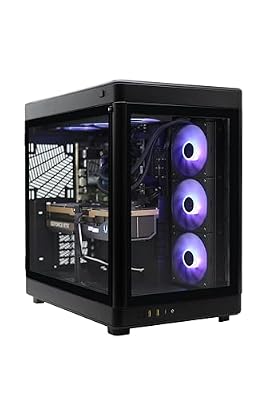
ZOTAC MEK Gaming PC Desktop, NVIDIA GeForce RTX 5090 32GB GDDR7, AMD Ryzen 7 9700X Up to 5.5GHz, 32GB DDR5, 2TB NVMe SSD, 1200W 80+ Gold PSU, WiFi 7, Windows 11 Pro


As an Amazon Associate we earn from qualifying purchases. Product prices and availability are accurate as of the date/time indicated.
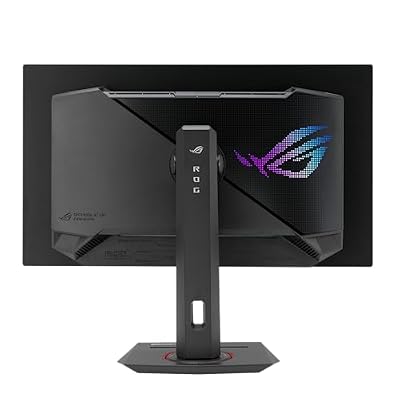
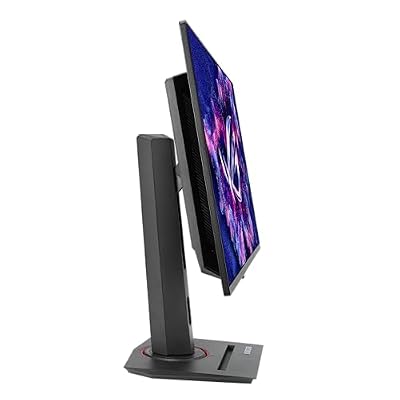
Monitor: ASUS ROG Strix QD-OLED 26.5″ (XG27ACDNG)
The ASUS ROG Strix XG27ACDNG brings QD-OLED quality to the $599 battlestation monitor tier. The QD Quantum Dot layer on top of OLED widens the color gamut past standard OLED — 99% DCI-P3 — while keeping OLED’s signatures: infinite contrast, 0.03ms pixel response and a 240Hz refresh. At 26.5 inches it’s a compact but premium display that does justice to every frame the RTX 5090 puts out. The ROG Strix look and branding fit a high-end battlestation perfectly.

ASUS ROG Strix 26.5” 1440P QD-OLED Gaming Monitor (XG27ACDNG) -QHD (2560x1440), 360Hz, 0.03ms, Custom Heatsink, OLED Care+, G-SYNC Compatible, 99% DCI-P3, DisplayWidget, AI Gaming, 3yr Warranty





As an Amazon Associate we earn from qualifying purchases. Product prices and availability are accurate as of the date/time indicated.
Standalone GPU Option: ASUS Prime RTX 5070 Ti OC 16GB
If you already run a compatible AM5 or LGA1851 system and want to build a battlestation around a GPU upgrade instead of a whole new prebuilt, the ASUS Prime RTX 5070 Ti OC is the premium standalone card at a battlestation-appropriate price. It gives you 80% of the RTX 5090’s gaming performance for 37% of the cost, with 16GB GDDR7, ASUS’s industrial-grade cooling and a 3-year warranty. The smart upgrade route for existing high-end owners.

ASUS Prime RTX 5070 Ti OC 16GB GDDR7 GPU, PCIe 5.0, HDMI 2.1b, 3X DP 2.1b, High FPS 4K Gaming, Creator PC, AI Creation, Video Editing, 3D Rendering, Streaming, Local AI, with GPU Holder




As an Amazon Associate we earn from qualifying purchases. Product prices and availability are accurate as of the date/time indicated.
Completing the Battlestation: Desk, Chair, Acoustics
A high-end battlestation reaches well past the PC and monitor: (1) Desk — a 60-inch or wider gaming desk with cable grommets and monitor-mount support. Budget $200–$400. (2) Chair — an ergonomic gaming chair or proper office chair for long sessions. Budget $200–$500. (3) Monitor arm — a single or dual arm frees up desk space and lets you dial in positioning. Budget $80–$150. (4) Desk mat — a full-desk mousepad ties the look together and protects the surface. Budget $30–$60. (5) Ambient lighting — LED bias lighting behind the monitor eases eye strain and sets the mood. Budget $30–$80.
Frequently Asked Questions
What defines a true high-end battlestation in 2026?
A flagship battlestation pairs a top GPU like the RTX 5090 with a Ryzen 9000X3D or Core Ultra 9 CPU, 32GB to 64GB of fast DDR5, and NVMe storage. Add a high-refresh 4K or ultrawide OLED, premium peripherals, and clean cable management for the complete experience.
What monitor suits a flagship gaming build?
A 4K 240Hz OLED or a high-refresh ultrawide OLED matches flagship hardware, showcasing the frame rates and visual fidelity these components produce. OLED delivers perfect blacks and instant response, while the high refresh rate ensures the extra GPU power translates into visibly smoother, more immersive gameplay.
How much power supply does a high-end rig need?
Plan for a 1000W or larger 80 Plus Gold or Platinum unit when running a 5090-class GPU and a high-core CPU. This provides stable power under peak load and headroom for transient spikes, and ensures the PSU supports the 12V-2×6 connector these top graphics cards use.
Is liquid cooling necessary for a battlestation?
For the highest-tier CPUs, a 360mm AIO or custom loop keeps temperatures and noise low under sustained load, and it looks the part. Premium air coolers can handle many chips, but flagship processors pushing high power benefit from liquid cooling’s superior heat dissipation during long sessions.
How much RAM does a high-end setup need?
32GB of fast DDR5 satisfies pure gaming, but 64GB is worthwhile if you stream, create content, or run heavy multitasking alongside games. On a no-compromise build, 64GB provides lasting headroom for future titles and professional workloads without the memory ever becoming a limitation.










