
Getting into PC gaming on a tight $1,200 all-in budget is absolutely doable in 2026 — provided you’re disciplined about where each dollar goes. This guide builds a full setup (PC + monitor + keyboard + mouse + headset) for under $1,200, aiming for 1080p/60fps+ in modern AAA games and 1080p/144fps+ in esports. No corners cut on the essentials, just a smart split of every dollar.
As an Amazon Associate we earn from qualifying purchases at no extra cost to you.


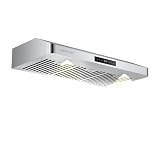
| Component | Product | Price |
|---|---|---|
| PC | Skytech Nebula Ryzen 5 5600 | $779 |
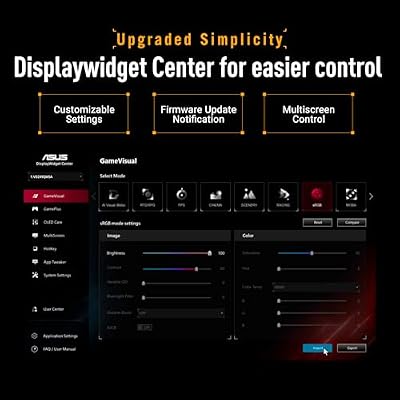
| Monitor | ASUS TUF Gaming 24″ 1080P 280Hz | $156 |
| Keyboard | Aula WIN60 HE 60% Mechanical | $33 |
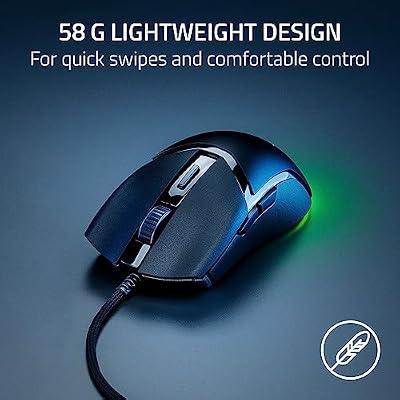
| Mouse | Razer Cobra Wired | $29 |
| Headset | Razer BlackShark V2 X | $34 |
| Total | ~$1,031 |
🛒 Best Price Today on Amazon
Prime members get fast, free shipping on everything above, plus member-only deals. New members get a 30-day free trial — cancel anytime.
Start 30-Day Prime Free Trial →See Today’s Amazon DealsIs $1,200 Enough for a Complete Gaming Setup in 2026?
Yes — with careful picks, $1,200 lands a complete, working gaming setup that does 1080p/60fps in modern AAA games and 100–200fps in esports. The trick is loading up the PC (70–75% of budget) and monitor (15%) while keeping peripherals lean without skimping on what matters. The build below comes to about $1,031 — leaving $170 spare for a budget desk ($80–$120) or to bump up a single component.
Budget Allocation Strategy for a Sub-$1,200 Gaming Setup
Here’s the budget split we’d run for a $1,200 complete setup: PC: 70–75% ($840–$900) — this is where the gaming performance lives; Monitor: 13–15% ($160–$180) — 1080p/144Hz+ is in reach at this budget; Keyboard: 3% ($30–$40) — a functional mechanical or membrane board; Mouse: 2–3% ($25–$35) — an accurate optical sensor is the bar; Headset: 3% ($30–$45) — directional audio for gaming and comms.
Budget Setup — Component Breakdown
PC: Skytech Nebula — Ryzen 5 5600 + Discrete GPU
The Skytech Nebula at $779 is the PC to build a sub-$1,200 setup around. The Ryzen 5 5600’s 6-core Zen 3 handles gaming and light background work without fuss, and the discrete GPU puts up solid 1080p numbers. Skytech’s build quality holds up at this tier, and the 1-year warranty is standard coverage. The 16GB DDR4 and 1TB SSD are fine for a primary gaming rig.

Skytech Nebula Gaming PC Desktop, Ryzen 5 5600 3.5 Ghz (4.4GHz Turbo Boost), NVIDIA RTX 3050 (6GB) 6GB GDDR6, 1TB SSD, 16GB DDR4 RAM 3200, 650W Gold PSU, Wi-Fi, Win 11 Home


As an Amazon Associate we earn from qualifying purchases. Product prices and availability are accurate as of the date/time indicated.
Monitor: ASUS TUF Gaming 24″ 1080P 280Hz
The ASUS TUF Gaming VG249QM5A is the best monitor value in this budget context. At $156 it brings 280Hz refresh — way past the 60–75Hz panels usually bundled into budget PC deals — on a Fast IPS panel that shuts down ghosting. In a setup where the PC won’t always hit 280fps, its G-Sync Compatible support keeps things tear-free at any framerate. You’re future-proofing the display for whenever the PC gets upgraded.

ASUS TUF Gaming VG249QM5A 24 Inch 1080p 240Hz G-SYNC Gaming Monitor | ELMB Sync, FreeSync Premium, Gaming AI, Fast-IPS, 0.3ms, 99% sRGB,Extreme Low Motion Blur Sync,3yr warranty





As an Amazon Associate we earn from qualifying purchases. Product prices and availability are accurate as of the date/time indicated.
Keyboard: Aula WIN60 HE 60% Mechanical
The Aula WIN60 HE is a standout at $33 — a Hall Effect 60% mechanical board with Rapid Trigger support, the kind of thing you normally only find on $80–$150 keyboards. The HE magnetic switches kill debounce delay and keep actuation consistent for the life of the key. The 60% footprint frees up mouse room on the desk. For a budget build, this is the keyboard that doesn’t feel like a compromise.
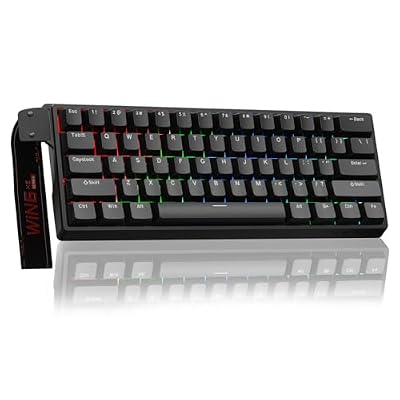
Aula WIN60 HE - 60% Mechanical Gaming Keyboard Wired, Magnetic Switch Hot Swappable, Adjustable Actuation Rapid Trigger Mode, 8000 Hz Polling Rate, RGB Small Keyboard 60 Percent Compact Design for PC


As an Amazon Associate we earn from qualifying purchases. Product prices and availability are accurate as of the date/time indicated.
Mouse: Razer Cobra Wired ($29) and Headset: Razer BlackShark V2 X
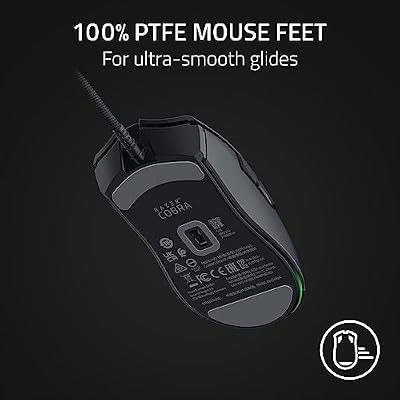
At $29 and $34 respectively, the Razer Cobra and BlackShark V2 X are the value champs in their categories. The Cobra’s 58g ultralight shell and Gen-3 optical sensor punch well above the $29 sticker. The BlackShark V2 X’s 50mm TriForce drivers and 7.1 spatial audio deliver genuine competitive sound on a budget. Neither one cuts a corner that touches actual gameplay.

Razer Cobra Wired Gaming Mouse, Gen-3 Optical Switches, 58g, Black | Chroma RGB Lighting with Underglow, Precise 8500 DPI Optical Sensor, 100% PTFE Mouse Feet




As an Amazon Associate we earn from qualifying purchases. Product prices and availability are accurate as of the date/time indicated.
Frequently Asked Questions
What can a $1200 total setup get you in 2026?
A $1200 budget can cover a capable 1080p to 1440p gaming PC plus a monitor, keyboard, and mouse. By choosing a mid-range GPU, a modern CPU, 16GB or 32GB of RAM, and an SSD, you get smooth high-settings gaming with money left for essential peripherals.
How should I split the budget between PC and peripherals?
Allocate roughly $900 to $1000 to the PC itself and $200 to $300 for a monitor, keyboard, mouse, and headset. Spending too much on peripherals starves the components that actually drive frame rates, so prioritize the GPU and CPU while choosing solid, affordable accessories.
What resolution should a $1200 setup target?
1080p at high refresh is the safest target, running modern games smoothly on this budget, though a strong mid-range GPU can also handle 1440p at high settings with upscaling. Pair the PC with a 1080p 144Hz or budget 1440p monitor to match its realistic performance.
Can I upgrade a budget setup later?
Yes, and you should plan for it. Choose a platform like AM5 and a power supply with some headroom so you can drop in a better GPU or more RAM down the road. This upgrade path lets a budget build grow with your needs without a full rebuild.
Should I buy a prebuilt or build to stay under $1200?
Building often stretches a tight budget further and lets you pick each part, but prebuilt deals can be competitive and add warranty peace of mind. Compare current prebuilt prices against a parts list; if the gap is small, the warranty and convenience of a prebuilt may win.









