
Apple’s Mac mini M4 is a fantastic little machine, but its base storage fills up fast, and Apple’s own upgrades are famously expensive. That’s created a booming market for M4-compatible SSD upgrades that let you dramatically expand capacity for a fraction of Apple’s pricing, alongside high-end NVMe drives for anyone building or upgrading a PC in the same breath.
We looked at the SSD options that matter for M4 users, from purpose-built Mac mini upgrade modules to flagship desktop NVMe drives, to clarify what “SSD M4” really means and which route makes sense for your setup.
As an Amazon Associate we earn from qualifying purchases at no extra cost to you.




🎮 Get More From Your Setup — Free
Prime Gaming gives you free PC games every month, in-game loot, and a free Twitch channel sub — plus fast free shipping on all the gear above. New members get a 30-day free trial.
Watch: SSD m4 — Video Review
Design & Build
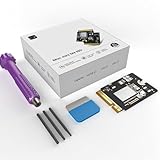
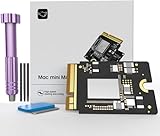
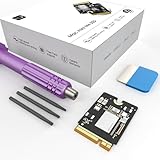
Two very different products share this space. Purpose-built Mac mini M4 upgrade modules, like those from CHGRNLF, Zinweyton, and sbaceflay in 1TB and 2TB capacities, are custom storage sticks designed to fit the M4’s proprietary slot, offering a DIY route to more space. They’re compact, model-specific, and installed by opening the mini. On the standard PC side, drives like the Samsung 990 PRO and 990 EVO Plus are conventional M.2 2280 NVMe sticks built to a universal standard with robust controllers and thermal design. Build quality on the Samsung drives is excellent; the Mac mini modules vary by brand, so buying from a reputable seller matters.
Performance
The two categories perform differently by design. Mac mini M4 upgrade modules like the sbaceflay 1TB deliver around 3300MB/s, a solid, usable speed that expands the mini’s storage affordably while keeping everyday performance snappy. For raw speed, though, nothing here matches the standard NVMe drives: the Samsung 990 PRO hits up to 7,450MB/s on PCIe 4.0, and the 990 EVO Plus reaches around 7,250MB/s, making them ideal for high-performance desktops, gaming rigs, and heavy content work. The trade-off is compatibility, the Samsung drives go in a PC or external enclosure, not directly into the M4’s proprietary slot. Choose based on whether you’re expanding a Mac mini or building a fast PC.
Pros & Cons
- Massive Mac mini savings versus Apple’s storage pricing
- High capacities up to 2TB for M4 modules and 4TB NVMe drives
- Blazing NVMe speeds up to 7,450MB/s on the Samsung 990 PRO
- Affordable route to expand or build without breaking the bank
- M4 upgrade modules require opening the mini and careful installation
- Third-party Mac modules vary in quality by brand
- Standard NVMe drives don’t fit the M4’s proprietary slot directly
Alternatives to Consider
If you’d rather not open your Mac mini, a fast external Thunderbolt or USB-C SSD enclosure paired with a Samsung 990-series drive gives you huge, speedy storage with no internal surgery. PC builders should simply choose the 990 PRO for peak performance or the 990 EVO Plus for excellent value. And anyone wanting the simplest path can buy a higher-capacity Mac mini up front, though at Apple’s premium. Match the solution to your comfort with installation and which machine you’re upgrading.
Step-by-Step: Choosing a Storage Route for a Mac mini M4
The Mac mini M4 does not use a standard M.2 slot. Its internal storage is a proprietary module, so the first decision is whether you want an internal replacement or an external drive. Work through these steps in order.
- Measure what you actually need. Add up your current library, then leave headroom of roughly 20 to 25 percent so the drive never runs near full.
- Decide internal or external. An internal module keeps the desk tidy and boots at full speed. An external NVMe enclosure is simpler, reversible and a lower-risk way to add space.
- Back up first. Replacing the internal module normally means a full DFU restore from a second Mac, which erases the machine. Make a complete Time Machine or cloned backup before touching anything.
- Match the module to the model. Modules for the M4 and M4 Pro are physically different, so confirm the listing names your exact chip.
- Restore and verify. After the restore, check the capacity in System Settings and run a large file copy to confirm the drive holds a steady speed.
Internal Module vs External Enclosure
| Factor | Internal upgrade module | External M.2 enclosure |
|---|---|---|
| Standard PC drive (such as a 990 PRO) works | No, proprietary connector | Yes, inside the enclosure |
| Needs a second Mac and DFU restore | Yes | No |
| Can hold the macOS install | Yes | Possible, but boot behavior depends on the port and enclosure |
| Link speed | Internal bus | 10Gbps USB or 40Gbps USB4/Thunderbolt, depending on the enclosure |
| Risk if something goes wrong | Higher; the machine must be restored | Low; just unplug it |
Common Mistakes
- Assuming any NVMe drive fits inside the Mac mini. Standard PC drives are meant for enclosures, not the internal slot.
- Pairing a fast drive with a 10Gbps enclosure and expecting full speed. The enclosure link, not the drive, becomes the ceiling.
- Skipping the backup before a DFU restore.
- Buying a module listed for a different Mac mini generation or chip tier.
- Ignoring heat. Sustained writes in a sealed enclosure can throttle, so look for an aluminum body or a thermal pad.
Troubleshooting
- The Mac does not detect the new module: Reseat it, then repeat the DFU restore with a known-good USB-C cable connected to the correct port.
- An external drive disconnects under load: Try a shorter, certified cable and a rear port, and avoid unpowered hubs.
- Copy speed drops after a few gigabytes: This is common behavior once a consumer drive’s fast cache fills. A very steep drop can point to heat.
- Disk Utility shows the wrong format: Erase the external drive as APFS before using it with macOS.
Related Guides
- Best Budget PSU in 2026
- Best First Gaming PC for Beginners (2026)
- Best PC Parts for Gaming (2026)
- Best Ryzen Am4 Compatable CPU List (2026)
Frequently Asked Questions
Can I upgrade the SSD in a Mac mini M4 myself?
Yes, with model-specific modules from brands like CHGRNLF, Zinweyton, and sbaceflay, though it requires opening the mini and following installation steps carefully. If you’re not comfortable, an external SSD is a no-risk alternative.
Will a Samsung 990 PRO work in a Mac mini M4?
Not directly, the M4 uses a proprietary storage slot, not a standard M.2. You can, however, use the 990 PRO in an external Thunderbolt or USB-C enclosure to add fast storage to the mini.
How fast are Mac mini M4 upgrade modules?
They typically deliver around 3300MB/s, which is plenty for everyday use and a big, affordable capacity boost. Standard PCIe 4.0 NVMe drives are faster but aren’t compatible with the M4’s internal slot.
Is the 990 PRO or 990 EVO Plus better?
The 990 PRO is the faster, more performance-oriented drive at up to 7,450MB/s, while the 990 EVO Plus offers slightly lower speeds at a better value. Both are excellent 4TB options for a PC.
Verdict
What you need under “SSD M4” depends entirely on your goal. To expand a Mac mini M4 affordably, a purpose-built 1TB or 2TB upgrade module from a reputable brand like sbaceflay is the way to sidestep Apple’s pricing, or use an external enclosure to avoid opening the machine. For a fast PC build, the Samsung 990 PRO is the performance pick and the 990 EVO Plus the value choice. Match the drive to the machine, and you’ll add plenty of speedy storage without overpaying.










