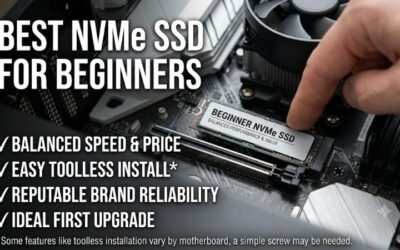
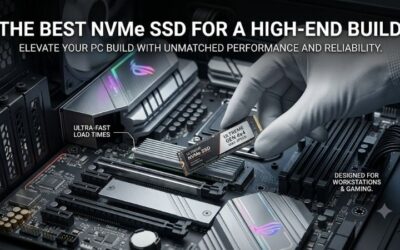
The fastest SSD you can buy in 2026 is a PCIe 5.0 NVMe drive, and the top models now push past 14,000 MB/s sequential reads, roughly double the previous generation. But raw sequential numbers only tell part of the story. Real-world speed depends on random performance, sustained write behavior, thermal management, and whether your motherboard even supports the latest interface. This guide ranks the fastest SSDs available and explains which one actually makes sense for your setup.
Whether you are chasing shorter game load times, faster video exports, or snappier boot-ups, the right drive delivers a tangible difference. Below we compare the fastest SSD options across PCIe 5.0 and PCIe 4.0 tiers, so you can match blistering speed to your budget and your system’s capabilities.
As an Amazon Associate we earn from qualifying purchases.
| Product | Key Spec | Best For |
|---|---|---|
| Crucial T710 | PCIe 5.0, up to 14,900 MB/s read | Fastest overall |
| Samsung 9100 Pro | PCIe 5.0, 14,700 MB/s, efficient | Best all-round PCIe 5.0 |
| WD Black SN8100 | PCIe 5.0, 14,900 MB/s, fast sustained writes | Sustained performance |
| Crucial T700 | PCIe 5.0, 12,400 MB/s, value 5.0 | Cheaper PCIe 5.0 |
| Samsung 990 Pro | PCIe 4.0, 7,450 MB/s, proven | Best PCIe 4.0 drive |
| WD Black SN770 | PCIe 4.0, 5,150 MB/s, great value | Budget speed |
| Crucial P310 | PCIe 4.0, compact 2230/2280 | Handhelds and laptops |
What Makes the Fastest SSD Fast
Sequential read and write speeds grab headlines, but the fastest SSD experience also depends on random 4K performance, which governs how quickly small files and game assets load. Controller quality, NAND type, and DRAM cache all play roles. A PCIe 5.0 drive like the Crucial T710 leads on paper, but in everyday tasks the gap over a top PCIe 4.0 drive is often smaller than the numbers suggest.
PCIe 5.0 Versus PCIe 4.0
PCIe 5.0 SSDs deliver the highest sequential speeds available, ideal for professionals moving huge video files or working with large datasets. However, they run hotter and cost more. PCIe 4.0 drives like the Samsung 990 Pro remain plenty fast for gaming and general use at a lower price and cooler temperatures. Choose PCIe 5.0 only if your workload genuinely benefits and your motherboard supports it.
Do You Actually Need the Fastest SSD?
For gaming, the honest answer is that even a good PCIe 4.0 drive already saturates what most titles can use, so the fastest SSD yields only modest load-time gains. Where PCIe 5.0 truly shines is content creation: video editing, 3D rendering, and large file transfers. Match the drive to your real workload rather than chasing benchmark bragging rights that daily tasks may never exploit.
Fastest SSD Specs Compared by Tier
| Drive | Interface | Listed read | Listed write | Controller | Tier |
|---|---|---|---|---|---|
| WD_Black SN8100 | PCIe 5.0 | 14,900 MB/s | 11,000 MB/s on the listing; some tests show higher | Silicon Motion SM2508 | Premium |
| Samsung 9100 Pro | PCIe 5.0 | 14,700 MB/s | about 13,400 MB/s (2TB) | Samsung in-house | Premium |
| Crucial T710 | PCIe 5.0 | 14,500 to 14,900 MB/s | 13,700 to 13,800 MB/s | Silicon Motion SM2508 | Premium |
| Crucial T705 | PCIe 5.0 | 14,500 MB/s (2TB) | about 12,700 MB/s | Phison E26 | Mid-range to premium |
| Lexar NM1090 PRO | PCIe 5.0 | 14,000 MB/s | 10,000 MB/s | per listing | Mid-range |
| Samsung 990 Pro | PCIe 4.0 | 7,450 MB/s | about 6,900 MB/s | Samsung in-house | Mid-range |
| Crucial P310 | PCIe 4.0 | 7,100 MB/s | per listing | per listing | Budget |
Write figures differ between sources because they depend on capacity, firmware and whether the test is a short burst or a long copy. Treat the table as a guide to class, not a ranking by the last hundred megabytes per second.
Synthetic Speed Versus Real-World Speed
The 14,000 MB/s figure comes from a sequential test with a deep queue. Everyday use looks different. Independent leaderboards that copy real files with a disk benchmark tend to show roughly 10,000 MB/s for the top drives, and games and apps depend more on small random reads than on sequential throughput. That is why a Gen4 drive loads most titles almost as fast as a Gen5 one. Technologies such as DirectStorage may widen the gap over time, but few games use them heavily today.
Why Random Performance and Controllers Matter
Random IOPS describe how many small reads and writes a drive can do per second. High-end drives reach over two million, which helps with operating-system tasks, databases and large code builds. The newer controllers in the T710 and SN8100 improved random speed and power draw over the T705, which is why they sit in the premium tier even though the headline sequential number is close.
Capacity and Endurance
Endurance is rated in terabytes written. The Samsung 9100 Pro and WD_Black SN8100 carry matching ratings of roughly 600 TBW at 1TB, 1,200 TBW at 2TB and 2,400 TBW at 4TB. A home user writing 50 GB a day would take decades to reach those numbers. Capacity matters more for speed: larger drives have more flash chips working together, so a 2TB model often writes faster than the 1TB version of the same drive.
Slot Sharing and Motherboard Checks
- Check which M.2 slot is Gen5. On many boards only the slot closest to the processor runs at that speed.
- Some boards share lanes between a Gen5 M.2 slot and the graphics slot, which can reduce the graphics card to fewer lanes when both are used. Read the board manual.
- Look at the space under the graphics card; a tall heatsink may not fit.
- Update the motherboard firmware so the board recognizes new drives.
Common Mistakes When Buying the Fastest SSD
- Paying for Gen5 on a board that only has Gen4 slots.
- Running a Gen5 drive without a heatsink and then losing speed to throttling.
- Judging two drives by sequential speed alone instead of random speed, capacity and price.
- Buying a portable external drive when the goal is a boot or game drive.
- Choosing 500GB or 1TB when game libraries are growing quickly.
Who Should Skip the Fastest SSD
Skip a Gen5 drive if you mostly play games, use a laptop or handheld, or have a Gen4 board. A good Gen4 drive such as the Samsung 990 Pro or Crucial P310 gives similar load times and runs far cooler. Put the saved money into more capacity or a better graphics card.
Thermals Matter for Sustained Speed
The fastest SSD generates real heat under load, and without adequate cooling it throttles to protect itself, erasing its speed advantage. Many PCIe 5.0 drives ship with or require a substantial heatsink. Efficient controllers such as the one in the Samsung 9100 Pro help, but every PCIe 5.0 drive, including the WD Black SN8100, depends heavily on your motherboard’s M.2 heatsink or a separate cooler. Always ensure proper cooling to keep peak performance intact.
Capacity and Endurance Considerations
Aim for at least 1TB, since modern games and creative projects consume space rapidly, and larger drives often post faster write speeds thanks to more NAND to work with. Endurance ratings, measured in terabytes written, indicate longevity; premium drives like the Samsung 9100 Pro offer high endurance that easily outlasts typical consumer use, giving peace of mind for years of heavy writing.
Compatibility Before You Buy
The fastest SSD only reaches its full speed in a compatible slot. PCIe 5.0 drives need a PCIe 5.0 M.2 slot, found on recent AMD and Intel motherboards; in an older slot they run at reduced speeds. Handhelds and thin laptops may require compact 2230 or 2242 form factors, so the Crucial P310 or similar is essential there. Always verify your slot type and size first.
Getting the Best Value on Speed
For most gamers, a top PCIe 4.0 drive like the Samsung 990 Pro or the budget-friendly WD Black SN770 offers the best balance of speed and price. Creators and enthusiasts who move large files justify the premium of a PCIe 5.0 drive. The fastest SSD is impressive, but the smartest purchase is the drive that matches your workload, motherboard, and budget.
Crucial T705 PCIe Gen5 NVMe 2TB SSD

Crucial T705 PCIe Gen5 NVMe 2TB SSD, Up to 14,500MB/s, TLC NAND, Intel & Ryzen Compatible, for Hardcore Gaming & High-Speed Storage, Solid State Drive, Includes 1Mo Adobe CC – CT2000T705SSD3
Included for 'Fastest SSD (2026 Guide)' as a representative home product in this roundup; selection reflects the product set returned for this topic.
View on AmazonThe Crucial T705 is the Gen5 drive for buyers who want near-top speed without paying the newest-model premium. The 2TB version lists up to 14,500 MB/s sequential reads, uses TLC NAND and a Phison E26 controller, and works with both Intel and Ryzen platforms. Comparison articles that put it next to the Samsung 9100 Pro and the WD_Black SN8100 find the gaming experience very close, and note that its street price has fallen well below its launch level.
Who it suits: gamers and general builders with a PCIe 5.0 M.2 slot who want a fast boot and load drive and see no benefit in paying for the very last few hundred megabytes per second. It is also a sensible pick for a mixed workload, since 2TB gives space for a large game library plus projects.
Strengths: Gen5 sequential speed at a mid-range to premium price instead of top-tier pricing, 2TB capacity that keeps write speed high, and a well-known brand with broad compatibility. Its listed write speed on the 2TB model is about 12,700 MB/s, which is lower than the Samsung and WD flagships but far beyond what any game needs.
Drawback: it runs warm and uses more power than newer controllers, so a good heatsink is mandatory. The plain version has no cooler, and a version with a heatsink is sold separately. Random performance trails the newer 9100 Pro and the T710, which matters little for gaming but a little more for heavy multitasking. Compared with the 9100 Pro already ranked above, it is the cheaper alternative that gives up some write speed and efficiency.
Lexar NM1090 PRO 1TB PCIe Gen 5 NVMe SSD
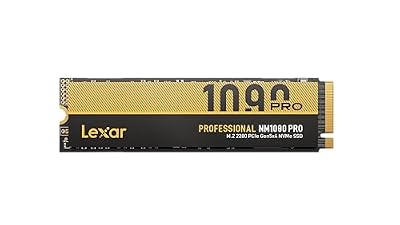
Lexar 1TB NM1090 PRO NVMe SSD, 14,000/10,000 MB/s, M.2 2280, PCIe Gen 5 | Ideal for AI Computing, Gaming, Content Creation, Thermal Control, DirectStorage Enabled, DRAM & SLC Cache, LNM109P001T-RNNNU
Included for 'Fastest SSD (2026 Guide)' as a representative home product in this roundup; selection reflects the product set returned for this topic.
View on AmazonThe Lexar NM1090 PRO is a Gen5 drive aimed at buyers who want the interface at a lower price tier. The listing gives its speed as 14,000 MB/s reads and 10,000 MB/s writes in the M.2 2280 format with PCIe Gen 5, and it is marketed for gaming, content creation and AI work.
Who it suits: someone building a new PCIe 5.0 platform on a limited budget, or a person who wants a fast second drive for scratch files and projects. At 1TB it makes sense as a secondary drive paired with a larger, cheaper PCIe 4.0 unit for games.
Strengths: reads close to the flagship range, a lower price tier than the Samsung, WD and Crucial leaders, and standard compatibility with Gen5 slots. For file transfers and project work, the speed gap to the top models is small in practice.
Drawback: Lexar is a less established name in enthusiast reviews than Samsung or WD_Black, and the 10,000 MB/s write figure is lower than the leaders. Its 1TB size also limits how much of the drive acts as fast cache. Heatsink details are not stated in the listing summary, so plan on a cooler from the motherboard or a separate one. Compared with the WD_Black SN8100 ranked above, it gives up sustained write speed and brand track record in return for a lower cost.
Crucial P310 1TB PCIe Gen4 SSD with Heatsink

Crucial P310 2280 1TB PCIe Gen4 NVMe Gaming PS5 SSD with Heatsink, Up to 7,100MB/s, PlayStation5, Laptop & Desktop (PC) Compatible, Solid State Drive - CT1000P310SSD5-01
Included for 'Fastest SSD (2026 Guide)' as a representative home product in this roundup; selection reflects the product set returned for this topic.
View on AmazonThe Crucial P310 is the PCIe 4.0 option for people who do not need the very fastest drive. This version comes with a heatsink and lists up to 7,100 MB/s, in the standard 2280 size, with listing text that names the PlayStation 5 along with laptop and desktop PCs. It is a good match for the guide’s earlier point that handhelds and thin laptops often need compact drives and a Gen4 interface.
Who it suits: console upgraders adding storage to a PlayStation 5, desktop builders with an older motherboard that has no Gen5 slot, and anyone who wants speed without heat. The included heatsink removes the need to buy a cooler, which matters for console use where space is limited.
Strengths: 7,100 MB/s is well above what current games can use, running temperatures are far lower than on a Gen5 drive, and the price tier is much friendlier. For gaming load times the difference against the 14,000 MB/s class is small.
Drawback: the heatsink adds height, so check clearance in a laptop or a console slot, and the listing is for a 2280 drive, which is not a fit for the small 2230 handheld slots. At 1TB, it fills quickly with modern games. Compared with the Samsung 990 Pro already ranked above, it is cheaper but lacks the Samsung’s higher sustained performance; choose it for value, not for peak numbers.
Related Upgrades
Pair a fast drive with the right system in our budget gaming PC and best budget gaming PC guides. Laptop owners should see our good gaming notebook, best laptop for gaming, and best budget gaming laptop roundups, while everyday users can speed up any machine covered in our best laptop for home use picks.
Frequently Asked Questions
What is the fastest SSD you can buy in 2026?
The fastest SSD in 2026 is a PCIe 5.0 NVMe drive such as the Crucial T710 or WD Black SN8100, reaching sequential reads near 14,900 MB/s. These drives roughly double the speed of the previous PCIe 4.0 generation. However, they require a compatible PCIe 5.0 slot and good cooling to sustain those speeds, so verify your motherboard before buying.
Is a PCIe 5.0 SSD worth it for gaming?
For most gamers, a PCIe 5.0 SSD offers only modest load-time improvements over a top PCIe 4.0 drive, because current games cannot fully use the extra bandwidth. The fastest SSD truly benefits content creators moving large video files or datasets. If you primarily game, a strong PCIe 4.0 drive like the Samsung 990 Pro delivers nearly the same experience for less money.
Does the fastest SSD need a heatsink?
Yes, the fastest SSD models, particularly PCIe 5.0 drives, generate significant heat and require adequate cooling to avoid throttling. Some ship with a heatsink, while others rely on your motherboard’s M.2 cooler. Without proper thermal management, the drive slows down to protect itself, erasing its speed advantage. Always ensure a heatsink is present before running one at full load.
How much SSD capacity do I need?
Aim for at least 1TB in 2026, since modern games routinely exceed 100GB each and creative projects consume space quickly. Larger drives also often post faster write speeds because they have more NAND to work with. If you install many games or work with large files, 2TB provides valuable breathing room and reduces how often you must manage storage.
Will the fastest SSD work in my laptop or handheld?
It depends on the form factor and slot. Many laptops and handhelds use compact 2230 or 2242 drives rather than the full-size 2280, so a model like the Crucial P310 may be required. They also typically use PCIe 4.0 slots, meaning a PCIe 5.0 drive would run slower. Always check your device’s supported size and interface before purchasing the fastest SSD.

Samsung SSD 990 PRO 2TB, PCIe 4.0 M.2 2280, Up to 7,450 MB/s | NVMe Internal Solid State Hard Drive for High End Computing, Gaming, and Heavy Duty Workstations, (MZ-V9P2T0B/AM)
Included for 'Fastest SSD (2026 Guide)' as a representative home product in this roundup; selection reflects the product set returned for this topic.
View on Amazon
Samsung SSD 9100 PRO 2TB, PCIe 5.0x4 M.2 2280, Up to 14,700MB/s | NVMe Internal Solid State Hard Drive best for AI Computing, Gaming, and Heavy Duty Workstations (MZ VAP2T0B/AM)
Included for 'Fastest SSD (2026 Guide)' as a representative home product in this roundup; selection reflects the product set returned for this topic.
View on AmazonSamsung SSD 9100 PRO 1TB, PCIe 5.0x4 M.2 2280, Up to 14,700MB/s | NVMe Internal Solid State Hard Drive best for AI Computing, Gaming, and Heavy Duty Workstations (MZ VAP1T0B/AM)
Included for 'Fastest SSD (2026 Guide)' as a representative home product in this roundup; selection reflects the product set returned for this topic.
View on Amazon
WD_Black SN8100 2TB NVMe SSD - PCIe 5.0x4, M.2 2280, Up to 14,900MB/s Read Speed, up to 11,000MB/s Write Speed, Best for AI Applications, Gaming, and Video Editing - WDS200T1X0M
Included for 'Fastest SSD (2026 Guide)' as a representative home product in this roundup; selection reflects the product set returned for this topic.
View on AmazonIs a Gen5 SSD faster than Gen4 in real games?
Only slightly in most cases. Load times fall by a second or two in many titles, since games depend on small random reads and decompression more than raw sequential speed.
Which is faster, the Samsung 9100 Pro or the WD_Black SN8100?
They trade wins. The WD_Black leads in listed read speed and sustained writes in several tests, while the Samsung leads in random operations and often runs a little cooler. Real-world gaming differences are negligible.
Does a PCIe 5.0 SSD work in a PCIe 4.0 slot?
Yes. It is backward compatible, but it runs at Gen4 speed, so you lose the advantage you paid for.
Why does my fast SSD slow down during a long copy?
Most drives write first to a fast cache. When the cache fills, speed drops to the flash chips’ native rate. Heat can also trigger throttling, which a heatsink and good case airflow help prevent.
Is the fastest SSD good for a PlayStation 5?
A console needs a drive that meets its published speed requirement and fits the slot with a heatsink. A fast Gen4 drive with a heatsink is the safer choice, since Gen5 drives run hotter than a console slot is designed for.