The Radeon RX 9070 XT and Ryzen 7 9800X3D make a coherent all-AMD gaming build for players who want 16 GB of VRAM, strong 1440p and capable 4K performance, and a CPU that reviewers rank among the best for games; the parts that need the most attention are a 750 W-or-larger power supply, an AM5 motherboard with a stable BIOS for the 9000-series, and a case that fits the partner card you choose.
What AMD Lists for Each Part
AMD lists the Radeon RX 9070 XT as an RDNA 4 card with 64 compute units, 4,096 stream processors, 16 GB of GDDR6 on a 256-bit interface, 64 MB of Infinity Cache, a 2,400 MHz game clock and boost up to 2,970 MHz. Typical board power is 304 W, the minimum recommended power supply is 750 W, and the reference design uses two 8-pin power connectors. It uses a PCIe 5.0 x16 interface. Partner cards differ: some use three 8-pin connectors, for instance, so always read the specific model’s manual.
The Ryzen 7 9800X3D is an 8-core, 16-thread Zen 5 processor for the AM5 socket. AMD lists a 4.7 GHz base clock, up to 5.2 GHz boost, 96 MB of L3 cache with 3D V-Cache, a 120 W default TDP, a 95 degrees C maximum operating temperature, DDR5-5600 support in two-module configurations and no bundled cooler.
At a Glance
| Component | Key stated specs | Best for | Limit to know |
|---|---|---|---|
| RX 9070 XT | 16 GB GDDR6, 304 W, 750 W PSU, PCIe 5.0 | 1440p high refresh, 4K with upscaling | Partner card size and connector count vary |
| Ryzen 7 9800X3D | 8C/16T, 96 MB L3, 120 W, AM5 | Gaming-first builds | Needs a good cooler; not a multi-core workstation chip |
| AM5 B850 board | DDR5, PCIe 5.0 on many models | Most builders | Check BIOS support and VRM quality |
| DDR5 with EXPO | 2×16 GB typical | Gaming and general use | Enable the profile manually in BIOS |
Motherboard Choices
AM5 boards come in several chipset tiers. B650 and B850 suit most gaming builds: B850 generally brings PCIe 5.0 for the graphics slot and an NVMe slot, along with newer connectivity such as WiFi 7 on many models. X870 and X870E boards add extra USB4 and more lanes, which matters mainly if you will populate many drives or add expansion cards. A 9800X3D draws moderate power, so a mid-range board with a competent VRM and a heatsink on the power stages is sufficient.
Check the board maker’s CPU support list to make sure the 9000-series is supported. Older boards may need a BIOS update before they recognise a newer chip, and the update process, often called BIOS Flashback, depends on the maker. Follow the motherboard manual precisely, since a failed flash can leave a board unusable.
Memory and EXPO
AM5 uses DDR5 only. A 32 GB (2×16 GB) kit is the common gaming choice, and AMD’s specification lists DDR5-5600 for the 9800X3D with two modules. Kits with EXPO profiles are tuned for AMD platforms, and enabling the profile in the BIOS applies the rated speed and timings. The menu name and location vary by board maker, so use the manual. Using two modules rather than four generally gives better stability at higher speeds, as AMD’s listings for other Ryzen 9000 parts indicate lower rated speeds with four modules. Enabling EXPO is a form of overclocking that may affect warranty terms and stability, so if the system crashes, step back to default settings and update the BIOS.
Power Supply
AMD’s 750 W minimum is for the card within a typical system. Add the CPU’s 120 W default TDP, storage and fans, and the total fits within 750 W, but many builders prefer 850 W for transient spikes and headroom. Choose a quality ATX 3.x unit with enough 8-pin PCIe connectors for your partner card; do not use daisy-chain splitters if the card needs three separate cables. If your card uses a 12V-2×6 connector instead, follow the card and PSU makers’ instructions, seat it fully and stop use if you notice heat damage.
Case and Cooling
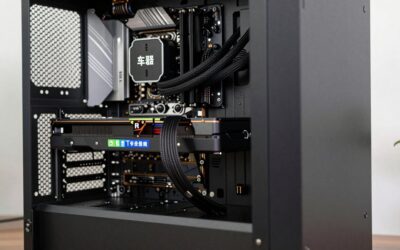
Partner RX 9070 XT cards are often large triple-fan designs. Compare the card’s published length and slot thickness against the case’s maximum GPU clearance. For the CPU, AMD’s 9800X3D ships without a cooler. Reviewers commonly pair it with a high-quality dual-tower air cooler or a 240 to 360 mm AIO. Confirm AM5 mounting support, cooler height and radiator clearance in the case manual. Good front-to-back airflow helps both parts, because the 3D V-Cache CPU and a 300 W-class GPU share the same case air.
| Case concern | What to check |
|---|---|
| GPU length | Partner card’s listed length versus case maximum |
| GPU thickness | 2.5 or 3-slot designs need room next to the card |
| Cooler height | Air cooler height versus side panel clearance |
| Radiator | Top or front mount size supported |
| Airflow | At least intake and exhaust fans, mesh front where possible |
Storage and Connectivity
A 1 to 2 TB NVMe drive covers a typical game library, and a PCIe 4.0 model is plenty because game load times are limited by the game itself more than by interface speed. Many B850 boards include a PCIe 5.0 M.2 slot, which is optional. Wired Ethernet is the safest choice for online play, and WiFi 7 is available on many recent AM5 boards if a cable is not practical. Count the M.2 slots, USB ports and front-panel connectors your case needs before choosing a board.
FSR 4 and What It Means in Games
The RX 9070 XT supports AMD’s FSR 4 upscaling, which relies on the machine-learning hardware in RDNA 4. Game support depends on the title, and reviewers note that FSR 4 is available in a growing but not universal list of games, so check a game’s settings menu or AMD’s supported-games list before depending on it. Older FSR versions still work where FSR 4 is not offered.
Performance Expectations
Reviewers typically position the RX 9070 XT as a strong 1440p card and a capable 4K card at tuned settings, competing in the same tier as the RTX 5070 Ti. Exact results vary with the game, settings and driver version, so read reviews of the titles you actually play. The 9800X3D helps most when the GPU is not the limit, such as at 1080p or 1440p in CPU-heavy games, while at 4K the graphics card tends to set the pace.
Pick X If… Decision Table
| Pick this | If you… |
|---|---|
| RX 9070 XT + 9800X3D | want an all-AMD gaming rig with 16 GB VRAM and top-tier CPU gaming results |
| RX 9070 XT + Ryzen 5 9600X | want to reduce cost and mostly play at 4K where the GPU leads |
| RTX 5070 Ti + 9800X3D | prefer DLSS 4 and NVIDIA features |
| Lower-tier GPU + 9800X3D | play competitive esports at high refresh and plan to upgrade the GPU later |
Alternatives
RTX 5070 Ti
NVIDIA lists 16 GB of GDDR7, 300 W and a 750 W recommended system power, with DLSS 4 support. Reviewers generally rate it as a close rival, and NVIDIA is often cited as ahead in ray tracing and software features.
Ryzen 5 9600X
A 6-core, 12-thread, 65 W AM5 chip at up to 5.4 GHz boost, it keeps the same platform and upgrade path while lowering the cost and cooling needs.
Ryzen 7 9700X
An 8-core, 65 W Zen 5 processor without the extra cache, suited to builders who split time between gaming and productivity.
Frequently Asked Questions
What power supply does the RX 9070 XT need?
AMD lists a 750 W minimum for the card. Partner models may use two or three 8-pin connectors, so read the card’s manual. Many builders choose 850 W for headroom.
Does the Ryzen 7 9800X3D come with a cooler?
No, AMD lists it without a cooler. Buy a tower air cooler or an AIO compatible with AM5, and confirm that it fits in your case.
Is B650 good enough for a 9800X3D?
Many B650 boards support Ryzen 9000 processors, often after a BIOS update. Check the board maker’s CPU support list and BIOS version before buying, and consider B850 if you want newer features such as PCIe 5.0 and WiFi 7.
Should I turn on EXPO?
EXPO applies the memory’s rated speed and timings, and most gaming builders enable it. It counts as overclocking in a technical sense, so if you see instability, go back to default settings and check for a BIOS update.
Is the RX 9070 XT or RTX 5070 Ti better?
They sit in a similar tier with 16 GB of VRAM each. The choice often comes down to features: DLSS 4 and ray-tracing strength for NVIDIA, FSR 4 and AMD’s driver tools for Radeon. Read reviews of the games you care about.
Do I need PCIe 5.0 for this card?
The card uses PCIe 5.0 x16 according to AMD, and it also works in older slots. Reviewers generally report small gaming differences between generations, so a PCIe 4.0 board is not a barrier.