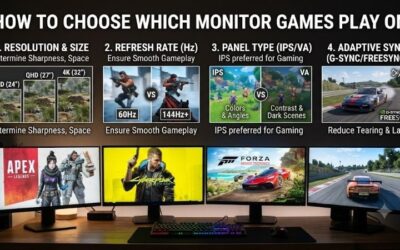
For most PC gamers the best resolution is 1440p on a 27-inch monitor, because it looks noticeably sharper than 1080p and asks far less of the graphics card than 4K; choose 1080p if your budget or GPU is modest and you want very high frame rates, and choose 4K if you have a high-end graphics card, a large screen and care more about image quality than raw frame rate.
Pixel Counts Explained
Resolution is the number of pixels drawn each frame, and the GPU workload scales roughly with that number. The figures below are simple arithmetic, not benchmarks.

Periphio Reaper Gaming PC, AMD Ryzen 5 5500 up to 4.4GHz with Radeon RX 6500 XT 4GB GPU (Gaming Optimized), 16GB RAM, 1TB SSD, WiFi, Windows 11 Desktop, Black, Full Battlestation
Included for 'Best Resolution for PC Gaming: 1080p vs 1440p vs 4K (and the GPU You Need)' as a representative home product in this roundup; selection reflects the product set returned for this topic.
View on Amazon
Skytech Gaming PC Desktop, Ryzen 5 5500, RTX 3050, 16GB RAM, 1TB SSD | Windows 11, NVMe SSD, DDR4 3200, 650W GOLD PSU, Wi-Fi 5, Nebula Series
Included for 'Best Resolution for PC Gaming: 1080p vs 1440p vs 4K (and the GPU You Need)' as a representative home product in this roundup; selection reflects the product set returned for this topic.
View on Amazon
Qehi Desktop Computer,Core i7 16GB RAM 512GB SSD | RX580 8GB Gaming PC RGB | Prebuilt Tower Up to 4.2GHz,WiFi 6, for Gaming, Live Stream, Office, Home,Students-White
Included for 'Best Resolution for PC Gaming: 1080p vs 1440p vs 4K (and the GPU You Need)' as a representative home product in this roundup; selection reflects the product set returned for this topic.
View on Amazon
Dell Gaming Tower Desktop PC – Intel Core i5-7500 7th Gen 3.4GHz – 16GB DDR4 RAM – 256GB SSD – GeForce GT 1030 – RGB Keyboard & Mouse – WiFi – Windows 11 Pro – Gaming Computer (Renewed)
Included for 'Best Resolution for PC Gaming: 1080p vs 1440p vs 4K (and the GPU You Need)' as a representative home product in this roundup; selection reflects the product set returned for this topic.
View on Amazon| Resolution | Pixels (width x height) | Total pixels | Relative to 1080p |
|---|---|---|---|
| 1080p (1920×1080) | Full HD | about 2.07 million | 1.0x |
| 1440p (2560×1440) | QHD | about 3.69 million | about 1.8x |
| 4K (3840×2160) | UHD | about 8.29 million | 4.0x |
That 4x jump from 1080p to 4K is why a graphics card that holds a steady high frame rate at 1080p can struggle at 4K. In many games, the frame rate will not fall exactly in proportion, because CPU limits and settings also matter, but the direction is consistent.
Monitor Size Versus Resolution
Pixel density, measured in pixels per inch, decides how sharp the image looks at a given size and viewing distance. Commonly cited pairings are:
- 24 inches: 1080p looks sharp at normal desk distance.
- 27 inches: 1440p is the usual sweet spot; 1080p begins to look soft to many people.
- 32 inches: 1440p is acceptable and 4K gives a clearly finer image.
- Large screens or TVs viewed from a desk: 4K is the sensible choice.
These are general guidelines; eyesight and seating distance make a difference. Ultrawide 3440×1440 monitors push about 4.95 million pixels, roughly 34 percent more than standard 1440p, so they need a somewhat stronger GPU.
Refresh Rate Matters as Much as Resolution
A 60 Hz monitor can show at most 60 frames per second, while 144 Hz, 165 Hz, 240 Hz and higher panels can show more. Competitive shooters benefit from high frame rates and low latency, and many esports players choose 1080p or 1440p at 240 Hz. Single-player and cinematic games benefit more from resolution and visual detail. Variable refresh rate technologies such as G-Sync and FreeSync smooth out frame-rate dips when supported by both monitor and GPU. A monitor’s refresh rate is only useful if your PC can actually deliver those frames.
Which GPU Tier Suits Which Resolution
| Goal | GPU tier | Examples (current-generation families) |
|---|---|---|
| 1080p at high refresh | Entry to mid-range | RTX 5060 class, Radeon RX 9060 XT class |
| 1440p at high settings | Mid-range to upper mid-range | RTX 5070, RX 9070, RTX 5070 Ti, RX 9070 XT |
| 4K at high settings | High-end | RTX 5070 Ti with upscaling, RTX 5080, RTX 5090 |
NVIDIA lists the RTX 5070 Ti with 16 GB of GDDR7 and the RTX 5070 with 12 GB, and reviewers describe the 16 GB model as the better fit for 4K and ultrawide. AMD lists the RX 9070 XT with 16 GB of GDDR6. Upscalers such as DLSS 4 and FSR 4 render at a lower internal resolution and scale up, which is how many 4K setups reach smooth frame rates. Treat the tiers above as starting points, since the demand of the game and the settings matter a lot.
What About the RTX 3060 Ti?
Readers often ask which monitor suits a GeForce RTX 3060 Ti, a previous-generation card. It is generally regarded as a 1080p high-refresh card that can also handle 1440p at medium to high settings in many games, often with upscaling in newer, demanding titles. It has 8 GB of VRAM, which can limit very high texture settings at 1440p. A 1440p 144 Hz monitor is a reasonable match if you are willing to lower some settings, while 4K is a stretch outside older or lighter games. If you mostly play esports titles, a 1080p 240 Hz or a 1440p 165 Hz screen both fit.
4K at 300 Plus FPS: Is It Realistic?
4K at 300 frames per second is only realistic in older or lightweight games, such as some esports titles at low settings, where the CPU and GPU are not heavily loaded. At 4K the GPU must draw over eight million pixels per frame, so very high frame rates in modern, detailed games are beyond what current hardware delivers natively. Frame generation can raise the displayed frame rate, but it adds latency and does not make the game respond like a truly faster one. If your target is extremely high frame rates, 1080p or 1440p is the practical path, paired with a strong CPU such as a Ryzen 7 9800X3D, which reviewers rate highly for games where the CPU is the limiting factor.
Resolution for Mac Gaming
Mac gaming is more constrained than on Windows, because the game library is smaller and macOS hardware varies. The best resolution depends on the specific Mac: Apple Silicon models with a built-in Retina display often scale the game to the panel’s native resolution or a lower internal resolution, and MetalFX upscaling is used in some titles. As a rule, a lower resolution or upscaling setting yields smoother frame rates on a thin laptop, while a Mac with a stronger GPU can handle higher settings. Check each game’s graphics menu and Apple’s specifications for your model. When using an external monitor, 1440p is a common balance, and 4K requires a stronger chip.
How to Choose: Decision Table
| If you… | Choose |
|---|---|
| Play competitive shooters and value frame rate | 1080p or 1440p at 165 to 360 Hz |
| Want one monitor for most games on a mid-range GPU | 27-inch 1440p, 144 to 180 Hz |
| Own a high-end GPU and play single-player games | 4K 120 to 144 Hz with upscaling |
| Want immersion with a wide field of view | 3440×1440 ultrawide |
| Have a tight budget | 1080p at 144 Hz or more |
Practical Tips
- Match the monitor to the GPU you have, not the one you hope to buy.
- Use upscaling at 1440p and 4K to recover frame rate with limited image-quality loss in most games.
- Run the monitor at its native resolution; non-native resolutions look soft.
- Use a DisplayPort or HDMI cable rated for the resolution and refresh rate you want; for 4K at high refresh, check that the cable and ports support the required version.
Frequently Asked Questions
Is 1440p better than 1080p for gaming?
1440p has about 1.8 times as many pixels, so images look sharper, especially on 27-inch screens. It requires a stronger GPU, though, and 1080p can still be the better choice for high-frame-rate esports on a budget.
Is 4K worth it for gaming?
It is worth it if you have a high-end GPU and a large monitor and value visual quality. Many players use upscaling to reach smooth frame rates, and some prefer 1440p at high refresh for responsiveness.
What monitor suits an RTX 3060 Ti?
A 1440p monitor at 144 Hz or a 1080p high-refresh monitor is a common pairing. Expect to adjust settings in demanding new games, and note that 8 GB of VRAM can limit the highest texture settings.
Can a PC run 4K at 300 fps?
Only in older or lightweight games at reduced settings. Modern detailed titles will not reach that rate at native 4K on current hardware, so aim for 1080p or 1440p if frame rate is the priority.
Does a higher resolution increase CPU load?
Mostly not; resolution mainly loads the GPU. A faster CPU matters more at lower resolutions, where the GPU can produce frames faster than the CPU can prepare them.
What resolution should I use on a Mac?
Use the display’s native resolution where the game runs smoothly, and lower the internal resolution or enable MetalFX upscaling where the game supports it. Check Apple’s specifications for your Mac’s graphics capability.