Best oled monitor for a budget build shopping gets tricky when the screen costs much of your graphics-card allowance. OLED can make dark games look richer without improving graphics-card performance. Prioritize 1440p, preserve graphics-card funding, and buy only if its gaming benefits outweigh the cost and required maintenance.
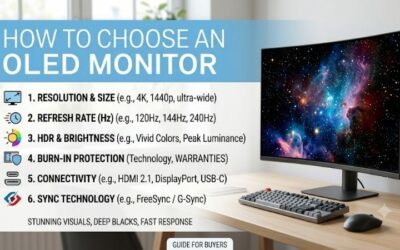
How to Choose an OLED Monitor
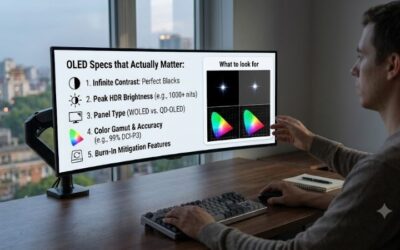
This guide compares four 1440p choices through refresh-rate, coating, connectivity, and ownership comparisons. Finding the best oled monitor for a budget build means matching specifications to gaming preferences and lighting. The picks favor practical features over 4K resolution, with purchase recommendations and meaningful disadvantages.
Resolution and Refresh Rate
Resolution sets graphics-card workload, while refresh rate sets display-update frequency. All four picks use 2560 x 1440, a useful middle ground for mainstream configurations. That is about 78% more pixels than 1080p, so check performance in your preferred titles before reallocating graphics-card funds toward display technology.
The best oled monitor for a budget build need not reach maximum refresh in every game. Faster refresh matters most in competitive multiplayer titles; story games can benefit from OLED contrast at lower rates. If you play both, the Alienware AW2725D gives you 280Hz headroom while keeping resolution at a more manageable 1440p.
Screen Finish and Room Lighting
Screen finish affects visibility under ambient illumination. A glossy surface preserves image clarity but can show distinct reflections from windows and lamps. A matte coating spreads those reflections, trading some surface clarity for less distracting glare. Judge that trade by your workstation’s actual location and window placement.
The best oled monitor for a budget build should complement room lighting before chasing specifications. Neither coating makes direct sunlight a good viewing condition, and repositioning lighting may help more than a higher-brightness preset. For rooms with unavoidable reflections, the LG 27GS93QE-B offers an anti-glare finish.
Connections and Everyday Convenience
Video inputs matter for computers sharing displays with a console or laptop. A connector’s label alone cannot establish supported resolution and refresh combinations. Read the model’s timing limits, especially on discounted older stock. A useful USB hub can also simplify peripheral changes without accessing the computer’s rear connections.
Do not pay for laptop docking features without practical justification: a USB-C socket may supply data or modest charging without video-input functionality. The original ASUS ROG Strix OLED XG27AQDMG has a USB hub and supports its top refresh rate through DisplayPort. For DisplayPort-equipped desktops, its port mix is a practical choice for gaming.
Purchase Price and Burn-In Coverage
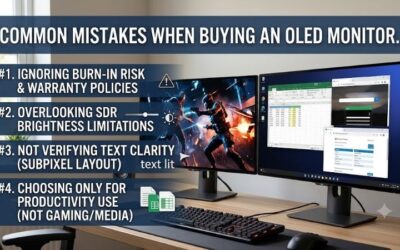
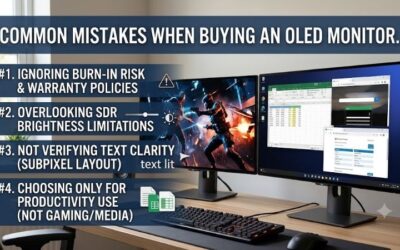
Purchase expenditure only partially determines OLED value. Permanent image retention remains a risk with repeated static content, despite enabled protection features. Maintain manufacturer-recommended protection routines and assess the written warranty. For predominantly static-window workloads, a cheaper IPS monitor may be a better buy.
Compare the exact model, seller, return window, and coverage before judging Amazon promotional listings. A damaged panel or unsatisfactory typography is easier to resolve during a valid return period than months later. When substantially discounted against Alienware, the MSI MAG 271QPX QD-OLED E2 is worth shortlisting.
Top Picks
The best oled monitor for a budget build is a conditional purchase, because promotions alter relative value. Alienware is the balanced starting point, MSI is the value alternative, and LG and ASUS serve different lighting needs. These recommendations evaluate published specifications and suitability, without representing personal detailed research.
| Product | Best For | Key Spec | Watch Out For |
|---|---|---|---|
| Alienware AW2725D | Best Overall | 1440p QD-OLED, 280Hz | USB-C does not accept video |
| MSI MAG 271QPX QD-OLED E2 | Best Value when discounted | 1440p QD-OLED, 240Hz | USB-C charging limited to 15W |
| LG 27GS93QE-B | Rooms With Reflections | 1440p OLED, 240Hz, anti-glare finish | Requires a worthwhile discount |
| ASUS ROG Strix OLED XG27AQDMG | Glossy-Screen Fans | 1440p WOLED, 240Hz | HDMI limited to 144Hz |
Alienware AW2725D: Best Overall
The Alienware AW2725D is my best overall pick for gaming buyers avoiding expensive 4K graphics-card upgrades. Its 27-inch class QD-OLED display combines 1440p resolution with 280Hz refresh. A compact stand and adjustable height accommodate conventional workstations, while its USB hub adds convenience for frequently disconnected peripherals.
Dell lists three years of support with Advanced Exchange and burn-in coverage, strengthening its ownership proposition. The limitation is its USB-C downstream port: it supports 15W charging without video-input functionality. Choose it for a desktop gaming setup; laptop users expecting comprehensive docking require different hardware.
MSI MAG 271QPX QD-OLED E2: Best Value
The MSI MAG 271QPX QD-OLED E2 earns best value with substantial checkout savings against Alienware. Its 26.5-inch QD-OLED panel runs at 2560 x 1440 and 240Hz. That keeps the core OLED gaming appeal intact, while HDMI 2.1 and USB-C video input make it useful for desktop configurations that share a screen between devices.
The best oled monitor for a budget build need not prioritize comprehensive docking, but MSI’s 15W USB-C power delivery is a real limit. Most gaming laptops require their separate power adapter. MSI specifies a three-year warranty including panel burn-in; the E2 suffix matters because similarly named variants differ in refresh specifications.
LG 27GS93QE-B: Best for Rooms With Reflections
The LG 27GS93QE-B is best for rooms with distracting localized reflections. Its 27-inch class OLED panel offers 1440p at 240Hz, with an anti-glare, low-reflection treatment. HDMI 2.1 supports the full QHD refresh on compatible hardware, providing flexibility for HDMI-connected desktops alongside conventional DisplayPort configurations
The coating is a tradeoff: glossy-image enthusiasts may prefer ASUS, particularly under controlled illumination. LG requires substantial discounting for budget-focused recommendations; coating-driven premiums diminish relative value. Buy it for the lighting match, following checkout-price and applicable-warranty comparisons.
ASUS ROG Strix OLED XG27AQDMG: Best for Glossy-Screen Fans
The ASUS ROG Strix OLED XG27AQDMG is best for glossy-screen fans with controllable surrounding illumination. Its 26.5-inch viewable WOLED panel delivers 1440p at 240Hz, and the stand provides 120mm of height adjustment. Its glossy finish is the key distinction from LG, so choose according to preferences for image clarity versus reflection control.
Its main connection drawback is HDMI 2.0, with HDMI refresh capped at 144Hz; DisplayPort is needed for 240Hz. ASUS lists three years of warranty including panel burn-in. Verify the complete model designation: this original XG27AQDMG is different from the newer Gen2 XG27AQDMGR, making their specifications noninterchangeable.
Frequently Asked Questions
Questions about the best oled monitor for a budget build come down to practical benefits versus purchase price. Frame rate, office hours, and panel care matter more than a response-time badge alone. These answers explain when OLED earns its place, when conventional alternatives make sense, and what to check during the retailer’s return period.
Can a Budget PC Run a 1440p OLED Monitor?
Yes, a budget PC can use a 1440p OLED monitor with compatible graphics-card video outputs. Display technology does not add a special rendering workload beyond resolution and graphics-setting requirements. Actual graphics-card performance determines satisfactory gaming; a fast panel cannot create performance the graphics card lacks.
Consult benchmarks matching your graphics card and preferred titles instead of isolated esports demonstrations. Upscaling and reduced settings can help demanding titles, but the result depends on the game. If buying OLED forces a large GPU downgrade, keep an affordable LCD for now and revisit the screen after improving the core system.
Is an OLED Monitor Good for Office Work?
No, OLED is not automatically better for a desk used mainly for work. Static toolbars add image-retention exposure, and text can look different from an LCD because of the subpixel arrangement. For spreadsheet-intensive or programming-focused workloads, prioritize small-text legibility rather than treating gaming strengths as office benefits.
If you work and game on one screen, inspect normal documents using customary scaling during the return period. This is where the best oled monitor for a budget build can lose its appeal despite impressive gaming contrast. A separate inexpensive office display may help, but incorporate secondary-display expenditure into purchase comparisons.
Can OLED Monitors Still Get Burn-In?
Yes, OLED can develop burn-in; protective features mitigate rather than eliminate burn-in risk. Static elements can age pixels unevenly and produce persistent visible patterns. Temporary image retention is not necessarily permanent damage. Treat warranty coverage as a financial backstop, not evidence that every workload is equally suitable.
Follow the model’s instructions for pixel care, permit scheduled maintenance completion, and use automatic display sleep during inactivity. Avoid forcing long manual refresh cycles beyond manufacturer-recommended intervals. Retain your receipt and model details, since warranty claims depend on the applicable terms and proof of purchase.
Is 240Hz Worth It Below 240 FPS?
No, a 240Hz monitor is not wasted with sub-240-fps gaming performance. Its refresh ceiling describes capacity, not minimum-performance requirements. OLED’s dark-scene contrast remains relevant in slower games. Still, paying extra for the highest refresh tier is hard to justify without sufficiently high-performance gameplay.
Variable refresh helps display synchronization with compatible graphics output, but it does not guarantee universally flicker-free or stutter-free gameplay. Evaluate demanding gameplay promptly, especially scenes with uneven frame times. Check operating-system refresh settings, since initial configurations may default to lower frequencies.
Final Thoughts
The best oled monitor for a budget build improves your games without compromising the computer behind it. Start with Alienware AW2725D, choose MSI for meaningful savings, and select LG or ASUS according to room lighting and coating preference. If office work dominates or the GPU budget suffers, save the money for a stronger system.