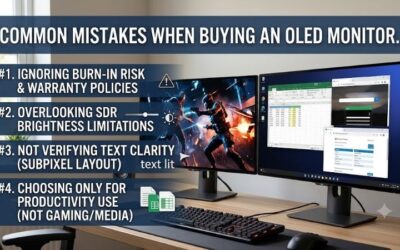
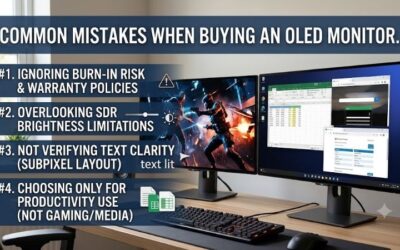
Best budget oled monitor shopping gets tricky because low prices can hide weaker HDR, fewer ports, or lower refresh rates. This guide compares four real 27-inch OLED options across speed, panel type, brightness, connectivity, and long-term protection, then shows exactly which model makes sense for value gaming, competitive play, and richer HDR.
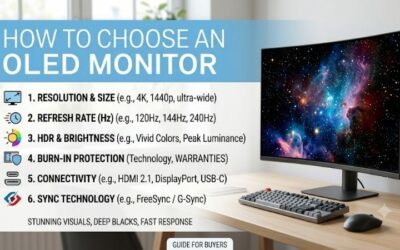
How to Choose an OLED Monitor
A budget OLED monitor should deliver what you notice most: deep blacks, fast pixel response, and enough refresh rate for your GPU. Cheaper models may cut HDR, ports, stand range, or burn-in coverage, so the best budget OLED monitor is not automatically the lowest-priced OLED for modern gaming desks for long gaming sessions and daily work at home.
Total Value
Start with total value rather than the sticker price. A 1440p OLED at 240Hz already provides a strong gaming baseline, so paying more should buy a clear upgrade: 280Hz motion, stronger HDR, better warranty support, or useful connectivity. That keeps this best budget OLED monitor choice focused on real gains for most premium PCs.
Refresh Rate
Refresh rate matters when your graphics card can sustain high frame rates. At 240Hz, the display refreshes every 4.17 milliseconds; at 280Hz, that falls to about 3.57 milliseconds. The difference is real but modest outside competitive play, which makes the 240Hz GO27Q24A a sensible fit for this best budget OLED monitor category during actual play.
Panel And HDR
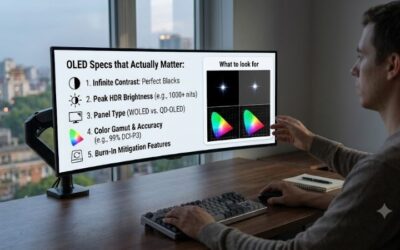
OLED panel type also changes the picture. QD-OLED models such as the Gigabyte GO27Q24A and MSI MAG 271QP QD-OLED X28 emphasize wide color and strong highlights, while the ASUS ROG Strix OLED XG27AQDMG Gen2 uses WOLED with a higher stated HDR peak. For dark-room gaming, that can simplify this best budget OLED monitor choice.
Ports And Protection
Finally, check the ports and protection features before buying. HDMI 2.1 helps with newer consoles, while the MSI MAG 271QP QD-OLED X28 adds USB-C. The Alienware AW2725D also brings strong warranty coverage, while ASUS adds OLED Care, making protection and connectivity useful parts of this best budget OLED monitor comparison for mixed-use desktops.
Performance
The strongest budget choices now sit close together in core OLED image quality, but they separate quickly once you compare refresh rate, HDR behavior, and extras. The table below focuses on specifications that change ownership, helping you see why each model earns a different role in this best budget OLED monitor lineup instead of headline numbers.
| Product | Display | Panel / Response | Brightness / Key Specs |
|---|---|---|---|
| Gigabyte GO27Q24A | 27″, 2560 × 1440, 240Hz | QD-OLED, 0.03ms GTG | 400-nit HDR peak, 99% DCI-P3, HDMI 2.1 |
| MSI MAG 271QP QD-OLED X28 | 26.5″, 2560 × 1440, 280Hz | QD-OLED, 0.03ms GTG | 1000-nit peak, USB-C 15W, 3-year burn-in coverage |
| Alienware AW2725D | 26.7″, 2560 × 1440, 280Hz | QD-OLED, 0.03ms GTG | 1000-nit peak, 99.3% DCI-P3, 3-year warranty |
| ASUS ROG Strix OLED XG27AQDMG Gen2 | 26.5″, 2560 × 1440, 240Hz | WOLED, 0.03ms GTG | 1300-nit peak, 99% DCI-P3, USB hub |
Gigabyte GO27Q24A
Gigabyte GO27Q24A is the Best Overall budget pick because it delivers a 27-inch QHD QD-OLED panel, 240Hz refresh rate, 0.03ms GTG response, 99% DCI-P3, and 400-nit HDR peak brightness. Its semi-gloss anti-reflective surface and HDMI 2.1 ports make the package strong for an affordable OLED gaming build and a three-year burn-in warranty.
The main strength is efficiency: you get modern QD-OLED contrast and 240Hz motion without stepping into a higher performance tier. Its weakness is the 400-nit HDR peak, which is far below the 1000-nit class represented by MSI and Alienware, so the GO27Q24A is better for value gaming than showcase HDR in a bright room when HDR is not your priority.
MSI MAG 271QP QD-OLED X28
MSI MAG 271QP QD-OLED X28 is the Best Value for buyers willing to spend more for 280Hz motion. Its 26.5-inch QHD QD-OLED panel reaches 280Hz with 0.03ms GTG, peaks at 1000 nits in HDR, and includes HDMI 2.1 plus USB-C with 15W power delivery, giving it a strong middle ground too.
The benefit is a higher performance ceiling without jumping to a flagship class, and MSI also includes a three-year warranty covering panel burn-in. The limitation is that the USB-C connection provides only 15W power and the monitor lacks KVM, so its extra connectivity is useful but not a complete laptop-dock replacement for a desk.
Alienware AW2725D
Alienware 27 280Hz QD-OLED Gaming Monitor AW2725D is the Best For Competitive Gaming. It combines a 26.7-inch QHD QD-OLED panel, 280Hz refresh rate, 0.03ms GTG response, 99.3% DCI-P3, and 1000-nit HDR peak brightness with a three-year service package that includes burn-in coverage. Its stand also supports height and pivot for fast PC gaming.
Its biggest advantage is balance: competitive players get 280Hz speed without giving up QD-OLED color and HDR capability. The catch is console flexibility, because Dell specifies HDMI operation up to 144Hz at QHD while DisplayPort reaches 280Hz, so it is mainly for PC rather than a broadly flexible console display for PC-first competitive use.
ASUS ROG Strix OLED XG27AQDMG Gen2
ASUS ROG Strix OLED XG27AQDMG Gen2 is the Best For HDR and cinematic gaming, using a 26.5-inch QHD WOLED panel with 240Hz refresh, 0.03ms GTG response, 99% DCI-P3 coverage, and a stated 1300-nit peak brightness. Its glossy TrueBlack surface is designed to emphasize contrast and highlights, especially in darker rooms with a flat panel.
That high peak brightness gives the ASUS a clear HDR-oriented reason to spend more, while its custom heatsink and OLED Care features add useful protection. The tradeoff is the glossy finish: rooms with strong windows or lamps can create distracting reflections, so this choice is strongest when ambient light stays controlled.
Frequently Asked Questions
Questions about the best budget OLED monitor usually come down to whether 240Hz is enough, whether burn-in is a serious concern, how much HDR brightness matters, and whether a cheaper panel gives up too much. The answers become clearer once you separate gaming frame rate from image quality and treat long-term protection as part of the purchase.
Is 240Hz Enough?
Is 240Hz enough for a budget OLED monitor? Yes, for most gamers it is. A 240Hz display already provides very fast motion with excellent OLED response, and the jump to 280Hz is most useful for players who consistently run extremely high frame rates. For mainstream gaming, 240Hz leaves more room for better HDR or warranty support on a strong GPU.
The exception is a high-end esports setup where the graphics card can stay close to 280 frames per second. In that case, the MSI MAG 271QP QD-OLED X28 or Alienware AW2725D makes more sense than paying extra for features you will barely notice elsewhere, because their 280Hz panels directly support that fast-refresh workload for serious esports play.
Does OLED Burn-In Matter?
Does OLED burn-in make a budget monitor risky? It adds a long-term consideration, but modern OLED monitors include protective features and manufacturer coverage. Gigabyte, MSI, Alienware, and ASUS all advertise three-year protection programs for their current OLED models, so warranty and panel-care settings need checking first for your use today.
For a desktop that shows static windows all day, use the monitor’s built-in OLED care tools and allow maintenance routines to run as designed. Gaming-focused use with varied content is a lower-stress pattern, while an always-static office dashboard deserves more caution; understand the OLED warranty and usage pattern before buying daily.
Is 400 Nits Enough?
Is 400 nits enough for OLED HDR? It can be enough for entry-level HDR, but it will not create the same bright specular impact as a panel rated around 1000 nits or higher. That is why the GO27Q24A works as the value pick, while the MSI, Alienware, and especially ASUS offer a stronger case for people who prioritize HDR highlights.
Peak brightness is not the only factor, because OLED’s per-pixel contrast already gives dark scenes a major advantage. Still, if you play HDR-heavy single-player games or watch movies, the higher-rated ASUS panel is easier to justify, while the lower-cost Gigabyte remains the better choice when SDR gaming and price discipline matter more.
Can I Use A Console?
Can I use a budget OLED with a PS5 or Xbox? Yes, but check the exact port limits before buying. HDMI 2.1 support is useful for current consoles, and the MSI and Gigabyte models include HDMI 2.1 inputs. Alienware also has HDMI 2.1, but its stated QHD limit is 144Hz, already above typical console needs at the required console refresh rate.
For PC gaming, DisplayPort often gives the cleanest route to a panel’s maximum refresh rate, while HDMI 2.1 helps when the monitor also serves as a console screen. That makes the Gigabyte a particularly flexible budget option, whereas the Alienware’s 144Hz HDMI ceiling matters only if you expected identical behavior across every source in a mixed PC setup.
Final Thoughts
There is no reason to overspend simply to own an OLED panel. The smartest best budget OLED monitor choice is Gigabyte’s GO27Q24A for value, while MSI’s X28 adds 280Hz performance, Alienware favors competitive PC gaming, and ASUS targets brighter HDR. Match the extra features to your actual workload, not to the spec sheet and your room lighting.