Finding a mechanical keyboard that feels great for gaming and works flawlessly with macOS is harder than it should be. In 2026, many boards still default to Windows layouts, lack proper Mac keycaps, or require awkward workarounds for media keys and shortcuts. The best keyboards for Mac get the details right: dedicated Mac mode, correct Option/Command legends, and stable Bluetooth or 2.4GHz that wakes your Mac instantly.
We compared keyboards for Mac compatibility, typing comfort, gaming latency, and build quality across compact 75% and full-size layouts. We prioritized native Mac support, reliable wireless performance, hot-swappable switches where possible, and features gamers actually use like N-key rollover, 1000Hz polling, and per-key customization without needing Windows-only software.
As an Amazon Associate we earn from qualifying purchases at no extra cost to you.








⚡ Save on Your Next PC — Amazon Prime
Prime members get fast free shipping on the systems above, plus early access to Prime Day & Black Friday PC deals. New members get a 30-day free trial.
Watch: Best Mechanical Keyboard for Mac — Video Review
How to Choose
- Mac Compatibility: Look for a physical Mac/Win switch, included Mac keycaps, and full support for macOS shortcuts, Spotlight, Mission Control, and media keys without remapping in third-party software.
- Connectivity & Battery: Choose Bluetooth 5.1 or higher for MacBook pairing, plus 2.4GHz for low-latency gaming and USB-C wired for charging while playing. Expect 40 to 400 hours depending on backlight use.
- Layout & Size: 75% and 96% layouts save 3 to 5 inches of desk space while keeping function keys and arrows for gaming. Full-size is best if you rely on a dedicated number pad for MMOs or productivity.
- Switch Type & Feel: Linear switches are quiet and fast for gaming, tactile Browns offer balanced feedback for typing, and low-profile switches reduce finger travel by about 30% for a laptop-like feel. Hot-swap lets you change switches without soldering.
- Build & Software: Gasket-mounted or aluminum frames reduce ping and flex, PBT keycaps resist shine, and QMK/VIA or Logi Options+ on macOS lets you remap keys and lighting directly on Mac without workarounds.
The Best Picks Reviewed
Keychron K3 Version 2 QMK 75% Wireless Low-Profile
Our top pick for most Mac gamers. This 75% low-profile board is purpose-built for Mac with a Mac/Win switch, Mac keycaps included, and full QMK/VIA support on macOS for remapping without installing Windows drivers. At just 22mm tall and 75% width, it saves significant desk space while keeping F-row and arrow keys. Hot-swappable low-profile switches, 2.4GHz/Bluetooth 5.1/USB-C, and up to 438 hours without backlight make it ideal for switching between a MacBook and a desktop. The low travel is fast for competitive play and far more comfortable for long typing sessions than bulky standard mechanicals.
Logitech MX Mechanical Wireless Illuminated Tactile
The most refined wireless option for Mac productivity and gaming. The Tactile Quiet switches provide a soft bump without loud clicks, and the full-size layout includes smart keys and smart illumination that brightens as your hands approach. It pairs with up to 3 devices via Bluetooth or Logi Bolt, supports Logi Options+ natively on macOS, and delivers up to 15 days with backlighting or 10 months with it off. With a low-profile aluminum chassis, 1000Hz polling in wired mode, and whisper-quiet operation, it is perfect if you want a premium, office-quiet board that still handles gaming.
Logitech Alto Keys K98M Wireless Mechanical Gasket
Logitech’s newer gasket-mounted design brings a softer, more cushioned typing feel that gamers are demanding in 2026. The K98M is a compact 98% layout that keeps the number pad in a much smaller footprint, with tactile mechanical switches, PBT keycaps, and a gasket structure that dampens harsh resonance. It offers Bluetooth, Logi Bolt, and USB-C, pairs instantly with Mac, and runs on Logi Options+ for macOS customization. If you want a creamy, thocky sound without modding and prefer a modern, minimal Graphite finish, this is the most polished all-rounder.
Keychron C2 Full Size Wired Mechanical Keyboard Retro
The best wired value for Mac users who want reliability and zero latency. This full-size board has a classic retro look, Brown tactile switches for versatile gaming and typing, and full N-key rollover over USB-C. There are no batteries to manage and no wireless lag, and it includes extra Mac keycaps and a Mac layout switch for plug-and-play compatibility. The sturdy frame, double-shot keycaps, and 1000Hz polling rate give you consistent performance for under half the price of wireless flagships. Ideal as a dedicated desktop gaming keyboard for iMac and Mac mini setups.
Kisnt KN85 Wireless 75% Mechanical Keyboard
A feature-packed 75% board for gamers who want customization and RGB on Mac. The KN85 connects via Bluetooth 5.0, 2.4GHz, and USB-C, supports hot-swappable linear switches, and comes with vibrant custom RGB backlighting with south-facing LEDs. Its gasket-mounted build and foam dampening deliver that creamy, low-pitched sound popular for both streaming and late-night gaming. Despite the compact 81-key layout, you keep dedicated function keys and easy Mac pairing. It is the most playful pick for setups where aesthetics, sound, and flexibility matter as much as performance.
Frequently Asked Questions
Do mechanical keyboards work well with MacBooks and Mac mini?
Yes, if they offer a Mac mode. All our picks include a Mac/Windows switch or automatic macOS detection, plus extra Mac keycaps for Option and Command. Keyboards with QMK/VIA or Logi Options+ for Mac let you remap keys natively on macOS without needing a Windows PC.
Is Bluetooth fast enough for gaming on Mac?
Bluetooth 5.1 is fine for casual and single-player games, but competitive players should use 2.4GHz wireless or wired USB-C for the lowest latency. 2.4GHz typically cuts latency from 15-20ms down to around 2-3ms and provides more stable 1000Hz polling.
What switch should I choose for mixed gaming and typing on Mac?
Brown tactile switches are the safest all-around choice, offering feedback without loud clicks. Linear switches are smoother and slightly faster for FPS games, while tactile and low-profile tactile switches reduce fatigue during long typing sessions. Hot-swappable boards let you try different switches later.
Does 75% vs full-size matter for Mac gaming?
75% keeps function keys, arrows, and F-row while saving about 4 inches of width for more mouse space, which most gamers prefer. Choose 96% or 98% if you want a number pad without a full-size footprint. Full-size only makes sense if you constantly use the numpad for work or MMOs.
Final Thoughts
For most Mac gamers in 2026, the Keychron K3 Version 2 QMK hits the sweet spot of compact size, flawless Mac integration, and low-profile speed. If you want a quiet, premium wireless workhorse, the Logitech MX Mechanical is unbeatable, while the Logitech Alto Keys K98M offers the best modern gasket feel and sound. Choose based on layout and connectivity, and you will have a board that finally feels native on Mac.
Top picks from this guide
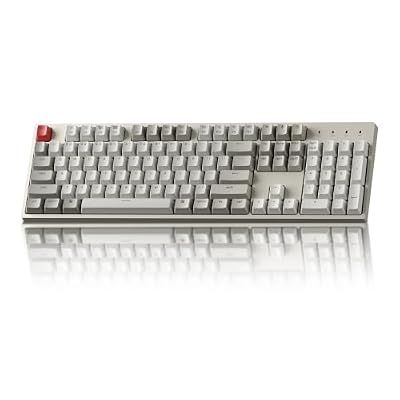 KeychronKeychron C2 Full Size Wired Mechanical Keyboard, Brown Switch, Retro…$51 \xc2\xb7 96/100
 KeychronKeychron K10 Max QMK Wireless Custom Mechanical Full-Size Keyboard |…$120 \xc2\xb7 96/100
 AULAAULA F75 Pro Wireless Mechanical Keyboard,75% Hot Swappable Custom Keyboard…$65 \xc2\xb7 96/100
 LogitechLogitech MX Mechanical Wireless Illuminated Keyboard Tactile - Graphite |…$150 \xc2\xb7 95/100