The Razer BlackWidow V4 is one of the most recognizable gaming keyboards on the market, and the current lineup spans everything from the full-size flagship to compact and low-profile variants. Our review focuses on the standard BlackWidow V4 with Razer’s Green clicky switches, the tactile, loud, satisfying option that made the BlackWidow name, while noting where the wider family, like the V4 Pro and V4 75%, fits in.
After extended use for both gaming and daily typing, the BlackWidow V4 proves it is more than just RGB flash. It delivers a premium build, genuinely competitive switches, and a feature set that justifies its price for gamers who want a full-featured mechanical board. Here is how it holds up in 2026.
As an Amazon Associate we earn from qualifying purchases at no extra cost to you.




⚡ Save on Your Next PC — Amazon Prime
Prime members get fast free shipping on the systems above, plus early access to Prime Day & Black Friday PC deals. New members get a 30-day free trial.
Watch: Razer BlackWidow V4 Review — Video Review
Design & Build
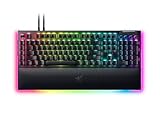
The BlackWidow V4 feels every bit the premium board. A reinforced top plate keeps the chassis rigid with zero flex, the doubleshot ABS keycaps resist shine, and the underglow RGB plus per-key Chroma lighting make it a showpiece on any desk. Dedicated media controls, a scroll wheel, and a plush wrist rest round out a layout designed for comfort during long sessions, and the cable routing keeps the desk tidy.
Performance
Razer’s Green switches are the star: clicky, tactile, and rated for a long lifespan, they offer a crisp actuation that feels responsive in fast-paced games and satisfying for typing. In competitive play the board is fast and consistent, with full N-key rollover so every simultaneous input registers. The optional software adds per-key remapping, macros, and lighting profiles, and the Chroma effects sync with other Razer gear for a unified setup.
Pros & Cons
- Pro: Premium, rigid build with a comfortable magnetic wrist rest.
- Pro: Crisp, satisfying Green clicky switches with full N-key rollover.
- Pro: Dedicated media controls and gorgeous per-key Chroma RGB.
- Pro: Deep software customization for macros and lighting.
- Con: Green switches are loud, which can bother housemates or on stream.
- Con: Premium price compared to no-frills mechanical boards.
- Con: Full-size footprint takes significant desk space.
Alternatives to Consider
If the standard V4 is not quite right, the family has you covered. The Razer BlackWidow V4 Pro adds a command dial and more premium features for enthusiasts, the BlackWidow V4 75% shrinks the footprint with a compact layout and Orange tactile switches for quieter, space-saving use, and the BlackWidow V4 X strips the wrist rest for a leaner, more affordable full-size option with Yellow linear switches. For wireless freedom, the V4 TKL Wireless is worth a look.
Frequently Asked Questions
Are the Green switches too loud?
They are clicky and noticeably loud, which many enthusiasts love but can annoy others or pick up on a stream mic. If you want quieter, the V4 75% or V4 X with Orange or Yellow switches are better choices.
Is the BlackWidow V4 good for gaming?
Yes. Its fast, consistent switches, full N-key rollover, and solid build make it a strong competitive and everyday gaming keyboard. The customization and Chroma lighting are welcome bonuses.
Does it need software to work?
It works plug-and-play, but Razer’s software unlocks per-key remapping, macros, and lighting profiles. Install it to get the full feature set and sync lighting with other Razer devices.
Which BlackWidow V4 should I buy?
Get the standard V4 for a full-featured clicky board, the V4 Pro for premium extras, the V4 75% for a compact quieter layout, or the V4 X for a leaner, cheaper full-size option. Pick by switch feel and size.
Verdict
The Razer BlackWidow V4 is a premium, well-built mechanical keyboard that earns its price with crisp Green switches, a rigid chassis, a comfortable wrist rest, and deep customization. Its only real caveats are the loud switches and full-size footprint, both addressed by other models in the lineup. If you want a feature-rich full-size board and love a clicky feel, the V4 is an easy recommendation.