
- What is the best panel for gaming monitors?
- How this panel technology roundup was evaluated
- IPS panels: Best all-around choice for most gamers
- VA panels: Best LCD option for dark-room gaming
- TN panels: A specialist option for competitive esports
- OLED panels: Best premium choice for image quality
- Mini-LED: A backlight upgrade, not a panel type
- What is the best panel for gaming monitors by game type?
- How to choose a panel without overspending
- Frequently asked questions
- Conclusion
Choosing the right display technology can make a noticeable difference to your gaming experience. When comparing what is the best panel for gaming monitors, IPS, VA, TN, and OLED are the main technologies worth considering. Each offers a different combination of motion clarity, contrast, color reproduction, viewing angles, and cost. IPS is the strongest all-around choice for most gamers, OLED delivers premium picture quality, VA excels in dark scenes, and TN remains a specialized option for competitive players who prioritize motion performance.
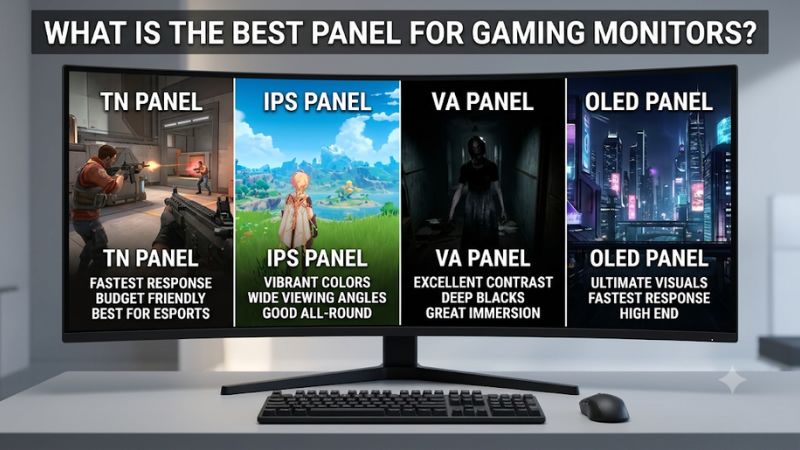
What is the best panel for gaming monitors?
IPS is the best panel technology for most gaming monitor buyers because it balances motion performance, color reproduction, viewing angles, availability, and price. It is particularly suitable for players who enjoy several genres rather than exclusively playing competitive shooters or cinematic single-player games.
However, IPS is not automatically the best option for every setup. OLED delivers superior contrast and extremely fast pixel transitions, making it particularly attractive for high-end gaming. VA provides deeper blacks than conventional IPS and is appealing for dark-room gaming, while TN remains relevant for some specialized esports displays.
The following comparison summarizes the main technologies.
| Panel technology | Main advantage | Main limitation | Best gaming use |
|---|---|---|---|
| Fast IPS | Balanced speed and color | Relatively low contrast | Competitive and general gaming |
| IPS Black | Higher LCD contrast than conventional IPS | Cannot match OLED blacks | Mixed gaming and productivity |
| VA | Deep native blacks | Potential dark-level smearing | RPGs and cinematic games |
| TN | Fast motion handling on suitable models | Weak viewing angles and colors | Competitive esports |
| WOLED | Per-pixel lighting and perfect blacks | Burn-in risk and brightness limitations | Premium immersive gaming |
| QD-OLED | Excellent contrast and color volume | Cost, reflections, and text clarity concerns | Premium HDR gaming |
Mini-LED deserves separate consideration because it is not a panel technology like IPS or VA. It is an advanced LCD backlighting system that can be combined with an LCD panel to improve brightness and contrast through local dimming.
The right purchase depends on how you play, your room lighting, your graphics card, and how much you want to spend. A fast IPS display can be a smarter purchase than an expensive OLED if you mainly play competitive games in a bright room and use your monitor for work throughout the day.
How this panel technology roundup was evaluated
A gaming monitor should not be judged by panel type alone. The underlying display technology determines certain characteristics, but the exact monitor implementation determines how well it performs.
This comparison considers several factors that directly influence gaming.
Motion handling and pixel response
Motion clarity is important in fast-moving games. A monitor with slow pixel transitions can show trailing images, smearing, or other artifacts when objects move rapidly across the screen.
OLED has a substantial advantage because its pixels can transition extremely quickly. Modern Fast IPS panels can also provide excellent motion performance, particularly at high refresh rates.
VA and TN require more model-specific consideration. VA displays can exhibit slow dark-level transitions, while some TN gaming monitors remain competitive because of their motion-handling characteristics.
A manufacturer’s advertised response time is not enough to establish which display is faster. Independent reviews that measure multiple pixel transitions and overshoot provide more meaningful comparisons.
Contrast and black levels
Contrast determines how much separation exists between bright and dark parts of an image. It can make a considerable difference in horror games, cinematic adventures, and environments with complicated lighting.
OLED has the advantage because each pixel produces its own light and can turn off completely. VA offers the strongest native contrast among conventional LCD technologies, while standard IPS and TN typically produce less impressive black levels.
Color accuracy and viewing angles
Color quality matters in both games and everyday desktop use. IPS and OLED generally offer consistent colors when viewed from different positions, while VA and TN can show greater changes when viewed off-center.
Color accuracy is also affected by calibration, color gamut, brightness, and the manufacturer’s implementation. Buying an IPS monitor does not guarantee professional color accuracy, and a well-calibrated VA monitor can still look excellent.
Practical cost and long-term ownership
The best panel is not necessarily the most expensive one. Buyers should consider the complete monitor, including resolution, refresh rate, ergonomics, warranty, and connectivity.
OLED requires additional consideration because permanent image retention is possible after prolonged exposure to static content. IPS, VA, and TN do not share this same OLED burn-in mechanism.
Independent testing from RTINGS and the technical explanations published by HP and Dell provide the basis for these comparisons. No individual monitor models have been assigned invented test scores or performance rankings.
IPS panels: Best all-around choice for most gamers
IPS, or In-Plane Switching, is one of the most widely used LCD panel technologies in modern gaming monitors.
It works by arranging liquid crystals so they rotate within the plane of the screen. This approach supports relatively consistent color reproduction and broad viewing angles, making IPS suitable for gaming, office work, streaming, and general desktop use.
The biggest advantage is its versatility. A good IPS gaming monitor can deliver a high refresh rate, attractive colors, and reliable motion performance without requiring an OLED-level budget.
Fast IPS for competitive gaming
Fast IPS is a gaming-oriented development of conventional IPS technology. Manufacturers optimize the panel and its driving electronics to support faster pixel transitions and higher refresh rates.
These displays are available in several configurations, including Full HD monitors designed for competitive gaming and higher-resolution models intended for more powerful PCs.
The biggest advantage is the balance between motion performance and image quality. Players can enjoy relatively clear movement without accepting the weaker viewing angles and color reproduction traditionally associated with TN panels.
Fast IPS is particularly appealing for first-person shooters, multiplayer games, racing titles, and general competitive gaming. Wide viewing angles also make it suitable for people who use multiple monitors or occasionally share their screen.
Another benefit is the large selection of available products. Buyers can find IPS monitors across different resolutions, refresh rates, sizes, and price categories.
However, standard IPS has a significant limitation: contrast. Many conventional IPS gaming displays have native contrast around 1,000:1, which means blacks can appear gray in a dark room. IPS glow may also become noticeable around the corners when viewing dark content at an angle.
IPS Black for improved LCD contrast
IPS Black is designed to improve the contrast performance of conventional IPS displays.
It retains important IPS characteristics, including broad viewing angles and useful color consistency, while increasing native contrast.
This makes IPS Black attractive for buyers who use their monitor for several purposes. Someone who works with spreadsheets during the day and plays games at night may appreciate its more balanced presentation.
However, the technology should not be confused with OLED. IPS Black still relies on an LCD panel and a backlight, so individual pixels cannot turn off independently to produce perfect blacks.
It is also important to inspect the exact specifications. Not every monitor using an IPS-family panel has the same contrast, response time, or color characteristics.
Buy Fast IPS if you want the most versatile option for gaming and general desktop use. Consider IPS Black when improved LCD contrast matters alongside color consistency. Skip conventional IPS if your primary priority is deep black levels in a dark gaming room.
VA panels: Best LCD option for dark-room gaming
VA, or Vertical Alignment, is another major LCD technology used in gaming monitors.
Unlike IPS, VA panels arrange liquid crystals vertically when no voltage is applied. This allows them to block light more effectively, producing higher native contrast and deeper blacks.
That advantage makes VA appealing for players who enjoy cinematic games in dim environments. A dark cave, nighttime city, or horror-game environment can look more convincing when the display produces deeper blacks rather than turning dark areas into gray.
HP identifies VA as the LCD panel type with stronger native contrast than conventional IPS and TN. Typical VA contrast specifications can be around 3,000:1 or higher, although the actual result varies by display.
Where VA performs best
VA is particularly attractive for single-player RPGs, open-world games, survival titles, and cinematic adventures.
The increased contrast can improve the separation between dark backgrounds and bright highlights. It is also useful for movie watching, especially when the screen is used in a relatively dark room.
Curved gaming monitors frequently use VA panels. Their curved shape can provide a more immersive appearance on ultrawide screens, although curvature itself does not increase contrast or improve pixel response.
Another advantage is that VA monitors do not carry the same OLED burn-in risk. This makes them practical for buyers who leave desktop applications, taskbars, and static interface elements visible for long periods.
Why VA can struggle with fast games
The main limitation is motion handling. Some VA panels have slower transitions between dark shades, resulting in dark smearing during fast-moving scenes.
This is particularly noticeable in darker games where objects move across shadowy backgrounds. A character running through a dim environment may leave a visible trail, even if the monitor advertises a short response time.
Variable refresh rate flicker is another potential concern on some VA displays. This can become noticeable when frame rates fluctuate significantly, especially in dark scenes.
Not all VA monitors exhibit these problems to the same degree. Some newer gaming models offer better response performance and high refresh rates, so buyers should look at independent model-specific testing rather than rejecting the entire technology.
RTINGS’ comparison of IPS and VA displays also highlights the contrast-versus-motion trade-off and documents differences in dark-level transitions and VRR behavior.
Buy VA if you prioritize contrast and immersive single-player gaming. Skip it if you mainly play competitive shooters and are particularly sensitive to dark smearing.
TN panels: A specialist option for competitive esports
TN, or Twisted Nematic, is one of the older LCD panel technologies.
It became popular in gaming because of its fast pixel transitions and ability to support high refresh rates. For many years, TN was the preferred choice for competitive players who valued motion clarity above color quality and viewing angles.
Although IPS and OLED have become considerably more competitive, TN has not disappeared entirely.
Why esports players still consider TN
A well-designed high-refresh-rate TN monitor can deliver excellent motion handling. This is useful in games where players constantly track fast-moving targets and rely on precise visual information.
The narrower viewing angles are less problematic when one person sits directly in front of the monitor. Likewise, weaker color reproduction may not matter much to players who prioritize frame visibility and motion clarity over cinematic image quality.
RTINGS compared a 540Hz TN gaming monitor with a 500Hz IPS model and found better motion handling on the tested TN display. This is an example of a model-specific advantage, not proof that every TN monitor is faster than every IPS monitor.
The disadvantages of TN
TN’s main weakness is image quality. Colors and brightness can change noticeably when viewed from different angles, particularly vertically.
This can make the monitor look inconsistent if the user moves their head or sits too close to a large display. TN panels also generally struggle to match the color reproduction and contrast available from modern IPS, VA, and OLED monitors.
Availability is another limitation. The modern gaming monitor market has shifted heavily toward IPS and OLED, leaving fewer TN choices across mainstream sizes and resolutions.
TN is therefore a niche purchase rather than the default recommendation. Before choosing it, compare independent motion tests against high-refresh IPS and OLED alternatives.
Buy TN if competitive performance is your overriding priority and the specific monitor demonstrates superior measured motion handling. Skip it if you want a versatile display for gaming, entertainment, and creative work.
OLED panels: Best premium choice for image quality
OLED, or Organic Light-Emitting Diode, works differently from conventional LCD technology.
LCD monitors use a backlight behind the panel. OLED monitors use self-emissive pixels, meaning each pixel produces its own light and can switch off independently.
This design creates exceptionally deep blacks and extremely high contrast. It also supports very fast pixel transitions, giving OLED an important advantage for fast-moving content.
For gamers who want premium visual quality, OLED is arguably the strongest overall display technology. Its combination of black levels, color performance, viewing angles, and motion handling is difficult for conventional LCD panels to match.
WOLED: Excellent contrast and cinematic gaming
WOLED is a major OLED implementation used in gaming monitors.
It uses a white OLED light source with color-filtering arrangements to produce the final image. The independent pixel illumination allows the screen to display deep blacks and bright highlights without relying on conventional LCD backlighting.
This works particularly well in cinematic games. Dark environments, lighting effects, and bright visual elements appear more distinct because the monitor can control individual pixels instead of dimming large sections of a backlight.
WOLED displays also provide very fast transitions and broad viewing angles. This makes them attractive for fast shooters as well as story-driven games.
However, WOLED is not perfect. Sustained full-screen brightness can be more limited than on some high-brightness LCD displays, and static interface elements can create a risk of permanent image retention over time.
Some WOLED monitors also use unusual subpixel arrangements that can affect desktop text clarity. The exact result depends on the panel generation and layout.
QD-OLED: Strong color volume and gaming visuals
QD-OLED combines OLED self-emissive pixels with quantum-dot technology.
Its main advantage is its ability to produce highly saturated colors while retaining OLED’s strong contrast. This makes it particularly attractive for games with bright environments, colorful visual effects, and HDR content.
QD-OLED also provides excellent motion handling and broad viewing angles.
However, its surface finish and subpixel arrangement deserve consideration. Many QD-OLED monitors use glossy or semi-glossy coatings that can reflect windows and lighting. Their triangular RGB subpixel layout can also create visible text fringing in some desktop applications.
In bright rooms, black levels can appear raised compared with the deep blacks visible in darker environments. This is an important consideration for buyers who use their monitors near windows or under strong ambient lighting.
OLED burn-in and long-term ownership
Burn-in is one of the biggest considerations when purchasing an OLED gaming monitor.
Static elements such as taskbars, game HUDs, browser controls, and fixed productivity windows can contribute to uneven pixel wear over time.
Modern OLED monitors include protective mechanisms such as pixel shifting, screen refresh routines, logo detection, and brightness management. These features reduce the risk, but they do not make it impossible.
Buyers can also reduce unnecessary exposure by hiding the taskbar, using a screensaver, allowing pixel-refresh routines to complete, and avoiding maximum brightness for static desktop content.
For someone who spends several hours gaming with varied content, OLED can be an excellent purchase. For someone who leaves the same spreadsheets, software interfaces, or dashboards open all day, IPS or VA may be a more comfortable long-term choice.
Buy OLED if you want the best combination of contrast, motion performance, and premium image quality. Skip it if the purchase price is too high, you work with static content for long periods, or you regularly use your PC in a brightly lit room with strong reflections.
Mini-LED: A backlight upgrade, not a panel type
Mini-LED is frequently included in discussions about gaming monitor panel technologies, but it is technically a backlighting method rather than an independent LCD panel category.
A Mini-LED monitor still uses an underlying LCD panel, which can be IPS or VA. The difference is that its backlight uses many smaller LEDs divided into local dimming zones.
These zones can reduce their brightness independently, improving contrast and allowing the display to produce brighter highlights without illuminating the entire screen equally.
Why Mini-LED is useful for HDR gaming
Mini-LED’s biggest advantage is brightness. High-quality implementations can deliver strong highlights for HDR games while maintaining darker surrounding areas.
This helps in games with sunlight, explosions, reflective surfaces, and dramatic lighting. It can also make HDR content more visible in brighter rooms than some OLED monitors.
Another advantage is the lack of the same organic-pixel burn-in mechanism associated with OLED. This makes Mini-LED attractive for people who combine gaming with productivity.
What buyers should watch for
Local dimming works by controlling groups of backlight zones rather than individual pixels.
As a result, a bright object against a black background can illuminate nearby dark areas, creating a visible halo called blooming.
The severity depends on the number of dimming zones, their size, algorithm quality, and the underlying LCD panel.
A Mini-LED display with more effective local dimming can provide a considerably better HDR experience than a basic edge-lit LCD monitor. Nevertheless, the technology does not guarantee perfect blacks.
RTINGS describes Mini-LED as a full-array backlighting implementation and explains how additional, smaller backlight zones improve local dimming and brightness control.
Buy Mini-LED if you want stronger HDR brightness, high contrast, and an LCD display without OLED burn-in concerns. Skip it if you prefer the perfect per-pixel blacks of OLED or cannot justify the additional cost.
What is the best panel for gaming monitors by game type?
Different gaming genres place different demands on a display. A competitive shooter emphasizes motion clarity and responsiveness, while an open-world adventure benefits more from rich colors, contrast, and immersive visuals.
The following recommendations provide a practical starting point.
| Gaming use case | Recommended panel | Main reason |
|---|---|---|
| Competitive FPS | Fast IPS or OLED | Excellent motion performance |
| Professional esports | Fast OLED, IPS, or specialist TN | High refresh rates and clear motion |
| RPG and open-world | OLED or VA | Strong contrast and immersion |
| Racing games | OLED or fast VA | Motion clarity and immersive visuals |
| Horror games | OLED or VA | Deeper blacks |
| Casual gaming | IPS | Balanced image quality |
| HDR gaming | OLED or Mini-LED LCD | High contrast and impactful highlights |
| Gaming and productivity | IPS | Versatility and no OLED burn-in |
| Budget gaming | IPS or VA | Broad selection and practical value |
Best panel for competitive first-person shooters
Fast IPS is a strong choice for most competitive players because it combines high refresh rates with good image quality and broad viewing angles.
OLED is another excellent option, particularly when the system and budget support a high-refresh-rate model.
TN remains relevant when a particular esports display delivers superior measured motion handling. However, choosing TN solely because of its historical reputation is not a reliable buying strategy.
Best panel for cinematic single-player games
OLED is the strongest premium option for cinematic gaming because its self-emissive pixels create deep blacks and excellent contrast.
VA is a more affordable alternative for players who want stronger contrast than conventional IPS without purchasing an OLED display.
Best panel for mixed gaming and everyday use
IPS is the safest general recommendation. It can handle competitive games, productivity, content consumption, and casual photo editing without the additional ownership considerations associated with OLED.
A good IPS model with high refresh and reliable color performance is often a more practical everyday monitor than an expensive specialist display.
How to choose a panel without overspending
Panel technology is important, but it should not be your only buying consideration. The best monitor is a combination of technologies and specifications that work together.
Match refresh rate to GPU performance
A 240Hz monitor is not automatically better than a 144Hz display for every gaming PC.
Your graphics card must generate enough frames to take advantage of the refresh rate. If a system consistently produces 100 FPS in demanding games, a 144Hz monitor may be a more balanced purchase than a 360Hz model.
Also consider the resolution. A high-resolution OLED display can look excellent, but running demanding games at native 4K requires considerably more GPU performance than running them at 1080p.
Check response time and input lag separately
Response time measures how quickly pixels change color. Input lag measures how long the monitor takes to begin displaying a received signal.
Both matter for gaming, but they describe different aspects of performance.
Do not assume a monitor advertised as 1ms is automatically more responsive than every monitor with a 4ms specification. Independent measurements at the intended refresh rate are more useful.
Consider adaptive sync
Variable refresh rate technologies such as AMD FreeSync and NVIDIA G-SYNC Compatible help synchronize the monitor with the graphics card.
This is useful when FPS fluctuates during gameplay, reducing tearing and improving consistency.
Check the exact supported refresh-rate range and connection requirements. Not every model supports the same features across HDMI and DisplayPort.
Think about screen coating and room lighting
Matte coatings diffuse reflections, making them useful in rooms with windows or overhead lights.
Glossy coatings can preserve a more vivid appearance but are more reflective. This matters particularly with certain QD-OLED monitors.
The best panel for a dark gaming room may not be the best choice for a desk positioned directly beside a bright window.
Prioritize the features you will actually use
A balanced monitor purchase should account for:
-
Native resolution and screen size.
-
Maximum refresh rate and supported connection.
-
Actual measured pixel response performance.
-
Adaptive-Sync compatibility.
-
Contrast and HDR capability.
-
Ergonomic adjustment and VESA mounting.
-
Warranty and OLED burn-in coverage, where applicable.
-
Total purchase cost, including tax and shipping.
Avoid paying for specifications that your PC cannot use. A properly matched 1440p Fast IPS monitor may provide a better everyday experience than a high-end 4K OLED display that forces you to compromise on gaming performance.
Frequently asked questions
Is IPS better than VA for gaming?
IPS is generally better for balanced gaming because it provides wide viewing angles and typically more consistent motion handling. VA is better for native contrast and deeper blacks. The right choice depends on whether you prioritize competitive motion clarity or dark-scene image quality.
Is OLED better than IPS for gaming?
OLED is generally better for contrast, black levels, viewing angles, and pixel response. IPS is more practical for bright rooms, long productivity sessions with static content, and buyers who want to avoid OLED burn-in concerns.
Is TN still worth buying in 2026?
Yes, but mainly for specialist competitive gaming. Certain TN displays still offer excellent motion handling at very high refresh rates. However, modern Fast IPS and OLED monitors provide strong alternatives with better overall image quality.
Which panel type is best for FPS games?
Fast IPS and OLED are excellent options for FPS gaming. TN can also be worthwhile when an independently researched model offers superior motion performance. Prioritize refresh rate, pixel response consistency, and input lag rather than panel type alone.
Is VA good for console gaming?
Yes. VA panels work well with compatible PlayStation and Xbox consoles. Their higher native contrast can improve cinematic games, although buyers should check dark-transition performance and supported HDMI refresh-rate modes.
Does Mini-LED perform better than OLED?
Neither wins every category. Mini-LED can deliver higher peak brightness and avoid OLED’s organic-pixel burn-in mechanism. OLED provides perfect per-pixel black levels and avoids the local-dimming blooming associated with LCD backlights.
Which panel type is best for a budget gaming PC?
IPS is generally the safest recommendation because it offers a broad selection of affordable monitors with useful refresh rates and good image quality. VA is worth considering when stronger contrast is a priority, especially for single-player gaming.
Can panel type affect gaming FPS?
No. Panel technology does not directly increase the FPS rendered by the CPU and GPU. It affects how the monitor displays those frames, including contrast, pixel transitions, motion clarity, and image quality.
Conclusion
IPS is the best all-around gaming monitor panel for most people because it balances speed, color reproduction, viewing angles, and cost. OLED is the premium choice for players who want the best contrast and motion performance, while VA is attractive for immersive gaming in darker rooms. TN remains a specialist alternative for esports, and Mini-LED offers an effective LCD backlighting upgrade for HDR gaming.
Rather than choosing the panel with the most impressive marketing claims, match the technology to your gaming habits, room lighting, PC performance, and budget. A well-designed IPS monitor is enough for many players, while OLED or Mini-LED becomes worthwhile when image quality and HDR are higher priorities.









