
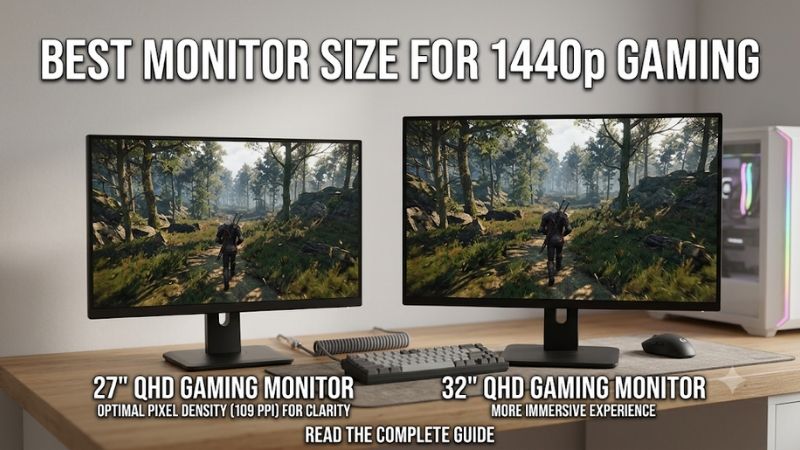
The best monitor size for 1440p gaming is usually 27 inches for a conventional desk. Choose 32 inches when a larger image matters more than close-up sharpness, or consider a 34-inch ultrawide for supported PC games. These six monitors show how size, panel technology, and viewing position change the decision.
Quick verdict: Best monitor size for 1440p gaming
Start with a 27-inch 2560 × 1440 monitor if you play several game genres and sit at a typical keyboard-and-mouse desk. It balances physical image size with about 109 pixels per inch. Moving to 32 inches enlarges the picture, but it does not add resolution or desktop information.
The MSI MAG 274QF E20 illustrates the conventional 27-inch IPS route. The AOC Q27G3XMN adds local-dimming hardware, while the Alienware AW2725DF provides a high-refresh QD-OLED alternative. Their different strengths show why choosing a size and choosing a panel are separate decisions.
For a larger 16:9 picture, consider the flat LG 32GS75Q-B or curved Gigabyte GS32QC. Both use 31.5-inch panels marketed in the 32-inch category. The MSI MAG 341CQP QD-OLED represents a different format: 34-inch 3440 × 1440 ultrawide, with extra horizontal pixels and a larger rendering workload.
Choose the size first, then the features you can use. These are role-based recommendations, without a verified cheapest-product ranking or a claim that one model wins every performance test. No fixed spending ceiling was supplied, so compare current US offers after narrowing the shortlist.
Quick comparison of six suitable monitors
Five monitors below use ordinary QHD resolution, while the ultrawide uses UWQHD. Refresh ceilings describe display capability rather than guaranteed game frame rates. A compatible graphics card, the selected connection, and your game settings determine how much of that capability your system can actually use.
| Monitor | Screen and resolution | Panel and shape | Refresh capability | Why it belongs here | Main limitation |
|---|---|---|---|---|---|
| MSI MAG 274QF E20 | 27 inches; 2560 × 1440 | Flat Rapid IPS | 200Hz DisplayPort; 144Hz HDMI | Conventional QHD desktop gaming | Tilt-only stand |
| AOC Q27G3XMN | 27 inches; 2560 × 1440 | Flat VA with Mini LED local dimming | Up to 180Hz | Local-dimming option without enlarging the screen | Zone-based dimming has compromises |
| Alienware AW2725DF | 26.7 inches; 2560 × 1440 | Flat QD-OLED | 360Hz DisplayPort; 144Hz HDMI | Compact high-refresh gaming | OLED care and burn-in considerations |
| LG 32GS75Q-B | 31.5 inches; 2560 × 1440 | Flat IPS | Up to 180Hz | Larger flat image with stand adjustment | Lower pixel density than 27-inch QHD |
| Gigabyte GS32QC | 31.5 inches; 2560 × 1440 | 1500R curved VA | 165Hz; 170Hz overclock | Larger curved picture at standard QHD resolution | No stand height adjustment |
| MSI MAG 341CQP QD-OLED | 34 inches; 3440 × 1440 | 1800R curved QD-OLED | Up to 175Hz | Wider view in compatible PC games | More pixels to render; game support varies |
How these monitors were selected
The shortlist emphasizes distinct ways to use a 1440-line display rather than six versions of the same purchase. Manufacturer specifications establish size, resolution, panel type, refresh limits, and physical features. The recommendations are researched editorial judgments, without fabricated detailed research, frame-rate results, or laboratory latency measurements.
Three 27-inch options cover different panel priorities; two larger QHD models compare flat and curved layouts; one ultrawide demonstrates the difference between greater diagonal size and greater horizontal workspace. The 34-inch model is an explicit format alternative, not a direct performance equivalent to standard QHD.
Pixel-density and screen-dimension comparisons were calculated from the stated resolution, diagonal, and aspect ratio. Rounded dimensions describe the active image, excluding bezels and stands. Actual product measurements take priority for desk planning, especially with curved displays and mounting hardware.
MSI MAG 274QF E20: Best monitor size for 1440p gaming on a typical desk
The MAG 274QF E20 pairs a flat 27-inch Rapid IPS panel with 2560 × 1440 resolution and a 200Hz DisplayPort ceiling. Its role is straightforward: a conventional QHD screen for someone who wants to assess the popular 27-inch size without moving into OLED ownership.
At roughly 109 PPI, the panel provides a useful balance between compact pixels and readable image scale. You can place it in front of a keyboard without the width of an ultrawide. That makes it a sensible format for a mixed library of shooters, strategy games, and single-player titles.
Connection choice matters. MSI lists QHD up to 144Hz over HDMI and 200Hz over DisplayPort. A laptop or desktop connected through HDMI will not automatically receive the DisplayPort ceiling. Check the source’s output capabilities before deciding whether the higher refresh feature benefits your setup.
The stand offers tilt, without the height adjustment some competing models provide. Include a suitable mounting solution in your cost comparison if its fixed height does not work. Buy if: You want a conventional 27-inch IPS format. Skip if: Height adjustment or sophisticated HDR is central; consider the AOC’s different backlight approach.
AOC Q27G3XMN: Keep 27 inches and change the backlight
The Q27G3XMN keeps the same 27-inch QHD format while using a VA panel and 336 local-dimming zones. AOC lists a maximum 180Hz refresh rate and DisplayHDR 1000 certification. It addresses picture-quality priorities without requiring the extra physical space of a 32-inch display.
That distinction matters when the screen already fits your desk. If your complaint is disappointing HDR rather than insufficient image size, buying a larger basic LCD may miss the problem. Local dimming controls different backlight regions, providing a separate improvement path from simply increasing the diagonal.
Zones are still larger than individual pixels. Bright interface elements against dark backgrounds can challenge any zone-based system, and a certification does not describe every scene or firmware setting. This guide does not invent blooming measurements or claim that the AOC matches OLED in all circumstances.
The adjustable stand also helps maintain your preferred position. Buy if: You want to retain 27-inch sharpness while investigating local-dimming HDR. Skip if: Your priority is a physically larger picture or you require a measured esports performance winner. Compare the Alienware for a different display technology and ownership trade-off.
Alienware AW2725DF: Compact QHD for high-refresh PC play
The AW2725DF has a 26.7-inch QD-OLED panel, placing it firmly in the familiar 27-inch class. Its 2560 × 1440 resolution and 360Hz DisplayPort ceiling make it relevant to gamers who want a compact screen with substantial refresh headroom rather than a bigger image.
A higher refresh ceiling becomes useful when your PC and preferred games can supply the frames. It does not guarantee an advantage in demanding titles that run far below that ceiling. Consider your actual game settings before paying for capability that your system rarely approaches.
Dell documents QHD up to 144Hz over HDMI, so DisplayPort is important for the 360Hz configuration. Its USB-C downstream port should not be mistaken for a USB-C video input. These connection details matter more than screen size if the display must serve a laptop as well as a desktop.
OLED also requires appropriate care around static desktop elements. Dell lists three-year service including burn-in coverage, subject to applicable terms. Buy if: High-refresh PC gaming drives the purchase. Skip if: Static work dominates or you want a larger canvas. The IPS alternatives avoid OLED-specific burn-in concerns.
LG 32GS75Q-B: A larger flat QHD canvas
The 32GS75Q-B uses a 31.5-inch IPS panel at 2560 × 1440, with an advertised 180Hz maximum refresh rate. It is the larger flat option for players who want game objects, interface elements, and desktop content physically bigger without changing the standard QHD pixel count.
Its calculated density is about 93 PPI. That is lower than a 27-inch QHD display, so fine text and edges will look coarser at the same viewing distance. The difference may matter less when the monitor sits farther away, but moving it back requires actual desk depth.
LG includes height, tilt, and pivot adjustment. Height adjustment is particularly useful when a larger panel otherwise places its upper edge too high. Confirm the entire stand footprint and available viewing position rather than assuming a wide desktop automatically provides a comfortable arrangement.
DisplayHDR 400 branding should not be interpreted as proof of advanced local dimming. Buy if: You prefer a larger flat image and can accept the density trade-off. Skip if: Your main goal is finer text at close range. The smaller MSI preserves more pixels per inch; the Gigabyte offers a curved alternative.
Gigabyte GS32QC: Larger QHD with a curved panel
The GS32QC combines a 31.5-inch VA panel, native QHD resolution, and a 1500R curve. Gigabyte specifies 165Hz operation with an optional 170Hz overclock. It illustrates a larger curved setup while retaining the same 2560 × 1440 rendering resolution as the smaller standard-QHD picks.
The curve changes the geometry around the viewer; it does not increase pixel density. Whether it feels more engaging depends on your seat, distance, and preference. It is worth seeing a curved display in person if you also use spreadsheets, design tools, or other applications where straight-line presentation matters to you.
Practical limitations include a tilt-only stand and no built-in speakers. Those omissions can create additional costs if you need a different mounting position or external audio. Compare the complete arrangement with the LG instead of judging either monitor solely by its listed diagonal.
Do not assume that VA panel type establishes a particular amount of dark smearing; that needs model-specific testing. Buy if: You want a larger curved QHD format. Skip if: Stand flexibility or close-up sharpness is the priority. Use the 170Hz figure only when the overclock is enabled and stable.
MSI MAG 341CQP QD-OLED: A wider 1440-line alternative
The MAG 341CQP QD-OLED uses a 34-inch 3440 × 1440 panel, 1800R curvature, and a maximum 175Hz refresh rate. It belongs in this comparison because many buyers associate 34 inches with 1440p, but its extra horizontal resolution changes both the experience and the workload.
Its approximate density is 110 PPI, close to a 27-inch QHD screen. The active image is also similar in height, with extra width extending the sides. This is a better way to understand its size than treating it as a much taller replacement for a 27-inch monitor.
Games need appropriate ultrawide support to use the full format well. Some interfaces, competitive titles, or cutscenes may remain constrained or show side bars. Check the games you actually play before buying. The extra pixels are not a guarantee of more useful visible information in every title.
OLED care remains relevant, and its USB-C power delivery is only 15W. Buy if: Supported PC games benefit from a wider presentation and your GPU can handle it. Skip if: Standard 16:9 compatibility or extensive static desktop work is more important. Choose a conventional QHD model when those requirements dominate.
Choosing the best monitor size for 1440p gaming
Screen size becomes easier to judge when physical dimensions, pixel density, and viewing distance are considered together. The following comparisons use geometry rather than a claim that one diagonal suits every person. Start with the available space and your normal seated position, then evaluate which trade-offs are acceptable.
Compare pixel density before assuming bigger is sharper
A larger display at the same resolution spreads the same pixels over more surface area. That enlarges the image while reducing pixel density. A 31.5-inch QHD monitor therefore offers larger content than a 27-inch QHD monitor at identical scaling, without providing additional rows or columns of desktop information.
| Nominal image size and format | Resolution | Calculated PPI | Approximate active width × height |
|---|---|---|---|
| 23.8-inch 16:9 | 2560 × 1440 | 123 | 20.7 × 11.7 inches |
| 27-inch 16:9 | 2560 × 1440 | 109 | 23.5 × 13.2 inches |
| 31.5-inch 16:9 | 2560 × 1440 | 93 | 27.5 × 15.4 inches |
| 32-inch 16:9 | 2560 × 1440 | 92 | 27.9 × 15.7 inches |
| 34-inch ultrawide | 3440 × 1440 | 110 | 31.4 × 13.1 inches |
The 23.8-inch row explains the compact alternative even though this shortlist does not include a US-verified model in that size. Higher PPI may appeal to close viewers, but smaller physical interface elements can require scaling. Availability and exact model features still matter more than choosing from a density table alone.
Use viewing distance as an adjustable variable
Try roughly 24–32 inches as a starting range for a 27-inch screen, or about 28–36 inches for a 31.5-inch model. These are trial positions, not mandatory ergonomic limits. Adjust until you can read comfortably and follow the game’s interface without constantly leaning forward or turning your head.
For equal apparent pixel size, viewing distance scales approximately with diagonal when resolution and shape stay the same. A 31.5-inch QHD panel needs about 17% more distance than a 27-inch panel. If 27 inches feels right at 27 inches away, about 31.5 inches away is a useful larger-screen comparison.
Match the format to your game library
For competitive games, ask whether you can track the center, corners, and interface comfortably from your seat. A 27-inch display is a useful starting point, but diagonal size alone does not improve aim. Refresh behavior, consistent frame delivery, and a suitable position remain important.
For racing games, flight simulators, and expansive single-player titles, a larger or wider image can be attractive. Confirm ultrawide rendering and field-of-view options before choosing the 34-inch MSI. A larger standard-QHD display enlarges the existing image; an ultrawide can change its shape and supported visible area.
Keep GPU workload separate from diagonal size
At identical render settings and resolution, moving from a 27-inch to a 31.5-inch QHD monitor does not inherently add rendering work. Both display 3,686,400 pixels per frame. Differences in panel size should not be blamed for frame-rate changes caused by new settings, refresh targets, or other system changes.
By comparison, 3440 × 1440 contains 4,953,600 pixels, about 34.4% more than standard QHD. That is a pixel-count comparison, not a predicted performance penalty. Actual frame rates depend on the game, graphics settings, CPU, GPU, and any upscaling configuration.
Frequently asked questions
The final choice often comes down to whether you need more physical image size, more detail, or a different format. Define that need before comparing prices. A monitor that improves one of those qualities may leave the others unchanged, so a larger diagonal is not automatically an upgrade.
Is 32-inch 1440p too blurry for gaming?
Not inherently. It has lower pixel density than 27-inch QHD, which becomes more noticeable at close range. From a suitable distance, you may prefer the larger image. If you want both a larger screen and finer close-up detail, compare 32-inch 4K and account for its different rendering demands.
Does 34-inch ultrawide make everything taller?
No. A 34-inch 3440 × 1440 screen is roughly as tall as a 27-inch 2560 × 1440 screen and substantially wider. The diagonal spans a different shape, so comparing only inch labels gives an incomplete picture of how much vertical space you gain.
Should I replace a satisfactory 27-inch QHD monitor?
Only if the replacement addresses a specific need, such as larger content, better positioning, different HDR hardware, or higher useful refresh. Keeping a suitable display can be the better decision. A larger panel at the same resolution does not automatically add detail or improve performance.
Conclusion
Choose 27-inch QHD as the starting point for most desks, using the MSI MAG 274QF E20, AOC Q27G3XMN, or Alienware AW2725DF according to panel priorities. Choose the LG 32GS75Q-B or Gigabyte GS32QC for a larger standard-QHD image. Consider the MSI MAG 341CQP only when ultrawide support, desk width, and GPU capability align. The right size fits your seat and games while preserving the sharpness you value.









