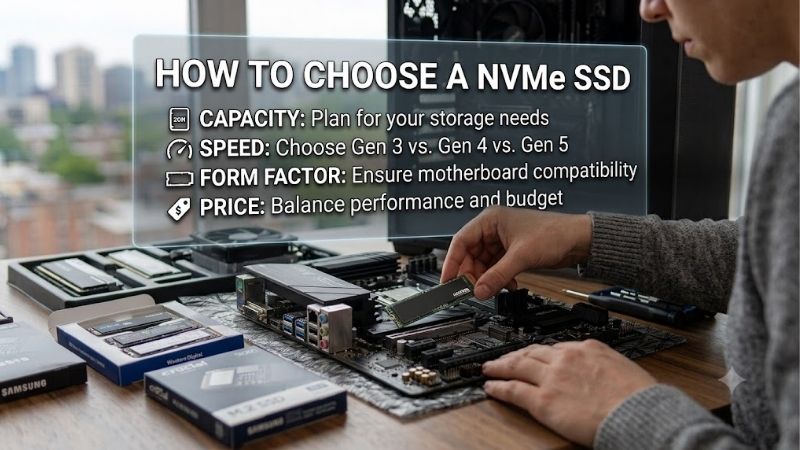
How to choose a nvme ssd becomes confusing when capacity, PCIe generation, and advertised speeds compete for attention. A faster drive can still be the wrong purchase if it does not fit your system or holds too few games. Start with compatibility, calculate your storage needs, and match performance to your actual workload.
Quick answer: Our top pick in 2026 is the Lexar NM790 1TB — our #1 rated choice. See the full ranked comparison, alternatives and buying advice below.
How to Choose an NVMe SSD
Learning how to choose a nvme ssd requires four decisions: physical compatibility, useful capacity, workload performance, and endurance. This guide compares four exact drive configurations against those priorities. Check system documentation first, then prioritize specifications addressing actual limitations over advertising figures.
Physical Fit and Motherboard Compatibility
M.2 identifies a physical format, while NVMe identifies the storage protocol. A slot accepting an M.2 card cannot guarantee universal NVMe compatibility. Confirm supported length, PCIe connectivity, and available clearance. These selections use the 2280 format, measuring 22 × 80 mm, rather than shorter handheld-oriented sizes.
For desktop installations, a bare drive can avoid conflicts with a motherboard heatsink. Follow the board’s mounting guidance rather than stacking unrelated cooling assemblies. TEAMGROUP MP44L 1TB measures approximately 2.25 mm thick and uses a thin heat-spreading label, making it practical alongside existing compatible motherboard cooling.
Capacity and Expansion Costs
Capacity planning should include Windows, applications, active games, project files, and temporary application working space. Compare costs at the capacity you actually need rather than the cheapest listing. A smaller fast drive cannot compensate for insufficient space, while a larger drive can reduce frequent software removal.
When deciding how to choose a nvme ssd for a growing game library, capacity can matter more than peak throughput. Kingston NV3 2TB supplies double these 1TB selections’ nominal capacity. Choose that configuration when your installed library justifies expansion and its price remains competitive against other 2TB alternatives.
Workload Performance and PCIe Bandwidth
Sequential transfer ratings measure large contiguous operations under defined test conditions. Everyday response also depends on random access, software behavior, and processor work. Treat read and write figures as advertised ceilings rather than universal experience. Gaming frame rates are not directly determined by peak storage throughput.
If you are learning how to choose a nvme ssd for frequent transfers, compare performance premiums against available motherboard bandwidth. Lexar NM790 1TB advertises reads up to 7,400 MB/s and writes up to 6,500 MB/s. Choose it when compatible PCIe 4.0 bandwidth and transfers justify its premium over mainstream alternatives.
Endurance and Project-Storage Features
Endurance is the specified cumulative writing allowance, while warranty coverage adds conditions and time limits. Compare equivalent capacities for durability, and keep separate backups regardless of the rating. Dedicated DRAM and management software also matter for project storage; no single feature guarantees consistent performance.
For project buyers researching how to choose a nvme ssd, Samsung 990 PRO 2TB combines 2GB of onboard DRAM with a 1,200 TBW allowance. Its software includes firmware and health-monitoring tools. Choose it when these features and capacity serve your workflow, rather than buying premium hardware solely for ordinary game launches.
Top Picks
Knowing how to choose a nvme ssd helps evaluate these recommendations by role. Each selection addresses a different purchasing priority, using manufacturer specifications rather than claimed hands-on results. Compare exact capacity and packaging at checkout; prices, cooling options, and specifications can differ across similarly named listings.
| Product | Best For | Key Spec | Watch Out For |
|---|---|---|---|
| Lexar NM790 1TB | Best Overall | Up to 7,400/6,500 MB/s read/write; 1,000 TBW | Burst specifications do not establish sustained write performance |
| TEAMGROUP MP44L 1TB | Best Value | Up to 5,000/4,500 MB/s read/write | Current manufacturer table lists 320 TBW |
| Kingston NV3 2TB | Best for Larger Game Libraries | Up to 6,000/5,000 MB/s read/write; 640 TBW | Lower endurance per terabyte than NM790 |
| Samsung 990 PRO 2TB | Best for Project-Storage Tools | 2GB DRAM; up to 7,450/6,900 MB/s read/write | Premium features can be unnecessary for ordinary gaming |
Lexar NM790 1TB: Best Overall
Lexar NM790 1TB is the best overall recommendation for a compatible desktop needing balanced specifications at competitive pricing. It advertises sequential reads up to 7,400 MB/s and writes up to 6,500 MB/s. Its 1,000 TBW rating provides a substantial specified writing allowance for everyday computing and project storage.
Its main limitation is that advertised burst performance does not establish sustained post-cache transfer speed. A high checkout price also weakens its value against alternatives. Choose NM790 for its specification balance, but prioritize adequate storage space if a larger mainstream drive better accommodates your installed library.
TEAMGROUP MP44L 1TB: Best Value
TEAMGROUP MP44L 1TB receives the best value recommendation when it is meaningfully cheaper than NM790. The current official table lists reads up to 5,000 MB/s and writes up to 4,500 MB/s. Its slim heat-spreading label avoids a tall cooler’s clearance requirements, fitting straightforward desktops with suitable motherboard cooling.
The drawback is its currently published 320 TBW allowance, below NM790 at equivalent capacity. Older retailer listings and historical reviews can differ, so verify the supplied version and applicable warranty. Choose MP44L for economical ordinary storage when the discount matters more than higher endurance or transfer ceilings.
Kingston NV3 2TB: Best for Larger Game Libraries
Kingston NV3 2TB is the best selection for a larger game library when competitively priced. The 2280 model advertises reads up to 6,000 MB/s and writes up to 5,000 MB/s. Its clearest advantage is the capacity increase over the 1TB recommendations, accommodating substantial installed collections without frequent storage reshuffling.
The compromise is its 640 TBW allowance, equivalent to 320 TBW per nominal terabyte. That is lower per terabyte than NM790, so this recommendation prioritizes library capacity rather than repeated heavy project writes. Confirm the 2280 version before purchase because the NV3 family also includes shorter models requiring different mounting lengths.
Samsung 990 PRO 2TB: Best for Project-Storage Tools
Samsung 990 PRO 2TB is the best pick here for project storage with dedicated DRAM and management tools. It combines 2GB of DRAM with advertised sequential reads up to 7,450 MB/s and writes up to 6,900 MB/s. Samsung Magician provides firmware management and drive-health information, useful alongside project-storage requirements.
The practical disadvantage is that its premium features can cost more than ordinary gaming needs. Peak sequential figures still do not guarantee equivalent improvement across applications. Choose this bare-drive version for compatible workstations when its capacity and tools justify the premium, and account for your system’s cooling requirements.
Frequently Asked Questions
The remaining questions about how to choose a nvme ssd concern the details that product labels often blur. PCIe generation, onboard memory, physical clearance, and usable storage are separate purchasing decisions. These answers help distinguish a real compatibility requirement from practical workload-specific features.
Will a Gen4 SSD Work in a Gen3 Slot?
Yes, a PCIe 4.0 NVMe SSD can generally operate in a compatible PCIe 3.0 NVMe slot, with throughput limited by the connection. Physical fit and motherboard support still need confirmation. This backward compatibility does not make SATA-only M.2 connectors NVMe-compatible or establish boot support on every older motherboard.
If your board limits bandwidth, buying Gen4 at a competitive price can still make sense for subsequent hardware reuse. Paying a substantial premium for inaccessible throughput is harder to justify. Consult the motherboard’s slot table for lane-sharing restrictions, because installed devices can affect available bandwidth.
Does a Gaming NVMe SSD Need DRAM?
No, dedicated DRAM is not mandatory for every gaming or everyday NVMe SSD. Some designs use host memory for mapping information, while controllers, flash behavior, and caching also affect results. Evaluate the complete drive rather than assuming a dedicated DRAM specification alone identifies every good operating-system drive.
For people considering how to choose a nvme ssd for write-intensive work, consult sustained-write benchmarks for the exact capacity and revision. Large transfers can behave differently from short benchmark runs, especially as available space decreases. A dedicated DRAM cache is useful context, but it cannot replace workload-specific evidence.
Do You Need to Buy an SSD Heatsink?
Not every NVMe drive needs a separate aftermarket heatsink. Requirements depend on the model, mounting environment, airflow, and workload. A motherboard’s compatible heatsink may already provide the intended solution. Check both sets of instructions before purchasing cooling, particularly where a tall assembly could obstruct nearby components.
Install storage with the computer powered down and disconnected, following its service instructions. If a thermal pad is supplied, remove protective film only as directed and verify correct screw or latch attachment. Assess operating temperatures under representative workloads before adding cooling equipment unnecessarily.
Should You Choose a 1TB or 2TB SSD?
Choose 1TB when your operating system, software, and active files fit comfortably and 2TB would compromise higher-priority components. Choose 2TB when your library requires expansion. Include update downloads and temporary files in the estimate; nominal capacity is not the same as formatted space available to the operating system.
A reported capacity below the package label does not automatically indicate lost storage, because units and formatting affect displayed totals. Plan from actual installed requirements instead of an arbitrary game count. If expansion remains possible, compare the total cost of later expansion against sufficient initial capacity.
Final Thoughts
Knowing how to choose a nvme ssd means prioritizing compatibility and workload. Lexar NM790 1TB balances specifications, TEAMGROUP MP44L 1TB favors meaningful savings, Kingston NV3 2TB expands game storage, and Samsung 990 PRO 2TB adds project-oriented tools and DRAM. Compare versions and checkout prices, then back up important files separately.
Ready to decide? Our #1 pick for 2026 is the Lexar NM790 1TB.
Live price & availability on Amazon.