How to choose an oled monitor becomes confusing when 240Hz gaming screens, 4K panels, and curved ultrawides promise different benefits. Start with graphics performance, room lighting, and daily applications. A 27-inch 1440p OLED suits many gaming desktops; prioritize 4K detail, laptop connectivity, or ultrawide immersion when those benefits matter.
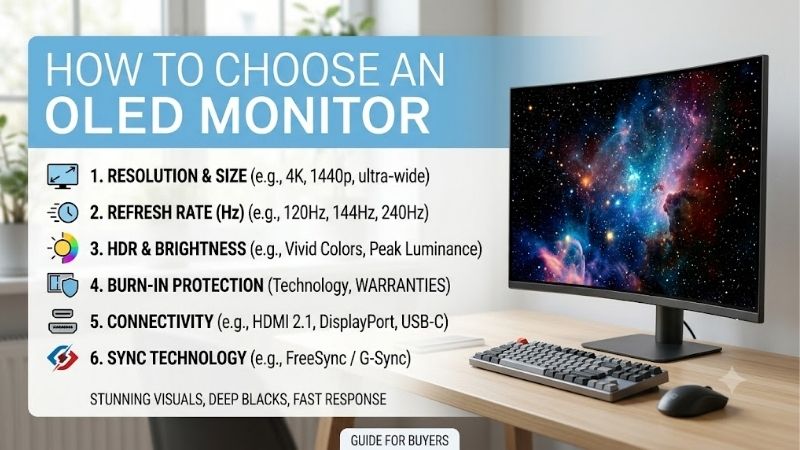
How to Choose OLED Monitors
This guide explains how to choose an oled monitor through four buying decisions and four product picks. You will compare specifications that affect everyday performance, identify unnecessary extras, and understand ownership costs before checkout. The goal is matching your computer and workspace rather than collecting impressive specifications.
Balance Resolution Against Graphics Performance
Learning how to choose an oled monitor starts with resolution rather than maximum refresh specifications. Rendering 4K increases graphics workload substantially compared with 1440p, particularly in demanding games. Check independent benchmarks for your graphics card and preferred titles before allocating the entire upgrade budget to a display.
At 27 inches, 1440p balances manageable desktop dimensions and achievable gaming performance. A larger 4K panel adds detail but can reduce the budget available for graphics upgrades. Choose the Alienware AW2725D for balanced 1440p gaming, or the ASUS ROG Swift OLED PG32UCDM when your graphics card and detail priorities justify higher resolution.
Compare Brightness in the Right Context
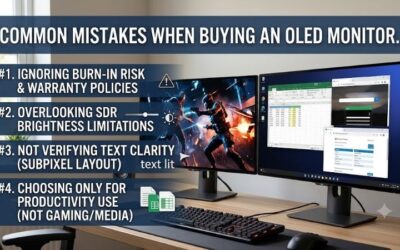
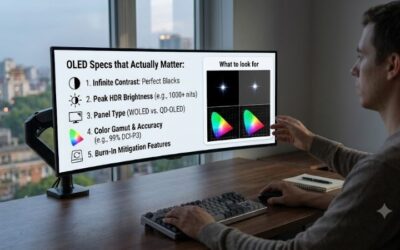
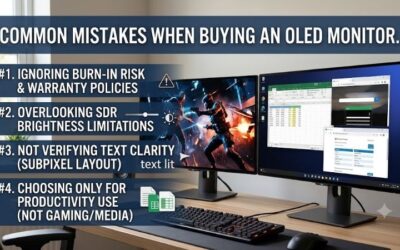
Brightness specifications need context because OLED output changes with bright-area size. Tiny HDR highlights cannot represent a white document filling the display. MSI specifies 250 nits for SDR and a 1,000-nit HDR peak at 3% average picture level. Comparing those figures directly misrepresents sustained desktop brightness in daily applications.
Controllable lighting makes contrast and reflections more useful priorities than maximum advertised brightness. Bright workspaces deserve an in-person evaluation, especially with mostly white applications. Choose the MSI MAG 271QPX QD-OLED E2 when its brightness suits your room and its checkout price offers useful savings over the Alienware.
Match Screen Shape to Games and Desk Space
Flat 16:9 screens accommodate familiar desktops and standard video formats, while ultrawides provide additional horizontal scenery in compatible games. Extra width does not guarantee a broader scene in every title. Measure usable desktop space around speakers and accessories before selecting a display through diagonal measurements alone.
Pronounced curvature favors centered gaming but can feel unfamiliar during straight-line design work. Preview strongly curved displays before purchasing if entertainment shares time with precise layout editing. Choose the LG UltraGear 34GS95QE-B when compatible racing simulations and adventures make immersive ultrawide gaming worthwhile.
Evaluate Connections and Ownership Costs
Connectivity affects total costs when a monitor replaces peripherals or a laptop dock. Confirm USB-C video compatibility and charging wattage separately, then investigate explicit burn-in warranty terms. Identical connector shapes can serve different purposes; lower prices can conceal extra charging adapters or peripheral requirements.
ASUS combines a built-in KVM with USB-C charging configurable up to 90W through its menu. Some laptops nevertheless require their original adapters. Choose the ASUS ROG Swift OLED PG32UCDM when integrated laptop connectivity simplifies your workstation, or the MSI MAG 271QPX QD-OLED E2 for basic USB-C video and explicitly stated burn-in coverage.
Top Picks
Knowing how to choose an oled monitor separates these recommendations: Alienware balances mainstream gaming requirements, MSI provides conditional value, ASUS prioritizes 4K and connectivity, and LG emphasizes immersion. Compare checkout totals because the ranking reflects suitability rather than a promise of lower prices or superior performance.
| Product | Best For | Key Spec | Watch Out For |
|---|---|---|---|
| Alienware AW2725D | Best Overall | 2560 × 1440, 280Hz QD-OLED | USB-C does not accept laptop video |
| MSI MAG 271QPX QD-OLED E2 | Best Value | 2560 × 1440, 240Hz QD-OLED | USB-C charging limited to 15W |
| ASUS ROG Swift OLED PG32UCDM | Best For 4K and Laptop Connectivity | 3840 × 2160, 240Hz; up to 90W USB-C | High graphics requirements at 4K |
| LG UltraGear 34GS95QE-B | Best For Immersive Ultrawide Gaming | 3440 × 1440, 240Hz, 800R curve | Strong curvature and uneven game support |
Alienware AW2725D: Best Overall
The Alienware AW2725D is the starting recommendation for desktop gamers learning how to choose an oled monitor. Its flat, 27-inch-class QD-OLED panel combines 2560 × 1440 resolution and 280Hz refresh capability. Competitive gaming headroom comes in a familiar format, without introducing the graphics requirements associated with 4K resolution.
An adjustable stand and three-year warranty including burn-in strengthen Alienware ownership beyond panel specifications. Its substantial limitation is USB-C: downstream connectivity supplies up to 15W without receiving laptop video. Desktop gaming is the clearest fit; laptop sharing requires separate video connections and charging arrangements.
MSI MAG 271QPX QD-OLED E2: Best Value
The MSI MAG 271QPX QD-OLED E2 earns its value position when checkout pricing meaningfully undercuts Alienware. Its 26.5-inch QD-OLED panel delivers 2560 × 1440 resolution with 240Hz refresh capability. Two HDMI 2.1 inputs accommodate another gaming device without repeated cable exchanges between desktop and console sessions behind the display.
USB-C video and three-year coverage including panel burn-in provide useful flexibility. However, 15W charging cannot replace most laptop adapters, limiting docking convenience despite the compatible connector. Verify the E2 suffix before ordering: the similarly named non-E2 monitor has different refresh rates and is not an identical product.
ASUS ROG Swift OLED PG32UCDM: Best For 4K and Laptop Connectivity
Buyers investigating how to choose an oled monitor for gaming and laptop sharing should consider the ASUS ROG Swift OLED PG32UCDM. Its 31.5-inch viewable QD-OLED panel combines 3840 × 2160 resolution and 240Hz capability. Higher pixel density supplies the attraction for detailed imagery, alongside connectivity suited to multiple computers.
Its KVM allows computers to share keyboard and mouse peripherals, reducing equipment duplication. Demanding 4K rendering creates the principal drawback, particularly in graphically intensive games. Compare laptop charging requirements against supported power delivery rather than assuming a single USB-C connection replaces every adapter.
LG UltraGear 34GS95QE-B: Best For Immersive Ultrawide Gaming
The LG UltraGear 34GS95QE-B targets dedicated gaming setups and compatible ultrawide titles. Its 34-inch OLED panel combines 3440 × 1440 resolution, 240Hz refresh capability, and 800R curvature. Wider presentation particularly benefits racing simulations and adventures where horizontal scenery contributes meaningfully to the viewing experience.
Wraparound presentation supplies the advantage and the tradeoff. Strong curvature can distract during precise straight-line editing, while unsupported games and standard video may introduce side bars. Choose LG specifically for immersive viewing geometry rather than diagonal size, and confirm desk space for the complete stand before checkout.
Frequently Asked Questions
Understanding how to choose an oled monitor includes everyday ownership details beyond promotional imagery. Panel maintenance, desktop readability, refresh settings, and seller terms can influence satisfaction after delivery. These answers distinguish useful gaming upgrades from purchases that conflict with your applications or expectations.
Can OLED Burn-In Be Prevented Completely?
No, OLED protection cannot guarantee prevention of burn-in. Prolonged bright, static imagery increases uneven pixel-aging risk. Keep manufacturer protection enabled, configure screen sleep during inactivity, and permit recommended maintenance cycles to finish without interruptions. Protection reduces exposure rather than eliminating the risk. www.asus.com
Warranty coverage reduces financial exposure without eliminating claim inconvenience. Preserve purchase records and confirm eligibility for the exact US model and seller. For unchanged dashboards displayed throughout extended workdays, a conventional LCD remains the conservative choice because that application repeatedly exposes static content.
Are OLED Monitors Good for Reading Small Text?
OLED displays small text, but readability varies with pixel structure, resolution, and personal sensitivity. Some subpixel arrangements create colored fringes around high-contrast lettering, differing from conventional LCD rendering. Evaluate this specifically when programming, spreadsheets, and document editing dominate your daily workload. www.dell.com
During the return window, evaluate familiar applications using your preferred scaling and normal viewing distance. Gaming footage cannot demonstrate comfortable document reading throughout a workday. The 4K ASUS offers higher pixel density than these 1440p alternatives, although resolution cannot guarantee satisfying lettering for every reader.
Do I Need 240 FPS to Benefit From OLED?
No, OLED contrast and fast pixel transitions benefit gaming below 240 FPS. Understanding how to choose an oled monitor means separating refresh capability from actual graphics performance. Higher specifications provide headroom without automatically justifying a graphics upgrade when your existing computer already delivers satisfying gameplay.
After installation, select the intended refresh setting through your operating system and investigate restrictive frame-rate caps within games. Source, display, and connection must support the selected mode. For libraries operating below the refresh ceiling, prioritize suitable resolution, desktop dimensions, and complete purchase costs.
What Should I Check Before Ordering on Amazon?
Verify the complete model number, seller, condition, and return terms before ordering. Similar names can represent different refresh rates, connections, or generations; renewed listings may carry different coverage. Confirm that the selected variation matches your comparison instead of relying on promotional photographs or abbreviated titles.
Inspect included cables, stand requirements, and US manufacturer warranty eligibility before purchasing. Attractive discounts become less useful when accessories add unexpected costs or seller records cannot establish coverage. Keep packaging during the permitted evaluation period while checking normal applications and preferred gaming settings.
Final Thoughts
Learning how to choose an oled monitor means matching resolution, brightness, geometry, and connectivity to your routine. Start with Alienware AW2725D for balanced gaming, MSI E2 for meaningful savings, ASUS for 4K and laptop sharing, or LG for immersive ultrawide gaming. Confirm model specifications and warranty eligibility before purchasing.