OLED monitor specs that actually matter are easier to judge once you separate useful specifications from impressive numbers. Refresh rate, resolution, panel type, HDR, connectivity, and OLED protection affect image quality and usability, while response-time claims often matter less than buyers expect. This guide focuses on visible differences.
How to Choose an OLED Monitor
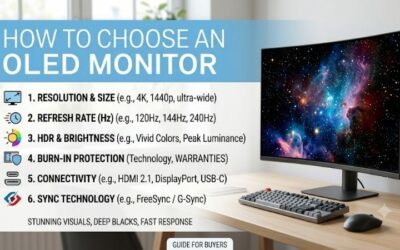
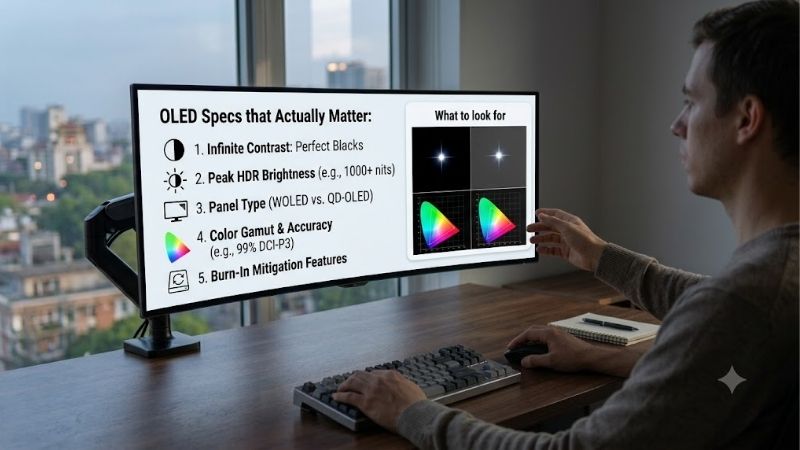
oled monitor specs that actually matter start with four decisions: resolution and pixel density, refresh rate and motion, panel technology and surface, and HDR, connectivity, and OLED protection. These specifications change what you see, how smoothly games respond, and how conveniently the display works with your computer or console.
Resolution And Pixel Density
Resolution determines how much detail the panel can show, while pixel density explains how tightly that detail is packed. A 27-inch 1440p OLED is a useful middle ground because it looks sharper than 1080p without demanding as much graphics power as 4K. For many gaming PCs, that balance is easier to drive reliably today.
For a first-OLED, 27-inch 1440p models such as the ASUS ROG Strix OLED XG27AQDMG and LG UltraGear 27GS95QE-B keep density practical while allowing high refresh rates. A 4K OLED makes more sense for larger screens or image-heavy work. Choose the resolution your GPU can drive consistently.
Refresh Rate And Response
Refresh rate determines how often the display can update the image. Moving from 60Hz to 144Hz is a major improvement, while 240Hz is already extremely fluid. 360Hz is a specialized step for competitive gaming, where very high-frame-rates can reduce visible latency and motion blur during rapid movement on screen in esports.
The MSI MPG 271QRX and Alienware AW2725DF both reach 360Hz at 1440p, while ASUS and LG offer 240Hz in this group. That makes 240Hz the sensible target for mixed gaming and 360Hz the specialist choice for esports. Do not pay for extra refresh unless your GPU can use it regularly.
Panel Type And Surface
Panel technology changes color behavior, brightness characteristics, and how the screen handles ambient light. WOLED and QD-OLED can both deliver OLED-level black levels and fast pixel response, but they are tuned differently. Surface treatment matters too: glossy panels suit controlled rooms, while anti-reflection finishes help near windows.
The ASUS XG27AQDMG uses a glossy WOLED panel, while LG 27GS95QE-B uses an anti-glare OLED surface. MSI MPG 271QRX and Alienware AW2725DF use QD-OLED with anti-reflective treatment. Choose ASUS for a controlled room, or LG, MSI, or Alienware when reflected light is a bigger concern during daytime use.
HDR, Ports, And OLED Care
oled monitor specs that actually matter also include HDR, ports, and panel-care features because these affect practical use beyond the desktop. HDR should be judged by peak brightness, contrast, and certification rather than the word HDR alone. Ports determine whether the monitor supports your PC, console, laptop, and accessories.
MSI 271QRX stands out with two HDMI 2.1 ports, DisplayPort, USB-C with up to 90W power delivery, KVM, and OLED Care 2.0. ASUS provides OLED Care and two USB ports, while LG offers HDMI 2.1 and USB connectivity. Alienware adds a USB hub and three-year OLED burn-in coverage.
Top Picks
oled monitor specs that actually matter become easier to compare when each model has a distinct purpose. ASUS ROG Strix OLED XG27AQDMG is the best overall balance, LG 27GS95QE-B is the value pick, MSI MPG 271QRX is the competitive-gaming choice, and Alienware AW2725DF targets premium HDR and color for buyers who want a high-end 1440p OLED.
| Product | Best For | Key Spec | Watch Out For |
|---|---|---|---|
| ASUS ROG Strix OLED XG27AQDMG | Best Overall | 26.5″ 1440p WOLED, 240Hz, glossy, 99% DCI-P3 | Glossy surface shows reflections |
| LG UltraGear 27GS95QE-B | Best Value | 27″ 1440p OLED, 240Hz, 0.03ms, HDMI 2.1 | Anti-glare coating changes image character |
| MSI MPG 271QRX QD-OLED | Best For Competitive Gaming | 26.5″ 1440p QD-OLED, 360Hz, 0.03ms, USB-C 90W | Extra 360Hz value depends on GPU output |
| Alienware AW2725DF | Best For HDR And Color | 26.7″ 1440p QD-OLED, 360Hz, 99.3% DCI-P3 | HDMI supports only QHD up to 144Hz |
ASUS ROG Strix OLED XG27AQDMG — Best Overall
oled monitor specs that actually matter are well represented by the ASUS ROG Strix OLED XG27AQDMG, especially for buyers wanting a balanced first OLED. Its 26.5-inch WOLED panel runs at 2560×1440 and 240Hz, reaches 99% DCI-P3, supports HDR10, and lists a 0.03ms GtG response. It also has ASUS OLED Care.
Its strongest advantage is the glossy panel combined with a high refresh rate and 1300-nit HDR peak specification. The drawback is specific: glossy surfaces reflect windows and lamps more readily than anti-reflective designs. Choose it for a controlled gaming room where contrast and punchy presentation matter more than reflection control.
LG UltraGear 27GS95QE-B — Best Value
oled monitor specs that actually matter make the LG UltraGear 27GS95QE-B a practical value choice for buyers who want 1440p OLED without paying specifically for 360Hz. It offers 27-inch QHD resolution, 240Hz refresh, 0.03ms GtG response, HDR True Black 400, 98.5% DCI-P3, HDMI 2.1, and variable-refresh support for compatible systems.
Its practical advantage is anti-glare treatment, which is easier to live with in mixed-lighting rooms than a glossy surface. The weakness is that the coating can make the image look less punchy under controlled lighting. Choose LG when room lighting is unpredictable and 240Hz already matches your graphics hardware and gaming preferences.
MSI MPG 271QRX QD-OLED — Best For Competitive Gaming
oled monitor specs that actually matter favor the MSI MPG 271QRX when refresh rate and connectivity are priorities. Its 26.5-inch QD-OLED runs at 2560×1440 and 360Hz with a 0.03ms GtG response, while the panel provides DisplayHDR True Black 400. Its HDMI 2.1 inputs can handle QHD at 360Hz, which is unusual and useful for high-refresh devices.
The advantage goes beyond speed: USB-C supports DisplayPort Alt Mode and up to 90W power delivery, while KVM lets one keyboard and mouse control multiple devices. The drawback is that a 360Hz ceiling has limited value when your GPU cannot sustain very high frame rates. Choose it for esports or multi-device desks where those connections matter.
Alienware AW2725DF — Best For HDR And Color
oled monitor specs that actually matter make the Alienware AW2725DF attractive to buyers who want premium QD-OLED color without moving to 4K. Its 26.7-inch QHD panel runs at 360Hz, reaches 99.3% DCI-P3, lists 1000-nit peak brightness, and carries VESA DisplayHDR True Black 400. It also supports Adaptive-Sync and 0.03ms response time.
The main advantage is the combination of wide color coverage, high refresh, and Dell’s OLED-focused support. Its meaningful limitation is connectivity: although it has HDMI 2.1, that input is limited to QHD at 144Hz, so PC users targeting 360Hz should use DisplayPort. For a 360Hz PC gaming setup, that detail is important.
Frequently Asked Questions
These questions help buyers judge what they will notice instead of reproducing manufacturer tables. The focus is on four areas that create the biggest real-world differences: resolution, refresh rate, OLED panel type, and HDR. Those choices determine whether you are paying for visible improvements or merely numbers that sound impressive today.
Is 1440p Or 4K Better For An OLED Monitor?
1440p is usually the better value for a 27-inch gaming OLED, while 4K becomes more attractive as screen size rises or detailed creative work becomes the priority. At 27 inches, 1440p already provides a dense image, and the lower rendering requirement makes 240Hz or 360Hz more achievable on a gaming GPU with comparable hardware.
A 4K OLED can look sharper for text, editing, and large-screen work, but it demands substantially more graphics power at high refresh rates. For competitive gaming, 1440p is often the more coherent target because it leaves more GPU headroom. Choose resolution together with screen size and frame-rate goals rather than independently.
Do I Really Need 240Hz Or 360Hz?
Most gaming buyers do not need 360Hz. A 240Hz OLED already provides very smooth motion and extremely quick pixel transitions, making it a strong target for mainstream high-refresh gaming. The 360Hz class is more specialized because its benefit appears when the system can consistently produce very high-frame-rates in competitive titles.
The MSI MPG 271QRX and Alienware AW2725DF are therefore specialist picks rather than automatic upgrades over 240Hz models. For story-driven games, strategy titles, or mixed desktop work, 240Hz is often enough. Competitive players running lightweight esports games at very high frame rates are most likely to notice the additional headroom.
Does QD-OLED Matter More Than WOLED?
QD-OLED does not automatically make a monitor better than WOLED. QD-OLED can offer strong color volume and wide-gamut performance, while WOLED remains highly capable for contrast, response speed, and gaming. Surface treatment, brightness behavior, calibration, and the monitor’s specific implementation can matter more than panel branding.
The ASUS XG27AQDMG demonstrates how a WOLED monitor can stand apart through its glossy surface, while MSI and Alienware use QD-OLED for wide-gamut gaming displays. Compare the entire display rather than choosing based on the panel acronym alone. The room, games, connection needs, and expected use should determine the fit.
Is HDR Really Important On An OLED Monitor?
HDR is important on OLED, but the certification name alone does not tell you how impressive the result will be. OLED’s per-pixel light control gives it an inherent advantage for dark scenes, yet HDR quality also depends on peak brightness, tone mapping, color coverage, and how the monitor handles small bright highlights.
The ASUS XG27AQDMG lists a 1300-nit HDR peak specification, LG supports DisplayHDR True Black 400, and MSI and Alienware also carry True Black 400 certification. Those numbers are not directly interchangeable, so evaluate the complete HDR implementation. A bright room can also reduce perceived HDR impact, making room lighting part of the decision.
Final Thoughts
oled monitor specs that actually matter are the specifications that change the display you see: resolution, refresh rate, panel type, surface, HDR, connectivity, and OLED care. ASUS is the balanced choice, LG is the value option, MSI favors competitive gaming and connectivity, while Alienware emphasizes premium QD-OLED color and 360Hz motion.