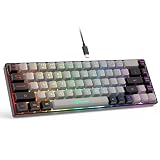
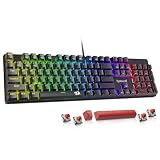
- Top Pick: Redragon Mechanical Gaming Keyboard Wired, 11 Programmable Backlit Modes, Hot-Swappable Red Switch, Anti-Ghosting, Double-Shot PBT Keycaps, Light Up Keyboard for PC Mac
- Best Value: Razer BlackWidow V4 X Mechanical Gaming Keyboard, Yellow Switches, Black
- Premium Choice: Logitech G413 SE Full-Size Mechanical Gaming Keyboard – Black
Mechanical keyboards used to be a luxury purchase, but in 2026 the sub-$50 category is genuinely crowded — and that’s exactly the problem. Budget listings are packed with vague switch descriptions, “mechanical-feel” membrane boards masquerading as the real thing, and keycaps that go shiny after three months of use. Spend badly here and you end up with mushy actuation, ping-heavy acoustics, and legends that wear off before your next GPU upgrade.
This guide cuts through that noise. We’ve focused on keyboards that deliver the things that actually matter at this price — real mechanical switches, durable PBT or thick ABS keycaps, reliable anti-ghosting, and build quality that survives daily gaming sessions. Below you’ll find a buying framework, hands-on impressions of the top picks, and answers to the questions budget buyers ask most.
As an Amazon Associate we earn from qualifying purchases at no extra cost to you. Product prices and availability are accurate as of the date shown and are subject to change.








⚡ Save on Your Next PC — Amazon Prime
Prime members get fast free shipping on the systems above, plus early access to Prime Day & Black Friday PC deals. New members get a 30-day free trial.
Watch: Best Mechanical Keyboard Under $50 — Video Review
How to Choose Mechanical Keyboard Under $50
- Switch type and feel: Linear switches (red, yellow) are smooth and fast, ideal for gaming. Tactile switches give a noticeable bump for typing accuracy. Under $50 you’ll rarely get a choice, so buy for the switch already installed rather than hoping to swap later.
- Hot-swap sockets: A hot-swappable PCB lets you change switches without soldering — a huge deal on a budget board, because it turns a $40 keyboard into a platform you can upgrade for $15 in switches instead of replacing entirely.
- Keycap material: Double-shot PBT resists shine and wear far better than thin ABS. If a listing doesn’t specify the material, assume it’s budget ABS and factor a replacement keycap set into your real cost.
- Layout and size: Full-size gives you a numpad; TKL and 75% free up desk space for low-sensitivity mouse movement. Compact layouts also travel better, but check that the arrow keys aren’t crammed into awkward positions.
- Anti-ghosting and rollover: Look for full N-key rollover or at minimum 26-key rollover. Cheap boards sometimes advertise “anti-ghosting” on only a handful of gaming keys, which causes dropped inputs during complex movement combos.
The Best Picks Reviewed
Redragon Hot-Swappable Mechanical Gaming Keyboard
This is the value benchmark under $50 — hot-swappable red switches, genuine double-shot PBT keycaps, and full anti-ghosting in a package that undercuts boards offering half as much. The 11 backlight modes are more novelty than necessity, but the fact that you can rebuild the feel of this board with a $15 switch order makes it the smartest long-term buy in the category.
AULA F75 Pro Wireless
The F75 Pro is the enthusiast pick here: a 75% hot-swap layout with a volume knob, pre-lubed Reaper switches, side-printed PBT keycaps, and triple connectivity via 2.4GHz, Bluetooth 5.0, and USB-C. It sounds and feels closer to a $100 custom build than a budget board, and the pre-lubed switches mean it’s genuinely usable out of the box with no modding required.
Razer BlackWidow V4 X
Frequently discounted into this bracket, the BlackWidow V4 X brings Razer’s linear Yellow switches — light, fast, and near-silent by mechanical standards — plus a genuinely solid chassis that doesn’t flex under aggressive keypresses. It’s the pick if you want brand-name reliability and Synapse software support rather than tinkerability.
Logitech G413 SE
The G413 SE is the no-nonsense option: an aluminum-alloy top plate, tactile mechanical switches, PBT keycaps, and single-colour white backlighting with no software bloat to install. There’s no RGB and no macro layer, but for durability per dollar it’s arguably the toughest board on this list.
Redragon K580
The K580 packs full-size RGB, dedicated macro keys, and a media wheel into a sub-$50 footprint, which is unusual at this price. It’s the best choice for streamers and productivity users who want physical shortcut keys without stepping up to a mid-range board.
Frequently Asked Questions
Are cheap mechanical keyboards actually durable?
Yes, if the switches are genuine mechanical units. Most budget switches are rated for 50–100 million actuations, which comfortably outlasts membrane boards. The parts that fail first are usually keycaps, cables, and stabilisers — not the switches themselves.
Is hot-swap worth paying extra for at this price?
Absolutely. Hot-swap is the single feature that extends a budget board’s lifespan, letting you replace worn switches individually or change the entire typing feel for the cost of a switch set rather than a new keyboard.
Do I need RGB lighting for gaming?
No — RGB has zero performance impact. It’s purely aesthetic, and boards that skip it often reinvest that budget into better keycaps or a sturdier plate, which is usually the better trade under $50.
Should I choose wired or wireless?
Wired is still the safe default for competitive play and eliminates battery management entirely. Modern 2.4GHz wireless is fast enough that most players won’t notice a difference, so choose wireless if desk tidiness or multi-device switching matters to you.
Final Thoughts
For most buyers, the Redragon hot-swappable board is the smartest all-round purchase under $50 — PBT keycaps, swappable switches, and room to grow. If you want the most modern experience and don’t mind a compact layout, the AULA F75 Pro delivers wireless connectivity and a pre-lubed typing feel that punches well above its price. And if you simply want something built like a tank that will still be working in five years, the Logitech G413 SE remains the durability champion of the category.