- Top Pick: GEODMAER 65% Gaming Keyboard, Wired Backlit Mini Keyboard, Ultra-Compact Anti-Ghosting No-Conflict 68 Keys Membrane Gaming Wired Keyboard for PC Laptop Windows Gamer
- Best Value: Logitech G213 Prodigy Wired RGB Gaming Keyboard – Black
- Premium Choice: TECKNET Wired Gaming Keyboard, RGB Backlit Keyboard with Metal Panel Design
Shopping for a gaming keyboard under $100 sounds simple until you actually start looking. The sub-$100 tier is the most crowded segment on the market, packed with everything from $25 membrane boards wearing gamer aesthetics to genuinely impressive hot-swappable mechanical keyboards that would have cost twice as much three years ago. The trouble is that spec sheets have gotten very good at hiding the difference. “Mechanical feeling” is not mechanical. “Anti-ghosting” can mean full N-key rollover or it can mean six keys and a shrug. And RGB lighting looks identical in product photos whether the board underneath is built to last five years or five months.
This guide cuts through that. We’ve focused on keyboards that deliver real value at their price rather than the longest feature list, weighing switch quality, build materials, typing feel, and long-term reliability. You’ll find genuine mechanical options, refined membrane boards that outperform their category, and at least one wireless custom-style keyboard that has no business being this affordable. Whether you’re building a first gaming PC on a tight budget or looking for a compact secondary board, there’s a pick here that earns its place on your desk.
As an Amazon Associate we earn from qualifying purchases at no extra cost to you.


⚡ Save on Your Next PC — Amazon Prime
Prime members get fast free shipping on the systems above, plus early access to Prime Day & Black Friday PC deals. New members get a 30-day free trial.
Watch: Best Gaming Keyboard Under $100 — Video Review
How to Choose Gaming Keyboard Under $100
- Switch type matters more than anything else: Mechanical switches offer crisp actuation and replaceable parts, while membrane boards are quieter and cheaper. Watch for the phrase “mechanical feeling,” which almost always signals a membrane keyboard mimicking the feel — fine for casual play, but not the same thing.
- Check the rollover spec, not just “anti-ghosting”: Look for N-key rollover or at least 26-key rollover if you play games requiring multiple simultaneous inputs. Vague anti-ghosting claims without a number often mean limited key registration under pressure.
- Match the layout to your desk and your games: Full-size boards give you a numpad for MMOs and productivity, while 65% and 75% layouts free up significant mouse space for low-sensitivity FPS play. Compact layouts lose dedicated function and arrow keys, so consider how often you use them.
- Prioritize build materials over lighting effects: A metal top plate, PBT keycaps, and a stable case will outlast flashy per-key RGB every time. ABS keycaps develop a greasy shine within months, whereas PBT holds its texture for years.
- Decide if hot-swap and wireless are worth the premium: Hot-swappable sockets let you change switches without soldering, which extends a board’s life considerably. Wireless adds convenience but check whether the 2.4GHz dongle mode offers low enough latency for competitive play — Bluetooth alone usually doesn’t.
The Best Picks Reviewed
AULA F75 Pro Wireless Mechanical Keyboard
This is the standout value pick of the group, offering a hot-swappable 75% layout, pre-lubed Reaper switches, side-printed PBT keycaps, and triple connectivity via 2.4GHz, USB-C, and Bluetooth 5.0. The gasket-style feel and volume knob deliver a custom-keyboard experience that genuinely rivals boards costing considerably more.
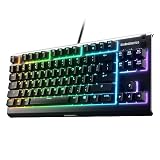
SteelSeries Apex 3 RGB Gaming Keyboard
SteelSeries built the Apex 3 around whisper-quiet gaming switches, IP32 water resistance, and a premium magnetic wrist rest, making it the best choice for shared spaces, late-night sessions, and desks where drinks live dangerously close to the keyboard. The 10-zone RGB isn’t per-key, but the overall polish and durability justify the tradeoff.
Logitech G213 Prodigy Wired RGB Gaming Keyboard
The G213 remains a reliable workhorse thanks to Logitech’s Mech-Dome keys, which deliver noticeably better tactile feedback than standard membrane switches, plus dedicated media controls and a spill-resistant chassis. It’s a set-and-forget board for players who want dependable performance without fussing over switch preferences.
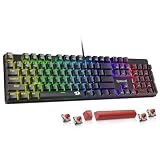
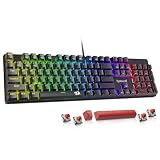
Redragon K521 Rainbow LED Gaming Keyboard
Redragon’s K521 packs 104 keys, multimedia controls, one-touch backlighting, and broad compatibility across PC, Mac, PS4/5, and Xbox into an aggressively priced full-size package. It’s a smart pick for console players and multi-device setups who need a full numpad without spending mechanical money.
GEODMAER 65% Wired Backlit Mini Keyboard
At 68 keys, this ultra-compact membrane board frees up serious mouse room for low-sensitivity FPS players while keeping anti-ghosting performance solid for its class. It’s the budget entry point into the 65% form factor, ideal as a travel board or a first step before committing to a pricier compact mechanical.
Frequently Asked Questions
Is a mechanical keyboard necessary for gaming under $100?
Not strictly, but it’s increasingly easy to get one at this price. Mechanical switches offer more consistent actuation and are individually replaceable, though a well-built membrane board like the G213 or Apex 3 will serve most players perfectly well and often runs quieter.
What’s the difference between 65%, 75%, and full-size layouts?
Full-size includes a numpad and dedicated function row, 75% drops the numpad but keeps function keys in a condensed layout, and 65% removes the function row as well, relying on layer shortcuts. Smaller layouts give you more mouse space, which competitive FPS players tend to prefer.
Are wireless gaming keyboards responsive enough for competitive play?
Yes, provided you use a 2.4GHz dongle rather than Bluetooth. Modern 2.4GHz connections are effectively indistinguishable from wired for the vast majority of players, while Bluetooth introduces enough latency to be noticeable in fast-paced titles.
Do PBT keycaps actually make a difference?
They do over time. PBT resists the oily shine and smoothing that ABS keycaps develop after months of use, holding their texture and legends far longer — which matters when you’re keeping a keyboard for several years.
Final Thoughts
If you want the most keyboard for your money in 2026, the AULA F75 Pro is the clear winner, delivering hot-swap sockets, PBT keycaps, and triple-mode wireless at a price that seemed impossible two years ago. Players who value quiet operation and long-term durability should look hard at the SteelSeries Apex 3, while anyone needing a dependable full-size board with strong media controls and cross-platform support will be well served by the Logitech G213 Prodigy. All three represent genuine value rather than spec-sheet padding, and any of them will comfortably outlast the budget you spent on it.
Top picks from this guide
 TECKNETTECKNET Wired Gaming Keyboard, RGB Backlit Keyboard with Metal Panel…$28 \xc2\xb7 99/100
 Logitech GLogitech G213 Prodigy Wired RGB Gaming Keyboard - Black |…$55 \xc2\xb7 99/100
 GEODMAERGEODMAER 65% Gaming Keyboard, Wired Backlit Mini Keyboard, Ultra-Compact Anti-Ghosting…$17 \xc2\xb7 98/100
 SteelSeriesSteelSeries Apex 3 Gaming Keyboard - Black | 10-Zone RGB…$50 \xc2\xb7 98/100