Shopping for a gaming mouse under $50 sounds simple until you actually start looking. The category is flooded with cheap sensors dressed up in RGB, wireless models that eat batteries during a ranked match, and “8000 DPI” marketing claims that mean almost nothing in practice. Meanwhile, the genuinely good budget options sit right next to the junk on the same search results page, and nothing on the box tells you which is which.
This guide cuts through that. Below you’ll find the gaming mice we’d actually recommend at or near the $50 mark in 2026, along with a short buying checklist so you know what matters and what’s just noise. Every pick here is chosen for real-world performance — sensor quality, switch durability, comfortable shape — rather than spec-sheet bragging rights. Note that one premium model is included for context on what serious money buys you, but the core recommendations stay within budget.
As an Amazon Associate we earn from qualifying purchases.







⚡ Save on Your Next PC — Amazon Prime
Prime members get fast free shipping on the systems above, plus early access to Prime Day & Black Friday PC deals. New members get a 30-day free trial.
Watch: Best Gaming Mouse Under $50 — Video Review
How to Choose Gaming Mouse Under $50
- Sensor quality over DPI numbers: Almost nobody games above 3,200 DPI. Ignore inflated maximum DPI claims and look for a proven optical sensor with consistent tracking and no smoothing or angle snapping.
- Shape and grip style: A mouse that fits your hand beats a mouse with better specs every time. Palm grippers want a taller, contoured body; claw and fingertip users are usually happier with something smaller and flatter.
- Weight: Under $50, expect roughly 60–120g. Lighter suits fast-flick shooters, while a bit more heft can help with slow, controlled aiming in tactical games. Adjustable weights are a nice bonus but not essential.
- Wired vs. wireless: Good budget wireless exists in 2026, but a quality wired mouse at this price will almost always have a better sensor and switches for the money. Only pay the wireless premium if cable clutter genuinely bothers you.
- Software and buttons: Onboard memory means your DPI stages and macros survive a PC swap. Extra thumb buttons are useful for MMOs and MOBAs but can get in the way if you play shooters with a relaxed grip.
The Best Picks Reviewed
Logitech G305 Lightspeed
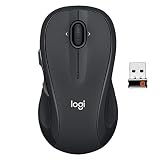
The G305 remains the benchmark for affordable wireless: Logitech’s Lightspeed connection is genuinely indistinguishable from wired in play, and a single AA battery runs for months rather than days. The shape is small and neutral, which suits claw and fingertip grips best, and at this price the value is hard to argue with.
Logitech G502 Hero
If you want the most features per dollar, the G502 Hero is still the answer — eleven programmable buttons, a free-spin scroll wheel, and adjustable weights that let you dial in the feel. It’s a heavy, wide mouse best suited to palm-grip players with medium-to-large hands, and it’s excellent for MMOs, strategy games, and anyone who lives in hotkeys.
Redragon M612
The M612 is the budget-of-the-budget pick, and it punches well above its price with a competent optical sensor, remappable buttons, and RGB that doesn’t look cheap. Build quality and software polish don’t match Logitech or Razer, but for a first gaming mouse or a spare for the second PC, it’s genuinely good value.
Razer Basilisk V3
Razer’s Basilisk V3 frequently dips to around the $50 mark and delivers a superb ergonomic shape, a smart scroll wheel that switches between tactile and free-spin, and optical switches that sidestep the double-click failures that plague mechanical ones. It’s the pick for right-handed palm grippers who want a mouse that will still feel great in three years.
Razer DeathAdder Essential
The DeathAdder shape is a modern classic for a reason, and the Essential strips it back to the fundamentals: a reliable sensor, five buttons, and one of the most universally comfortable right-handed bodies ever made. There’s no wireless and no frills, but as a no-nonsense wired shooter mouse it’s tough to beat.
Frequently Asked Questions
Is a $50 gaming mouse good enough for competitive play?
Yes. Budget mice in 2026 use sensors that are effectively flawless for gaming, and plenty of ranked and semi-pro players use models in this bracket. What you give up at this price is build refinement, weight reduction, and battery life — not raw tracking accuracy.
Do I need more than 1,600 DPI?
Most competitive players sit between 400 and 1,600 DPI and adjust sensitivity in-game. Higher DPI is mainly useful on 4K monitors or for productivity, so treat a huge maximum DPI figure as a marketing number rather than a buying reason.
Is wireless worth it at this price?
It can be, but you’ll trade away features elsewhere. The Logitech G305 proves affordable wireless can be genuinely lag-free, but at $50 a wired mouse typically gets you more buttons, better switches, and a nicer build for the same money.
How long should a gaming mouse last?
Expect three to five years from a well-made mouse. The usual failure points are the main click switches developing double-clicks and cable fraying near the strain relief, so models with optical switches and braided or flexible cables tend to age best.
Final Thoughts
For most players, the Logitech G305 Lightspeed is the smartest buy under $50 — reliable wireless, a proven sensor, and battery life you can forget about. If you’d rather have buttons than freedom from cables, the Logitech G502 Hero offers more functionality per dollar than anything else in the category, while the Razer DeathAdder Essential is the safe, comfortable choice for shooter players who just want a great shape and nothing to fuss with. Any of the three will feel like a serious upgrade over a generic office mouse, and none of them will make you wish you’d spent more.