Picking a gaming CPU under $300 has never been more confusing. AMD’s X3D chips have reshaped the mid-range, older Zen 3 processors are still shockingly capable at bargain prices, and the gap between “cheap enough” and “fast enough” is easy to misjudge. Spend too little and you bottleneck a good graphics card; spend too much on cores you’ll never use in games and you’ve wasted budget that belonged in your GPU.
- Watch: Best CPU for Gaming Under $300 — Video Review
- How to Choose CPU for Gaming Under $300
- The Best Picks Reviewed
- What to Look For in a Gaming CPU at This Budget
- Which One Should You Buy?
- A Worked Example: Matching a CPU to Your Goals
- Common Mistakes When Buying a Gaming CPU
- Cooling and Power Planning Checklist
- Frequently Asked Questions
- Final Thoughts
- Related Articles
This guide cuts through the noise. Below you’ll find the CPUs that genuinely deliver the best frames-per-dollar for gaming in 2026, whether you’re building a fresh AM5 system, upgrading an aging AM4 rig, or assembling a budget 1080p machine. Every pick here is chosen for real-world gaming performance and value — not synthetic benchmark bragging rights. We also cover what actually matters when choosing, and answer the questions we get asked most.
As an Amazon Associate we earn from qualifying purchases at no extra cost to you.


⚡ Save on Your Next PC — Amazon Prime
Prime members get fast free shipping on the systems above, plus early access to Prime Day & Black Friday PC deals. New members get a 30-day free trial.
Watch: Best CPU for Gaming Under $300 — Video Review
How to Choose CPU for Gaming Under $300
- Platform longevity: AM5 (DDR5) is the forward-looking choice with a clear upgrade path, while AM4 (DDR4) is the cheapest way to a fast gaming PC if you already own a compatible board and memory. Factor the total platform cost, not just the chip.
- 3D V-Cache matters more than core count: For gaming specifically, AMD’s stacked L3 cache delivers larger frame-rate gains than extra cores. An 8-core X3D chip will beat a 12- or 16-core non-X3D part in most games.
- Match the CPU to your resolution: At 1440p and 4K the GPU does most of the work, so a mid-tier CPU is plenty. At 1080p with a high-refresh monitor, or in simulation and strategy titles, the CPU becomes the limiting factor and an X3D chip pays off.
The Best Picks Reviewed
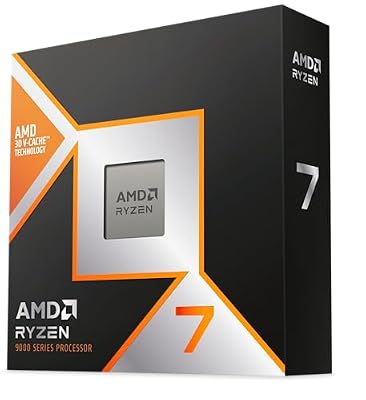
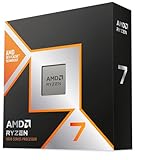
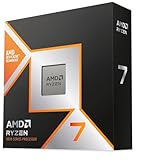
AMD Ryzen 7 9800X3D
Still the definitive gaming processor, the 9800X3D pairs Zen 5 cores with second-generation 3D V-Cache and, unlike its predecessors, is fully overclockable. It sits at the very top of this budget bracket depending on where you shop, but if you can land one near $300 it’s the fastest gaming CPU most people will ever need.
AMD Ryzen 7 7800X3D
The chip that made X3D a household name remains outstanding value now that pricing has settled, delivering within a handful of frames of the 9800X3D in the vast majority of titles. For a new AM5 build focused purely on gaming, this is the smartest money in the entire list.
AMD Ryzen 7 5800X3D
The best upgrade in PC gaming history for anyone sitting on an AM4 motherboard — drop it in, update the BIOS, and instantly gain X3D-class frame rates without buying new memory or a new board. It’s no longer a match for Zen 5 parts, but the performance-per-dollar for existing AM4 owners is unmatched.
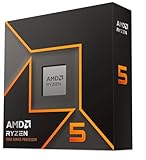
AMD Ryzen 5 9600X
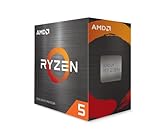
A lean, efficient six-core Zen 5 part that punches well above its price in games and handles productivity work more gracefully than its core count suggests. It’s the sensible entry point to AM5 for gamers who want DDR5 and a long upgrade runway without stretching to an X3D chip.
AMD Ryzen 5 5500
The budget hero of this roundup, offering six cores, twelve threads and a bundled Wraith Stealth cooler for pocket change on the AM4 platform. It won’t feed a high-end GPU at 1080p, but paired with a mid-range card it delivers a genuinely smooth 60fps-plus experience for remarkably little.
What to Look For in a Gaming CPU at This Budget
A fixed spending ceiling forces trade-offs between cores, cache, and the cost of the platform around the chip. These four factors explain most of the differences between the processors in this list.
3D V-Cache Versus Raw Clock Speed
The X3D chips stack an extra cache die on top of the processor. The Ryzen 7 9800X3D, 7800X3D, and 5800X3D each carry 96 MB of L3 cache, compared with 32 MB on the Ryzen 5 9600X and 16 MB on the Ryzen 5 5500. Games with large working sets, such as simulation, strategy, and open-world titles, gain the most from that cache because the processor spends less time waiting on system memory. Titles that lean on a single fast thread gain less, which is why a high-clocked chip like the 9600X, with a boost clock up to 5.4 GHz, remains competitive in many esports games.
Platform Costs Beyond the Chip
Choosing a processor also chooses a socket and memory type. The 9800X3D, 7800X3D, and 9600X use AM5 with DDR5 memory. The 5800X3D and 5500 use AM4 with DDR4. Because DDR4 and AM4 motherboards are older, they cost less, which helps if you can reuse existing memory. AM5 is the longer-lived platform, so it leaves more room for a later processor upgrade. Weigh this alongside the chip itself, since a lower-cost processor on a more expensive platform can cost more overall.
Cooling and Power Draw
Several of these processors ship without a cooler. AMD lists the 9800X3D, the 5800X3D, and the 9600X as boxed without a cooling solution, and recommends a good air or liquid cooler for them. The Ryzen 5 5500, by contrast, includes the Wraith Stealth cooler. The rated power also differs: the 9600X is a 65 W part, the X3D models sit at about 105 to 120 W, so factor a cooler into the build rather than assuming the box covers it.
Graphics Card Pairing and Resolution
The processor matters most when the graphics card is fast and the resolution is low. At 1080p with a powerful card, CPU differences show up in frame rates. At 1440p and 4K, the graphics card becomes the limit, and a mid-range chip often performs within a few frames of a premium one. Spend more on the processor if you play at high refresh rates, and more on the GPU if you play at high resolutions. Also note that the Ryzen 5 5500 has no integrated graphics and supports only PCIe 3.0, so it needs a discrete card.
Which One Should You Buy?
| If you… | Choose… |
|---|---|
| want the strongest gaming performance and a modern AM5 platform | AMD Ryzen 7 9800X3D |
| want large cache on AM5 and are content with the previous generation | AMD Ryzen 7 7800X3D |
| already own an AM4 board and DDR4 memory | AMD Ryzen 7 5800X3D |
| play high-refresh esports titles and want a cooler-running 65 W chip | AMD Ryzen 5 9600X |
| need the lowest-cost sensible entry and already have an AM4 board | AMD Ryzen 5 5500 |
A Worked Example: Matching a CPU to Your Goals
Consider a player at 1440p with a mid-range graphics card who mostly plays shooters. The card is already the limiting factor, so the 9600X delivers nearly everything that the X3D chips would, and the saved money can go to a better graphics card or faster memory. Now consider a player running large strategy and simulation games at 1080p with a fast card. Here cache dominates, so one of the 8-core X3D processors is the better use of the budget.
The same logic applies to an AM4 upgrade. If the existing board and DDR4 memory work, dropping in a 5800X3D keeps the build running without replacing the motherboard and memory, which is often the most economical path to a noticeable lift. Be aware that the 5800X3D has a locked multiplier, so it does not support traditional overclocking.
Common Mistakes When Buying a Gaming CPU
- Forgetting the cooler. Buying a boxed processor that does not include one leaves the build unable to run safely until a cooler arrives.
- Counting only cores. Cache and clock speed predict game performance better than core count, once you pass six to eight cores.
- Ignoring the motherboard and memory. A bargain processor can lose its advantage if the platform requires costly DDR5 and a new board.
- Pairing a premium chip with a weak graphics card. Past a point, extra CPU power cannot raise frame rates if the GPU is the bottleneck.
- Assuming PCIe 4.0 everywhere. The Ryzen 5 5500 supports PCIe 3.0 only, which matters little for most x16 graphics cards but more for cards that use fewer lanes.
Cooling and Power Planning Checklist
- Match the cooler to the processor’s rated power. A 65 W chip like the 9600X runs happily on a modest tower cooler, while 105 to 120 W X3D chips benefit from a larger tower or a liquid unit.
- Check socket compatibility. AM4 and AM5 coolers use different mounting hardware, although many coolers include brackets for both.
- Leave power supply headroom. Choose a unit that exceeds the combined draw of the processor and graphics card by a comfortable margin, usually 20 to 30 percent.
- Update the BIOS before installing a newer chip. Older boards may need an update to recognise a processor released after the board shipped.
- Enable the memory profile. XMP or EXPO is off by default, and leaving it disabled wastes memory speed.
Frequently Asked Questions
Is $300 enough for a great gaming CPU in 2026?
Absolutely.
Do I need 3D V-Cache for gaming?
You don’t need it, but you’ll notice it. X3D chips shine in CPU-heavy genres — simulators, strategy games, MMOs and esports titles at high refresh rates — while the advantage narrows considerably at 4K where the GPU is the bottleneck.
Should I buy AM4 or AM5 today?
Choose AM5 if you’re building from scratch and want future upgrade options, and choose AM4 only if you already own a compatible motherboard and DDR4 memory. Buying a brand-new AM4 platform in 2026 is a dead end unless the total saving is substantial.
Will I need a separate CPU cooler?
The Ryzen 5 5500 is the exception, as it includes AMD’s Wraith Stealth cooler in the box.
Final Thoughts
If your priority is raw gaming performance and you’re building on AM5, the Ryzen 7 7800X3D is the value champion of this list and the pick we recommend to most buyers, with the Ryzen 7 9800X3D worth the stretch if it dips near the $300 mark. AM4 owners looking for one final, dramatic upgrade should go straight to the Ryzen 7 5800X3D, while anyone assembling a tight budget rig will find the Ryzen 5 5500 delivers far more gaming performance than its price tag suggests.