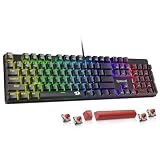
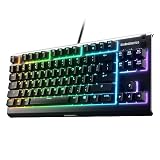
- Top Pick: Redragon Mechanical Gaming Keyboard Wired, 11 Programmable Backlit Modes, Hot-Swappable Red Switch, Anti-Ghosting, Double-Shot PBT Keycaps, Light Up Keyboard for PC Mac
- Best Value: Logitech G413 SE Full-Size Mechanical Gaming Keyboard – Black
- Premium Choice: Redragon K580 Wired RGB Mechanical Gaming Keyboard, Macro Key & Media Wheel
Ask any two PC gamers which keyboard to buy and you’ll get the same fork in the road: mechanical or membrane. The difference comes down to what sits under each key. Mechanical boards use an individual spring-loaded switch per key, while membrane boards press a rubber dome onto a printed circuit sheet. That single engineering choice cascades into everything you feel — actuation weight, sound, travel distance, typing fatigue, and how many years the board survives before keys start feeling mushy.
In 2026 the decision matters more than it used to, because the price gap has largely collapsed. Hot-swappable mechanical boards with pre-lubed switches and PBT keycaps now sell for what a mid-range membrane board cost five years ago, and wireless mechanical options have gone from premium novelty to entry-level standard. Membrane hasn’t disappeared, though — it still wins on silence, spill tolerance, and pure budget value. Here’s how to pick the right side for your desk.
As an Amazon Associate we earn from qualifying purchases at no extra cost to you. Product prices and availability are accurate as of the date shown and are subject to change.








⚡ Save on Your Next PC — Amazon Prime
Prime members get fast free shipping on the systems above, plus early access to Prime Day & Black Friday PC deals. New members get a 30-day free trial.
Watch: Mechanical vs Membrane Keyboard: 2026 Guide — Video Review
Quick Verdict
Mechanical is the right default for most gamers in 2026. If you want crisp actuation, per-key durability, and the option to change switches later, start with the AULA F75 Pro for a modern wireless 75% build, the Redragon hot-swappable wired mechanical for maximum value, or the Logitech G413 SE for a no-nonsense full-size board. Membrane still makes sense if you’re on a tight budget, share a room, or want something quiet and simple — the Logitech G213 Prodigy is the safe pick, while the SteelSeries Apex 5 splits the difference with a hybrid switch.
Key Differences
- Feel and feedback: Mechanical switches actuate partway through the press with a defined bump or smooth glide; membrane domes collapse under pressure and need a full bottom-out.
- Durability: Mechanical switches are typically rated for 50–100 million presses per key. Rubber domes soften over time, usually fading around the 5–10 million mark.
- Repairability: Hot-swap boards like the AULA F75 Pro let you pull and replace a dead switch in seconds. A failed membrane sheet effectively means a new keyboard.
- Noise: Membrane is quieter by default. Linear mechanical switches close the gap, but clicky and tactile switches are audibly louder.
- Anti-ghosting and rollover: Mechanical boards commonly offer full N-key rollover; budget membrane boards often cap out at 10-key or use blocked zones.
- Price: Membrane still undercuts mechanical at the very bottom of the market, but the difference above $50 is now marginal.
Mechanical Keyboards
Mechanical boards win on consistency. Because every key has its own switch, the fifth press feels identical to the fifty-thousandth, and the actuation point sits above the bottom of the travel — so you can register inputs without slamming the keycap into the plate. For fast counter-strafing or rapid ability rotations, that shorter effective travel is a real advantage. The Redragon hot-swappable board is a good demonstration of how far the budget tier has come: linear red switches, double-shot PBT keycaps that resist shine, anti-ghosting, and socketed switches you can swap without soldering.
The trade-offs are noise and desk footprint. Even linear switches produce more sound than a rubber dome, and clicky variants are genuinely disruptive on voice comms. Compact layouts help: the AULA F75 Pro’s 75% form factor keeps arrow keys and a volume knob while freeing mouse space, and its pre-lubed switches plus 2.4GHz, Bluetooth, and USB-C connectivity make it a strong all-rounder. If you’d rather have a full number pad and dedicated media controls, the Redragon K580 adds a macro column and media wheel, while the Logitech G413 SE keeps things deliberately plain with a brushed aluminum top plate and white backlighting.
Membrane Keyboards
Membrane’s advantages are practical rather than glamorous. The sealed rubber sheet gives better resistance to dust and minor spills, the boards are lighter, and they’re quiet enough for a shared bedroom or a late-night session next to a sleeping partner. The Logitech G213 Prodigy is the archetype: five-zone RGB, integrated palm rest, media keys, spill resistance, and a soft dome feel that many long-time office typists actually prefer to a stiff tactile switch.
What you give up is precision and longevity. Domes require a full press to register, which means more finger travel and a mushier bottom-out, and the feel gradually softens as the rubber ages. If you like the quiet but want firmer feedback, the SteelSeries Apex 5 is the compromise worth knowing about — its hybrid blue switches pair a mechanical click mechanism with a membrane base, and it adds per-key RGB, an aircraft-grade aluminum frame, and a small OLED smart display for on-the-fly settings.
Which Should You Buy?
- For competitive FPS: Pick mechanical with linear switches — the Redragon hot-swappable wired board or the Logitech G413 SE.
- For a clean wireless desk: Pick the AULA F75 Pro for tri-mode connectivity and a compact 75% layout.
- For MMOs and productivity: Pick the Redragon K580 for its macro keys and media wheel.
- For quiet or shared spaces: Pick membrane — the Logitech G213 Prodigy is the reliable choice.
- For a tactile click without going full mechanical: Pick the SteelSeries Apex 5 hybrid.
Frequently Asked Questions
Are mechanical keyboards actually better for gaming?
Generally yes. The higher actuation point, consistent key feel, and full N-key rollover give you more reliable and repeatable inputs. The gap is small for casual play but noticeable in fast-paced competitive titles.
Which switch type is quietest?
Membrane is quietest overall. Among mechanical options, pre-lubed linear switches like those in the AULA F75 Pro are the closest match; avoid clicky blues if noise matters.
What does hot-swappable mean?
The switches sit in sockets rather than being soldered, so you can pull them out with a puller tool and install different ones. It lets you repair a dead key or change the entire feel of the board without any soldering.
Do I need PBT keycaps?
They’re not essential, but PBT resists the greasy shine that develops on cheaper ABS caps and holds its texture far longer — a meaningful upgrade on a board you’ll use daily for years.
Final Verdict
For most gamers in 2026, mechanical is the better long-term buy: it lasts longer, feels more precise, and is now cheap enough that the old price argument barely holds. Choose the AULA F75 Pro if you want wireless and compact, the Redragon options for value and features, or the Logitech G413 SE for durable simplicity. Stick with the Logitech G213 Prodigy if quiet operation and spill resistance outrank feel, or take the SteelSeries Apex 5 hybrid if you want a foot in both camps.