
- Top Pick: Elgato Stream Deck MK.2 Studio Controller, 15 Macro Keys
- Best Value: Elgato Stream Deck +, Audio Mixer and Studio Controller
- Premium Choice: FIFINE AmpliGame Stream Controller with 15 Macro Keys, Streaming Keyboard with Trigger Actions in OBS/Twitch/YouTube/Streamlabs, Shortcut Buttons Keypad Works with Mac and PC-D6
A Stream Deck is a customizable bank of LCD keys that fires off scene switches, app launches, audio mutes, macros, and more with a single press. By 2026 Elgato has a model for every need and desk size. Here’s how to pick the best Stream Deck for the way you actually work, from a compact six-key starter to the 32-key powerhouse.
🛒 Best Price Today on Amazon
Prime members get fast, free shipping on everything above, plus member-only deals. New members get a 30-day free trial — cancel anytime.
As an Amazon Associate we earn from qualifying purchases.


Best Stream Decks of 2026
Stream Deck Comparison Table
| Model | Keys | Extras | Best For | Price |
|---|---|---|---|---|
| Stream Deck MK.2 | 15 LCD keys | Swappable plate | Most streamers | ~$149 |
| Stream Deck + | 8 keys + 4 dials | Touch strip, dials | Audio mixing | ~$199 |
| Stream Deck XL | 32 LCD keys | Maximum buttons | Power users | ~$249 |
| Stream Deck Mini | 6 LCD keys | Compact | Beginners | ~$79 |
Best Overall: Stream Deck MK.2
The Stream Deck MK.2 nails the sweet spot with 15 customizable LCD keys — enough for scene switches, audio controls, app launches, and macros without swallowing your desk. The swappable faceplate and adjustable stand add flexibility, and the software’s folders and multi-actions make the control nearly limitless. For most streamers, it’s the right call. Because each key is a tiny screen, your icons update dynamically — a mute button shows its live state, a timer counts down, and folders reveal nested pages of commands.
Best for Audio: Stream Deck +
The Stream Deck + bolts four rotary dials and a touch strip onto eight LCD keys, which makes it perfect for riding audio levels, scrubbing video, and tweaking lighting in real time. Anyone mixing multiple audio sources or editing video will love that tactile dial control sitting right alongside the buttons. The dials are far more precise than clicking through software sliders, and the touch strip gives you a second layer of controls without adding physical width to the unit.
Best for Power Users: Stream Deck XL
The Stream Deck XL packs 32 LCD keys for streamers and creators who want every command in reach without diving into folders. The larger keys and expanded layout suit complex productions, multi-app workflows, and heavy macro users who need maximum direct access. If you run a multi-scene show with numerous sources, overlays, and sound effects, having them all visible at once is a genuine workflow improvement over paging through folders.

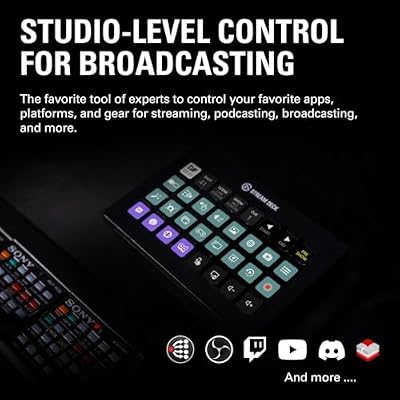
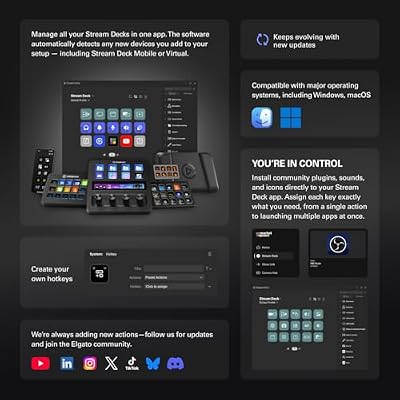
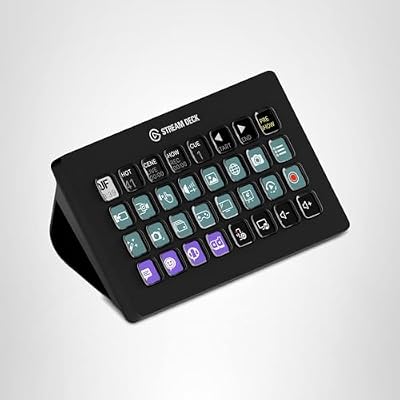
Elgato Stream Deck XL Advanced Studio Controller, 32 Keys | Instantly trigger unlimited actions, Powerful integrations, Visual feedback, Custom icon packs, Works with Mac and PC



As an Amazon Associate we earn from qualifying purchases. Product prices and availability are accurate as of the date/time indicated.
How to Choose a Stream Deck
- Number of keys: 6 (Mini) for basics, 15 (MK.2) for most, 32 (XL) for power users
- Dials: The Stream Deck + adds rotary control for audio and video
- Desk space: Match the footprint to your available room
- Software: All models use the same powerful, plugin-rich software
- Wired vs mobile: Hardware decks are USB-wired; a phone app version exists for occasional use
Combine your Stream Deck with a great streaming mic and webcam for a complete setup.
Which Stream Deck Size Is Right for You?
Choosing the right Stream Deck comes down to how many commands you reach for regularly and how much desk space you can spare. If you’re just starting out and mainly want to mute your mic, switch a couple of scenes, and launch a few apps, the six-key Mini covers the essentials cheaply. Most streamers and creators land on the 15-key MK.2 — it holds a solid working set of controls on the top level and expands almost infinitely through folders. The XL is for people who genuinely dislike folders and want everything one press away, while the Stream Deck + is the specialist pick for anyone whose workflow revolves around audio and video adjustment rather than simple triggers. When in doubt, the MK.2 is the safe recommendation because folders let a 15-key deck do most of what a 32-key deck does.
Stream Deck for Productivity, Not Just Streaming
A Stream Deck earns its keep well beyond a streaming setup. Developers bind keys to build scripts, git commands, and terminal shortcuts; video editors map timeline actions and export presets; office workers trigger meeting-join links, mute toggles, and canned text snippets. Because the software supports profiles that switch automatically based on the active application, the same physical deck can show a Photoshop layout in one app and an OBS layout in another. That context-switching is what turns it from a streaming gadget into an everyday productivity accelerator.
What You Can Do With a Stream Deck
Beyond streaming, a Stream Deck is a genuine productivity tool. You can launch applications, run macros, control smart lights, switch OBS scenes, mute your mic, post to social media, and trigger sound effects — all from one key. With folders and multi-actions, even the 15-key MK.2 can hold hundreds of commands, which makes it just as valuable to editors, developers, and office workers as it is to streamers.
Frequently Asked Questions
What does a stream deck actually do?
A stream deck is a panel of customizable LCD or physical keys that trigger actions with one press: switching scenes, muting your mic, launching apps, posting chat messages, or running multi-step macros. Each key shows a custom icon and can be organized into folders. It streamlines streaming and productivity by replacing complex hotkeys and alt-tabbing with tactile, labeled buttons.
How many keys do I need?
Key count ranges from around 6 on mini models to 32 on large XL versions. Beginners often do well with a 15-key deck, which covers scenes, sources, and common actions with room to grow. Heavy users with many scenes and macros benefit from more keys or folder navigation. Choose based on how many one-tap actions you realistically use during a stream.
Does a stream deck work with OBS and other software?
Yes, stream decks integrate deeply with OBS Studio, Streamlabs, and many creative and productivity apps through official plugins. You can control scenes, sources, audio, and transitions directly. There is also a broad plugin ecosystem for smart home, Discord, Spotify, and more. Check that your specific streaming software and tools have supported integrations before buying if you rely on niche apps.
Are physical-key or touchscreen stream decks better?
Physical-key decks give satisfying tactile feedback and reliable presses, ideal for quick actions without looking. Touchscreen and hybrid models add gestures and dynamic layouts but can be less certain to press by feel. Some newer decks combine tactile keys with a touchscreen strip. For most streamers, physical keys remain the dependable choice; touchscreens suit those wanting more flexible, dynamic controls.
Can I use a stream deck for non-streaming tasks?
Absolutely. Beyond streaming, people use stream decks for video editing shortcuts, app launching, text expansion, meeting controls like muting Zoom, and smart home automation. The customizable macros make it a powerful productivity tool for any workflow with repetitive actions. If you spend long hours in creative or office software, a stream deck earns its keep well outside of live streaming.
Ready to decide? Our #1 pick for 2026 is the Stream Deck MK.2.
Live price & availability on Amazon.










