
A good streaming webcam puts your face on screen with clarity and a professional polish that helps you connect with viewers. By 2026 the options run from dependable 1080p cams to crisp 4K models with smart autofocus. Here are the best webcams for streaming, content creation, and video calls.
- Best Webcams of 2026
- Webcam Comparison Table
- Best 4K: Logitech Brio 4K
- Best for Streaming: Elgato Facecam
- Best Low Light: Razer Kiyo Pro
- Webcam Resolution vs Frame Rate: What Matters More
- Lighting: The Upgrade That Beats a New Camera
- How to Choose a Streaming Webcam
- Why 1080p60 Is the Streaming Sweet Spot
- Frequently Asked Questions
- Related Articles
- Related Guides
🛒 Best Price Today on Amazon
Prime members get fast, free shipping on everything above, plus member-only deals. New members get a 30-day free trial — cancel anytime.
As an Amazon Associate we earn from qualifying purchases.





Best Webcams of 2026
Webcam Comparison Table
| Webcam | Resolution | Frame Rate | Best For | Price |
|---|---|---|---|---|
| Logitech Brio 4K | 4K | 30fps (1080p/60) | Premium quality | ~$199 |
| Elgato Facecam | 1080p | 60fps | Streaming | ~$149 |
| Razer Kiyo Pro | 1080p | 60fps | Low light | ~$129 |
| Logitech C920 | 1080p | 30fps | Value | ~$59 |
Best 4K: Logitech Brio 4K
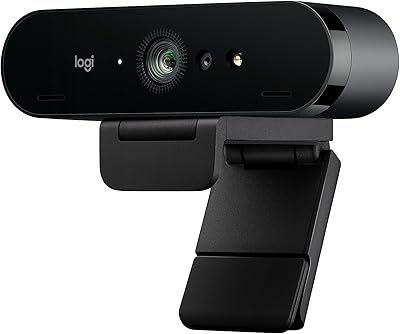
The Logitech Brio 4K serves the sharpest image of any mainstream webcam, with 4K capture, HDR, and excellent autofocus. It’s overkill for the many streamers who output at 1080p, but the extra resolution buys you cropping flexibility and future-proof quality. For creators who demand the best image, it’s the top choice.
The Brio’s HDR is its underrated strength — it balances a bright window behind you against your face far better than cheaper cams, which is a common problem in home offices. It also works as a sharp video-call camera for professionals, and Logitech’s software adds background replacement and framing controls. If you record content that will be edited later at 4K, the extra detail gives you room to crop and reframe in post.



As an Amazon Associate we earn from qualifying purchases. Product prices and availability are accurate as of the date/time indicated.
Best for Streaming: Elgato Facecam
The Elgato Facecam is built for streamers, with a premium Sony sensor, sharp 1080p60 capture, and the Camera Hub software for dialing in exposure and color. It skips autofocus on purpose — a fixed focus range tuned for desk distance — and the payoff is consistent, professional results.
The Facecam’s standout feature is its uncompressed video pipeline and manual controls — you can lock exposure, white balance, and ISO so your image never shifts mid-stream as lighting changes. That consistency is exactly what viewers subconsciously read as “professional.” The fixed-focus f/2.4 glass lens stays razor sharp at typical desk distance, and because there’s no autofocus motor, it never hunts or breathes during your broadcast.
Best Low Light: Razer Kiyo Pro
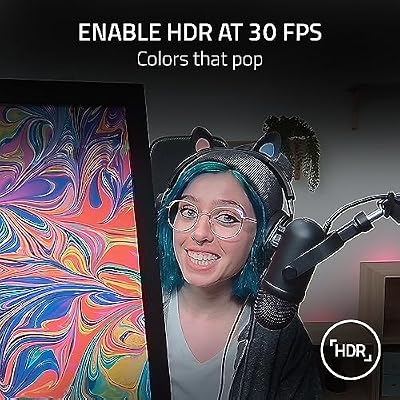
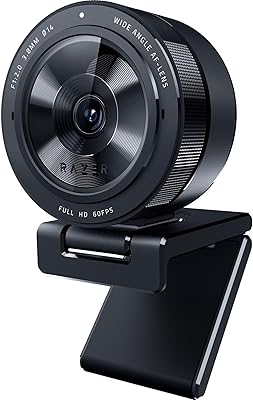
The Razer Kiyo Pro shines in dim rooms thanks to its adaptive light sensor, pulling clean 1080p60 where other cams turn grainy. Its wide-angle options and HDR make it versatile across varied lighting, ideal for streamers who can’t perfectly control their room.
The Kiyo Pro’s large Sony STARVIS sensor is the same class used in security cameras built for darkness, which is why it holds detail and color when the lights drop. You can choose between 80°, 90°, and 103° fields of view depending on whether you want a tight head-and-shoulders framing or a wider shot that shows your setup. For anyone streaming at night or in a room with mixed, uncontrollable lighting, it’s the most forgiving option here.

Razer Kiyo Pro Webcam for Streaming, Gaming, Video Calls: Full HD 1080p 60FPS - Adaptive Light Sensor - HDR Enabled - Wide Angle Lens with Adjustable FOV - Works with OBS, Xsplit, Twitch, Zoom, Teams




As an Amazon Associate we earn from qualifying purchases. Product prices and availability are accurate as of the date/time indicated.
Webcam Resolution vs Frame Rate: What Matters More
When choosing a webcam, most people fixate on resolution, but for streaming the frame rate often matters more. A 1080p60 camera produces visibly smoother motion than a 4K30 one, and since most platforms cap output at 1080p anyway, the extra resolution is often downscaled away. The exception is recorded content destined for 4K editing, where the higher resolution gives you cropping room. For live streaming and video calls, prioritize a clean 1080p60 image with good low-light handling over raw 4K pixels you’ll never actually broadcast.
Lighting: The Upgrade That Beats a New Camera
Before spending more on a higher-resolution webcam, invest in lighting — it transforms image quality more than any sensor upgrade. A single key light or softbox positioned slightly above and to the side of your face eliminates the flat, grainy look that makes cheap streams look amateur. Even a budget C920 with proper lighting outperforms a premium 4K cam struggling in a dim room. Aim for soft, even light on your face and avoid strong backlight from windows behind you. Adding a subtle fill light on the opposite side removes harsh shadows for a balanced, professional result.
How to Choose a Streaming Webcam
- Resolution: 1080p is the streaming standard; 4K adds cropping flexibility
- Frame rate: 60fps gives smoother motion than 30fps for streaming
- Low-light performance: Crucial if your room lighting isn’t ideal
- Autofocus: Helpful if you move around; fixed focus is more consistent
Combine your webcam with a quality streaming microphone for professional production.
Why 1080p60 Is the Streaming Sweet Spot
4K webcams exist, but most streaming platforms output at 1080p, and 60fps looks noticeably smoother than 30fps. A 1080p60 cam like the Elgato Facecam gives you sharp, fluid video without the bandwidth and processing tax of 4K. And honestly, good lighting does more for a professional look than raw resolution ever will.
Frequently Asked Questions
Is 1080p enough or do I need a 4K webcam for streaming?
Most streams display webcam feeds in a small window, so a sharp 1080p60 webcam looks great and is easier on bandwidth and CPU. 4K webcams add detail useful for full-screen shots or cropping in, and better sensors improve low-light quality, but they cost more and demand more processing. For typical streaming, a high-quality 1080p60 camera is the practical sweet spot.
How important is frame rate for a streaming webcam?
Frame rate affects how smooth your motion looks. 60fps webcams produce fluid, professional-looking video, noticeably better than 30fps for animated streamers who move a lot. Many budget webcams cap 1080p at 30fps. If smooth motion matters to you, prioritize a webcam that delivers 1080p at 60fps over one offering higher resolution at only 30fps for a livelier on-camera presence.
Does webcam low-light performance matter?
Yes, most streaming happens in rooms that are not brightly lit, and cheap webcams look grainy and dark indoors. A larger sensor and good processing help, but even the best webcam benefits from a key light. If you cannot add lighting, prioritize a webcam known for strong low-light performance; otherwise, pair a solid webcam with proper lighting for the best image.
Do webcams have autofocus and how well does it work?
Many webcams offer autofocus that keeps you sharp as you move, while some use fixed focus that stays crisp at a set distance. Autofocus is convenient but can hunt or drift; fixed focus is reliable if you sit at a consistent distance. Some cameras let you lock focus in software. Consider your setup: autofocus suits movement, fixed focus suits a stable seat.
Can I use a webcam’s built-in microphone for streaming?
Webcam microphones are convenient but generally sound thin and pick up room noise, since they sit far from your mouth. They work in a pinch, but a dedicated USB or XLR microphone dramatically improves voice quality, which viewers notice more than video. Use the webcam mic as a backup, and invest in a separate microphone for professional-sounding streams if audio quality matters.
Ready to decide? Our #1 pick for 2026 is the Logitech Brio 4K.
Live price & availability on Amazon.
Top picks from this guide
LogitechLogitech 4k Webcam$120 \xc2\xb7 96/100 EMEETEMEET C60E Dual-Camera 4K Webcam for Streaming, Wide-Angle & Telephoto…$54 \xc2\xb7 96/100
 LogitechLogitech MX Brio Ultra HD 4K Webcam Collaboration and Streaming…$199 \xc2\xb7 96/100
 NexiGoNexiGo N680E Pro 4K Webcam with Ring Light, PDAF Autofocus,…$100 \xc2\xb7 96/100








