Vram explained for beginners makes GPU shopping easier by showing what graphics memory does, when 12GB is enough, when 16GB matters, and which cards make sense. This guide compares four GPUs so you can match memory, bandwidth, features, and power to your PC without paying for capacity you won’t use before you buy today.
How to Choose A GPU
VRAM explained for beginners starts with one rule: capacity is only part of GPU memory performance. A good pick balances VRAM size with bandwidth, your games or creative apps, and your case and power budget, so the card avoids memory bottlenecks without becoming difficult to install or power in a sensible new build today.
VRAM Capacity
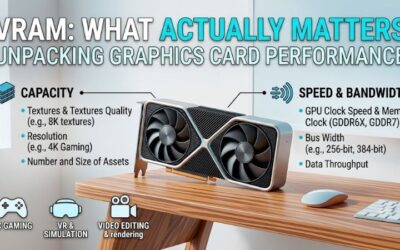
VRAM capacity is the first number to check because textures, large game assets, ray-traced scenes, and creative projects can fill memory before the GPU core is fully occupied. VRAM explained for beginners should treat 12GB as workable for many 1440p builds, while 16GB gives more breathing room when settings rise in newer titles.
More memory doesn’t automatically make a GPU faster, but running short can cause stutter, texture drops, or settings compromises. A safer long-term target is 16GB for demanding games, while 12GB can still work well at moderate settings. For more memory headroom, the RX 9060 XT or RTX 5060 Ti fits best when texture demands are high.
Memory Bandwidth
Bandwidth describes how quickly the GPU moves data between its processor and memory. Wider buses can help, but memory speed and cache matter too, so a 12GB card can still have high bandwidth. Compare the complete memory design, not capacity alone, especially across brands and GPU generations under sustained workloads in practice.
The SAPPHIRE PULSE RX 9070 uses 16GB on a 256-bit bus at 20Gbps, while the ASUS Dual RTX 5070 uses 12GB on 192-bit memory at 28Gbps. The RX 9060 XT and RTX 5060 Ti both use 128-bit memory, but their memory systems serve different performance tiers. For bandwidth-first buying, the RX 9070 stands out at high settings and higher resolutions.
Resolution And Workload
Resolution changes VRAM demand because higher resolutions push larger frame buffers and texture data through the card. At 1080p, capacity is easier to manage; at 1440p, 16GB is increasingly comfortable; at 4K, game settings and GPU power matter just as much. Balance both before choosing your target card, especially for demanding games.
For modern gaming features, NVIDIA’s RTX 5070 adds DLSS and strong ray-tracing support, while AMD’s RX 9060 XT and RX 9070 support FSR 4 and current Radeon features. Choose what your games use, not what sounds more advanced; the RTX 5070 is the clearest match when those features are supported for demanding modern titles.
Power And Physical Fit
A card that fits your case and PSU is more useful than a faster option that forces a rebuild. Check length, slot thickness, connector type, and PSU guidance. Smaller systems can favor the 229mm ASUS Dual RTX 5060 Ti, while larger cases can accommodate the 280mm RX 9070 and stronger cooling when airflow and clearance are tight.
PSU needs separate these picks: SAPPHIRE PULSE RX 9060 XT is rated at 170W typical board power, RX 9070 at 220W, and ASUS recommends 750W for its Dual RTX 5070 OC. That makes PSU planning part of the purchase, with the RTX 5060 Ti the easier fit for compact cases, rather than assuming a larger memory buffer fixes every bottleneck.
Top Picks
VRAM explained for beginners is most useful when the numbers connect to real cards. These four picks cover value, balanced 1440p gaming, NVIDIA features, and compact builds, with different memory setups that show why capacity alone should never decide a purchase. Each model serves a distinct buyer, rather than being judged by memory alone. (ASUS Global)
| Product | Best For | Key Spec | Watch Out For |
|---|---|---|---|
| SAPPHIRE PULSE AMD Radeon RX 9070 GPU | Best Overall | 16GB GDDR6, 256-bit, 20Gbps | 280mm, 220W |
| SAPPHIRE PULSE AMD Radeon RX 9060 XT OC 16GB | Best Value | 16GB GDDR6, 128-bit, 20Gbps | Narrower memory interface |
| ASUS Dual GeForce RTX 5070 12GB GDDR7 OC Edition | Best For Ray Tracing | 12GB GDDR7, 192-bit, 28Gbps | Only 12GB VRAM |
| ASUS Dual GeForce RTX 5060 Ti 16GB GDDR7 OC Edition | Best For Compact 1440p Builds | 16GB GDDR7, 128-bit, 28Gbps | Lower GPU tier |
SAPPHIRE PULSE AMD Radeon RX 9070 GPU — Best Overall
SAPPHIRE PULSE AMD Radeon RX 9070 GPU is the Best Overall pick for 1440p/4K gamers seeking 16GB without moving into a higher memory tier. It carries 16GB GDDR6 on a 256-bit bus, with 3584 stream processors and up to 2520MHz boost, giving it ample memory headroom for demanding scenes and textures, especially in 4K gaming.
Its main advantage is balance: 16GB and a 256-bit interface suit demanding textures and high-resolution gaming, while the Pulse cooler uses a dual-fan design. The tradeoff is size and power; this 2.5-slot card is 280mm long and rated at 220W, so compact PCs need careful installation and adequate cable clearance in a well-ventilated case.
SAPPHIRE PULSE AMD Radeon RX 9060 XT OC 16GB — Best Value
SAPPHIRE PULSE AMD Radeon RX 9060 XT OC 16GB is the Best Value choice for buyers seeking 16GB without stepping into a higher performance class. It carries 16GB GDDR6, a 128-bit bus, 20Gbps memory, and 2048 stream processors, with boost up to 3290MHz for mainstream 1440p systems with a modest power budget and sensible 1440p settings.
Its key advantage is 16GB in a mainstream 1440p option, with a 170W typical board rating and a 450W minimum PSU recommendation. The compromise is narrower memory bandwidth than the RX 9070, so 16GB capacity shouldn’t be mistaken for equal performance in demanding games where the GPU core is the bigger limit at very high settings.
ASUS Dual GeForce RTX 5070 12GB GDDR7 OC Edition — Best For Ray Tracing
ASUS Dual GeForce RTX 5070 12GB GDDR7 OC Edition is Best For Ray Tracing and NVIDIA-focused gaming. It has 12GB GDDR7, a 192-bit interface, 28Gbps memory, and 6144 CUDA cores, with a 2572MHz OC-mode clock. It also supports NVIDIA DLSS for compatible games and displays, adding useful feature flexibility in supported ray-traced titles.
Its strength is feature depth alongside solid memory throughput, making it attractive for games where ray-tracing, upscaling, and NVIDIA’s software stack matter. Its downside is the 12GB ceiling: VRAM explained for beginners should note that this leaves less texture headroom than the 16GB AMD alternatives when memory demand climbs.
ASUS Dual GeForce RTX 5060 Ti 16GB GDDR7 OC Edition — Best For Compact 1440p Builds
ASUS Dual GeForce RTX 5060 Ti 16GB GDDR7 OC Edition is Best For Compact 1440p Builds and buyers seeking 16GB NVIDIA memory without moving to RTX 5070. It offers 16GB GDDR7, a 128-bit interface, 28Gbps memory, and 4608 CUDA cores in a 229mm-long 2.5-slot design for easier case fitment without needing a longer three-slot card.
Its advantage is 16GB capacity in a short dual-fan card that simplifies fitment in smaller cases. The limitation is the 128-bit memory interface and lower-tier GPU core, so it isn’t a substitute for the RTX 5070 when high ray-tracing performance or heavier workloads are the priority, especially when raw GPU performance becomes the limit.
Frequently Asked Questions
VRAM explained for beginners often leaves buyers with one question: how much memory is enough? The answer depends on resolution, texture settings, ray tracing, mods, and workload type. These questions turn those variables into practical rules you can use before checkout and future upgrades without overspending on unused memory.
How Much VRAM Do I Need For 1440p?
For new 1440p gaming, 12GB is a workable floor; 16GB is more comfortable for demanding textures, mods, or long-term ownership. A 12GB RTX 5070 can still be excellent, but 16GB cards like the RX 9060 XT leave extra headroom as textures grow, making future settings less restrictive without paying for capacity you will not use.
At 1080p, 8GB can still work in a well-planned build, but that doesn’t make 8GB a universal recommendation. Exceptions include less-demanding games, older titles, and workloads that fit in memory; modern settings benefit from extra capacity when large asset packs or heavier textures are involved in most mainstream games.
Is More VRAM Always Better?
No. More VRAM doesn’t directly raise frame rates when the GPU already has enough memory. VRAM explained for beginners is easiest to understand as capacity: once a game fits, extra memory adds little, while running out can create stutter or force lower texture settings on demanding scenes, texture-heavy presets, or large mods.
Think of VRAM like workspace rather than horsepower. A larger workspace prevents overflow, but the GPU core, memory bandwidth, architecture, and software still determine speed. That’s why the 16GB RX 9060 XT isn’t automatically faster than every 12GB card; capacity prevents overflow, but it doesn’t replace GPU performance.
How Much VRAM Do I Need For 4K?
For 1440p, 16GB is a strong target when the GPU tier makes sense, but 12GB remains viable on a faster card with efficient upscaling. Value depends on the whole system, not a single memory number on the box, especially when core performance differs between GPUs at your chosen resolution and your games need higher-quality textures.
At 4K, VRAM demand can rise with large textures, ray tracing, and mods, so 16GB gives useful breathing room. Still, a 16GB card with insufficient shader performance won’t become a true 4K powerhouse simply because capacity is high; the GPU core must keep up and settings may need balancing in memory-heavy scenes or heavily modded games.
Does VRAM Matter For Creative Work?
Yes, VRAM matters for creative work, but the ideal amount depends on the application. Video timelines, high-resolution assets, 3D scenes, and local AI workloads can consume memory quickly, making 16GB more attractive when software can use it. VRAM explained for beginners should account for mixed creative workloads too.
Check application requirements, project size, and whether your workflow benefits from GPU acceleration before paying extra for capacity. For gaming and creation, the RX 9070 and 16GB RTX 5060 Ti offer useful room, while the RTX 5070 adds NVIDIA-specific tooling and features for supported workflows when project sizes increase.
Final Thoughts
VRAM explained for beginners means matching capacity and bandwidth to your workload, not chasing maximum VRAM. The RX 9060 XT and RTX 5060 Ti offer 16GB, while RTX 5070 favors NVIDIA features and RX 9070 adds stronger high-resolution headroom. That’s the sensible buying approach for the games you actually play and create with.