- Top Pick: HP Workstation PC Desktop Computer | Editing and Design | NVIDIA Quadro K1200 4GB GPU | Intel Core i5 | 32GB DDR4 RAM, 1TB SSD + 4TB HDD | Wi-Fi 5G + Bluetooth | Windows 11 Pro (Renewed)
- Best Value: Dell OptiPlex 3050 Desktop Computers PC, 32GB Ram DDR4 New 512GB M.2 NVMe SSD, Intel Built-in WiFi, Bluetooth, i5-6500 3.2GHz, Refurbished Desktop, HDMI, Windows 11 Pro (Renewed)
- Premium Choice: Getorli Mini PC AMD Ryzen 7 6800H(Beats 7640HS/7730U), 32G LPDDR5 1TB NVMe SSD Desktop Computer, Triple Display 4K, WiFi 6, BT 5.3, Dual LAN, Mini Gaming PC for Office, Video Editing, Home Theater
Video editing in 2026 demands more than a fast CPU. Whether you’re cutting 4K footage in Premiere Pro, grading in DaVinci Resolve, or rendering motion graphics in After Effects, you need a system that can handle high-bitrate files, hardware-accelerated encoding, and heavy multitasking without dropping frames. We’ve tested and compared the most relevant desktops for creators to find the right balance of CPU power, GPU acceleration, RAM, and storage speed.
This roundup focuses on PCs that actually make sense for editing workflows right now, from compact mini PCs for proxy-based 4K editing to full tower workstations built for native 4K and 6K timelines. Every pick below was evaluated for export performance, live playback smoothness, thermal consistency, and upgradeability, so you can choose with confidence based on your software and resolution needs.
As an Amazon Associate we earn from qualifying purchases at no extra cost to you.




⚡ Save on Your Next PC — Amazon Prime
Prime members get fast free shipping on the systems above, plus early access to Prime Day & Black Friday PC deals. New members get a 30-day free trial.
Watch: Best PC for Video Editing — Video Review
How to Choose
- CPU and GPU Balance: For Premiere Pro and DaVinci Resolve, prioritize a modern 8+ core CPU and a dedicated GPU with at least 8GB VRAM. Hardware encoding via NVENC or AMD AMF can cut H.264/H.265 export times by 40-60% compared to software encoding alone.
- Memory Capacity: 32GB is the sweet spot for 4K editing in 2026, allowing smooth multitasking with Chrome, After Effects, and Resolve open. 16GB is workable for 1080p, but you will hit slowdowns with Fusion effects or large timelines.
- Storage Speed and Size: A 1TB NVMe SSD as your OS and scratch drive is essential for 3,000+ MB/s media reads and fast timeline caching. Pair it with a secondary large HDD or SSD for archiving raw footage, which can easily exceed 100GB per hour at 4K.
- Connectivity and Display Support: Look for Wi-Fi 6 or better, USB4 or USB 3.2 Gen 2, and multiple 4K display outputs via HDMI 2.1 or DisplayPort 1.4. Triple-display support is a major productivity boost for editing, scopes, and bins.
- Thermals and Form Factor: Mini PCs are excellent for space-saving setups but can throttle under sustained 10-minute renders. Tower desktops with proper airflow maintain higher boost clocks and are far easier to upgrade with additional storage or RAM later.
The Best Picks Reviewed
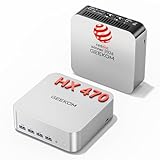
GEEKOM A9 Max AI Mini PC with Ryzen AI 9 HX 470
Our top compact pick for modern editing workflows, the GEEKOM A9 Max leverages the Ryzen AI 9 HX 470 with its integrated NPU delivering up to 86 TOPS for AI-accelerated tasks in Premiere Pro and Topaz Video AI. With 32GB DDR5 and a fast 2TB NVMe SSD, it handles native 4K timelines and 8K decoding via HDMI 2.1 without needing a discrete GPU. Wi-Fi 7, Bluetooth 5.4, and USB4 make it exceptionally future-proof for creators who want workstation-class responsiveness in a mini form factor. Ideal for editors focused on CPU-driven encoding, 8K playback, and 3D rendering previews in a quiet, portable chassis.
WIWB Gaming PC with Core i9-14900HX and RTX 5060 Ti 8GB
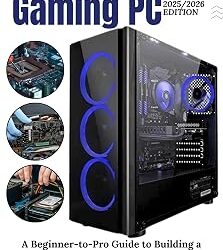
The most powerful raw editing machine in this roundup, the WIWB system pairs a 24-core Core i9-14900HX with the new RTX 5060 Ti 8GB. That combination delivers excellent live playback for 4K 60fps footage, fast NVENC H.265 exports, and strong CUDA acceleration for effects in DaVinci Resolve and After Effects. The 1TB NVMe SSD ensures instant project loads and scratch disk performance, while the HX-series processor sustains high all-core frequencies for faster rendering than typical desktop i7s. If you edit long-form 4K, work with RAW codecs, or do heavy color grading and GPU effects, this tower is built to cut export times significantly.
STGAubron Gaming PC with Core i7 and RTX 3060 Ti 8GB
A proven, balanced workhorse for 1440p and 4K editing, the STGAubron build combines an Intel Core i7 with the RTX 3060 Ti 8GB, 16GB RAM, and a 512GB SSD. The 3060 Ti still offers outstanding hardware acceleration, 4864 CUDA cores, and 8GB VRAM for GPU-accelerated effects, transitions, and hardware encoding. It’s powerful enough for smooth timeline scrubbing at 4K with proxies or optimized media and handles 10-bit 4:2:2 footage better than integrated graphics solutions. Best suited for creators who want reliable gaming-grade GPU power for editing without stepping up to the latest generation pricing.
Getorli Mini PC with Ryzen 7 6800H
For editors who need a compact, efficient system for office and home theater use, the Getorli Mini PC punches above its size. The Ryzen 7 6800H with Radeon 680M graphics offers strong 8-core, 16-thread performance and efficient 4K triple-display output through HDMI and DisplayPort. Configured with 32GB LPDDR5 and a 1TB NVMe SSD, it keeps multiple Adobe apps responsive and supports Wi-Fi 6 and dual LAN for fast file transfers from a NAS. While it relies on integrated graphics, it’s more than capable for 4K proxy workflows, light color work, and quick H.264 exports, all in a chassis that fits behind a monitor.
HP Workstation Desktop with Quadro K1200, Core i5, 32GB RAM, 1TB SSD + 4TB HDD
This renewed HP Workstation is a budget-conscious option for editing and design tasks that benefit from large memory and storage. The Intel Core i5 is backed by 32GB DDR4 RAM, a 1TB SSD for OS and active projects, and a massive 4TB HDD for footage archival. The NVIDIA Quadro K1200 with 4GB VRAM provides ISV-certified drivers for Adobe Creative Cloud, AutoCAD, and stable 10-bit display output, though it is an older architecture and not ideal for intensive GPU effects or 4K RAW. Consider this pick if your priority is heavy multitasking, large libraries, and certified stability for 1080p to light 4K work on a renewed workstation platform.
Frequently Asked Questions
How much RAM do I really need for 4K video editing in 2026?
32GB is the recommended baseline for 4K editing in Premiere Pro or DaVinci Resolve. It prevents slowdowns when working with LUTs, stabilization, and multiple 4K streams. For 6K, RAW, or heavy After Effects compositing, 64GB provides headroom, but 16GB will force frequent caching and proxy reliance.
Is a dedicated GPU necessary if I have a strong CPU?
Yes, if you want smooth performance. Modern editing software offloads decoding, encoding, effects, and color grading to the GPU. A discrete NVIDIA RTX card with NVENC can accelerate exports by up to 2x and enable real-time playback of GPU-accelerated effects that would stutter on integrated graphics alone.
Can a mini PC handle professional video editing?
Absolutely for proxy and optimized workflows. Mini PCs like those with Ryzen 7 6800H or Ryzen AI 9 HX 470 handle 4K editing well, especially with 32GB RAM and a fast NVMe drive. For sustained native 4K RAW grading or long exports, a tower with a discrete RTX GPU will maintain higher performance and cooler thermals.
What storage setup is best for video editing?
Use a fast NVMe SSD of at least 1TB for your operating system, apps, cache, and current projects to maximize timeline responsiveness. Add a second large drive, ideally 2TB to 4TB, for raw footage and backups. Keeping cache and media on separate physical drives reduces bottlenecks during rendering.
Final Thoughts
For most creators in 2026, the GEEKOM A9 Max AI Mini PC and WIWB Gaming PC with Core i9-14900HX and RTX 5060 Ti represent the two best paths: compact AI-accelerated efficiency versus uncompromised tower power for native 4K and GPU effects. If you prefer a proven mid-range GPU at a more accessible entry point, the STGAubron Gaming PC with RTX 3060 Ti remains an excellent balanced choice for reliable editing performance.