How to choose an external ssd starts beyond headline speed. Check USB compatibility, capacity, durability, and workflow before buying. This guide breaks down the real trade-offs, then matches four proven portable SSDs to common priorities, from fast editing and travel to dependable backups and everyday file work tasks.
Quick answer: For most people in 2026, the best how to choose an external ssd is the Samsung Portable SSD T9 — our #1 rated choice. See the full ranked comparison, alternatives and buying advice below.
How to Choose an External SSD
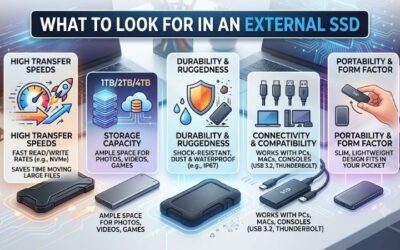
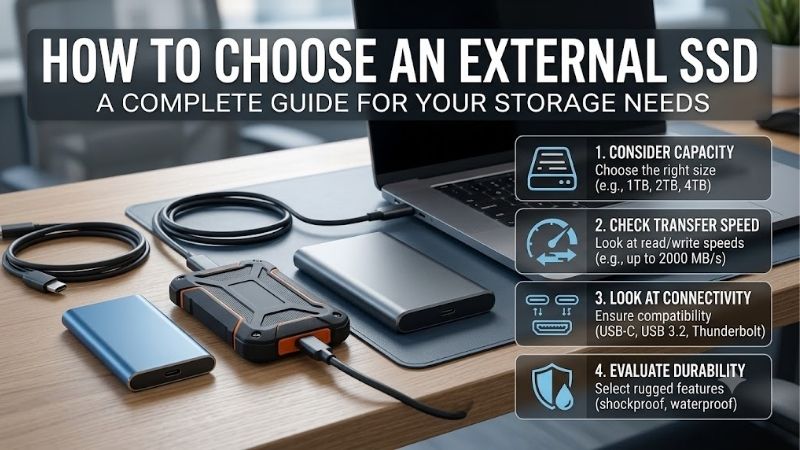
The practical answer to how to choose an external ssd is to match interface speed, usable capacity, protection, and your workflow. Start with the port, size the drive for your library, then pay for ruggedness or security only where your work benefits. This order prevents needless spending on unnecessary extras overall.
Interface Speed
Interface speed is the first filter because a fast SSD cannot outrun its port or cable. USB 3.2 Gen 2 sits below the 20Gbps class used by fastest portable drives, while Gen 2×2 can unlock higher sequential transfers on supported hosts. Check computer/cable/port standard before buying for sustained high-volume transfers.
A 20Gbps drive makes sense only when the host can use it. Samsung T9 and Kingston XS2000 target USB 3.2 Gen 2×2 systems, fitting compatible desktop-systems/laptops that can sustain the connection without becoming a bottleneck during large transfers. That matters most for bandwidth-heavy, sustained creator workloads today.
Capacity
Capacity should cover active files plus headroom, not merely today’s folder size. For photos/documents, 1TB may be plenty, while video projects, game libraries, and large backups justify 2TB or 4TB. Buying larger reduces reshuffling but raises upfront cost, tying up more money in high-capacity storage for long-term needs.
Capacity depends on what stays on the drive between backups. The Samsung T7 Shield reaches 4TB, making it a roomy portable archive without prioritizing the fastest 20Gbps interface. That makes it useful for large photo/backup libraries, especially photo-heavy, backup-intensive libraries that expand across multiple seasons.
Durability And Protection
Durability matters most when the SSD travels in a camera bag/backpack/work equipment. Look for tested drop resistance and water/dust protection, but remember an IP rating does not permit submersion. More-rugged enclosures can add size/weight, so match protection to travel conditions and routine handling for portability.
For frequent outdoor/on-location use, SanDisk Extreme PRO Portable SSD combines IP65 protection with forged aluminum, while Samsung T7 Shield uses a rugged elastomer exterior and is also rated IP65. Both suit buyers expecting more bumps/exposure than a desk drive during travel/field work. For mobile-production creators.
Security And Workflow Features
Security and workflow features matter more when the drive holds client files, records, or a working media library. Hardware encryption can protect stored data, while bundled software may simplify drive health/updates/password controls. They matter less for scratch storage, where speed usually comes first in routine work.
Choose features that solve a real problem. The Samsung T9 includes AES 256-bit hardware encryption and Samsung Magician software, while the other picks emphasize portability/ruggedness, letting you pay for security when sensitive work makes it worthwhile. That suits professionals carrying confidential files in transit.
Top Picks
The four picks cover different priorities rather than repeating the same drive. Each uses solid-state storage, but the balance shifts between peak speed, rugged protection, compact size, and everyday value. That is why how to choose an external ssd should start with your workflow, not a speed chart, across long-term workloads.
| Product | Best For | Key Spec | Watch Out For |
|---|---|---|---|
| Samsung Portable SSD T9 | Best Overall | USB 3.2 Gen 2×2; up to 2,000/2,000 MB/s; AES 256-bit hardware encryption | 122g; needs a compatible 20Gbps host for top speed |
| Samsung T7 Shield | Best Value | USB 3.2 Gen 2; up to 1,050/1,000 MB/s; up to 4TB; IP65; 3m drop resistance | Lower peak throughput than 20Gbps-class drives |
| SanDisk Extreme PRO Portable SSD | Best For Creators | USB 3.2 Gen 2×2; 4TB up to 2,000/2,000 MB/s; IP65; 3m drop protection | 77.5g and larger than the pocket-size Kingston option |
| Kingston XS2000 | Best For Travel | USB 3.2 Gen 2×2; up to 2,000/2,000 MB/s; 28.9g; up to 4TB; IP55 with sleeve | Full speed depends on a 20Gbps-capable host |
Samsung Portable SSD T9
Samsung Portable SSD T9 is the Best Overall choice for demanding file-transfers, large-project work, and users with a 20Gbps port. It offers up to 2,000 MB/s sequential read/write, AES 256-bit hardware encryption, and drop resistance to 3 meters, backed by a five-year limited warranty. It supports Windows/macOS/Android.
For the T9, how to choose an external ssd gets easier because its speed/security/device mix is hard to ignore. The drawback is 122-gram weight plus USB 3.2 Gen 2×2 dependence for top performance, so it is not the lightest laptop companion. That trade-off suits heavy, sustained project work for professional-workflow demands.
Samsung T7 Shield
Samsung T7 Shield is the Best Value pick for buyers wanting capacity and rugged protection without chasing 20Gbps peak throughput. It reaches up to 1,050 MB/s read and 1,000 MB/s write, supports capacities through 4TB, and carries IP65 protection with drop resistance to 3 meters. Its 10Gbps interface is practical today.
Its advantage is consistency for travel/backups and everyday media storage, especially with a standard 10Gbps USB connection. The limitation is its lower ceiling versus newer 20Gbps drives, so how to choose an external ssd depends on whether durability and broad usefulness matter more than speed. It suits routine file work.
SanDisk Extreme PRO Portable SSD
SanDisk Extreme PRO Portable SSD is the Best For Creators moving large photo/video/project files off-desk. The 4TB version reaches up to 2,000 MB/s read/write over USB 3.2 Gen 2×2, with IP65 resistance, up to 3-meter drop protection, and a five-year warranty. It is built for sustained professional mobile-workflows at a high-demand pace.
The forged aluminum chassis helps manage heat during sustained work, useful for demanding transfers, but the drive weighs 77.5 grams and is larger than the tiny Kingston option. For how to choose an external ssd around field production, the mix of speed/protection and included USB-C/USB-A cables is valuable on location.
Kingston XS2000
Kingston XS2000 is the Best For Travel for buyers wanting genuinely pocketable carry. It reaches up to 2,000 MB/s read/write through USB 3.2 Gen 2×2, weighs 28.9 grams, and offers capacities up to 4TB, with an included rubber sleeve for water/dust/shock resistance. The compact body is its defining travel advantage too.
Its footprint is the appeal, but how to choose an external ssd for travel also means accepting the need for a 20Gbps host for headline speed. The sleeve adds protection without making the drive bulky, while the five-year warranty gives long-term ownership a security safety net. The weight advantage is noticeable all day.
Frequently Asked Questions
Frequently asked questions about how to choose an external ssd often come down to speed, capacity, USB compatibility, and backup safety. The answers below focus on practical limits buyers encounter after purchase, including when a faster drive matters and how to avoid paying for performance your current hardware cannot use.
Are External SSDs Faster Than Hard Drives?
Yes, an external SSD is noticeably faster than an external hard drive for transfer, app loading, and random access. The gap is especially noticeable with small files and projects, while HDDs still make sense when low cost per terabyte matters more than speed, noise, size, or shock resistance. An SSD is quieter to carry.
The exception is a workflow limited by an older USB port, where a premium SSD may not reach its rated transfer rate. A slower interface still works, but leaves performance on the table. For heavy work, check port/cable before spending extra for a 20Gbps-class drive. Matching both sides prevents an expensive bottleneck.
How Much External SSD Storage Do You Need?
For most people, 2TB is a comfortable middle ground because it gives room for photos/documents/games and several active projects without paying for maximum capacity. Go to 4TB when the drive will hold large video libraries, several backup sets, or a broad game collection. Storage growth should guide that jump over time.
There is little benefit in filling a portable SSD immediately, so leave working headroom for future files and normal drive management. For a growing library, think in yearly storage growth rather than only the data sitting on your computer today. Spare space prevents reorganization and keeps active projects manageable.
Does Every USB-C Port Support The Same SSD Speed?
No, not every USB-C port delivers the same SSD speed. A USB-C connector describes the shape, while the underlying USB standard determines bandwidth. A drive rated for USB 3.2 Gen 2×2 can connect to slower ports, but it will operate at the host/cable limit. The connector alone never tells full performance story on the road.
That makes port checking one of the easiest ways to avoid wasted money. If your computer only supports 5Gbps or 10Gbps USB, a 20Gbps drive can still help with future hardware, but you should not expect maximum advertised sequential speed on the current machine. Check the computer’s specification before ordering in advance.
Should An External SSD Be Your Only Backup?
External SSDs excel for working files/backups, but they should not be your only copy of important data. SSDs have no moving heads and resist bumps better than portable hard drives, yet any storage device can fail, be lost, or become corrupted, so redundancy still matters. A second copy protects against failure long-term.
A simple approach is one working copy plus at least one backup, with another copy for irreplaceable files when the data matters. This buying decision is only part of protecting your library; the backup plan matters just as much as the drive itself. Test important backups occasionally so restores work for peace of mind.
Final Thoughts
The best way to how to choose an external ssd is to match the drive to your bottleneck: port bandwidth, capacity, travel, or security. Samsung T9 suits demanding all-round work, while T7 Shield, SanDisk Extreme PRO, and Kingston XS2000 each target a clearer priority. Keep the purchase grounded in use, not marketing today.
Ready to decide? Our #1 pick for 2026 is the Samsung Portable SSD T9.
Live price & availability on Amazon.