How to choose a cpu cooler starts with a common mistake: a cooler can fit the socket yet struggle with sustained heat, crowd tall memory, or become noisy. The right match depends on CPU workload, case clearance, platform, and acoustic tolerance rather than heatsink size. Look at sustained load, not short benchmark spikes.

Quick answer: Our top pick in 2026 is the Thermalright Phantom Spirit 120 SE — our #1 rated choice. See the full ranked comparison, alternatives and buying advice below.
How to Choose a CPU Cooler
The simplest way to learn how to choose a cpu cooler is to start with sustained processor power, then check cooler design, socket support, dimensions, and fan behavior. More thermal headroom can steady boost performance; a smaller tower can simplify installation when capacity demands are moderate. That order is practical.
Cooling Capacity
Cooling capacity is the cooler’s ability to move processor heat through the fin stack and into case airflow, making it central to how to choose a cpu cooler. Heatpipes, fin area, tower volume, and fan airflow matter. The dual-tower Thermalright Phantom Spirit 120 SE provides substantial reserve for long loads overall.
You need more capacity when the CPU spends long periods rendering, compiling, encoding, or sustaining high boost power. The trade-off is extra size and weight, so buying the biggest cooler is unnecessary for modest chips. For sustained loads, the Phantom Spirit 120 SE is the clearest fit among these four options.
Case Clearance
Cooler height is a hard limit, so it belongs near the top of how to choose a cpu cooler. The side panel must clear the tower, while width and fin position can affect tall memory. The 150mm ID-COOLING SE-214-XT shows how a shorter tower eases mid-tower fit checks before installation in typical cases before purchase too.
Measure the case’s maximum CPU-cooler height rather than estimating from photos. Also check memory and motherboard clearance before mounting. The 154mm be quiet! Pure Rock 3 Black offers a compact conventional tower format, while the Phantom Spirit 120 SE needs more attention around tall RAM. Exact dimensions decide the fit.
Fan Noise
Fan noise depends on bearing design, fan speed, blade geometry, airflow restriction, and the motherboard’s curve, all useful checks in how to choose a cpu cooler. Maximum noise is comparative, not guaranteed. Pure Rock 3 Black lists 12.4, 24.4, and 31.2dB(A) at 50, 75, and 100 percent; fan curves change the final result.
Quiet operation matters most in an office, bedroom, recording area, or workstation that runs for hours. A lower-speed fan can be easier to live with, but aggressive curves may increase load noise. ID-COOLING SE-214-XT and Phantom Spirit 120 SE both publish low maximum noise figures for air coolers in this class.
Socket Compatibility
Socket support belongs in the first compatibility check when learning how to choose a cpu cooler. Current mainstream desktop platforms include AMD AM4 and AM5 and Intel LGA1700 and LGA1851, but mounting standards vary. Cooler Master Hyper 212 Halo Black supports those four sockets, making it a useful compatibility example.
Compatibility also means checking the supplied mounting hardware and your motherboard layout. Older cooler revisions can differ from current packages, so use the manufacturer’s current compatibility information. For a new build, the Hyper 212 Halo Black gives broad modern socket coverage without requiring a dual-tower footprint.
Top Picks
The four picks translate those criteria into distinct use cases. Phantom Spirit 120 SE emphasizes cooling reserve; SE-214-XT focuses on value; Pure Rock 3 Black prioritizes restrained acoustics; Hyper 212 Halo Black adds ARGB. Together they show how to choose a cpu cooler without assuming one design fits every build.
| Product | Best For | Key Spec | Watch Out For |
|---|---|---|---|
| Thermalright Phantom Spirit 120 SE | Best Overall | 7 × 6mm heatpipes; 154mm height | Large dual-tower footprint |
| ID-COOLING SE-214-XT | Best Value | 4 × 6mm heatpipes; 150mm height | Less reserve than larger towers |
| be quiet! Pure Rock 3 Black | Best For Quiet Builds | 4 × 6mm heatpipes; 31.2dB(A) max | Single-tower cooling reserve |
| Cooler Master Hyper 212 Halo Black | Best For RGB Builds | 4 heatpipes; ARGB fan; 154mm height | Moderate thermal capacity |
Thermalright Phantom Spirit 120 SE — Best Overall
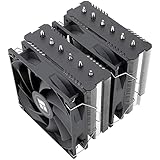
Thermalright Phantom Spirit 120 SE is the Best Overall pick for builders wanting substantial air-cooling capacity without an AIO. It measures 110 x 125 x 154mm, weighs 765g, uses seven 6mm heatpipes, and includes two 120mm fans rated at 1500 RPM maximum. Its dual-tower footprint suits roomier cases.
Its advantage is a large thermal-transfer system in a conventional air cooler. The drawback is bulk: 765g and 125mm width demand attention around RAM and case clearance. It suits gaming, workstation, and sustained-load systems with room for a dual tower. That thermal reserve is the central benefit for these workloads.
ID-COOLING SE-214-XT — Best Value
ID-COOLING SE-214-XT is the Best Value pick for a straightforward single-tower build. It measures 124 x 72 x 150mm, weighs 500g with its fan, uses four 6mm direct-touch heatpipes, and includes a 120mm PWM fan reaching 1500 RPM maximum. Its compact hardware keeps installation simple. It favors moderate mainstream power targets.
Its advantage is the combination of low mass, modest dimensions, and broad AM4, AM5, LGA1700, and LGA1851 compatibility. The trade-off is lower cooling capacity than the larger dual-tower pick, so it fits moderate gaming and productivity loads better than heavily sustained high-power workloads. Its lower mass can simplify handling.
be quiet! Pure Rock 3 Black — Best For Quiet Builds
be quiet! Pure Rock 3 Black is the Best For Quiet Builds choice for users who value a restrained tower and controlled acoustics. It measures 71 x 124 x 154mm, weighs 570g, uses four 6mm direct-touch heatpipes, and includes one 120mm fan rated at 31.2dB(A) maximum. Its footprint avoids larger dual-tower bulk.
Its strength is the balance between compact footprint and controlled operation. Its limitation is clear: one tower and four heatpipes provide less headroom than the Phantom Spirit 120 SE. That makes it more appropriate for everyday gaming, office work, and mixed desktop use than extreme sustained loads, where additional reserve matters.
Cooler Master Hyper 212 Halo Black — Best For RGB Builds
Cooler Master Hyper 212 Halo Black is the Best For RGB Builds option for a familiar single-tower layout with integrated lighting. It measures 124 x 73 x 154mm, uses four heatpipes and aluminum fins, and includes one 120mm ARGB fan rated from 650 to 2050 RPM with 27dBA maximum noise. Check case clearance.
The advantage is that the lighting is built into the included fan, while modern AM4, AM5, LGA1700, and LGA1851 sockets are supported. The compromise is cooling hardware closer to other single-tower designs than a dual tower, so choose it for moderate workloads where RGB is a build priority.
Frequently Asked Questions
Most CPU-cooler questions concern four practical issues when deciding how to choose a cpu cooler: air-cooling sufficiency, tower fit, acoustic output, and required capacity. Start with workload and case limits, then verify socket and fan details. Specifications narrow the field, but they do not replace fit checks.
Is Air Cooling Enough for a Modern CPU?
Yes, air cooling can be enough for many modern desktop CPUs when the cooler has adequate capacity and the case provides sensible airflow. A large dual tower can handle more sustained heat than a stock-style cooler, while a modest chip does not need the largest heatsink. Workload decides useful reserve for everyday use.
The exception is unusually high sustained power, restrictive case airflow, or a very low acoustic target. In those situations, prioritize thermal headroom and airflow before appearance. Phantom Spirit 120 SE provides more reserve, while SE-214-XT aligns better with moderate gaming and productivity loads. Match capacity to the workload.
How Tall Should My CPU Cooler Be?
Choose a cooler whose published height is below your case’s CPU-cooler clearance, then leave practical installation room. Mainstream towers often sit around 150 to 154mm. SE-214-XT is 150mm tall; Pure Rock 3 Black and Hyper 212 Halo Black are each 154mm tall. Verify the case specification for compact cases especially.
Do not stop at height. Wider heatsinks can overlap memory slots, and front fans can sit over taller modules. Compare the cooler’s full width and height with the case limit and RAM height before buying. This matters most for larger dual-tower designs such as Phantom Spirit 120 SE; RAM height can change fit before mounting.
Does More Heatpipe Count Always Mean Better Cooling?
No. More heatpipes can increase heat-transfer potential, but fin area, contact quality, airflow, fan pressure, mounting, and case ventilation also matter. A seven-heatpipe cooler can offer more reserve than a four-heatpipe design, but specifications alone cannot predict an exact temperature difference.
Use heatpipe count as one clue rather than a ranking rule. The Phantom Spirit 120 SE uses seven 6mm heatpipes, while the other three picks use four heatpipes. That supports the dual-tower design’s larger thermal capacity, but workload and airflow still determine whether the extra hardware matters in your PC.
Is a Bigger CPU Cooler Always Better?
No. A bigger cooler helps only when added thermal capacity matches CPU heat output and the case can accommodate it. Oversizing a modest system adds weight and installation complexity without guaranteed benefit. A single tower can be more sensible when space and workloads are moderate. Bigger is not automatically more efficient.
The better approach is enough headroom for your real workload, followed by a physical-fit check. SE-214-XT and Pure Rock 3 Black show why moderate towers remain useful, while Phantom Spirit 120 SE demonstrates when added heatsink volume becomes worthwhile for sustained loads. Size should follow workload, not aesthetics.
Final Thoughts
The best buying decision matches cooler capacity to CPU workload, then confirms socket support, case clearance, and acceptable fan noise. For how to choose a cpu cooler in practice, use Phantom Spirit 120 SE for higher thermal demand, SE-214-XT for value, Pure Rock 3 Black for acoustics, and Hyper 212 Halo Black for RGB builds.
Ready to decide? Our #1 pick for 2026 is the Thermalright Phantom Spirit 120 SE.
Live price & availability on Amazon.