Best cpu cooler for a first time buyer searches frequently reveal a compatibility problem: socket-compatible cooling hardware may obstruct memory or exceed enclosure dimensions. Fan counts cannot resolve those compatibility questions. This guide identifies practical options and their tradeoffs. Install each cooler using its socket-specific manual.
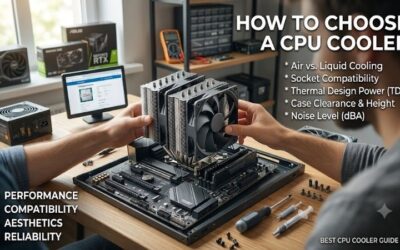
How to Choose a CPU Cooler
Choosing the best cpu cooler for a first time buyer requires checking socket support, clearance, workload, and installation needs. These four recommendations cover everyday air cooling, budget builds, tall memory, and an introductory liquid option. Compare those requirements before purchasing decorative lighting or oversized cooling assemblies.
Processor Socket and Mounting Requirements
Socket compatibility determines whether included mounting components match your motherboard. AM4 and AM5 labels describe AMD platforms; LGA1700 and LGA1851 identify specific Intel mounting requirements. Check the actual retail package, since older inventory or similarly named variants may contain different hardware than advertised.
For the best cpu cooler for a first time buyer, mounting complexity deserves attention alongside compatibility. The ARCTIC Freezer 36 uses its supplied replacement contact frame on compatible Intel platforms, adding installation steps. For a mainstream AMD build with compatible mounting hardware, choose the ARCTIC Freezer 36 as the default choice.
Case Clearance and Memory Access
Air-cooler height requires closed-side-panel clearance, while radiator installations require sufficient fan-and-radiator clearance. Memory clearance is a separate measurement: tall heatspreaders can obstruct an overhanging fan. Compare the case’s cooler limit and component dimensions before ordering, allowing for installation adjustments.
The Noctua NH-U12S redux specifies 158mm height and features a slim heatsink without RAM-slot overhang. The Thermalright Assassin X 120 Refined SE specifies a shorter 148mm heatsink for tighter height limits. Choose the Noctua NH-U12S redux especially when unobstructed tall-memory access outweighs minimum tower height.
Workload, Noise, and Cooling Capacity
Cooling demand follows processor power and sustained activity rather than overall computer cost. Browsing and gaming differ from prolonged multicore rendering. Read reviews using comparable workloads and noise levels; unrelated manufacturer wattage ratings cannot establish reliable, universally comparable cooling performance.
The best cpu cooler for a first time buyer should cover the intended workload without disproportionate spending. Basic towers accommodate moderate-power builds, while unrestricted flagship workloads deserve separate evaluation. Choose the Thermalright Assassin X 120 Refined SE when moderate CPU demands and affordability take priority.
Connections and Ownership Costs
Air coolers generally require fan connections, while liquid models introduce pump operation and radiator mounting. Additional lighting or display controllers increase wiring complexity. Compare warranty coverage and replacement parts alongside purchase price, because fan replacements and complete cooling assemblies incur different expenses.
For the best cpu cooler for a first time buyer exploring liquid cooling, prioritize straightforward motherboard connections over decorative controls. The CORSAIR NAUTILUS 240 RS uses direct connections without an additional controller. Choose the CORSAIR NAUTILUS 240 RS when radiator compatibility and additional pump hardware suit your plans.
Top Picks
These recommendations interpret the best cpu cooler for a first time buyer according to purchase priorities. ARCTIC is the general air option, Thermalright emphasizes savings, Noctua provides memory clearance, and CORSAIR simplifies an introductory AIO setup. Rankings reflect documented features and limitations rather than detailed research.
| Product | Best For | Key Spec | Watch Out For |
|---|---|---|---|
| ARCTIC Freezer 36 | Best Overall | 159mm height; four 6mm heatpipes; two P12 PWM PST fans | Supported Intel installations use a replacement contact frame |
| Thermalright Assassin X 120 Refined SE | Best Value | 148mm heatsink; four 6mm heatpipes; 120mm PWM fan | Limited headroom for sustained high-power workloads |
| Noctua NH-U12S redux | Best For Tall Memory | 158×125×71mm installed dimensions; pre-applied NT-H1 | Second fan requires separate purchase |
| CORSAIR NAUTILUS 240 RS | Best For a First AIO | 240mm radiator; two RS120 fans; direct motherboard connections | Requires radiator clearance and pump operation |
ARCTIC Freezer 36: Best Overall
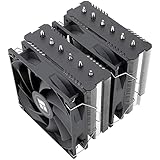
The ARCTIC Freezer 36 earns Best Overall for a mainstream build with compatible mounting hardware and enclosure clearance. Four 6mm heatpipes and two P12 PWM PST fans form a single-tower arrangement measuring 159mm tall. Its click-in fan mounting avoids conventional wire clips, simplifying subsequent fan removal and replacement.
Its main caveat for beginners is the supplied Intel contact frame, which replaces the original socket retention mechanism. Read that procedure before purchasing if assembly simplicity matters. The 159mm height also excludes some narrow cases. Choose it when its fan mounting and accessories justify the additional assembly steps.
Thermalright Assassin X 120 Refined SE: Best Value
The Thermalright Assassin X 120 Refined SE earns Best Value when current pricing undercuts competing recommendations. Its four 6mm heatpipes and included 120mm PWM fan provide a straightforward mainstream single-tower design. The 148mm heatsink height accommodates enclosures incompatible with these taller air alternatives.
Its single-fan configuration provides less cooling headroom in practice than larger high-power cooling designs. Treat it as a moderate-demand purchase rather than universal flagship-processor cooling. Check the exact socket kit and installed fan position before purchase, especially when replacing a proprietary OEM cooler.
Noctua NH-U12S redux: Best For Tall Memory
The Noctua NH-U12S redux earns Best For Tall Memory when unobstructed RAM-slot access takes priority. Its slim heatsink avoids memory overhang, and the installed assembly measures 158×125×71mm. Pre-applied NT-H1 compound eliminates initial paste application, while the six-year warranty provides a clearly documented ownership benefit.
Its tradeoff is paying for mounting, compatibility, and support features rather than maximum heatsink size per dollar. A second fan requires separate purchase, and the compact tower is not the preferred recommendation for flagship rendering loads. Choose it for a compatible mainstream processor when unobstructed memory access takes priority.
CORSAIR NAUTILUS 240 RS: Best For a First AIO
The CORSAIR NAUTILUS 240 RS earns Best For a First AIO for buyers deliberately choosing compatible liquid cooling. Its 240mm radiator uses two RS120 fans, and the direct motherboard connections eliminate additional controller requirements. Pre-applied thermal compound reduces preparation, while the five-year warranty provides documented coverage.
The compromise is additional mechanical complexity: a pump and radiator require additional space, connections, and monitoring. A 240mm label cannot establish universal enclosure compatibility, and pump noise remains possible at reduced fan speeds. Choose it for an intentional liquid-cooling setup without assuming superior acoustics.
Frequently Asked Questions
Questions about the best cpu cooler for a first time buyer concern the included stock cooler, air versus liquid hardware, thermal paste, and startup checks. These answers clarify installation and purchase requirements. Your exact processor, motherboard, and enclosure provide better purchasing guidance than generic temperature promises.
Do I Need an Aftermarket CPU Cooler?
No, you do not always need an aftermarket cooler. Some retail processors include stock cooling suitable for everyday workloads at appropriate power settings; others ship without a cooler. Check the exact package contents before budgeting. Upgrade when the included model produces unacceptable noise or struggles with sustained workloads.
If your PC includes functioning cooling hardware, establish a temperature and noise baseline before replacing it. For the best cpu cooler for a first time buyer, the useful improvement might involve quieter operation rather than additional gaming performance. Avoid replacing functional hardware solely because photographs suggest a larger heatsink.
Is Air Cooling Better For a First Build?
Air cooling usually simplifies a first build by eliminating pump and radiator installation. That advantage often depends on case clearance and access around the socket. Oversized towers still complicate assembly, so compare the actual installation process rather than assuming air cooling universally simplifies assembly.
Liquid cooling remains reasonable with radiator clearance and a layout favoring compact socket-area hardware. The CORSAIR recommendation offers direct motherboard connectivity. Account for pump operation and tube routing, and follow the manufacturer’s orientation guidance instead of bending hoses sharply for decorative placement.
Does Every CPU Cooler Include Thermal Paste?
No, thermal paste is not included with every CPU cooler, although many retail models provide either a small tube or a pre-applied coating. Check the exact package description before purchasing additional compound. The Noctua and CORSAIR selections here include pre-applied material, whereas ARCTIC supplies MX-6 for manual application.
Use the supplied compound as directed, and avoid supplementing pre-applied coatings. Remove any protective cold-plate film before mounting, if present. A remount requires cleaning the mating surfaces and reapplying compound according to instructions. Additional compound makes sense for anticipated repeat installations.
What Should I Check After Installing a CPU Cooler?
Check fan or pump detection and processor temperature at initial startup, then perform a controlled workload. An idle reading alone cannot establish sustained-load mounting quality. Keep cables clear of moving fan blades, and verify the motherboard is using the control mode recommended for the connected hardware before tuning.
If temperatures climb unexpectedly or fan operation fails, shut down and inspect mounting and connections before restarting. Some supported fan-stop settings are normal at low demand, so check manufacturer instructions. Do not compensate for a poor mount by disabling thermal protection or increasing processor voltage during troubleshooting.
Final Thoughts
The best cpu cooler for a first time buyer matches processor demands, case dimensions, and assembly preferences. Choose ARCTIC for general air cooling, Thermalright for budget value, Noctua for tall-memory clearance, or CORSAIR for a deliberate first AIO. Check package contents and mounting requirements before purchasing extra cooling features.