Bedroom gaming has its own rhythm. The best Windows gaming handhelds for bedroom gaming are the ones that feel comfortable in bed, look good in low light, stay quiet enough not to disturb anyone nearby, and last long enough to finish a session without hunting for a charger. A handheld that works well on a desk or a train may not be the best choice for a dark room, a pillow, and a late-night save point.
The screen matters most after dark. An OLED panel gives deep blacks and strong contrast, which makes night scenes and dark dungeons look rich instead of grey. A good IPS panel can also work well, as long as it can dim low enough for comfortable viewing and does not wash out in a dark room.
Comfort matters just as much. A handheld that is too heavy will tire the arms when it is held above the chest. Grips that fit the hands, controls that fall naturally under the thumbs, and a weight that can be held for an hour without strain are all worth paying attention to. Fan noise matters too. A handheld with a quiet cooling system lets a player use the built-in speakers at low volume without a constant hum in the background.
The three handhelds below cover different approaches to bedroom play: a large OLED model for the most vivid picture, a light and comfortable 7-inch model for long sessions in bed, and a balanced 8-inch model with strong memory and a large battery.
How to Choose the Best Windows Gaming Handhelds for Bedroom Gaming
Start with the screen, and think about how you play in the dark. An OLED screen is the strongest choice for bedroom gaming, because its deep blacks make dark scenes look clean and its contrast stays strong at low brightness. If you choose an IPS screen, look for a panel that can dim to a comfortable level and that keeps colours accurate at low brightness. A 120Hz screen is enough for most bedroom play.
Weight and grip shape decide whether a handheld is comfortable in bed. A 7-inch handheld is usually the easiest to hold for a long time, because it is lighter and narrower than an 8-inch or 8.8-inch model. An 8-inch model gives a larger picture, which helps with text-heavy games, but it will feel heavier after an hour. Look for contoured grips, well-placed sticks, and a weight distribution that does not pull the handheld forward. A kickstand or detachable controllers can also help, because they let the screen stand on its own.
Fan noise is easy to overlook and hard to ignore once you notice it. A handheld with a larger battery and an efficient processor can often run at lower fan speeds during less demanding games, which keeps the room quiet. Check whether the handheld has a quiet performance mode, and whether the fan vents point away from the player. A headphone jack is essential for late-night play when someone else is sleeping nearby.
Battery life shapes how a bedroom session ends. A larger battery, measured in watt-hours, usually means a longer session, but the screen and the game also affect how quickly it drains. A handheld that charges quickly is useful when the battery runs low before bedtime. Finally, check the software. A handheld that can suspend a game quickly and resume from sleep without fuss will fit bedroom play better than one that needs several steps to wind down.
The Best Windows Gaming Handhelds for Bedroom Gaming
Lenovo Legion Go 2

The Lenovo Legion Go 2, sold as the Legion Go Gen 2, is an 8.8-inch Windows handheld with a 1920 by 1200 OLED touchscreen at up to 144Hz, an AMD Ryzen Z2 series processor, up to 32GB of memory, a 1TB solid-state drive, and a 74Wh battery. The OLED panel is the reason it leads this guide. In a dark bedroom, its deep blacks make night scenes, horror games, and space games look vivid, and its contrast stays strong even when the brightness is turned low for comfortable viewing.
The detachable controllers and built-in kickstand make it easy to prop the screen up on a bedside table or a pillow and play without holding the full weight of the handheld. The 8.8-inch screen is large enough for text-heavy role-playing games and strategy titles, and the microSD card reader adds room for more games.
This handheld suits a player who wants the most vivid picture in a dark room and who plays a lot of story-driven or atmospheric games. It is a good fit for someone who likes to prop the screen up and play with the controllers detached. Its size and weight mean it is less suited to holding above the chest for hours, so use the kickstand when you settle in.
View the Lenovo Legion Go 2 on Amazon
ASUS ROG Xbox Ally

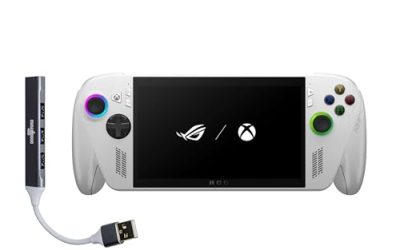
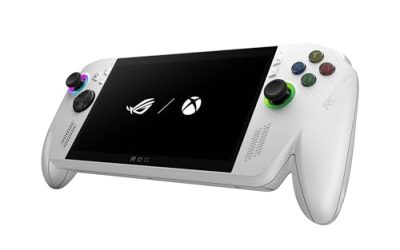
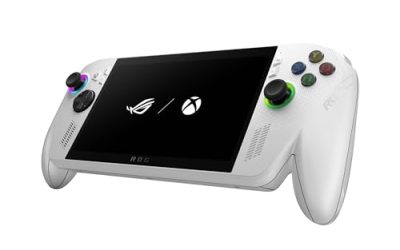
The ASUS ROG Xbox Ally is a 7-inch Windows handheld with a 1920 by 1080 touchscreen at 120Hz, an AMD Ryzen Z2 A processor, 16GB of LPDDR5 memory, a 512GB solid-state drive, and a 60Wh battery. At 670 grams, it is the lightest handheld in this guide, and its contoured grips are shaped like a modern controller, which makes it comfortable to hold in bed for long sessions. The Xbox Full Screen Experience boots into a controller-friendly interface, so it is easy to pick a game and start playing without navigating the Windows desktop in the dark.
The 7-inch screen is smaller than the other picks here, but it is sharp, smooth, and bright enough for a dark room, and it can be dimmed for comfortable late-night viewing. The microSD card reader adds storage for more games, and the USB-C port supports charging and accessories.
This handheld suits a player who values comfort and simplicity above all else in the bedroom. It is a good fit for someone who plays in bed every night, who wants a light handheld that does not tire the arms, and who likes the Xbox interface for quick access to Game Pass and Steam. It also suits a player who uses headphones most of the time and wants a handheld that is easy to pick up, play, and put down.
View the ASUS ROG Xbox Ally on Amazon
MSI Claw A8 1TB

The MSI Claw A8 is an 8-inch Windows handheld with a 1920 by 1200 touchscreen at 120Hz, an AMD Ryzen Z2 Extreme processor, 24GB of LPDDR5x memory, a 1TB NVMe solid-state drive, and a Thunderbolt 4 port. The 8-inch screen sits between the other two picks in size, giving a larger picture than the 7-inch Xbox Ally while staying more compact than the 8.8-inch Legion Go 2. The 24GB of memory gives demanding games more headroom, and the 1TB drive holds a larger bedroom library without constant uninstalling.
The Ryzen Z2 Extreme processor is designed for smooth play at 1080p, and the handheld’s cooling system is built to keep temperatures in check during long sessions. The microSD card reader adds expansion, and the Thunderbolt 4 port allows a fast connection to a monitor or an external drive when the handheld is used outside the bedroom.
This handheld suits a player who wants a balanced bedroom handheld with a larger screen and more storage than the lightest option. It is a good fit for someone who plays a mix of demanding action games and slower role-playing titles in bed, and who wants enough memory and storage to keep a varied library installed.
View the MSI Claw A8 on Amazon
Comparison Table
| Product | Key Spec | Best For |
|---|---|---|
| Lenovo Legion Go 2 | 8.8-inch OLED 144Hz screen, Ryzen Z2 series, up to 32GB RAM, 1TB SSD, 74Wh battery | Vivid picture in a dark room |
| ASUS ROG Xbox Ally | 7-inch 1080p 120Hz screen, Ryzen Z2 A, 16GB RAM, 512GB SSD, 670g | Light, comfortable play in bed |
| MSI Claw A8 | 8-inch 120Hz screen, Ryzen Z2 Extreme, 24GB RAM, 1TB SSD, Thunderbolt 4 | Balanced screen, memory, and storage |
Frequently Asked Questions
Is an OLED screen better for bedroom gaming?
Yes, for most bedroom play. An OLED panel produces deep blacks and strong contrast, which makes dark scenes look clean and detailed in a dim room. An IPS panel can still work well if it dims low enough, but it cannot match the black levels of OLED in a dark bedroom.
How can I keep fan noise down at night?
Choose a less demanding game setting, use a quiet or low-power performance mode if the handheld has one, and keep the vents clear of bedding. Headphones also help, because they let you hear the game clearly at low volume without turning the speakers up to cover fan noise.
What is the most comfortable way to play a handheld in bed?
Rest the handheld on a pillow or use a kickstand so your arms do not carry the full weight. Keep your elbows supported, take a short break every hour, and use headphones if someone else is sleeping nearby.
Can I use a Windows handheld with a TV in the bedroom?
Yes. Most Windows handhelds have a USB-C port with video output, so they can connect to a TV or a monitor with a USB-C to HDMI adapter or a dock. That turns the handheld into a small console for the bedroom TV.
Conclusion
The best Windows gaming handhelds for bedroom gaming make late-night play comfortable, quiet, and vivid. The Lenovo Legion Go 2 is the pick for the most striking picture, with an 8.8-inch OLED screen, detachable controllers, and a kickstand that suits propped-up play. The ASUS ROG Xbox Ally is the pick for comfort, with a light 670-gram body, controller-shaped grips, and an Xbox interface that makes it easy to start a game in the dark. The MSI Claw A8 is the balanced pick, with an 8-inch screen, 24GB of memory, a 1TB drive, and a Thunderbolt 4 port for use beyond the bedroom.
Before you buy, think about how you actually play at night: whether you hold the handheld above your chest, prop it on a pillow, or use headphones. Choose the screen, weight, and battery that fit that routine.
Disclosure: As an Amazon Associate, we may earn from qualifying purchases.