Commuting is the hardest test for a handheld. The best Windows gaming handhelds for commuting need to be light enough to hold on a crowded train, quick enough to start and stop at a station, and efficient enough to last through a journey without a charger. A handheld that is comfortable on a couch may feel heavy after twenty minutes standing on a bus.
Weight is the first thing to notice on a commute. A difference of a hundred grams may not matter at a desk, but it matters when the handheld is held in one hand while the other holds a rail. A compact 7-inch or 8-inch body fits more easily in a bag, and a slim profile means it can be slipped into a small backpack without a bulky case.
Sleep and resume behaviour is just as important. A good commuting handheld should suspend a game quickly when the train arrives, and resume it just as quickly when the journey continues. A handheld that loses progress or takes a long time to wake will be left at home. Battery life matters too, but it is not just about total hours. A handheld that charges quickly and sips power in sleep mode will serve a commuter better than one with a large battery and a slow charger.
The three handhelds below cover different approaches to commuting: a light 7-inch model that is easy to carry anywhere, a compact 8-inch model with a larger battery and a 1TB drive, and a balanced 8-inch model with strong memory and a Thunderbolt port for use at the destination.
How to Choose the Best Windows Gaming Handhelds for Commuting
Start with weight and size, and think about how you actually travel. A handheld under 700 grams is noticeably easier to hold on a crowded train than one over 800 grams, and a 7-inch model will fit in more bags than an 8.8-inch model. If you commute standing up, look for a handheld that can be held comfortably in one hand. If you commute sitting down, a slightly larger screen may be worth the extra weight, because it makes text and menus easier to read.
Battery life should be judged by the length of your journey, not by a headline figure. A handheld with a 60Wh battery can last through a typical commute, but a longer journey or a demanding game will drain it faster. Look for a handheld with a fast-charging USB-C port, so a short charge at work can top it up. A handheld that holds its charge in sleep mode for days will be ready when you pick it up.
Screen brightness and glare affect how usable a handheld is on the move. A train or a bus has bright windows, overhead lights, and changing light as the vehicle moves, so a screen that can get bright enough to stay readable in daylight is important. A 120Hz refresh rate makes motion look smooth, which helps during fast-paced games on a moving vehicle.
Finally, check storage and connectivity. A commuter may not have Wi-Fi on the journey, so games need to be installed locally before leaving home. A 1TB drive holds more games for offline play, and a microSD slot adds room for more. Bluetooth support for wireless headphones is essential on public transport, where speakers are not an option.
The Best Windows Gaming Handhelds for Commuting
ASUS ROG Xbox Ally

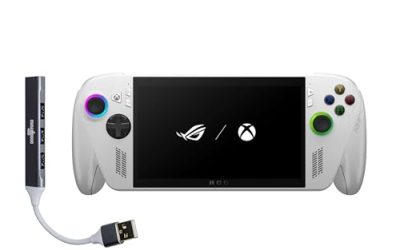
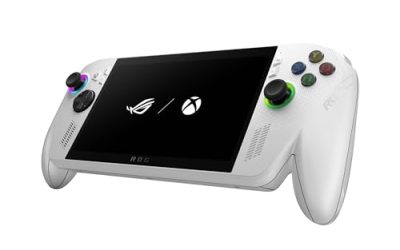
The ASUS ROG Xbox Ally is the lightest handheld in this guide, at 670 grams, with a 7-inch 1920 by 1080 touchscreen at 120Hz, an AMD Ryzen Z2 A processor, 16GB of LPDDR5 memory, a 512GB solid-state drive, and a 60Wh battery. Its light body and contoured grips make it the easiest handheld here to hold on a crowded train, and its compact size means it fits in a small bag without a bulky case. The Xbox Full Screen Experience boots into a controller-friendly interface, so it is easy to pick a game and start playing as soon as the train leaves the station.
The 7-inch screen is sharp and smooth, and it can be dimmed for comfortable viewing in a tunnel or brightened for daylight near a window. The microSD card reader adds storage for more games, and the USB-C port supports fast charging, so a short charge at work can top the battery up for the journey home.
This handheld suits a commuter who wants the lightest and simplest option for daily travel. It is a good fit for someone who plays in short bursts between stops, who carries the handheld in a small bag, and who wants a device that is easy to pick up, play, and put away.
View the ASUS ROG Xbox Ally on Amazon
Lenovo Legion Go S Windows 1TB

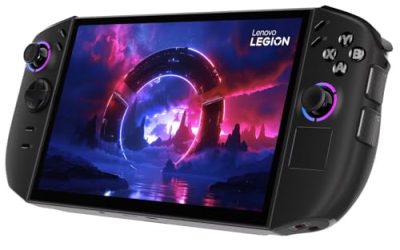
The Lenovo Legion Go S with Windows 11 is an 8-inch handheld with a 1920 by 1200 IPS touchscreen at 120Hz, an AMD Ryzen Z2 Go processor, 32GB of memory, a 1TB solid-state drive, and a 55.5Wh battery. Its 1TB drive is the largest in this guide for offline play, which matters on a commute without Wi-Fi, because it holds more games installed and ready to play. The 8-inch screen is larger than the Xbox Ally’s, which makes text and menus easier to read on a moving train, while the handheld itself stays compact at 727 grams.
The Legion Go S has a rounder, more compact design than the original Legion Go, with fixed controllers that make it easier to slip into a bag. The microSD card reader adds more storage, and the USB-C port supports fast charging, so the handheld can be topped up quickly at work.
This handheld suits a commuter who wants a larger screen and more storage for offline play. It is a good fit for someone with a long journey, who plays a mix of games without Wi-Fi, and who wants a 1TB drive so they do not have to choose which games to uninstall before leaving home.
View the Lenovo Legion Go S on Amazon
MSI Claw A8 1TB

The MSI Claw A8 is an 8-inch Windows handheld with a 1920 by 1200 touchscreen at 120Hz, an AMD Ryzen Z2 Extreme processor, 24GB of LPDDR5x memory, a 1TB NVMe solid-state drive, and a Thunderbolt 4 port. The 1TB drive holds a large library for offline commuting, and the 24GB of memory gives demanding games more headroom than a 16GB handheld. The Ryzen Z2 Extreme processor is designed for smooth play at 1080p, which helps during fast-paced games on a moving vehicle.
The 8-inch screen is large enough for detailed game interfaces, while the handheld stays compact enough for a bag. The microSD card reader adds expansion, and the Thunderbolt 4 port allows a fast connection to a monitor or an external drive when the commuter arrives at work or at home.
This handheld suits a commuter who wants a balanced device for travel and for use at the destination. It is a good fit for someone who plays demanding games on the journey, who wants a 1TB drive for offline play, and who connects the handheld to a monitor or a dock when they arrive.
View the MSI Claw A8 on Amazon
Comparison Table
| Product | Key Spec | Best For |
|---|---|---|
| ASUS ROG Xbox Ally | 7-inch 1080p 120Hz screen, Ryzen Z2 A, 16GB RAM, 512GB SSD, 670g | Lightest carry and quick sessions |
| Lenovo Legion Go S | 8-inch 120Hz screen, Ryzen Z2 Go, 32GB RAM, 1TB SSD, 727g | Offline play with a large library |
| MSI Claw A8 | 8-inch 120Hz screen, Ryzen Z2 Extreme, 24GB RAM, 1TB SSD, Thunderbolt 4 | Balanced travel and desk use |
Frequently Asked Questions
How long should a handheld battery last for commuting?
It depends on the length of the journey and the game. A handheld with a 55Wh to 60Wh battery will usually last through a typical commute of an hour or less, even with a demanding game. For a longer journey, choose a handheld with a larger battery and a fast-charging port. Keep the screen brightness at a comfortable level, rather than at maximum, to extend the session.
Can I play games offline on a Windows handheld?
Yes, as long as the games are installed before you leave home and do not require a constant online connection. Steam, Xbox PC Game Pass, Epic Games Store, and GOG all allow offline play for many titles, although some games need an online check from time to time. Download and update games over Wi-Fi at home before you rely on them for a commute.
Is a 7-inch or 8-inch screen better for commuting?
A 7-inch screen is lighter and easier to hold on a crowded train, and it fits in more bags. An 8-inch screen is larger and easier to read, which helps with text-heavy games and menus. If you commute standing up, a 7-inch model is usually more comfortable.
How do I keep a handheld safe while commuting?
Use a slim hard case that fits the handheld, and keep the handheld in a separate pocket away from keys and other hard objects. A screen protector helps against scratches, and a wrist strap or a grip can prevent drops on a moving vehicle.
Conclusion
The best Windows gaming handhelds for commuting are light, quick to start, and ready to play without Wi-Fi. The ASUS ROG Xbox Ally is the pick for the lightest carry, with a 670-gram body, a 7-inch screen, and a controller-first interface that makes it easy to play in short bursts. The Lenovo Legion Go S is the pick for offline play, with a 1TB drive, 32GB of memory, and an 8-inch screen that holds a large library for a long journey. The MSI Claw A8 is the balanced pick, with a 1TB drive, 24GB of memory, a Ryzen Z2 Extreme processor, and a Thunderbolt 4 port for use at the destination.
Before you buy, think about how you travel: whether you stand or sit, how long the journey is, and whether you have Wi-Fi on the way. Choose the weight, screen size, and storage that fit that routine.
Disclosure: As an Amazon Associate, we may earn from qualifying purchases.