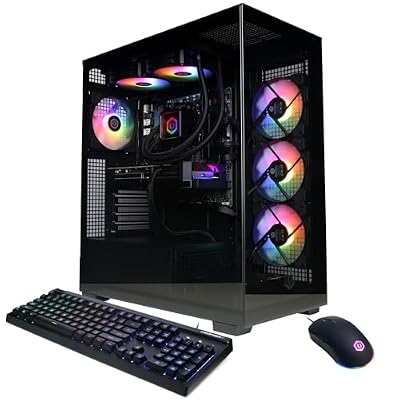
- Top Pick: CyberPowerPC Gaming PC, AMD Ryzen 9 9900X, GeForce RTX 5070 12GB
- Best Value: Skytech Gaming King 95 Gaming PC, Ryzen 9 9900X3D, RTX 5070 Ti
- Premium Choice: iBUYPOWER Slate Gaming PC Desktop Computer AMD Ryzen 9 7900X CPU, NVIDIA GeForce RTX 5080 16GB GPU, 32GB DDR5 5200MHz RAM, 2TB NVMe SSD, Windows 11 Home, Gamer Keyboard and Mouse – SBA9N5801
A gaming PC Ryzen 9 build is the sweet spot between enthusiast performance and practical pricing for anyone who wants high frame rates at 1440p or 4K without stepping into flagship territory. The problem is that the Ryzen 9 label covers a surprisingly wide range of silicon and GPU pairings, and the price spread between entries can be over two thousand dollars. A buyer needs to understand whether the CPU is being paired with a GPU that actually leverages it, whether the memory and storage configs leave room for growth, and whether the thermals are managed well enough to sustain boost clocks through long sessions.
What separates a good gaming PC Ryzen 9 system from a mediocre one is balance. Overclocking a CPU while bottlenecking it with a weak GPU wastes potential, and skimping on RAM capacity when running modern titles means stuttering regardless of how fast the processor is. This roundup compares eight machines built around AMD Ryzen 9 and, in two cases, closely related Ryzen 7 chips that appeared in the same shortlist on price-to-performance grounds. Owner feedback on forums and retailer review pages informed the pros and cons noted below.
As an Amazon Associate we earn from qualifying purchases at no extra cost to you.



Quick Picks
| Product | Best for | Price |
|---|---|---|
| CyberPowerPC Ryzen 9 9900X / RTX 5070 | Balanced 1440p gaming on a budget | Check on Amazon |
| Skytech King 95 | 1440p and entry 4K gaming with headroom | Check on Amazon |
| iBUYPOWER Slate | High-frame-rate 4K with generous storage | Check on Amazon |
| iBUYPOWER Element | Cost-conscious Ryzen 9 entry point | Check on Amazon |
| KOTIN Gaming PC | Value builds that pair Ryzen with RTX 5060 Ti | Check on Amazon |
| Panorama XL RTX 5080 / 9950X3D | Maximum multi-thread and gaming performance | Check on Amazon |
| MSI Aegis ZS | Quiet liquid-cooled build with Wi-Fi 7 | Check on Amazon |
| ZOTAC MEK Ryzen 7 9700X / RTX 5060 Ti | Compact chassis, capable midrange | Check on Amazon |
How We Compared
We narrowed candidates by weighing CPU-GPU balance against published benchmark ranges for each silicon tier, confirming that RAM capacity met the practical floor for modern titles and that storage was fast enough to avoid load-time penalties. Price-to-performance ratio relative to equivalent DIY builds set the final cut, and we cross-referenced owner reviews for patterns in thermal complaints, software bloat, or component failure that spec sheets do not reveal.
The 8 Best Gaming Pc Ryzen 9 in 2026
CyberPowerPC Gaming PC (Ryzen 9 9900X / RTX 5070 12GB)
This build targets players who want a credible Ryzen 9 gaming PC without paying a premium for an X3D cache or a Ti-tier GPU. The 9900X handles current and upcoming AAA titles smoothly, and the RTX 5070 12GB delivers strong 1440p performance with enough VRAM to avoid texture pop-in at high settings.
- Well-balanced CPU-GPU pairing with no obvious bottleneck
- Only 12GB VRAM limits comfort at 4K in future titles
Skip this if you plan to game at 4K or run heavy ray-traced workloads; the 5070 will struggle beyond 1440p at ultra settings.
Skytech Gaming King 95 (Ryzen 9 9900X3D / RTX 5070 Ti)
The 3D V-Cache variant of the 9900X makes this a stronger choice for CPU-sensitive titles and simulation games that reward the extra cache. Paired with the 5070 Ti, it pushes higher frame rates at 1440p and handles 4K at medium-high settings better than the CyberPowerPC option above.
- X3D cache provides measurable uplift in CPU-bound scenarios
- 5070 Ti steps up VRAM and shader throughput over the base 5070
- Price creeps close to builds with a full RTX 5080
If you can stretch to the iBUYPOWER Slate or MSI Aegis ZS, you get a 5080 for a similar or modestly higher outlay.
iBUYPOWER Slate (Ryzen 9 7900X / RTX 5080 16GB)
Pairing the 7900X with an RTX 5080 16GB and 32GB of DDR5 makes this one of the most GPU-forward options on the list. The 16GB of VRAM and 2TB NVMe SSD mean it will stay relevant for larger game installs and high-resolution texture packs without immediate upgrades.
- RTX 5080 with 16GB VRAM is ideal for 4K and heavy ray tracing
- 2TB Gen4 SSD eliminates storage anxiety for large libraries
- Ryzen 9 7900X is a generation older and trails 9000-series IPC
iBUYPOWER Element (Ryzen 9 7900X / RTX 5070 12GB)
Owners praise the compact chassis and straightforward BIOS for DIY upgrades, though the 1TB SSD fills quickly with modern titles.
- Best entry price for a genuine Ryzen 9 gaming PC in this roundup
- DIY-friendly internals and clean Windows 11 Home install
- 1TB storage requires an immediate secondary drive for serious libraries
Skip if you want a set-and-forget system; budget an extra drive from day one or look at the Slate.
KOTIN Gaming PC (Ryzen 7 8700F / RTX 5060 Ti 8GB)
Not a Ryzen 9, but the KOTIN earns its spot by offering the lowest total cost while still delivering a modern AM5 platform with DDR5. The 8700F is a capable gaming CPU, and the RTX 5060 Ti 8GB targets solid 1080p and entry 1440p performance.
- AM5 socket preserves upgrade path to future Ryzen 9 chips
- 8GB VRAM will become a constraint in 1440p and 4K titles
Anyone who specifically wants a Ryzen 9 should pass, but as a price anchor it reframes what the others cost.
Panorama XL (Ryzen 9 9950X3D / RTX 5080 16GB)
The ceiling of this list. The 9950X3D is a 16-core processor with 3D V-Cache, paired here with 64GB DDR5 and a 2TB Gen4 drive in a build that leans workstation-class. Wi-Fi 7 and a three-year warranty round out a package aimed at streamers and content creators who also game at 4K.
- Top-tier multi-thread and gaming performance in a single machine
- 64GB RAM and Wi-Fi 7 future-proof the build well beyond current needs
Skip unless your workload extends beyond gaming into rendering, compiling, or heavy multitasking.
MSI Aegis ZS (Ryzen 9 9900X / RTX 5080)
MSI pairs its current 9900X with a full RTX 5080 in a chassis that uses liquid cooling, keeping noise and thermals in check during extended sessions. Wi-Fi 7, Windows 11 Pro, and a design explicitly marketed as DIY-friendly make it attractive to upgraders who want a polished starting point.
- Liquid cooling sustains boost clocks and reduces fan noise
- Windows 11 Pro and Wi-Fi 7 add practical connectivity features
- Price sits above several air-cooled alternatives with similar specs
If you already have a quiet room or prioritize acoustics, the cooling premium is worthwhile.
ZOTAC MEK (Ryzen 7 9700X / RTX 5060 Ti 16GB)
Like the KOTIN, this is a Ryzen 7 build that made the list on GPU value. The 16GB version of the RTX 5060 Ti is unusual at this price and gives the ZOTAC MEK more VRAM headroom than several costlier options, making it a sleeper pick for players who want high-resolution textures without the 5080 tax.
- 16GB VRAM on a 5060 Ti is rare and extends longevity at 1440p
- 9700X is efficient and handles modern games without issue
- Not a Ryzen 9, so it misses the specific search intent for some buyers
Pick this if VRAM capacity matters more than core count for your workload.
Buying Guide
CPU and GPU must be matched, not just powerful
A Ryzen 9 9900X paired with an RTX 5070 is a sensible combination for 1440p, but putting the same CPU behind an RTX 5060 Ti leaves shader horsepower on the table. Conversely, a 7900X feeding a 5080 still runs the GPU at near-full utilization because games remain GPU-bound at high resolutions. Check that the GPU tier you choose will not be limited by the CPU’s single-thread speed or cache configuration at your target resolution.
RAM and storage capacity set your upgrade timeline
Thirty-two gigabytes of DDR5 is now the realistic minimum for a gaming PC Ryzen 9 build that will not need attention for two or three years. Storage is equally decisive: a 1TB NVMe drive fills after three or four AAA installs. If the listed capacity is 1TB, factor an additional drive into your total cost before comparing prices across systems.
Cooling, connectivity, and warranty affect real-world value
Liquid cooling keeps sustained clocks higher and fan noise lower than stock air solutions, which matters in bedrooms or shared spaces. Wi-Fi 7 is still backward-compatible and useful if your network will upgrade. A three-year warranty, as offered on the Panorama XL, is uncommon in this segment and reduces the long-term risk of component failure.
Our Verdict
If your primary goal is maximum 4K frame rates and you want a quieter, liquid-cooled chassis, the MSI Aegis ZS wins because the RTX 5080 with a 9900X and a Pro-tier OS covers creative workloads alongside gaming without a significant price jump over the Skytech.
FAQ
Is a Ryzen 9 worth it over a Ryzen 5 for gaming?
In pure gaming terms, the difference is often small at resolutions above 1080p because the GPU is the bottleneck. A Ryzen 9 earns its price if you also stream, compile, run simulations, or want the CPU to stay ahead of upcoming titles that lean into multi-threading.
How much VRAM do I need in 2026?
Twelve gigabytes remains adequate at 1440p for current titles at high settings, but 16GB is the comfortable threshold for 4K and for ray-traced textures that ship in larger games. Eight gigabytes will increasingly force downgraded texture packs.
Are prebuilt gaming PCs Ryzen 9 systems upgradable?
Most use standard ATX or mATX motherboards with AM5 sockets, meaning you can swap the CPU, GPU, and RAM later. The main constraint is the power supply wattage and case clearance listed in the product specs; check those before planning a GPU upgrade.
What should I expect from owner feedback on these brands?
CyberPowerPC and Skytech reviews commonly note strong out-of-box performance but occasional fan control quirks in BIOS. iBUYPOWER units receive praise for clean software images but criticism for bundled peripherals being basic. MSI and ZOTAC tend to have fewer thermal complaints thanks to conservative fan curves, though some owners find them louder than expected under load.
Top picks from this guide
 CyberpowerPCCyberPowerPC Gaming PC, AMD Ryzen 9 9900X, GeForce RTX 5070…$2,346 \xc2\xb7 98/100
 KOTINKOTIN Gaming PC Desktop, Ryzen 7 8700F, RTX 5060 Ti…$1,400 \xc2\xb7 96/100
 ZOTACZOTAC MEK Gaming PC Desktop, Ryzen 7 9700X, NVIDIA GeForce…$2,000 \xc2\xb7 95/100
 iBUYPOWERiBUYPOWER Element Gaming PC Desktop Computer AMD Ryzen 9 7900X…$2,300 \xc2\xb7 94/100