Buying a prebuilt gaming PC has never been smarter. The value gap that once punished ready-made systems has narrowed, and reputable builders now ship well-balanced machines with warranties and current-gen GPUs. The question is less “should I buy prebuilt” and more “which system and builder deliver the best value.”
- Watch: Best Places To Buy Prebuilt Gaming PC — Video Review
- How to Choose Where to Buy a Prebuilt
- 13 Best Places to Buy a Prebuilt Gaming PC in 2026
- List of Major US Prebuilt PC Manufacturers and Sellers: Warranty and Return Windows
- Retailer, Builder, or Brand Direct? How the Options Compare
- How to Buy a Prebuilt PC: A Step-by-Step Checklist
- Which GPU Tier Fits Your Monitor?
- Best Prebuilt Gaming PC by Budget: Quick Picks From This Guide
- The Best Prebuilt Gaming PCs Reviewed
- More Current Prebuilt Systems Worth Comparing at These Sellers
- Best Places to Get Prebuilt PCs: What Reddit and PC Forums Recommend
- Prebuilt Spec Thresholds That Separate a Fair Deal From a Weak One
- Which Store Should You Buy From?
- Other Prebuilt Gaming PC Sellers Worth a Look
- Buy Direct or From a Retailer? A Quick Comparison
- Best Prebuilt Gaming PC Seller by Situation
- Quick Checklist Before You Buy From Any Seller
- Best Place to Get a Gaming PC: Quick Answers by Search Question
- Frequently Asked Questions
- Final Thoughts
- Best Prebuilt Gaming PCs by Budget at These Stores
- Red Flags to Watch for in Any Prebuilt Listing
- Warranty, Returns, and Support: What to Check Before You Pay
- When to Buy a Prebuilt Gaming PC
- Should You Buy Refurbished or Open-Box?
- Related Articles
This roundup answers the question from both sides: it ranks the stores and builders worth buying from, then highlights the standout prebuilt systems they sell in 2026, the kind of balanced, no-bottleneck rigs that make buying prebuilt an easy call. The systems span budget RTX 3050 towers to flagship RTX 5080 machines, so there’s a fit for every wallet.
Updated October 2026 — The best place to buy prebuilt gaming PC systems depends on what you value most: Costco for the longest return window (90 days on computers), Best Buy or Micro Center for in-store pickup and returns (15 days), and iBUYPOWER or CyberPowerPC direct for the longest warranty (iBUYPOWER lists 3 years parts and labor; CyberPowerPC 2 years parts, 3 years labor). Walmart (30-day returns) and Newegg are best for sale prices if you stick to listings sold by the retailer itself.
Top 3 systems in this guide: the STORMCRAFT Phantom (Ryzen 7 9800X3D, RTX 5080) for high-refresh 4K, the STORMCRAFT Falcon (RTX 5070) for 1440p value, and the Ocean of Stars (Ryzen 7 9700X, RTX 5070) as a second 1440p option. Listings for the same system name can differ by seller, so compare the full parts list.
Short answer: the best place to buy prebuilt gaming PC systems depends on what you value. Costco and Best Buy are the safest for returns, Micro Center is best if you live near a store, and iBUYPOWER or CyberPowerPC direct give the longest warranty plus a configurable parts list. Return windows and warranty terms for every seller are compared in the table below.


STORMCRAFT Falcon Prebuilt RTX 5070 Gaming PC,R7 7800X3D,32GB DDR5,1TB SSD | Best Ryzen CPU,AMD B850 Chipset,6000MHz RGB RAM,850W PSU,360mm AIO,1440p/4K Desktop Tower Computer for Esports, Streaming, VR
Included for '17 Best Places to Buy a Prebuilt Gaming PC (2026): Most Reliable Sellers' as a representative home product in this roundup; selection reflects the product set returned for this topic.
View on Amazon
Skytech Gaming PC Storm, Ryzen 5, RTX 5060 Ti 8GB, 16GB RAM, 1TB SSD | Windows 11, AMD 5500, NVIDIA 5060 Ti 8G, NVMe SSD, DDR4 3200, 650W GOLD PSU, Wi-Fi 5, Desktop
Included for '17 Best Places to Buy a Prebuilt Gaming PC (2026): Most Reliable Sellers' as a representative home product in this roundup; selection reflects the product set returned for this topic.
View on Amazon
ZYNEEX Prebuilt Gaming Desktop PC, AMD Ryzen 5 5500, GeForce RTX 3050 6GB,16GB DDR4 3200MHz RAM, 1TB NVMe SSD, ARGB Air Cooling, Wi-Fi,Tower Computer for Gaming, Streaming, Editing
Included for '17 Best Places to Buy a Prebuilt Gaming PC (2026): Most Reliable Sellers' because the listing adds cooling or gel-infused layers, which is the attribute this article compares.
View on Amazon
Skytech Gaming PC Desktop, Ryzen 7 9850X3D, RX 9070 XT, 32GB RAM, 2TB SSD | Windows 11, Gen4 NVMe SSD, DDR5 5600, 850W GOLD ATX 3 PSU, 360 ARGB AIO , Wi-Fi 5, Azure 3 Series
Included for '17 Best Places to Buy a Prebuilt Gaming PC (2026): Most Reliable Sellers' as a representative home product in this roundup; selection reflects the product set returned for this topic.
View on Amazon
Skytech Gaming PC Shadow 5, Ryzen 7, RTX 5060 Ti 8GB, 16GB RAM, 1TB SSD | Windows 11, AMD 8700F, NVIDIA 5060 Ti 8G, NVMe SSD, DDR5 6000, 750W GOLD PSU, Wi-Fi 5, Desktop
Included for '17 Best Places to Buy a Prebuilt Gaming PC (2026): Most Reliable Sellers' as a representative home product in this roundup; selection reflects the product set returned for this topic.
View on Amazon
Skytech Gaming PC Desktop, Intel i5 14400F, RTX 5060, 16GB RAM, 1TB SSD | Windows 11, NVMe SSD, DDR5 6000, 750W GOLD PSU, Wi-Fi 5, Archangel 5 Series
Included for '17 Best Places to Buy a Prebuilt Gaming PC (2026): Most Reliable Sellers' because the listing adds cooling or gel-infused layers, which is the attribute this article compares.
View on AmazonWatch: Best Places To Buy Prebuilt Gaming PC — Video Review
How to Choose Where to Buy a Prebuilt
- Component balance: Look for a CPU and GPU that complement each other so neither bottlenecks your games.
- Warranty and support: Established builders offer meaningful warranties and responsive support, a key advantage over DIY.
- Upgrade room: A quality power supply and spare slots let you upgrade storage or the GPU down the line.
- Cooling quality: Adequate airflow or an AIO keeps performance consistent, especially on higher-tier builds.
- Value at your budget: Compare the GPU tier to the price; the graphics card drives most gaming performance.
13 Best Places to Buy a Prebuilt Gaming PC in 2026
Choosing the right system is half the decision. Where you buy it matters just as much, because the seller determines your return window, who handles warranty repairs, how quickly you can get help, and how much room you have to customize parts. Below are the 13 places most worth checking in 2026, grouped from big retailers to builders and major PC brands. Return windows, warranty terms, and membership perks change often, so confirm the current policy at checkout.
1. Best Buy — Best for In-Store Pickup and Protection Plans
Best Buy carries one of the widest selections of prebuilt gaming desktops in a physical store, including systems from major PC brands and third-party builders. The biggest advantages are convenience and support: you can often buy online and pick up the same day, return a machine in person if something is wrong, and add an optional protection plan. Open-box listings can also shave a meaningful amount off a system that was returned unused. The trade-off is that configurations are fixed, so you cannot swap a single part before purchase.
2. Micro Center — Best for Enthusiasts Who Live Near a Store
Micro Center is the closest thing to a PC hobbyist’s candy store. It stocks its own PowerSpec prebuilt line alongside systems from brands such as Lenovo, MSI, Dell, and ASUS ROG, and its staff tend to know components well. You can shop by graphics card or processor, inspect cases in person, and walk out with a system the same day. The catch is geography: Micro Center has a limited number of US locations, so it is most valuable if one is within driving distance.
3. Newegg — Best for Spec-Focused Online Shopping
Newegg’s filters make it easy to compare prebuilts by GPU, CPU, memory, storage, and power supply, which suits buyers who already know what specs they want. It sells systems from many builders and also offers its own ABS prebuilt line. Pay attention to whether a listing is sold by Newegg itself or by a marketplace seller, since return policies and support can differ significantly between the two.
4. Walmart — Best for Budget Deals and Wide Availability
Walmart lists prebuilts from established gaming brands and integrators, and its seasonal sales can produce some of the lowest prices on entry and mid-range systems. Like other large online marketplaces, it also hosts third-party sellers, so check who is shipping the machine and what the return terms are before you buy. Sticking to listings sold and shipped by the retailer keeps returns simple.
5. Costco — Best for Extended Return and Support Perks
Costco requires a membership, and its prebuilt selection is smaller and rotates frequently. What makes it worth checking is the support around the purchase: membership perks on electronics typically include a more generous return window and added warranty or tech-support help compared with many retailers. If you find a configuration you like there, that safety net can be worth more than a slightly lower price elsewhere.
6. Skytech Gaming — Best for Balanced Mainstream Builds
Skytech sells directly through its own site as well as through major retailers, and several systems in this guide come from its lineup. Its strength is balanced, mainstream configurations from entry-level to high-end, with recognizable components and current-generation graphics cards. Buying direct can give access to configurations or sales that do not appear at retailers, while buying through a big-box store can make returns easier.
7. iBUYPOWER — Best for Ready-to-Ship and Custom Options in One Place
iBUYPOWER offers both ready-to-ship systems and a custom configurator, so you can choose between speed and control. Its site currently advertises multi-year parts warranty coverage on new desktops, which is longer than the one-year coverage common among budget builders, but confirm the exact terms for your configuration. Its systems also appear at several large retailers.
8. CyberPowerPC — Best for Configurator Depth
CyberPowerPC is one of the largest US system integrators, with a huge range of cases, components, and price points. Its online configurator lets you change nearly every part, which is useful when you want a specific GPU, more storage, or a better power supply than a fixed model offers. Its prebuilts are also widely stocked at big-box stores. When configuring, prioritize named, rated power supplies and dual-channel memory over cosmetic extras like additional RGB fans.
9. NZXT — Best for Clean Design and Simple Choices
NZXT builds its prebuilts in its own minimalist cases, with tidy cable management and a short list of performance tiers that makes choosing easy. It sells primarily direct from its own site. It suits buyers who want a good-looking, well-organized system without wading through dozens of options. Check the exact components in each tier, since configurations are refreshed regularly.
10. Maingear — Best for Premium Boutique Builds
Maingear is a US boutique builder known for meticulous assembly, premium cable work, and high-end options such as custom liquid cooling. Prices sit above mainstream integrators, so it makes the most sense for buyers who want a showpiece system and personalized service rather than the lowest cost per frame.
11. Alienware (Dell) — Best for Large-Brand Support Infrastructure
Alienware is Dell’s gaming brand, and buying a gaming desktop from it means access to Dell’s large support network, including optional service plans. Dell’s site runs frequent promotions, and its outlet offers certified refurbished systems. If future upgrades matter to you, check how standard the motherboard, power supply, and case are on the specific model before buying.
12. HP OMEN — Best for Frequent Direct-Store Sales
HP’s OMEN desktops are sold through HP’s own store and major retailers, and HP regularly discounts them during seasonal sales. Buying direct sometimes allows configuration changes that retail models lack. As with other big-brand systems, look at the power supply rating and case layout if you plan to upgrade the graphics card later.
13. Lenovo Legion — Best for Coupon Hunters
Lenovo’s Legion gaming towers are sold through Lenovo’s site and retail partners, and Lenovo’s store frequently stacks sales with coupon codes and member offers. Legion systems tend to emphasize clean designs and solid cooling. Confirm the exact GPU variant and memory configuration, since similar-sounding models can differ in ways that affect performance.
Beyond these 13, smaller builders such as Starforge Systems, CLX Gaming, Velocity Micro, Falcon Northwest, and Corsair’s own prebuilt line are worth comparing, as are local PC shops that build to order and offer in-person service. A local builder can be an excellent choice if you value face-to-face support and want someone nearby to handle repairs.
List of Major US Prebuilt PC Manufacturers and Sellers: Warranty and Return Windows
The single biggest difference between these 13 places is what happens when something breaks. Retailers control the return window; builders control the warranty. The table below lists the standard terms published by each company as of October 2026. Terms change often and can differ by sales channel, so confirm the policy on your invoice before you pay.
| Where you buy | Type | Standard return window (desktops) | Standard warranty when bought here | Custom configuration |
|---|---|---|---|---|
| Best Buy | Retailer | 15 days (60 days for paid My Best Buy Plus/Total members) | Maker’s warranty; optional paid protection plans | No |
| Micro Center | Retailer | 15 days for desktop computers | Maker’s warranty; in-store repair for iBUYPOWER direct orders | No (PowerSpec house brand) |
| Newegg | Retailer and marketplace | 15 days for desktop PCs sold by Newegg; marketplace sellers set their own | Maker’s or seller’s warranty | Limited (ABS line) |
| Walmart | Retailer and marketplace | 30 days for computers sold by Walmart | Maker’s or seller’s warranty | No |
| Costco | Warehouse club | 90 days for computers | CyberPowerPC systems sold here: 2 years parts and labor | No |
| iBUYPOWER direct | System integrator | Builder policy | 3 years parts, 3 years labor (orders from July 1, 2026) | Yes |
| CyberPowerPC direct | System integrator | Builder policy | 2 years parts, 3 years labor | Yes |
| NZXT | System integrator | Builder policy | 2 years parts and labor, lifetime tech support | Limited tiers |
| Maingear | Boutique builder | Builder policy | 1 year hardware, extendable to 3 years for a fee | Yes, extensive |
| Starforge Systems | Boutique builder | Builder policy | 2 years hardware and labor | Yes |
| Skytech, Alienware, HP OMEN, Lenovo Legion | Builder or major brand | Depends on the store | Typically 1 year standard; paid extensions available from the big brands | Direct sites only |
Two patterns stand out. First, the same builder can carry a shorter warranty when you buy through a retailer than when you buy direct, so a cheaper retail price can hide a year less coverage. Second, a long return window and a long warranty rarely come from the same place. A sensible compromise is to buy from a builder with a multi-year warranty through a retailer whose return window gives you at least two weeks to run your own games and stress checks.
Ready-to-Ship vs Build-to-Order: How Long You Wait
Retail stock (Best Buy, Micro Center, Walmart, Costco) usually ships within a few days or can be picked up the same day. Build-to-order systems from iBUYPOWER, CyberPowerPC, NZXT, Maingear and Starforge must be assembled and burned in before they leave the warehouse, and the estimated ship date shown at checkout is often one to two weeks out, longer around Black Friday and new GPU launches. Most configurators also show a ready-to-ship section; those systems trade customization for speed.
- Need it this week: retail stock or a builder’s ready-to-ship list.
- Need a specific part list: build-to-order, and order two to three weeks ahead of any deadline.
- Buying a holiday gift: order before mid-November or pick up in store.
How We Chose These 13 Places
This is a research-based guide; we did not order systems from every store. Each place was judged on five points: the published return window for desktops, warranty length and who handles repairs, how much you can customize, how widely current GPUs (RTX 50-series, Radeon RX 9000-series) are stocked, and whether the store mixes in third-party marketplace sellers. Sources were each company’s own return and warranty pages, current product listings, and independent buyer guides from PC hardware publications. Policies were checked in October 2026.
Retailer, Builder, or Brand Direct? How the Options Compare
| Where You Buy | Examples | Main Advantages | Main Drawbacks | Best For |
|---|---|---|---|---|
| Big-box retailer | Best Buy, Walmart | In-person returns, fast pickup, frequent sales | Fixed configurations, marketplace sellers on some sites | Buyers who want simple returns |
| Enthusiast store | Micro Center | Knowledgeable staff, house-brand value, same-day purchase | Limited store locations | Hobbyists near a store |
| Online specialist | Newegg | Detailed spec filters, wide selection | Policies vary by seller | Spec-driven shoppers |
| Warehouse club | Costco | Strong return and support perks | Membership required, rotating selection | Risk-averse buyers |
| System integrator | Skytech, iBUYPOWER, CyberPowerPC, NZXT | Custom configurations, current components | Warranty handled by the builder, shipping for repairs | Buyers who want specific parts |
| Boutique builder | Maingear, Falcon Northwest | Premium assembly and service | Highest prices | Showpiece and high-end builds |
| Major PC brand | Alienware, HP OMEN, Lenovo Legion | Large support networks, frequent promotions | Some models use less standard parts | Buyers who value brand support |
| Local PC shop | Independent builders | Face-to-face service and repairs | Pricing and quality vary | Buyers who want local help |
How to Buy a Prebuilt PC: A Step-by-Step Checklist
If you have never bought one, follow these eight steps in order. They take the guesswork out of choosing a seller and a system.
- Set your resolution and budget first. Match the graphics card tier to your monitor using the GPU table below, then shop only that tier.
- Choose the seller type. Retailers such as Best Buy and Costco make returns easy, integrators such as iBUYPOWER and CyberPowerPC give you control over parts, and big brands such as Lenovo and Alienware bring large support networks.
- Read the full parts list. Look for a named power supply with at least a Bronze rating, two matched memory sticks, a branded NVMe SSD, the exact GPU model with its VRAM, and the complete CPU model number.
- Compare against a DIY build. A prebuilt that costs no more than roughly 10 to 15 percent above the same parts bought separately is usually fair once Windows, assembly and warranty are counted.
- Check the warranty and return window. The same builder can offer a shorter warranty through a retailer than direct, so read the terms for the exact place you are buying.
- Confirm who is selling. On marketplaces, buy only listings sold and shipped by the retailer or the builder.
- Inspect on arrival. Open the box right away, check that the parts match your order, run a few demanding games and update graphics drivers while you are still inside the return window.
- Register the warranty. Keep the invoice, the original box and the serial number in one place in case you need service.
Which GPU Tier Fits Your Monitor?
Since the graphics card drives most gaming performance, the quickest way to narrow any store’s prebuilt listings is to match the GPU tier to your monitor’s resolution and refresh rate. This table maps the systems in this guide to the experience each tier is built for. Actual frame rates vary by game and settings, so treat it as a starting point.
| GPU Tier | Systems in This Guide | Best Suited To |
|---|---|---|
| RTX 3050 | ZYNEEX Prebuilt | 1080p esports and lighter modern games at medium settings |
| RTX 5060 and RTX 5060 Ti 8GB | Skytech Archangel 5, Skytech Storm, Skytech Shadow 5 | 1080p at high settings, high-refresh esports |
| RX 9060 XT 16GB | Ryzen 7 5700X with RX 9060 XT | 1080p at high to ultra settings, entry 1440p |
| RTX 5070 | STORMCRAFT Falcon, Ocean of Stars | 1440p at high refresh rates |
| RX 9070 XT | Skytech Azure 3 | High-refresh 1440p and capable 4K |
| RTX 5080 | STORMCRAFT Phantom | 4K gaming and very high-refresh 1440p |
If you plan to upgrade your monitor within a year or two, buy for the resolution you are moving to rather than the one you have today. A graphics card swap later is possible on most prebuilts with a quality power supply, but buying the right tier up front is usually the better value.
Best Prebuilt Gaming PC by Budget: Quick Picks From This Guide
Use this table to jump to a price tier. Each line lists the key parts from the product listing, and tiers are approximate because prices move with sales.
| Budget tier | Pick | Key parts | Aimed at |
|---|---|---|---|
| Budget | ZYNEEX Prebuilt | Ryzen 5 5500 · RTX 3050 6GB · 16GB DDR4 · 1TB NVMe | 1080p esports, lighter modern games |
| Mid-range | Skytech Gaming Storm | Ryzen 5 · RTX 5060 Ti 8GB · 16GB RAM · 1TB SSD | High-settings 1080p |
| Budget | Skytech Gaming Archangel 5 | Core i5-14400F · RTX 5060 · 16GB RAM · 1TB SSD | Entry current-gen graphics |
| Mid-range | CyberPowerPC Gamer Xtreme VR | Core i5-14400F · RTX 5060 Ti 8GB · 16GB DDR5 · 2TB SSD | Mainstream 1080p with a big drive |
| Mid-range | HOENGAGER Panorama with RX 9060 XT 16GB | Ryzen 7 5700X · RX 9060 XT 16GB · 32GB DDR4 · 1TB NVMe SSD | 1080p ultra, entry 1440p |
| Upper mid-range | STORMCRAFT Falcon | Ryzen 7 7800X3D · RTX 5070 · 32GB DDR5 · 1TB SSD | High-refresh 1440p |
| Upper mid-range | Lenovo Legion Tower 5 | Ryzen 7 7800X3D · RTX 5070 · 32GB · 1TB SSD | 1440p with big-brand support |
| Upper mid-range | iBUYPOWER Y40 | Ryzen 7 9800X3D · RTX 5070 12GB · 32GB DDR5-5200 | 1440p with a 3-year direct warranty |
| High-end | Skytech Gaming Azure 3 | Ryzen 7 9850X3D · RX 9070 XT · 32GB RAM · 2TB SSD | High-refresh 1440p, capable 4K |
| Premium | STORMCRAFT Phantom | Ryzen 7 9800X3D · RTX 5080 · 32GB DDR5-6000 · 2TB NVMe | 4K and very high-refresh 1440p |
If you are torn between the Lenovo Legion Tower 5 and the iBUYPOWER Y40, choose the Legion for coupon-stacked pricing and one company handling support, and choose the Y40 for the longer direct warranty and standard parts.
The Best Prebuilt Gaming PCs Reviewed
STORMCRAFT Falcon (RTX 5070)
The reviewed Falcon listing pairs a Ryzen 7 7800X3D with an RTX 5070, a strong value pick for 1440p. Note that the STORMCRAFT Falcon name is also used for a Core Ultra 7 270K Plus variant (the second pick at the top of this guide), so confirm the CPU in the exact listing before you order.
Skytech Gaming Storm (RTX 5060 Ti)
A well-balanced mid-range rig, the Storm pairs a Ryzen 5 with an RTX 5060 Ti 8GB, 16GB of RAM and a 1TB SSD, offering strong 1080p and entry 1440p performance.
Skytech Gaming Shadow 5 (RTX 5060 Ti)
Another dependable Skytech build, the Shadow 5 pairs a Ryzen 7 with an RTX 5060 Ti, a great choice for smooth high-refresh 1080p gaming.
ZYNEEX Prebuilt (RTX 3050)
The budget entry here, the ZYNEEX teams a Ryzen 5 5500 with an RTX 3050 and ARGB cooling, an affordable on-ramp for esports and lighter titles.
More Current Prebuilt Systems Worth Comparing at These Sellers
The systems above lean heavily toward two builders. If a listing is out of stock or you want a different brand name on the warranty paperwork, these four add a major-brand tower, a small-form-factor option, a second RTX 5070 Ti route and a cheaper RTX 5060 entry. Specs below come from the listing titles; anything the listing does not state is marked “not listed”.
ZOTAC MEK Gaming PC (Ryzen 7 9700X, RTX 5070 Ti 16GB)

ZOTAC MEK Gaming PC Desktop, Ryzen 7 9700X, NVIDIA GeForce RTX 5070 Ti 16GB | 32GB DDR5, 1TB NVMe SSD, 750W 80+ Gold PSU, WiFi 6E, Bluetooth 5.3, Windows 11 Pro, GDDR7, up to 5.5GHz
Included for '17 Best Places to Buy a Prebuilt Gaming PC (2026): Most Reliable Sellers' as a representative home product in this roundup; selection reflects the product set returned for this topic.
View on AmazonZOTAC is a graphics card maker first, so a prebuilt from the company is built around a GPU it knows well. The listing names a Ryzen 7 9700X, a GeForce RTX 5070 Ti with 16GB of GDDR7, 32GB of DDR5, a 1TB NVMe SSD, a 750W 80+ Gold power supply, Wi-Fi 6E, Bluetooth 5.3 and Windows 11 Pro. That is a clean, easy-to-read parts list, which is exactly what the checklist earlier in this guide asks for.
It suits buyers who want 16GB of video memory for high-refresh 1440p and entry-level 4K without paying for a flagship card. The Pro edition of Windows is a small bonus for people who work from home on the same machine. The 9700X is a very efficient eight-core chip, so the 750W supply is adequate for the stock configuration.
The drawback is storage: 1TB fills quickly with a few modern installs, and the cooler type is not listed in the title, so check the listing images before you commit. Compared with the STORMCRAFT Falcon, this pick gives up the X3D cache chip but moves up one GPU tier; compared with the Ocean of Stars it adds 4GB of video memory for the same memory and SSD size.
HP OMEN 45L Gaming Desktop (Core Ultra 7 265K, RTX 5070 Ti)
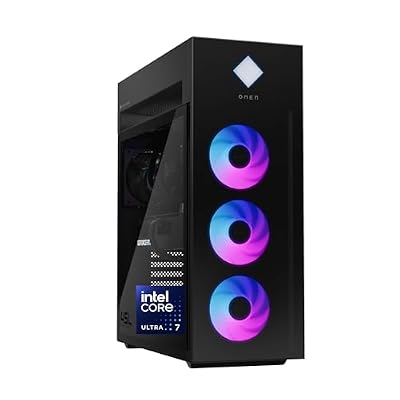
HP OMEN 45L Gaming Desktop, Intel Core Ultra 7 265K, 32 GB RAM, 1 TB SSD, NVIDIA GeForce RTX 5070 Ti, Windows 11 Pro, Microsoft Copilot, Tempered Glass, GT22-3060 (2025)
Included for '17 Best Places to Buy a Prebuilt Gaming PC (2026): Most Reliable Sellers' as a representative home product in this roundup; selection reflects the product set returned for this topic.
View on AmazonThis is the big-brand option for readers who prefer a large company handling support. The listing shows an Intel Core Ultra 7 265K, 32GB of RAM, a 1TB SSD, a GeForce RTX 5070 Ti, Windows 11 Pro and a tempered glass case, and it is tagged as a 2025 model. Memory speed, power supply wattage and cooler details are not listed in the title, so confirm them before you pay.
The case is the selling point. A 45-liter tower leaves plenty of airflow room and is simpler to open up than many compact designs. If you plan to add a second SSD or swap the graphics card in a few years, a roomy chassis helps. Major-brand desktops can use semi-custom motherboards or power supplies, so read the upgrade notes in the red flags section below.
The trade-off is that it is an older model year than the 2026 systems in this guide, and it sits in the premium tier. It makes sense when you find it from a seller with a clear return window, or when a store promotion lowers the cost. Against the iBUYPOWER Y40 it offers a bigger GPU tier but a shorter default warranty from the manufacturer.
Cooler Master NR2 Pro (Ryzen 7 9800X3D, RTX 5070 Ti, Mini-ITX)
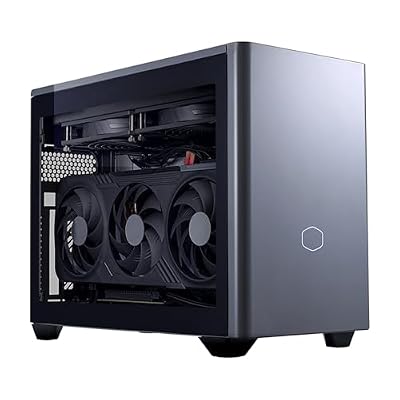
Cooler Master NR2 Pro Gaming PC 9800X3D + RTX 5070 Ti Mini ITX PC | AMD Ryzen 7 9800X3D + NVIDIA RTX 5070 Ti 16GB Gaming PC, 32GB DDR5 6000MHz, 2TB M.2 SSD, 280mm AIO Cooler, Windows 11
Included for '17 Best Places to Buy a Prebuilt Gaming PC (2026): Most Reliable Sellers' as a representative home product in this roundup; selection reflects the product set returned for this topic.
View on AmazonEvery other pick here is a mid-tower. The NR2 Pro is the compact exception: a Mini-ITX system with a Ryzen 7 9800X3D, a GeForce RTX 5070 Ti with 16GB, 32GB of DDR5-6000, a 2TB M.2 SSD and a 280mm all-in-one cooler, running Windows 11. Power supply wattage is not listed in the title.
It is aimed at desks and living-room setups where a full tower will not fit. Small cases pack parts tightly, so they run louder and warmer than a roomy tower under a long gaming session, and upgrade options are narrower: you are limited to graphics cards that fit the case and a power supply in a small format.
The strengths are the same X3D processor used by the STORMCRAFT Phantom, a 2TB drive and a case from a company that makes enclosures for a living. It sits at the top of the premium tier, so it is worth it only if size is a real requirement. If you have space, a tower with the same GPU class gives you easier upgrades for less.
NOVATECH Titan Prebuilt (Ryzen 5, RTX 5060, 16GB RAM)

NOVATECH Titan Prebuilt Gaming PC Desktop Computer - RTX 5060 - Ryzen 5-1TB M.2 SSD - 16GB RAM WiFi/BT, Win 11 Pro - Gaming Computer Tower, Pre Built PC Gaming - 1 Year Warranty
Included for '17 Best Places to Buy a Prebuilt Gaming PC (2026): Most Reliable Sellers' as a representative home product in this roundup; selection reflects the product set returned for this topic.
View on AmazonThe Titan is a plain entry system for buyers who want current-generation graphics without spending on extras. The listing names a Ryzen 5 (exact model not listed), a GeForce RTX 5060, 16GB of RAM, a 1TB M.2 SSD, Wi-Fi and Bluetooth, Windows 11 Pro and a one-year warranty.
That last point matters. A one-year warranty is the floor mentioned in the FAQ above, so it is acceptable at this tier, but it is shorter than what iBUYPOWER and CyberPowerPC offer when you order direct. Treat it as a budget system and keep the return window in mind; run your games and a few stress checks in the first week.
It fits 1080p at high settings and fast esports titles. Compared with the Skytech Archangel 5 earlier in the guide, the processor model and power supply are not listed here, so you give up some visibility into the parts list. Choose this one only if the exact processor and power supply are confirmed in the full listing, or if the price gap to the Skytech is large.
Best Places to Get Prebuilt PCs: What Reddit and PC Forums Recommend
Ask for the best places to get prebuilt PCs on Reddit or PC forums and the same advice repeats, and it lines up with the policy data above:
- Buy the parts list, not the brand. Community members judge a prebuilt by its full component list: a named power supply, two sticks of RAM, a current GPU with its exact VRAM, and a branded NVMe SSD.
- Price-check against a DIY build. A common rule of thumb: if the prebuilt costs no more than about 10-15% above the same parts bought separately, the assembly, Windows license and warranty make it worth it.
- Micro Center and Costco get the most praise for returns and in-person help, and Micro Center’s PowerSpec systems are often cited as fair value.
- Integrators get mixed comments on quality control, so many buyers order Skytech, CyberPowerPC or iBUYPOWER through a retailer with a solid return policy, then register the warranty with the builder.
- Smaller builders such as Starforge and CLX are often recommended for clean builds and named parts, but they mostly ship build-to-order, so expect a longer wait.
Prebuilt Spec Thresholds That Separate a Fair Deal From a Weak One
Use the thresholds below as a quick filter when two listings look similar. They apply to any seller in this guide.
| Part | Minimum worth accepting | Better choice | Walk away if |
|---|---|---|---|
| Graphics card | RTX 5060 or RX 9060 XT for 1080p | RTX 5070 or RX 9070 class for 1440p | Only the series is named, not the model and VRAM |
| Memory | 16GB in two matched sticks | 32GB DDR5 | Single stick or unlisted speed |
| Storage | 1TB NVMe | 2TB Gen4 NVMe | Unnamed drive or SATA-only boot drive |
| Power supply | 650W 80+ Bronze | 750W to 850W 80+ Gold | Wattage given without brand or rating |
| Cooling | Tower air cooler with clear airflow | 240mm to 360mm all-in-one | No cooler mentioned on a high-power CPU |
| Warranty | 1 year parts and labor | 2 to 3 years from the builder | No warranty statement at all |
Match the Seller to Your Risk Tolerance
| If you worry about | Pick this route | Why |
|---|---|---|
| Dead on arrival or wrong parts | Costco or a store with in-person returns | Longest window or same-day exchange |
| Long-term repairs | Builder direct with a multi-year warranty | One company owns the whole machine |
| Upgrading the graphics card later | A mid-tower with a standard-size power supply | Fewer proprietary parts |
| Space | Mini-ITX or small-form-factor systems | Fit first, upgrade options second |
| Paying more than the parts are worth | Compare against a parts list for the same GPU and CPU | A premium above roughly 10 to 15 percent needs a reason such as a longer warranty |
Mistakes to Avoid When Buying From Any Seller
- Buying on a processor name alone. An older chip with a new GPU label can bottleneck the graphics card at 1440p.
- Ignoring the power supply. A weak or unnamed unit limits upgrades and is the most common reason a prebuilt fails early.
- Paying extra for decoration. Extra RGB fans and a bundled keyboard add little compared with another 16GB of memory or a bigger SSD.
- Skipping the first-week test. Run two or three demanding games, watch temperatures and confirm the memory is running at its rated speed in the BIOS.
- Assuming the retailer warranty equals the builder warranty. Confirm which one applies to your order.
Who Should Skip a Prebuilt
Skip a prebuilt if you want a specific case, specific memory or a specific motherboard, or if you already own a monitor, drive and power supply you can reuse. Also skip it if the only difference between two offers is a price gap larger than the total warranty value. In those cases a self-built system or a custom configurator order gives better control.
Which Store Should You Buy From?
Best Websites for Buying Prebuilt PCs
Newegg is the best website for finding prebuilt PCs by exact spec, thanks to its GPU, CPU and power-supply filters. Best Buy and Walmart are best for comparing big-brand systems with easy returns, and Lenovo’s and Dell’s own stores are best for coupon-stacked Legion and Alienware deals.
Best Sites to Buy Prebuilt Gaming PC Designs You Can Customize
CyberPowerPC and iBUYPOWER have the deepest configurators, letting you change nearly every part, case and cooler. NZXT offers fewer, cleaner designs, while Maingear and Starforge suit buyers who want a showpiece build with premium cable work.
Great Places to Buy Prebuilt PCs in Person
Micro Center is the best in-person option if you live near one, since staff can look over the system before you leave. Best Buy has far more locations for same-day pickup, and Costco offers the longest return window on computers.
Quick Match by Buyer Type
- First prebuilt, want zero hassle: Costco (90-day returns) or Best Buy (same-day pickup, in-store returns).
- You want the longest coverage: iBUYPOWER or CyberPowerPC direct.
- Tight budget: Walmart and Newegg sales, sticking to listings sold and shipped by the retailer.
- Showpiece system with personal service: Maingear.
Other Prebuilt Gaming PC Sellers Worth a Look
The 13 places above cover the main routes, but a few other names appear on shopping lists and are worth checking when the main sellers are out of stock.
- ASUS ROG: sells ROG desktops through its own store and major retailers, with premium cases and components. Best for buyers who want a matched ROG ecosystem.
- MSI: offers Aegis and Codex towers mainly through retailers such as Micro Center and Newegg. Often a good fit if you want a name-brand motherboard and GPU.
- Corsair: sells Vengeance desktops with Corsair cooling and power supplies. Check the current model year and configuration before comparing against cheaper builders.
- PowerSpec (Micro Center): the store’s house brand, usually priced below name-brand rivals and easy to return in person.
- Boutique builders: companies such as Falcon Northwest sit in the premium tier and focus on custom cooling and long support. They suit buyers with a large budget who want a hand-built machine.
Buy Direct or From a Retailer? A Quick Comparison
| Route | Best for | Main trade-off |
|---|---|---|
| Direct from the builder (iBUYPOWER, CyberPowerPC) | Longest warranty and configurable parts | Repairs go through the builder’s RMA, which can take two to three weeks |
| Big-box retailer (Best Buy, Walmart) | Easy in-store returns and protection plans | Fixed configurations and shorter return windows |
| Enthusiast store (Micro Center) | In-person shopping, component knowledge, house-brand deals | Limited number of US locations |
| Warehouse club (Costco) | Longer return window and added support perks | Membership required, rotating stock |
| Marketplace sellers | Occasional low prices | Return and support terms vary by seller |
Warranty terms differ between sources and change by date and order channel. iBUYPOWER lists three years of parts and labor on new desktop orders from July 2026 on its own site; CyberPowerPC direct orders are reported at two years of parts and three years of labor. Systems bought through a third-party retailer can carry a shorter term, so read the exact listing.
Best Prebuilt Gaming PC Seller by Situation
First-time buyer
Best Buy or Micro Center. Both let you return the machine in person, and staff can help check that the specs match what you expected.
Best warranty
iBUYPOWER or CyberPowerPC direct. Confirm the warranty length for your order date and keep the order confirmation and serial number.
Lowest price
Walmart and Newegg during sale events, plus open-box or refurbished listings. Stay with listings sold by the retailer itself so the return terms are clear.
Premium build quality
Maingear, NZXT or a boutique builder. Expect a higher price tier for cable management, cooling and support.
Most customization
CyberPowerPC or iBUYPOWER configurators, where you can choose CPU, GPU, memory and storage before buying.
Quick Checklist Before You Buy From Any Seller
- Confirm the exact GPU model and VRAM, not just the series name.
- Check the power supply wattage and efficiency rating; 80+ Bronze is the floor, Gold is better.
- Look for a named motherboard, memory speed and DDR generation.
- Read the return window and who handles repairs before checkout.
- Check whether the listing is sold by the retailer or a third-party seller.
- Save screenshots of the listing and the order confirmation.
Do prebuilt gaming PCs from big-box stores use proprietary parts?
Some major-brand desktops use custom motherboard layouts, smaller power supplies or unusual front-panel connectors. Many system integrators use standard ATX parts. Check the listing for a named motherboard chipset and power supply wattage, and look at photos of the case interior if they are provided.
Is it safe to buy a prebuilt from a seller I have never heard of?
It can be, but treat it like any marketplace purchase: read the full parts list, confirm the return window, check whether the seller or the builder handles the warranty and photograph the box when it arrives. A short, clear warranty is better than a long vague one.
What GPU should a 1440p prebuilt have?
The RTX 5070 or RX 9070 class is the practical starting point for high-refresh 1440p, and 16GB of video memory gives extra margin as textures grow. For 1080p, an RTX 5060 or RX 9060 XT is enough for most current games at high settings.
Is it worth paying for a longer warranty on a prebuilt?
For systems in the upper mid-range and premium tiers, yes, if the extension covers parts and labor and the company handles shipping. For budget systems, a standard one-year warranty plus a long return window is usually enough.
Should I buy a prebuilt with last year’s CPU and a new GPU?
That is fine for most games if the CPU is a mainstream model with at least six cores, but avoid pairing a very old processor with an RTX 5070 or higher because the graphics card will wait on the processor at high refresh rates.
Best Place to Get a Gaming PC: Quick Answers by Search Question
What is the best place to get a gaming PC?
For most buyers the best place to get a gaming PC is Best Buy or Costco when you want easy returns, and iBUYPOWER or CyberPowerPC direct when you want a longer warranty and a visible parts list. Micro Center is the pick if a store is within driving distance. The right choice depends on whether you rank returns, warranty or price first.
What are good websites to buy a prebuilt gaming PC?
Good websites are the ones that list the full parts list before you pay: Newegg (sold by Newegg itself), Micro Center online, Best Buy, Walmart (retailer-sold listings), and builder sites such as iBUYPOWER, CyberPowerPC, Skytech Gaming and NZXT. Before checkout, confirm the exact CPU, GPU model, RAM speed, SSD size and power supply wattage.
Where can I find the best prebuilt gaming PC website for 2026?
No single site wins every category in 2026. Use a retailer for return protection, a builder site for warranty length and configuration options, and a boutique builder such as Maingear when you want premium assembly. Compare the same GPU tier across two or three sellers before you decide.
Where do I look if I want a good PC for a fixed budget?
- Under about $1,000: retailer sales at Walmart, Newegg and Micro Center, usually RTX 5060-class cards or older RTX 40-series stock.
- Around $1,200-$1,600: builder-direct sites such as Skytech Gaming and iBUYPOWER, typically RTX 5060 Ti to RTX 5070 with 16-32GB of RAM.
- Above $2,000: Micro Center, Maingear, Alienware and NZXT, where RTX 5070 Ti and RTX 5080 systems with better cases and cooling are common.
What should I check on any seller before buying?
Check four things: the return window (Costco 90 days on computers, Walmart 30 days, Best Buy and Micro Center 15 days), the warranty length in years for parts and labor, whether the listing is sold by the retailer or a third-party marketplace seller, and whether the power supply is a named brand with an 80 Plus rating. A listing that hides the PSU or motherboard model is a warning sign.
Frequently Asked Questions
Is prebuilt worse value than building myself?
The gap has shrunk considerably. For the warranty, assembly, and support, a well-chosen prebuilt is a smart buy for most gamers.
Which brands are most reliable?
Established builders such as Skytech, iBUYPOWER and CyberPowerPC publish their warranty terms, so compare the policy for the exact seller in the table above before you buy.
Can I upgrade a prebuilt later?
Usually yes. Check for a quality power supply and free slots so you can add storage, RAM, or a stronger GPU in the future.
What’s the most important spec?
The GPU. It drives the bulk of gaming performance, so match its tier to your target resolution and refresh rate first.
Is it better to buy from a retailer or directly from the builder?
Retailers usually make returns easier, especially if you can bring the system back to a store. Buying direct from a builder often gives more configuration options, earlier access to new components, and occasionally better warranty terms. If you value simple returns, choose a retailer; if you want a specific part list, buy direct.
Is Micro Center or Best Buy better for prebuilt gaming PCs?
Both are strong choices. Micro Center tends to appeal to enthusiasts with knowledgeable staff and its PowerSpec house brand, but stores are limited to certain areas. Best Buy has far more locations, easy in-store pickup and returns, and frequent sales. The better option is usually whichever has the configuration you want at the better price near you.
Are marketplace sellers safe for buying a prebuilt PC?
They can be, but they carry more risk. Check the seller’s history, return policy, and warranty statement, and confirm that the listing names every major component. When in doubt, choose listings sold and shipped directly by the retailer or the builder.
What warranty should a prebuilt gaming PC have?
At minimum, look for one year of parts and labor coverage from a builder or retailer that handles claims directly. Longer parts coverage is a bonus, and optional protection plans can make sense for expensive systems. Avoid systems with no clearly stated warranty.
When is the best time to buy a prebuilt gaming PC?
Black Friday and Cyber Monday typically bring the deepest discounts, followed by back-to-school and holiday sales. Prices on systems with previous-generation graphics cards also tend to drop after new GPUs launch.
Does upgrading a prebuilt void the warranty?
Usually not for common upgrades such as adding storage or memory, but policies vary by builder. Read the warranty terms before opening the case, and keep the original parts in case you need to send the system in for service.
Final Thoughts
For top-tier performance, the STORMCRAFT Phantom leads, while the STORMCRAFT Falcon is the standout value at the high-mid range. Budget-focused buyers will find the ZYNEEX RTX 3050 a sensible, affordable starting point.
STORMCRAFT Phantom (RTX 5080) — Best for High-Refresh 4K Without Compromise
The Phantom pairs an RTX 5080 with a Ryzen 7 9800X3D, one of the strongest gaming processors available thanks to its large stacked cache. The listing adds 32GB of DDR5-6000 memory, a 2TB Gen4 NVMe SSD, an 850W power supply, and a 360mm all-in-one liquid cooler on a B850 motherboard, plus a keyboard and mouse. That is a well-balanced flagship configuration with plenty of headroom for 1440p at very high refresh rates and demanding 4K titles.
Skytech Gaming Azure 3 (RX 9070 XT) — Best High-End AMD Pick
The Azure 3 combines a Ryzen 7 9850X3D with a Radeon RX 9070 XT, an all-AMD pairing aimed at high-refresh 1440p and capable 4K gaming. The RX 9070 XT’s 16GB of video memory gives it comfortable headroom for high-resolution textures in modern games. It makes sense for buyers who prefer AMD graphics or want strong rasterized performance per dollar, while RTX systems remain the better fit if NVIDIA-specific features are a priority.
Ocean of Stars (RTX 5070) — Best Value Upper-Mid-Range Build
This system pairs a Ryzen 7 9700X with an RTX 5070 12GB, 32GB of DDR5-6000, a 1TB PCIe SSD, a 240mm AIO cooler, and an 850W power supply. It competes directly with the STORMCRAFT Falcon as an excellent 1440p machine, and the 850W supply leaves room for a future GPU upgrade.
HOENGAGER Panorama (Ryzen 7 5700X, RX 9060 XT 16GB) — Best Mid-Range Pick for 1080p and 1440p
This tower pairs an eight-core Ryzen 7 5700X with a Radeon RX 9060 XT 16GB, 32GB of DDR4 memory, a 1TB NVMe SSD and a 240mm liquid cooler. The 16GB version of the RX 9060 XT is the one to look for, since the extra memory helps in newer games at higher settings. It is a sensible step up from 8GB-class graphics for buyers who play at 1080p with high settings or want to dip into 1440p.
Skytech Gaming Archangel 5 (RTX 5060) — Best Entry to Current-Gen Graphics
The Archangel 5 uses an Intel Core i5-14400F with an RTX 5060, 16GB of DDR5-6000, a 1TB NVMe SSD, and a 750W Gold power supply. That Gold-rated supply is a good sign of build quality at this price and leaves room for a GPU upgrade later. It is aimed squarely at 1080p gaming at high settings and esports titles at high frame rates.
Best Prebuilt Gaming PCs by Budget at These Stores
The systems reviewed above lean toward Skytech and STORMCRAFT. If you are shopping at the integrators and major brands on this list, these are current configurations worth comparing, grouped by price tier. Exact parts vary by retailer SKU, so match the full model number before you buy.
Best Prebuilt Gaming PC for 1080p (Budget Tier)
What to expect at this tier:
- GPU class: RTX 5060, RTX 5060 Ti or Radeon RX 9060 XT
- High settings at 1080p in most current games; high refresh rates in esports titles
- 16GB of RAM is common; 32GB is a bonus worth paying a little extra for
- Check for a named power supply of at least 650W Bronze so a future GPU upgrade is possible
CyberPowerPC Gamer Xtreme VR (RTX 5060 Ti) — Best for Mainstream 1080p From a Big Integrator

CyberPowerPC Gamer Xtreme VR Gaming PC, Intel Core i5-14400F 2.5GHz, GeForce RTX 5060 Ti 8GB, 16GB DDR5, 2TB PCIe 4.0 SSD, WiFi Ready & Windows 11 Home (GXiVR8060A34)
Included for '17 Best Places to Buy a Prebuilt Gaming PC (2026): Most Reliable Sellers' as a representative home product in this roundup; selection reflects the product set returned for this topic.
View on AmazonKey specs: Intel Core i5-14400F · GeForce RTX 5060 Ti 8GB · 16GB DDR5 · 2TB PCIe 4.0 SSD
- CPU: Intel Core i5-14400F (10 cores)
- GPU: GeForce RTX 5060 Ti with 8GB of video memory
- Memory and storage: 16GB DDR5, 2TB PCIe 4.0 SSD
- Where sold: CyberPowerPC direct, big-box retailers and online marketplaces
- Warranty: 2 years parts and 3 years labor when bought direct; retail-channel terms can be shorter
The CyberPowerPC Gamer Xtreme line is one of the most widely stocked prebuilts in the US, which makes it easy to compare prices across stores. The 2TB SSD is generous for this tier.
Pros:
- Large SSD for the price band
- Standard ATX parts that are easy to upgrade
- Longer warranty when bought direct
Cons:
- 8GB of video memory limits ultra textures in newer games
- 16GB of RAM is the floor for this tier
Skip it if: you play at 1440p; step up to an RTX 5070 system below.
Best Prebuilt Gaming PC for 1440p (Upper Mid-Range Tier)
What to expect at this tier:
- GPU class: RTX 5070 or RTX 5070 Ti, or Radeon RX 9070 XT
- High-refresh 1440p in most games, with upscaling for demanding titles
- Gaming-focused CPUs such as the Ryzen 7 7800X3D or 9800X3D
- 32GB of DDR5 is standard; look for at least a 750W power supply
- Big-brand towers (Lenovo, Alienware) cost more per frame but bring larger support networks
iBUYPOWER Y40 (Ryzen 7 9800X3D, RTX 5070) — Best for High-Refresh 1440p With a Long Warranty

iBUYPOWER Y40 Gaming PC Desktop Computer AMD Ryzen 7 9800X3D CPU, NVIDIA GeForce RTX 5070 12GB GPU, 32GB DDR5 5200MHz RAM, 1TB NVMe SSD, Windows 11 Home, Gamer Keyboard and Mouse - Y40BA7N5703
Included for '17 Best Places to Buy a Prebuilt Gaming PC (2026): Most Reliable Sellers' as a representative home product in this roundup; selection reflects the product set returned for this topic.
View on AmazonKey specs: AMD Ryzen 7 9800X3D · GeForce RTX 5070 12GB · 32GB DDR5-5200 · Y40 dual-chamber case
- CPU: AMD Ryzen 7 9800X3D (8 cores, 3D V-Cache)
- GPU: GeForce RTX 5070 with 12GB of video memory
- Memory: 32GB DDR5-5200
- Warranty: 3 years parts and labor on direct orders placed since July 1, 2026, with in-store repair at Micro Center
The iBUYPOWER Y40 puts the money where 1440p high-refresh gaming benefits most, and iBUYPOWER’s current direct-order warranty is the longest of the integrators covered here.
Pros:
- One of the fastest gaming CPUs available
- 12GB GPU suits 1440p
- Best warranty terms of any integrator when bought direct
Cons:
- CPU is stronger than an RTX 5070 needs, so cost per frame is higher than a Ryzen 7 9700X build
- Retail-channel units can carry a shorter warranty
Skip it if: you mainly play at 1080p, where a cheaper CPU loses little.
Lenovo Legion Tower 5 (Ryzen 7 7800X3D, RTX 5070) — Best Major-Brand Pick for Coupon Hunters

Lenovo Legion Tower 5-2026 - Gaming Desktop - NVIDIA GeForce RTX 5070 - Ryzen 7 7800X3D - 32GB Memory - 1TB Storage - Windows 11 Home - Eclipse Black - Free 3 Months PC Game Pass
Included for '17 Best Places to Buy a Prebuilt Gaming PC (2026): Most Reliable Sellers' as a representative home product in this roundup; selection reflects the product set returned for this topic.
View on AmazonKey specs: AMD Ryzen 7 7800X3D · GeForce RTX 5070 · 32GB memory · 1TB SSD
- CPU: AMD Ryzen 7 7800X3D
- GPU: GeForce RTX 5070
- Memory: 32GB
- Storage: 1TB SSD
The 2026 Lenovo Legion Tower 5 is the value play among the big PC brands, especially when Lenovo’s store stacks coupons, and the 7800X3D remains one of the best gaming CPUs for the money.
Pros:
- Strong CPU-GPU balance for 1440p
- Clean, compact case
- Lenovo support network with optional on-site service
Cons:
- 1TB SSD fills quickly with modern games
- Some internal parts are less standard than integrator builds, so check before planning upgrades
Skip it if: you want a custom part list; retail Legion configurations are fixed.
Alienware Aurora ACT1250 (Core Ultra 7 265F, RTX 5070) — Best for Single-Company Support

Alienware Aurora Gaming Desktop, RTX 5070, Intel Core Ultra 7 265F | 1TB SSD, 32GB DDR5, Wi‑Fi 7, Bluetooth, Killer 2.5Gb Ethernet, Windows 11 Home, Wired Keyboard, ACT1250
Included for '17 Best Places to Buy a Prebuilt Gaming PC (2026): Most Reliable Sellers' as a representative home product in this roundup; selection reflects the product set returned for this topic.
View on AmazonKey specs: Intel Core Ultra 7 265F · GeForce RTX 5070 · 32GB memory · 1TB SSD
- CPU: Intel Core Ultra 7 265F (20 cores)
- GPU: GeForce RTX 5070
- Memory: 32GB
- Storage: 1TB SSD
The Alienware Aurora ACT1250 is Dell’s mainstream gaming tower. It fits shoppers who value Dell’s service plans and one company handling every repair.
Pros:
- Dell support infrastructure and optional on-site plans
- 20-core CPU also handles streaming and video editing
- Frequent direct-store promotions
Cons:
- Usually costs more than an integrator build with the same GPU
- Standard warranty is shorter than iBUYPOWER or CyberPowerPC direct
Skip it if: lowest cost per frame is your priority.
Red Flags to Watch for in Any Prebuilt Listing
Wherever you shop, a few warning signs separate a good prebuilt from one that cut corners in places most buyers do not check:
- Unnamed power supply: A listing that says only “650W PSU” with no brand or efficiency rating is a common corner to cut. Look for a named unit with at least a Bronze rating, and preferably Gold on mid-range and high-end systems.
- Single-stick memory: One memory module runs in single-channel mode, which can noticeably reduce performance, especially on systems relying on integrated graphics. Two matched sticks are the norm.
- Ambiguous GPU variants: Some graphics cards come in versions with different memory amounts. Make sure the listing states the exact model and VRAM.
- Vague processor wording: Phrases like “Core i7 up to 4.0GHz” without a full model number can hide an older generation chip. Look for the full model name.
- Generic storage: An unbranded SSD may be slower or less durable. A named NVMe drive is a better sign.
- Airflow-starved cases: Solid glass fronts with few intake vents can make high-end parts run hot and loud.
- Unclear seller identity: On marketplaces, a seller with little history or no clear warranty statement is a risk no discount justifies.
Warranty, Returns, and Support: What to Check Before You Pay
A prebuilt’s biggest advantage over a DIY build is having one party responsible if something goes wrong. Make sure that promise is real by checking these points before checkout:
- Warranty length and scope: One year of parts and labor is common among budget builders, while some integrators offer longer parts coverage. Note whether labor is included.
- Who handles repairs: Some builders handle everything; others send you to individual component makers after a period.
- Shipping costs: Find out who pays to ship a faulty system back, since a large tower is expensive to ship.
- Upgrade policy: Check whether opening the case or adding parts affects coverage. Many builders allow common upgrades, but terms vary.
- Return window and restocking fees: Retailers and builders differ widely, and some charge fees on opened computers.
- Support channels: Phone, chat, and email support, plus realistic response times, matter most the week your system arrives.
When the system arrives, inspect it immediately. Remove any packing foam from inside the case, confirm the components match your order, run a few demanding games, and update graphics drivers. Problems that appear in the first days are easiest to resolve within the return window.
When to Buy a Prebuilt Gaming PC
Prebuilt prices follow a predictable rhythm. The biggest discounts usually arrive during Black Friday and Cyber Monday, with smaller waves around back-to-school season, major holidays, and mid-year retailer sales events. New graphics card launches also shift pricing: systems with the outgoing generation often drop in price once successors arrive, which can be a sweet spot for value-focused buyers. If you are not in a hurry, track a few systems for several weeks to learn their normal price range so you can recognize a genuine deal.
Should You Buy Refurbished or Open-Box?
Open-box and certified refurbished systems can offer meaningful savings, especially at big-box retailers and manufacturer outlet stores. Open-box usually means a customer returned the system, often unused, while certified refurbished systems have been inspected and repaired as needed by the manufacturer or retailer. The key is warranty: buy only when the seller provides clear warranty coverage, and inspect the system on arrival for missing accessories, cosmetic damage, and correct components. Avoid unverified used systems from marketplace listings unless you can see the machine running before paying.
What are great places to buy prebuilt PCs?
Costco and Best Buy are great for returns, Micro Center for in-person help, Newegg for spec filters, and iBUYPOWER, CyberPowerPC or NZXT direct for custom builds. Pick the seller type that matches whether you value easy returns, a specific parts list, or a long warranty.
How do I buy a prebuilt PC for the first time?
Start with your monitor resolution, pick the matching graphics card tier, and buy from a seller with a clear return window and warranty. Read the full parts list, then inspect and run demanding games right after delivery while you can still return it.
What should a prebuilt gaming PC spec list include?
A trustworthy listing names the power supply and its efficiency rating, shows two matched memory sticks, states the exact GPU model with its VRAM and gives the full CPU model number. Vague wording such as “Core i7 up to 4.0GHz” or an unnamed 650W supply is a warning sign.
Which place offers the longest warranty on a prebuilt gaming PC?
Among the sellers compared here, iBUYPOWER lists 3 years of parts and labor on direct orders placed since July 1, 2026, and CyberPowerPC lists 2 years of parts and 3 years of labor direct. Retail-channel units can carry shorter terms, so confirm the policy for your exact order.