
The best gaming PC in 2026 is not automatically the most expensive one. The global memory shortage has pushed prices up, but prebuilt desktops now often match or beat the cost of building the same machine yourself, and there are strong options at almost every budget. Our top pick is the iBUYPOWER Element with a Ryzen 7 7800X3D and Radeon RX 9070 XT, a pairing that delivers high-refresh 1440p and capable 4K without RTX 5080 pricing. If you want the same core hardware for less, the Skytech King 95 undercuts it by around $500, and the CyberPowerPC Gamer Xtreme is the budget machine to beat thanks to 32GB of DDR5 and a 2TB SSD.
- Quick List: The 10 Best Gaming PCs of 2026
- Gaming PC Comparison Table
- 1. iBUYPOWER Element: The Best Gaming PC Overall
- 2. Skytech King 95: Best Value Gaming PC
- 3. CyberPowerPC Gamer Xtreme VR: Best Budget Gaming PC
- 4. ABS Cyclone Aqua: Best Gaming PC Under $2,000 for 1440p
- 5. Skytech Gaming PC with RTX 5080: Best Gaming PC for 4K
- 6. Lenovo Legion Tower 5i: Best Big-Brand Gaming PC for 1440p
- 7. ASUS ROG G700: Best Mid-Range Gaming Tower
- 8. Alienware Aurora: Best Alienware Gaming PC for 4K
- 9. Minisforum G1 Pro: Best Mini Gaming PC
- 10. Alienware Area-51: The No-Compromise Gaming PC
- How We Pick the Best Gaming PCs
- How to Choose a Gaming PC
- GPU Hierarchy: How the Graphics Cards in These PCs Compare
- Prebuilt vs Building Your Own
- Frequently Asked Questions
- Related Articles
October 10, 2026: Rebuilt the guide from scratch. Every pick is now a specific, in-stock configuration with its exact CPU, GPU, RAM and storage listed, plus a new GPU hierarchy table, a “How we pick” section and ten picks covering budget, 1440p, 4K, mini PC and no-compromise builds. Older generic listings (RTX 3050 and older GPUs) were removed.
Quick answer: For most people in 2026, the best gaming pc 2026 is the iBUYPOWER Element — our #1 rated choice. See the full ranked comparison, alternatives and buying advice below.
Quick List: The 10 Best Gaming PCs of 2026
As an Amazon Associate we earn from qualifying purchases. Prices change often; the figures below were checked on Amazon on October 10, 2026.
- Best Overall: iBUYPOWER Element Gaming PC (Ryzen 7 7800X3D, RX 9070 XT 16GB, 32GB DDR5, 2TB SSD) — High-refresh 1440p and entry 4K · about $2,600
- Best Value: Skytech King 95 Gaming PC (Ryzen 7 7800X3D, RX 9070 XT) — Same CPU and GPU as our top pick for less · about $2,100
- Best Budget: CyberPowerPC Gamer Xtreme VR (Core Ultra 5 225F, RTX 5060 8GB, 32GB DDR5, 2TB SSD) — 1080p high-refresh with plenty of RAM and storage · about $1,510
- Best Under $2,000 for 1440p: ABS Cyclone Aqua Gaming PC (Core i7-14700F, RTX 5070 12GB, 32GB DDR4, 1TB SSD) — RTX 5070 and 32GB RAM without the premium · about $1,840
- Best for 4K: Skytech Gaming PC (Ryzen 7 9800X3D, RTX 5080 16GB, 32GB RAM, 2TB SSD) — The fastest gaming CPU plus an RTX 5080 · about $3,400
- Best Big-Brand 1440p: Lenovo Legion Tower 5i (Core Ultra 7 265F, RTX 5070 Ti 16GB, 32GB, 1TB SSD) — 16GB of VRAM and Lenovo support · about $2,775
- Best Mid-Range Tower: ASUS ROG G700 Gaming Desktop (Core Ultra 7 265F, RTX 5070 12GB, 32GB DDR5, 1TB SSD) — Liquid-cooled CPU and an 850W PSU for upgrades · about $2,400
- Best Alienware for 4K: Alienware Aurora Gaming Desktop (Core Ultra 9 285, RTX 5080 16GB) — RTX 5080 with Dell’s support network · about $3,185
- Best Mini PC: Minisforum G1 Pro Mini Gaming PC (Ryzen 9 8945HX, RTX 5060 8GB, 32GB DDR5, 1TB SSD) — A real desktop RTX 5060 in a 3.8-liter box · about $1,720
- No-Compromise Pick: Alienware Area-51 Gaming Desktop (Core Ultra 9 285K, RTX 5090 32GB, 64GB DDR5, 4TB SSD) — RTX 5090 flagship, best bought on discount · about $9,200
Gaming PC Comparison Table
| Gaming PC | CPU | GPU | RAM / SSD | Best for | Approx. price |
|---|---|---|---|---|---|
| iBUYPOWER Element | Ryzen 7 7800X3D | RX 9070 XT 16GB | 32GB DDR5 / 2TB | 1440p high refresh, entry 4K | $2,600 |
| Skytech King 95 | Ryzen 7 7800X3D | RX 9070 XT 16GB | See listing | Best value 1440p | $2,100 |
| CyberPowerPC Gamer Xtreme VR | Core Ultra 5 225F | RTX 5060 8GB | 32GB DDR5 / 2TB | 1080p on a budget | $1,510 |
| ABS Cyclone Aqua | Core i7-14700F | RTX 5070 12GB | 32GB DDR4 / 1TB | 1440p under $2,000 | $1,840 |
| Skytech Gaming PC (RTX 5080) | Ryzen 7 9800X3D | RTX 5080 16GB | 32GB / 2TB | 4K and 240Hz 1440p | $3,400 |
| Lenovo Legion Tower 5i | Core Ultra 7 265F | RTX 5070 Ti 16GB | 32GB / 1TB | 1440p, big-brand support | $2,775 |
| ASUS ROG G700 | Core Ultra 7 265F | RTX 5070 12GB | 32GB DDR5 / 1TB | Upgradeable mid-range | $2,400 |
| Alienware Aurora | Core Ultra 9 285 | RTX 5080 16GB | See listing | 4K with Dell support | $3,185 |
| Minisforum G1 Pro | Ryzen 9 8945HX | RTX 5060 8GB | 32GB DDR5 / 1TB | Small desks, living room | $1,720 |
| Alienware Area-51 | Core Ultra 9 285K | RTX 5090 32GB | 64GB DDR5 / 4TB | No-compromise 4K | $9,200 |
1. iBUYPOWER Element: The Best Gaming PC Overall
Specifications: AMD Ryzen 7 7800X3D · AMD Radeon RX 9070 XT 16GB · 32GB DDR5-5200 RGB · 2TB NVMe SSD · Windows 11 Home · keyboard and mouse included. Price checked: about $2,600 (model EWA7R97XT01).
The iBUYPOWER Element earns the top spot because it gets the two parts that matter most for gaming exactly right. The Ryzen 7 7800X3D is a previous-generation chip, but its 3D V-Cache still makes it faster in games than almost any non-X3D processor, and the RX 9070 XT sits just behind the RTX 5080 in PC Gamer’s 3DMark Time Spy Extreme GPU hierarchy (14,315 points versus 16,252), ahead of the RTX 5070 Ti. That is genuine high-refresh 1440p performance and very playable 4K with FSR upscaling, for roughly $800 less than a typical RTX 5080 machine.
The rest of the build is unusually generous for 2026. Memory prices have made 16GB the default on many prebuilts, so 32GB of DDR5 and a 2TB SSD at this price stand out. PC Gamer named the closely related iBUYPOWER RDY Element 9 Pro, which uses the same 7800X3D and RX 9070 XT pairing, its best gaming PC overall and praised its value and lack of bloatware. Note that this Amazon configuration lists DDR5-5200 memory rather than the faster DDR5-6000 in the RDY model, a small difference in games but worth knowing.
Reasons to buy
- Best-in-class gaming CPU for the money paired with a top-tier AMD GPU
- 32GB of DDR5 and 2TB of storage, both rare at this price
- 16GB of VRAM leaves headroom for future games
Reasons to avoid
- AMD’s FSR upscaling and frame generation are less widely supported than Nvidia DLSS
- DDR5-5200 memory is slower than the DDR5-6000 X3D chips prefer
Buy if you want the best balance of frame rates, memory and storage without paying RTX 5080 prices. Don’t buy if you specifically want Nvidia features such as DLSS 4 multi-frame generation; the Lenovo Legion Tower 5i below is the closest Nvidia alternative.

iBUYPOWER Element Gaming PC Desktop Computer AMD Ryzen 7 7800X3D CPU, AMD Radeon RX 9070XT 16GB GPU, 32GB DDR5 RGB 5200MHz RAM, 2TB NVMe SSD, Windows 11 Home, Gamer Keyboard and Mouse - EWA7R97XT01
Best overall: Ryzen 7 7800X3D + RX 9070 XT with 32GB DDR5 and 2TB SSD; same CPU/GPU pairing as PC Gamer top pick (iBUYPOWER RDY Element 9 Pro).
Consider: AMD FSR less supported than DLSS; DDR5-5200 memory.
View on Amazon2. Skytech King 95: Best Value Gaming PC
Specifications: AMD Ryzen 7 7800X3D · AMD Radeon RX 9070 XT · memory and SSD vary by listing (check the configuration before you buy). Price checked: about $2,100.
If our top pick’s price is a stretch, the Skytech King 95 delivers the same CPU and GPU for around $500 less. Because the 7800X3D and RX 9070 XT do almost all of the work in games, frame rates should land in the same class as the iBUYPOWER Element, which makes this the best performance per dollar on the list for 1440p gamers.
The trade-off is in the details. Skytech’s Amazon title only confirms the processor and graphics card, so check the listing for the exact RAM capacity, speed and SSD size. Our rule of thumb: insist on 32GB in two sticks (dual-channel) and at least a 1TB NVMe drive. If this listing ships with less, the price gap to the iBUYPOWER narrows quickly once you add the upgrades yourself.
Reasons to buy
- Top-pick gaming performance for noticeably less money
- Skytech towers generally use standard ATX parts, which keeps upgrades simple
Reasons to avoid
- Memory and storage need checking per listing
- Same AMD feature trade-offs as our top pick
Buy if you want the most frames per dollar at 1440p. Don’t buy if you want a fully specified, no-surprises configuration; pay the extra for the iBUYPOWER.
3. CyberPowerPC Gamer Xtreme VR: Best Budget Gaming PC
Specifications: Intel Core Ultra 5 225F · Nvidia GeForce RTX 5060 8GB · 32GB DDR5 · 2TB PCIe 4.0 SSD · Wi-Fi ready · Windows 11 Home. Price checked: about $1,510.
This is the same configuration Tom’s Hardware reviewed and named its best budget gaming PC: a Core Ultra 5 225F, RTX 5060, 32GB of DDR5-6400 and a 2TB SSD. That storage and memory is the headline. Many rivals at this price ship with 16GB or a single memory stick and a 512GB or 1TB drive, which fills up after a handful of modern games.
The RTX 5060 is a 1080p card first. It scores close to the RTX 4060 Ti in PC Gamer’s GPU hierarchy and supports DLSS 4 frame generation, so high-refresh 1080p and lighter 1440p are realistic. Its 8GB of VRAM is the main limitation; the newest games can need medium textures to stay smooth. Tom’s Hardware also found the stock air cooler very loud even at idle, so budget for a quieter cooler or a good headset.
Reasons to buy
- 32GB DDR5 and 2TB SSD at a budget price
- DLSS 4 support extends the RTX 5060’s life
- Clean Windows install without bloatware, per Tom’s Hardware
Reasons to avoid
- 8GB of VRAM limits texture settings in new AAA games
- Noisy stock CPU cooler
Buy if you play at 1080p and want a machine that will not run out of RAM or storage. Don’t buy if you play at 1440p with maxed-out textures; step up to the ABS Cyclone Aqua.
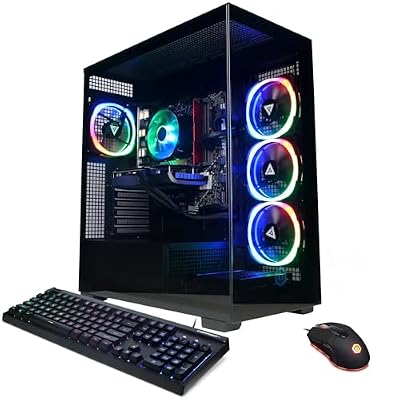
CyberpowerPC Gamer Xtreme VR Gaming PC, Intel Core Ultra 5 225F, GeForce RTX 5060 8GB, 32GB DDR5, 2TB PCIe 4.0 SSD, WiFi Ready & Windows 11 Home
Best budget: same configuration Tom's Hardware reviewed as its best budget PC (Core Ultra 5 225F, RTX 5060, 32GB DDR5, 2TB).
Consider: 8GB VRAM; loud stock CPU cooler per Tom's Hardware.
View on Amazon4. ABS Cyclone Aqua: Best Gaming PC Under $2,000 for 1440p
Specifications: Intel Core i7-14700F · Nvidia GeForce RTX 5070 12GB · 32GB DDR4-3200 · 1TB M.2 SSD · Windows 11. Price checked: about $1,840.
ABS is Newegg’s in-house PC brand, and PC Gamer picked the Cyclone Aqua as its best budget gaming PC because it puts money into the parts that matter: a strong CPU, 32GB of RAM and a capable GPU, while skipping flashy extras. This Amazon configuration steps up to an RTX 5070, which scores about two-thirds higher than the RTX 5060 in PC Gamer’s Time Spy Extreme hierarchy and is a comfortable 1440p card.
The 20-core Core i7-14700F also handles streaming and content creation well. The compromises are the ones PC Gamer flagged: a modest selection of I/O ports, so you may need a USB hub, and DDR4 instead of DDR5 memory. In games the DDR4 costs little, and 32GB of any memory is a win during the shortage.
Reasons to buy
- RTX 5070 and 32GB RAM for well under $2,000
- Strong multi-core CPU for streaming and editing
Reasons to avoid
- Limited front and rear ports
- DDR4 memory and a 1TB SSD
Buy if you want a no-nonsense 1440p machine. Don’t buy if you want 16GB of VRAM for long-term 1440p; the RX 9070 XT picks above have it.

ADVANCED BATTLESTATIONS ABS Cyclone Aqua Gaming PC - Windows 11 - Core i7-14700F - GeForce RTX 5070 12GB - DLSS 4-32GB DDR4 3200-1TB M.2 SSD
Best under 2,000 USD for 1440p: ABS Cyclone Aqua is the PC Gamer budget pick; this config has i7-14700F, RTX 5070 12GB and 32GB RAM.
Consider: Limited I/O ports; DDR4 memory; 1TB SSD.
View on Amazon5. Skytech Gaming PC with RTX 5080: Best Gaming PC for 4K
Specifications: AMD Ryzen 7 9800X3D · Nvidia GeForce RTX 5080 16GB · 32GB RAM · 2TB SSD. Price checked: about $3,400.
For 4K, or for 240Hz-plus 1440p, this Skytech pairs the two parts reviewers recommend most at the high end. The Ryzen 7 9800X3D is widely regarded as the best gaming CPU you can buy, and the RTX 5080 is the fastest card below the RTX 5090, with full access to DLSS 4 upscaling and multi-frame generation. It is essentially the same core configuration PC Gamer recommends in its high-end pick, the Corsair Vengeance a7500, which is currently hard to find on Amazon in that spec.
32GB of memory and a 2TB SSD round it out. As with every Skytech, confirm the exact power supply and memory speed on the listing; for an RTX 5080 you want at least an 850W 80 Plus Gold unit.
Reasons to buy
- Top gaming CPU plus the second-fastest consumer GPU
- DLSS 4 multi-frame generation for very high 4K frame rates
- 2TB of storage
Reasons to avoid
- A big price jump over RX 9070 XT machines
- The 9800X3D is a gaming chip first; heavy productivity users can find more cores for less
Buy if you game on a 4K or 240Hz monitor. Don’t buy if you play at 1080p; the extra money buys little you will see.
6. Lenovo Legion Tower 5i: Best Big-Brand Gaming PC for 1440p
Specifications: Intel Core Ultra 7 265F (20 cores) · Nvidia GeForce RTX 5070 Ti 16GB · 32GB memory · 1TB SSD · Legion K510 keyboard included. Price checked: about $2,775.
The Legion Tower 5i is our pick for buyers who want Nvidia and the reassurance of a major manufacturer’s warranty and support. The RTX 5070 Ti is the sweet-spot Nvidia card of this generation: 16GB of VRAM, performance close to the previous RTX 4080, and DLSS 4 support. It is excellent at 1440p high refresh and handles 4K with upscaling.
The 20-core Core Ultra 7 265F is a strong all-rounder that is better at productivity than gaming-focused X3D chips, though slightly behind them in CPU-bound games. Big-brand towers sometimes use proprietary motherboards or power supplies, so if you plan to swap major parts later, check the upgrade options first.
Reasons to buy
- RTX 5070 Ti with 16GB VRAM and DLSS 4
- Big-brand warranty and support
- Good for gaming plus productivity work
Reasons to avoid
- More expensive than the RX 9070 XT picks for similar raw performance
- Big-brand towers can be harder to upgrade than standard ATX builds
Buy if you want Nvidia features and a name-brand warranty. Don’t buy if you want the cheapest route to 1440p; the Skytech King 95 is faster per dollar.

Lenovo Legion Tower 5i – AI-Powered Gaming PC - Intel® Core Ultra 7 265F Processor – NVIDIA® GeForce RTX™ 5070 Ti Graphics – 32 GB Memory – 1 TB Storage Legion K510 Mini Pro Gaming Keyboard
Best big-brand 1440p: Lenovo Legion Tower 5i with RTX 5070 Ti 16GB, Core Ultra 7 265F and 32GB for buyers wanting Nvidia and major-brand support.
Consider: Costs more than RX 9070 XT picks for similar performance; may be harder to upgrade.
View on Amazon7. ASUS ROG G700: Best Mid-Range Gaming Tower
Specifications: Intel Core Ultra 7 265F · Nvidia GeForce RTX 5070 12GB · 32GB DDR5 · 1TB PCIe 4.0 SSD · Windows 11 Pro (model G700TF-XS776). Price checked: about $2,400.
Tom’s Hardware named the ROG G700 its best mid-range gaming PC. The reasons are the build quality touches you rarely see at this level: a 240mm liquid cooler on the CPU, a roomy glass case and an 850W power supply with enough headroom for a much faster graphics card later. Gaming performance is solid at 1080p and 1440p, with less demanding games playable at 4K.
Two caveats. The case has no mounts for 2.5-inch or 3.5-inch drives, so all extra storage has to be M.2. And at this price the RTX 5070 is the weak link compared with the RX 9070 XT machines above, so watch for discounts; the G700 is a much stronger buy below $2,000.
Reasons to buy
- Liquid-cooled CPU and quality chassis
- 850W PSU leaves room for a GPU upgrade
- Windows 11 Pro included
Reasons to avoid
- No 2.5-inch or 3.5-inch drive bays
- RTX 5070 is modest for the price
Buy if you value build quality and plan to upgrade the GPU later. Don’t buy if raw frame rate per dollar is your priority.

ASUS ROG G700 (2025) Gaming Desktop PC, Intel® Core™ Ultra 7 265F Processor, NVIDIA® GeForce RTX™ 5070, 1TB M.2 NVMe™ PCIe® 4 SSD, 32GB DDR5 RAM, Windows 11 Pro, G700TF-XS776
Best mid-range tower: ASUS ROG G700, named best mid-range PC by Tom's Hardware; 240mm liquid cooler, 850W PSU, RTX 5070, 32GB DDR5.
Consider: No 2.5/3.5-inch drive bays; RTX 5070 modest for the price.
View on Amazon8. Alienware Aurora: Best Alienware Gaming PC for 4K
Specifications: Intel Core Ultra 9 285 · Nvidia GeForce RTX 5080 16GB · memory and storage vary by listing. Price checked: about $3,185.
The redesigned Aurora brings Alienware’s styling and Dell’s support network to a more sensible price than the Area-51. The RTX 5080 handles 4K at high settings, especially with DLSS 4, and the 24-core Core Ultra 9 285 is a capable chip for streaming and creative work alongside gaming.
Check the memory configuration before you buy. PC Gamer has criticized Alienware in the past for shipping single-channel memory, which halves bandwidth; you want two sticks. And as PC Gamer advises for the brand, avoid paying full price, because Alienware desktops are discounted regularly.
Reasons to buy
- RTX 5080 for 4K gaming
- Dell warranty and support options
Reasons to avoid
- Costs slightly less than the Skytech RTX 5080 pick but uses a slower gaming CPU
- Memory configuration needs checking
Buy if you want a premium big-brand 4K machine. Don’t buy if you want the fastest possible frame rates for the money; the Skytech 9800X3D build is quicker in CPU-limited games.
9. Minisforum G1 Pro: Best Mini Gaming PC
Specifications: AMD Ryzen 9 8945HX (16 cores) · Nvidia GeForce RTX 5060 8GB · 32GB DDR5 · 1TB PCIe 4.0 SSD · 5GbE · Wi-Fi 7. Price checked: about $1,720.
Most mini PCs rely on integrated or laptop graphics. The G1 Pro, which PC Gamer sells as the AtomMan G1 Pro and named its best mini PC for gaming, fits a desktop RTX 5060 into a chassis of just 3.8 liters. That makes it a real option for a cramped desk or as a living-room console replacement, with solid 1080p and playable 1440p at medium to high settings.
You pay a premium for the size: a full-size tower with the same GPU costs less. PC Gamer also noted mixed cooling under heavy load and few USB ports, though there is a spare M.2 slot for more storage.
Reasons to buy
- Desktop RTX 5060 in a tiny, portable case
- 16-core CPU, 32GB RAM, 5GbE and Wi-Fi 7
- Spare M.2 slot
Reasons to avoid
- “Mini PC tax” compared with full-size towers
- Limited USB ports; cooling is mixed under heavy loads
Buy if space matters more than price. Don’t buy if you have room for a tower; the CyberPowerPC is cheaper with the same GPU.

MINISFORUM G1 Pro Mini PC, Ryzen 9 8945HX, 16C/32T up to 5.4GHz, GeForce RTX 5060 8GB GDDR7,32GB DDR5, 1TB SSD, 5GbE, Wi-Fi 7, Quad 4K, 245W Performance Gaming PC
Best mini PC: Minisforum (AtomMan) G1 Pro, PC Gamer best mini gaming PC; desktop RTX 5060 in a 3.8 L chassis with 32GB DDR5.
Consider: Mini PC price premium; few USB ports; mixed cooling.
View on Amazon10. Alienware Area-51: The No-Compromise Gaming PC
Specifications: Intel Core Ultra 9 285K · Nvidia GeForce RTX 5090 32GB GDDR7 · 64GB DDR5 · 4TB SSD · liquid cooled · Wi-Fi 7 · model AAT2250. Price checked: about $9,200.
If budget truly does not matter, the Area-51 is as fast as prebuilt gaming PCs get. The RTX 5090 scores more than 50% higher than the RTX 5080 in PC Gamer’s Time Spy Extreme hierarchy, and in PC Gamer’s review a similar Area-51 configuration averaged 91 fps in Black Myth: Wukong at 1440p Very High and 256 fps in Cyberpunk 2077 with ray tracing, upscaling and frame generation enabled. Both PC Gamer and Tom’s Hardware found it runs impressively quietly for the hardware inside.
The redesigned chassis is far more upgrade-friendly than older Alienwares, but its ATX12VO power supply limits motherboard choices later. And this listing’s price, with 64GB of RAM and 4TB of storage, is very high. Treat it as a “wait for a discount” machine; PC Gamer’s advice is never to pay full price for an Alienware.
Reasons to buy
- RTX 5090: the fastest consumer gaming GPU
- 64GB RAM and 4TB SSD out of the box
- Quiet under load for its class
Reasons to avoid
- Extremely expensive at list price
- ATX12VO power supply complicates motherboard swaps
Buy if you want maximum 4K and path-traced performance and can catch a sale. Don’t buy if you are value-minded; the Skytech RTX 5080 build costs a third as much.

Dell Alienware Area-51 AAT2250 Gaming Desktop - Intel Core Ultra 9 285K, NVIDIA GeForce RTX 5090 32GB GDDR7, 64GB DDR5 RAM, 4TB SSD, Liquid Cooled, Wi-Fi 7, Windows 11 Home - Lunar Silver
No-compromise pick: Alienware Area-51 with RTX 5090 32GB, Core Ultra 9 285K, 64GB DDR5, 4TB; reviewed by PC Gamer and Tom's Hardware.
Consider: Very expensive at list price; ATX12VO PSU limits motherboard swaps.
View on AmazonHow We Pick the Best Gaming PCs
The Build PC Guide editorial team does not run an in-house benchmark lab, and we will not pretend otherwise. Instead, every machine on this list has to pass four checks:
- Published lab results. We lean on independent reviews from outlets that benchmark systems, chiefly PC Gamer and Tom’s Hardware. Six of our ten picks are machines those teams reviewed or close relatives of them.
- A balanced configuration. We reject systems with single-channel memory, less than 1TB of NVMe storage above $1,200, or a GPU that is clearly too weak for the price. Old GPUs such as the RTX 3050, RX 6500 XT or anything older do not make the cut in 2026.
- Real availability. Every pick is an in-stock Amazon listing with a confirmed CPU and GPU, checked on the date shown at the top of this page. We link directly to the product page, not to a search.
- Price-to-performance. We compare each machine’s GPU tier (see the hierarchy below) with its price. If a rival offers the same CPU and GPU for much less, it wins the spot.
We recheck prices and stock regularly and replace picks when a configuration disappears or a better-value machine arrives.
How to Choose a Gaming PC
- Start with the graphics card. The GPU sets your frame rates more than any other part. Match it to your monitor: RTX 5060 or RX 9060 XT for 1080p, RTX 5070, RTX 5070 Ti or RX 9070 XT for 1440p, and RTX 5080 or RTX 5090 for 4K.
- Prefer 16GB of VRAM if you can. 8GB cards still work at 1080p, but new games increasingly need lower texture settings to fit. Cards with 16GB, such as the RX 9070 XT and RTX 5070 Ti, will age better.
- Get 32GB of RAM in two sticks. 16GB is the minimum; 32GB is the 2026 sweet spot. Two sticks give you dual-channel bandwidth, and a single stick halves it.
- Insist on a 1TB or larger NVMe SSD. Big games now take 80GB to 150GB each. 2TB is more comfortable, and a free M.2 slot makes adding more easy.
- Do not overspend on CPU cores. Six to eight fast cores are plenty for gaming. X3D chips such as the 7800X3D and 9800X3D are the best for games; extra cores help mainly with streaming and editing.
- Check the power supply and case. A reputable 80 Plus Gold PSU with headroom (750W to 850W for most builds) and standard ATX parts make future upgrades simple.
If you have a fixed budget, see our dedicated guides to the best gaming PC under $1500 and the best gaming PC under $2000.
Matching a Gaming PC to Your Monitor and Games
Pairing a $3,000 RTX 5080 machine with a 1080p 60Hz monitor wastes most of the GPU, while pushing an RTX 5060 system onto a 4K 144Hz panel means turning settings down constantly. If you mostly play competitive shooters, prioritize frame rate and a high-refresh monitor; if you prefer cinematic single-player games, lean into resolution and ray tracing, where Nvidia’s DLSS 4 currently has the edge.
GPU Hierarchy: How the Graphics Cards in These PCs Compare
The table below ranks the graphics cards used in our picks and their close rivals by 3DMark Time Spy Extreme score, as published in PC Gamer’s gaming PC GPU hierarchy. It is a quick way to compare raw performance between machines; ray tracing and upscaling support can change the picture in specific games.
| Graphics card | Time Spy Extreme score | Found in our picks | Best resolution |
|---|---|---|---|
| Nvidia RTX 5090 | 25,206 | Alienware Area-51 | 4K max settings |
| Nvidia RTX 5080 | 16,252 | Skytech RTX 5080, Alienware Aurora | 4K |
| AMD RX 9070 XT | 14,315 | iBUYPOWER Element, Skytech King 95 | 1440p high refresh, 4K with upscaling |
| Nvidia RTX 5070 Ti | 13,534 | Lenovo Legion Tower 5i | 1440p high refresh, 4K with upscaling |
| Nvidia RTX 5070 | 10,670 | ABS Cyclone Aqua, ASUS ROG G700 | 1440p |
| Nvidia RTX 5060 Ti | 7,261 | – | 1080p to 1440p |
| AMD RX 9060 XT 16GB | 7,229 | – | 1080p to 1440p |
| Nvidia RTX 5060 | 6,379 | CyberPowerPC Gamer Xtreme, Minisforum G1 Pro | 1080p |
| Nvidia RTX 4060 | 4,930 | – | 1080p |
Prebuilt vs Building Your Own
Prebuilt gaming PCs give you convenience, a single warranty for the whole system and instant use with no assembly. Building your own gives full control over every part and can save money in normal times. In 2026, though, the memory shortage has flipped the usual math: system builders buy RAM and SSDs in bulk, so prebuilts on sale now often match or beat the cost of the same parts bought individually. The main reasons to build yourself are wanting a very specific combination of parts, reusing components you already own, or simply enjoying the process.
Frequently Asked Questions
What is the best gaming PC in 2026?
Our top pick is the iBUYPOWER Element with a Ryzen 7 7800X3D, Radeon RX 9070 XT, 32GB of DDR5 and a 2TB SSD for about $2,600. It offers high-refresh 1440p and capable 4K gaming without RTX 5080 pricing. For the same CPU and GPU for less, the Skytech King 95 costs about $2,100, and for 4K the Skytech build with a Ryzen 7 9800X3D and RTX 5080 is the pick.
How much should I spend on a gaming PC in 2026?
Expect about $1,200 to $1,600 for a solid 1080p machine with an RTX 5060, $1,800 to $2,800 for strong 1440p with an RTX 5070, RTX 5070 Ti or RX 9070 XT, and $3,000 or more for 4K with an RTX 5080. Memory shortages have raised prices, so put most of your budget into the graphics card and make sure you still get 32GB of RAM and at least 1TB of storage.
Are prebuilt gaming PCs worth it in 2026?
Yes. Because system builders buy memory and storage in bulk, prebuilt gaming PCs on sale often cost the same as or less than buying the parts yourself in 2026. You also get a single warranty, Windows preinstalled and no assembly. Check that the machine uses dual-channel memory, a 1TB or larger NVMe SSD and a quality power supply.
Is 8GB of VRAM enough for a gaming PC in 2026?
8GB of VRAM, as on the RTX 5060, is fine for 1080p gaming but increasingly requires medium texture settings in new AAA games. If you play at 1440p or want the PC to last several years, choose a card with 12GB or 16GB, such as the RTX 5070, RTX 5070 Ti or RX 9070 XT.
How much RAM does a gaming PC need in 2026?
16GB is the practical minimum and 32GB is the recommended amount for a 2026 gaming PC. Make sure it comes as two sticks for dual-channel bandwidth. Going beyond 32GB rarely helps games, so spend that money on a better graphics card instead.
AMD or Nvidia: which GPU should my gaming PC have?
AMD’s RX 9070 XT offers more raw performance per dollar and 16GB of VRAM, which is why it powers our top two picks. Nvidia cards such as the RTX 5070 Ti and RTX 5080 cost more but have the edge in ray tracing and support DLSS 4 multi-frame generation in more games. Choose AMD for value and Nvidia if you prioritize ray tracing and upscaling features.
Can I upgrade a prebuilt gaming PC later?
Most prebuilts that use standard ATX parts, such as Skytech, iBUYPOWER, CyberPowerPC and ABS machines, let you upgrade the GPU, RAM and storage later. Big-brand towers can use proprietary parts, and mini PCs like the Minisforum G1 Pro are more limited. Before buying, check for a free M.2 slot and enough power supply wattage for a future graphics card.
Ready to decide? Our #1 pick for 2026 is the iBUYPOWER Element.
Live price & availability on Amazon.









