The right pc case fan is one of the cheapest upgrades you can make and one of the most impactful, quietly lowering temperatures and extending the life of every component inside your build. Yet fans are easy to overlook amid flashier parts. This guide explains how airflow really works, how to choose a case fan for your goals in 2026, and which models balance performance, noise, and price.
As an Amazon Associate I earn from qualifying purchases.
As an Amazon Associate we earn from qualifying purchases at no extra cost to you.







🛒 Best Price Today on Amazon
Prime members get fast, free shipping on everything above, plus member-only deals. New members get a 30-day free trial — cancel anytime.
How to choose the right pc case fan
Choosing a pc case fan comes down to matching the fan’s design to its job. Airflow-optimized fans move large volumes of air across open spaces, while static-pressure fans push air through dense radiators and mesh filters. Size matters too: a 140mm fan moves more air at lower speeds and less noise than a 120mm equivalent. Consider bearing type for longevity and PWM control for quiet, temperature-based speed. Our airflow fundamentals guide covers the theory in depth.
| Product | Best For | Standout Feature | Rating |
|---|---|---|---|
| Noctua NF-A12x25 | Premium pc case fan | Best-in-class quiet airflow | 4.9/5 |
| Arctic P12 PWM | Budget value | Strong static pressure per dollar | 4.7/5 |
| be quiet! Silent Wings 4 | Near-silent builds | Decoupled anti-vibration mounts | 4.8/5 |
| Corsair iCUE RGB fan | Aesthetics | Addressable lighting | 4.6/5 |
| Lian Li Uni Fan SL | Cable-free setups | Interlocking daisy-chain design | 4.7/5 |
The best pc case fan picks for 2026
Each pc case fan below excels at a particular goal, whether that is raw quiet performance, budget value, or eye-catching lighting. Match your priorities to the pick, and remember that a balanced intake and exhaust setup matters more than any single fan.
Noctua NF-A12x25 — the quiet performance king
Widely regarded as the benchmark, this pc case fan moves impressive air while staying remarkably quiet, thanks to tight tolerances and a refined blade design. It works equally well on a radiator or as a case fan. The only real drawback is the premium price and the divisive brown-and-beige color scheme.
Arctic P12 PWM — the value champion
For builders on a budget, this pc case fan delivers strong static pressure and quiet operation at a fraction of premium prices, making it easy to buy several for a full setup. It is a superb value for mesh cases and radiators. Its plain looks and basic packaging are the compromises for that low cost.
be quiet! Silent Wings 4 — the whisper-quiet choice
True to its name, this pc case fan is engineered for silence, with decoupled mounts that cut vibration and a smooth motor that stays inaudible at low speeds. It suits sound-dampened builds perfectly. The premium acoustic engineering costs more, so it is best reserved for the fans nearest your ears, as our quiet build guide recommends.
Corsair iCUE RGB — the showpiece
If your build has a glass side panel, this pc case fan combines respectable airflow with bright addressable lighting that ties a themed setup together. The software offers deep lighting control. Its cooling is good rather than class-leading, and the ecosystem requires a controller hub, which adds a little cost and cabling complexity.
Lian Li Uni Fan SL — the tidy solution
This pc case fan tackles cable clutter with an interlocking design that daisy-chains fans together, drastically reducing the wiring behind your motherboard tray. It looks clean and performs well. The proprietary connectors lock you into the ecosystem, so plan your fan count before buying, and see our cable management basics for a tidy result.
Thermalright TL-C12 — the budget surprise
Rounding out the list, this pc case fan offers performance well beyond its modest price, with solid airflow and low noise that punch above the cost. It is a favorite for filling out a build affordably. The bearing longevity is good rather than exceptional, but for the price it is genuinely hard to beat.
Setting up your pc case fan for the best airflow
Buying a great pc case fan is only half the battle; placement determines results. Aim for a slight positive pressure by running marginally more intake than exhaust, which keeps dust out through filters rather than letting it settle everywhere. Mount intakes at the front and bottom, exhausts at the rear and top, so cool air flows across hot components and out. Our airflow setup guide and dust management tips walk through the ideal configuration.
Control matters as much as placement. Connect PWM fans to motherboard headers and build a fan curve that keeps things quiet at idle and ramps up only under load. This balances noise and cooling far better than running fans at a fixed speed. If your case has limited headers, a simple hub or splitter helps, and our quiet build guide explains how to tune curves for the best acoustic experience.
Finally, keep your pc case fan setup clean. Dust filters trap the grime that chokes airflow, but only if you rinse them every month or two. A quick clean keeps temperatures low and fans quiet for years. Pair fresh airflow with a good CPU cooler and quality thermal paste for a system that stays cool under any load you throw at it.
Frequently Asked Questions
How many pc case fans do I need?
Most builds run well with three to five fans: two intakes at the front, one exhaust at the rear, and optionally top exhausts. The goal is balanced airflow with slight positive pressure. More fans help high-end systems, but beyond a point the returns diminish and noise rises without meaningful temperature gains.
What is the difference between airflow and static-pressure fans?
Airflow fans move large volumes of air across open spaces and suit case intakes and exhausts. Static-pressure fans push air through dense obstacles like radiators and mesh filters. Many modern fans balance both, but matching the fan type to its job squeezes out the best cooling performance from your setup.
Should I run positive or negative air pressure?
Slight positive pressure, with a bit more intake than exhaust, is generally best. It forces air out through gaps rather than pulling dust in, so grime enters mainly through filtered intakes you can clean. Negative pressure can cool marginally better but tends to draw dust into every unfiltered opening.
Are PWM pc case fans worth it over voltage-controlled ones?
Yes, for most builders. PWM fans allow precise, temperature-based speed control through a four-pin header, staying quiet at idle and ramping up only when needed. Voltage-controlled fans work but offer coarser control. The small price difference is well worth the quieter, smarter operation PWM provides across daily use.
Top picks from this guide
 CorsairCORSAIR RS120 ARGB 120mm PWM Fans – Daisy-Chain Connection –…$49 \xc2\xb7 99/100
 CorsairCORSAIR RS120 120mm PWM Fans – Daisy-Chain Connection – Low-Noise…$43 \xc2\xb7 98/100
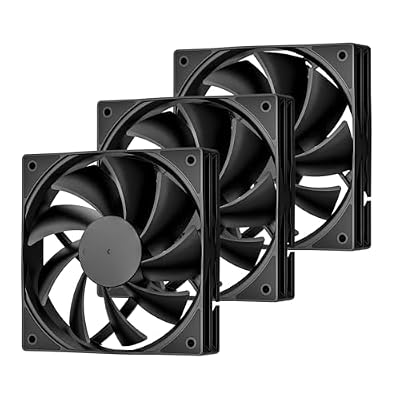 DARKROCKDARKROCK 3-Pack 120mm Black Computer Case Fans | High Performance…$9 \xc2\xb7 98/100
 ThermalrightThermalright 5 Pack TL-C12C-S CPU Fan 120mm ARGB Case Cooler…$21 \xc2\xb7 95/100