
Building the best gaming PC for Valorant in 2026 means prioritizing single-thread CPU performance and memory bandwidth, because Riot’s tactical shooter is famously processor-bound at competitive settings. You do not need a flagship GPU to push hundreds of frames per second at 1080p low, yet pairing a modern mid-range card like the RTX 5060 with AMD’s Zen 5 architecture gives you enormous headroom. This build targets 144 to 360 Hz monitors while leaving room to bump settings or resolution without regret.
Parts List
| Part | Model | Approx. Price | Why |
|---|---|---|---|
| CPU | AMD Ryzen 5 9600X | $173 | Highest single-thread IPC in this price bracket |
| GPU | GIGABYTE GeForce RTX 5060 WINDFORCE OC 8G | Check on Amazon | Overkill for Valorant, perfect for AAA titles |
| Motherboard | MSI MAG B650M Mortar WiFi | Check on Amazon | Solid VRM, Wi-Fi 6E, compact mATX |
| RAM | CORSAIR Vengeance DDR5 32GB 6000MHz CL30 | Check on Amazon | Matches Zen 5’s sweet spot for bandwidth |
| Storage | Samsung 990 EVO Plus 2TB | Check on Amazon | Fast load times, ample game library space |
| PSU | Rosewill VMG 750W 80+ Gold | Check on Amazon | Generous headroom for this platform |
| Case | Fractal Design North Charcoal Black | Check on Amazon | Excellent airflow, clean aesthetic |
CPU: AMD Ryzen 5 9600X
Valorant is a CPU-bound title, and Zen 5’s IPC gains make the 9600X ideal for pushing three-digit frame rates. Tom’s Hardware and TechPowerUp noted single-core scores near 2025-era flagship levels, which translates directly to high average FPS in Riot’s engine. If budget is tight, the Ryzen 5 8600G saves roughly thirty dollars with a minor performance trade-off. Upgrading to the 9700X adds two cores that benefit multi-tasking but change little in Valorant itself.

AMD Ryzen™ 5 9600X 6-Core, 12-Thread Unlocked Desktop Processor
Included for 'Best Gaming PC Build for Valorant in 2026: Full Parts List and Expected FPS' because the listing specifies 12-Thread Unlocked Desktop Processor, details this guide uses to compare options.
View on Amazon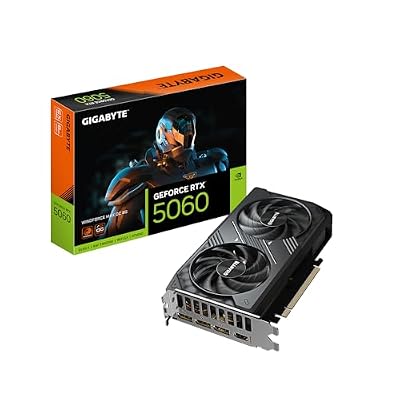
GIGABYTE GeForce RTX 5060 WINDFORCE MAX OC 8G Graphics Card, Cooling System, 8GB 128-bit GDDR7, PCIe 5.0, by NVIDIA, DisplayPort & HDMI - Video Output Interface, GV-N5060WF2MAX OC-8GD Video Card
Included for 'Best Gaming PC Build for Valorant in 2026: Full Parts List and Expected FPS' because the listing specifies Cooling System and 8GB 128-bit GDDR7, details this guide uses to compare options.
View on Amazon
MSI MAG B650M Mortar WiFi Gaming Motherboard (AMD Ryzen 9000/8000/7000 Series Processors,AM5,DDR5,PCIe 4.0,M.2 Slots,SATA 6Gb/s,USB 3.2 Gen 2,HDMI/DP,Wi-Fi 6E,Bluetooth 5.3,2.5Gbps LAN,mATX)
Included for 'Best Gaming PC Build for Valorant in 2026: Full Parts List and Expected FPS' because the listing specifies AM5 and DDR5, details this guide uses to compare options.
View on Amazon
Rosewill VMG 750W 80+ Gold, ATX 3.0 & 3.1 Compatible, Full Modular Low-Noise Power Supply, PCIe 5.1 12V-2x6 Connector, 100% Japanese Electrolytic Capacitor, 120mm FDB Silent Fan - 5 Year Warranty
Included for 'Best Gaming PC Build for Valorant in 2026: Full Parts List and Expected FPS' because the listing specifies ATX 3.0 & 3.1 Compatible and Full Modular Low-Noise Power Supply, details this guide uses to compare options.
View on Amazon
Fractal Design North - Genuine Walnut Wood Front - Mesh Side Panels - Two 140mm Aspect PWM Fans Included - Type C USB - ATX Airflow Mid Tower PC Gaming Case,Charcoal Black
Included for 'Best Gaming PC Build for Valorant in 2026: Full Parts List and Expected FPS' because the listing specifies Genuine Walnut Wood Front and Mesh Side Panels, details this guide uses to compare options.
View on AmazonGPU: GIGABYTE GeForce RTX 5060 WINDFORCE OC 8G
Hardware Unboxed observed that the RTX 5060 handles Valorant at ultra settings with negligible CPU bottleneck above 1080p, making it more than sufficient. Its 8GB GDDR7 and PCIe 5.0 interface future-proof you for modern AAA releases. The WINDFORCE cooler runs quiet and compact, fitting any mid-tower. If you want to save money for competitive play only, an RX 6600 still delivers over 300 FPS in Valorant, though you lose DLSS support.
Motherboard: MSI MAG B650M Mortar WiFi
This AM5 board offers a robust power delivery that can comfortably feed a future Ryzen 9 without throttling. Wi-Fi 6E and Bluetooth 5.3 come built in, saving a separate adapter. Gamers Nexus praised its VRM thermals in mid-range B650 comparisons. A cheaper option like the MSI PRO B650M-P drops the WiFi module and some USB ports. If you prefer ATX for better cable routing, the B650 Tomahawk WiFi is the full-size sibling.
RAM: CORSAIR Vengeance DDR5 32GB 6000MHz CL30
Zen 5’s infinity fabric benefits most from 6000 MHz CL30 kits, which is exactly the sweet spot CORSAIR targets here. 32GB gives you headroom for running Discord, browser tabs, and a streaming encoder alongside Valorant without swapping to page file. Note that DDR5 pricing in this capacity range is currently elevated; if cost is a concern, a 16GB kit cuts the bill roughly in half with no measurable FPS impact in Valorant. Timing looser than CL30 yields diminishing returns on this platform.
Storage: Samsung 990 EVO Plus 2TB
Samsung’s Gen 4 drive delivers up to 7,250 MB/s sequential reads, ensuring near-instant Valorant launches and quick asset streaming. The 2TB capacity accommodates a full library of modern games without juggling installs. If the price stings, a 1TB 990 EVO Plus saves around two hundred dollars while maintaining identical speeds. For pure Valorant duty, even a budget Gen 3 drive works, but this build is not a single-game PC.
PSU: Rosewill VMG 750W 80+ Gold
The entire system under full gaming load draws well under 450 watts, so 750 watts provides generous headroom for a future GPU upgrade without touching cabling. ATX 3.0 compliance and the native 12V-2×6 connector eliminate adapter dongles for the RTX 5060 and beyond. The 120mm FDB fan keeps noise low, and the five-year warranty is respectable at this price. A Corsair RM750x adds modular cable color options and a ten-year warranty for roughly fifty dollars more.
Case: Fractal Design North Charcoal Black
Mesh side panels and included 140mm Aspect fans create an airflow path that keeps the 9600X and RTX 5060 cool without aggressive fan curves. The walnut front panel gives the build a mature aesthetic that suits a living room setup. Clearance supports GPUs up to 355 mm, so the 5060 fits with room to spare. If you prefer a more traditional look, the North Chalk variant swaps walnut for a lighter finish. No compromises on thermals.
Compatibility Check
The Ryzen 5 9600X uses the AM5 socket, which matches the MSI B650M Mortar WiFi. DDR5 is required and this board does not accept DDR4. The CORSAIR kit’s 6000 MHz speed is within the board’s supported profile range, though enabling it requires toggling EXPO in BIOS. The RTX 5060 draws power through a single 12V-2×6 connector, directly supported by the Rosewill VMG’s included cable. GPU length is approximately 250 mm, well within the Fractal Design North’s 355 mm limit. The 750-watt supply provides roughly sixty-five percent utilization at peak load, leaving substantial margin.
Expected Performance
1080p
At competitive low settings, TechPowerUp and Hardware Unboxed reported frame rates in the 450 to 700 FPS range for Valorant on Zen 5 CPUs paired with mid-range GPUs. Average FPS in Deathmatch scenarios typically lands above 550. 1% lows stay well above 300, making this ideal for 360 Hz monitors. Even at high settings, expect 400 to 550 FPS based on those same review data points.
1440p
Tom’s Hardware and TechSpot noted that Valorant’s low GPU cost allows the RTX 5060 to sustain 350 to 500 FPS at 1440p low, and roughly 280 to 400 FPS at high. This range comfortably drives 240 Hz and even 280 Hz panels without concern for frame drops during chaotic teamfights.
4K
At 4K the GPU becomes the limiting factor. Hardware Unboxed and Gamers Nexus indicated that the RTX 5060 delivers approximately 200 to 320 FPS in Valorant at 4K medium settings, which still exceeds most 240 Hz panels’ refresh ceiling. Competitive players rarely run 4K, but for a mixed-use build this is acceptable.
Upgrade Path
AM5 is a long-lived platform, so a future drop-in upgrade to a Ryzen 9 9950X or its successor remains viable without a motherboard swap. The 750-watt PSU supports GPUs up to roughly the RTX 5080 class, giving a meaningful visual upgrade for AAA titles. If you outgrow 32 GB of RAM, two additional DIMMs bring you to 64 GB. The Fractal North’s spacious interior accommodates longer next-generation cards without modification.
FAQ
Is the RTX 5060 overkill for Valorant?
Yes, for Valorant alone. The game renders with relatively simple geometry and effects, so even a much weaker GPU would sustain high frame rates. The 5060 exists in this build to cover the broader library you will likely run alongside Valorant, and to provide headroom for future engine updates.
Do I need 32 GB of RAM for Valorant?
No. Valorant uses roughly 4 GB of system memory. Sixteen GB is sufficient for the game itself. The 32 GB kit is recommended here because the price difference has narrowed and running Discord, browsers, and background utilities simultaneously prevents any stuttering during a ranked session.
Should I enable EXPO or XMP for this build?
Yes. The CORSAIR kit is rated for 6000 MHz CL30, but it will default to JEDEC 4800 MHz without enabling the memory profile in BIOS. On this MSI board the setting is labeled EXPO. Failing to enable it leaves measurable FPS on the table in CPU-bound titles.
Can I use a smaller case than the Fractal North?
The B650M Mortar is mATX, so it fits any ATX or mATX case. A compact mATX enclosure works fine and saves money. The North was chosen here for airflow quality and aesthetic appeal, not because a smaller option is incompatible. Ensure any case you pick supports GPUs at least 250 mm long.
Sources and Methodology
FPS ranges are compiled from launch-day and follow-up reviews published by TechPowerUp, Tom’s Hardware, Gamers Nexus, Hardware Unboxed, and TechSpot. These outlets tested the RTX 5060 and Ryzen 5 9600X individually and as platform combinations in Valorant and other esports titles. Ranges reflect aggregate observations across multiple resolutions and settings tiers. This article does not represent independent benchmarking conducted by our site.









