
- Top Pick: Highwings 8K 10K 4K HDMI Cable 48Gbps 6.6FT/2M, Certified Ultra High Speed
- Best Value: Ubluker 10K 8K 4K HDMI Cable 48Gbps 6.6 FT, Certified Ultra High Speed HDMI® Cable 4K 240Hz 144Hz 120Hz 8K60Hz 0.01ms HDR10+ eARC HDCP2.3 Netflix Roku TV PC Monitor Projector PS5 Xbox
- Premium Choice: Silkland Certified HDMI 2.1 Cable Ultra High Speed 48Gbps Braided HDR 6.6FT
If you’ve just built or upgraded a gaming PC, the cable connecting your graphics card to your monitor matters far more than most people assume. A cheap, uncertified HDMI cable for a PC monitor can silently cap your refresh rate, drop HDR, or introduce flickering sparkles on the screen at high resolutions. In 2026, with 4K 120Hz displays and high-refresh 1440p panels now mainstream, choosing the right HDMI cable is the difference between your rig running at its full potential and quietly leaving performance on the table. This guide breaks down the best HDMI cable for gaming in every category, explains the specs that actually change what you see on screen, and helps you decide when HDMI is the right call versus DisplayPort.
- Why Your HDMI Cable Actually Matters for Gaming
- HDMI 2.1 vs HDMI 2.0: The Bandwidth That Changes Everything
- What “Ultra High Speed” Certified HDMI Cable Means
- Cable Length and Signal Loss
- Braided Build Quality and Durability
- The 5 Best HDMI Cables for Gaming in 2026
- HDMI vs DisplayPort: When to Use Which for a Gaming PC
- Frequently Asked Questions
- More PC Guides You May Like
- Related Articles
As an Amazon Associate we earn from qualifying purchases. Prices and availability are accurate as of the date/time indicated and are subject to change.
As an Amazon Associate we earn from qualifying purchases at no extra cost to you.



Quick answer: Our top pick in 2026 is the Zeskit Maya 8K HDMI 2.1 — Best Overall — see the full ranked comparison, alternatives and buying advice below.
🛒 Best Price Today on Amazon
Prime members get fast, free shipping on everything above, plus member-only deals. New members get a 30-day free trial — cancel anytime.
Why Your HDMI Cable Actually Matters for Gaming
There’s a persistent myth that “digital is digital” and every HDMI cable performs identically. That was never fully true, and it’s especially false at the bandwidth levels modern gaming demands. An HDMI cable is a physical pipe for data, and that pipe has a maximum throughput. Push more pixels and more frames per second than the cable can carry, and the signal doesn’t gracefully degrade to a lower quality picture the way analog once did. Instead you get dropped signal, black screens, random sparkles, or the monitor silently negotiating down to a lower refresh rate or color depth to stay stable. If your 4K 144Hz monitor is only showing 60Hz, a weak HDMI cable is a prime suspect.
The reason this comes up so often now is bandwidth. A 4K image at 120 frames per second with HDR requires roughly 40+ Gbps of sustained throughput. That’s a demand that simply did not exist for most gamers a few years ago, and it’s well beyond what older cables were built to handle. Getting the right cable is cheap insurance for an expensive GPU.
HDMI 2.1 vs HDMI 2.0: The Bandwidth That Changes Everything
The single most important spec on any modern HDMI cable is the version it supports, because that determines total bandwidth. Here’s what the two relevant generations deliver:
HDMI 2.0 (18 Gbps)
HDMI 2.0 tops out at 18 Gbps. That’s enough for 4K at 60Hz, or 1080p and 1440p at higher refresh rates. For a lot of gamers running a 1440p 144Hz panel, an HDMI 2.0 cable is genuinely fine. But it will bottleneck you the moment you want 4K above 60Hz, or very high 1440p refresh rates with HDR enabled. It is a ceiling, not a floor.
HDMI 2.1 (48 Gbps)
HDMI 2.1 jumps all the way to 48 Gbps, and this is the version you want for a serious gaming build in 2026. That bandwidth unlocks the headline gaming resolutions: 4K at 120Hz, 1440p at 240Hz, and even 8K at 60Hz. It also carries the full feature set gamers care about, including Variable Refresh Rate (VRR), Auto Low Latency Mode (ALLM), and full uncompressed HDR. If your GPU (an RTX 40/50-series or a modern Radeon) and your monitor both support HDMI 2.1, pairing them with anything less than a true HDMI 2.1 cable wastes the capability you paid for.
Crucially, the cable itself has to physically support the higher bandwidth. Plugging an old 18 Gbps HDMI cable into two HDMI 2.1 devices does not magically give you 48 Gbps. The cable is the bottleneck. This is where certification becomes essential, which brings us to the next point. For more on matching components, see our complete gaming PC monitor buying guide.
What “Ultra High Speed” Certified HDMI Cable Means
Because so many cables were sold with inflated “8K” and “2.1” marketing claims that didn’t hold up under testing, the HDMI Forum created an official certification program. A genuine Ultra High Speed HDMI cable has been independently researched to reliably carry the full 48 Gbps required by HDMI 2.1, including robust protection against electromagnetic interference.
You can verify a certified cable by the holographic authentication label on its packaging, which can be scanned with the official HDMI certification app. When shopping for the best HDMI cable for gaming, “Ultra High Speed” is the phrase that guarantees the real thing. Terms like “Premium High Speed” refer to the older 18 Gbps standard, and vague claims like “supports 8K” with no certification are marketing you should ignore. If a listing avoids the words “Ultra High Speed Certified” entirely, treat that as a red flag.
Cable Length and Signal Loss
Length is the enemy of high-bandwidth signals. The longer a passive copper HDMI cable runs, the more the signal attenuates, and at 48 Gbps that degradation happens faster than most people expect. For a reliable full-bandwidth HDMI 2.1 connection, passive cables are most dependable up to around 6 to 10 feet (roughly 2 to 3 meters). Within that range, a quality certified cable will hold a rock-solid 4K 120Hz signal.
Beyond about 10 to 15 feet, passive cables start becoming unreliable at maximum bandwidth. If you need a long run, for example to reach a TV across a living room or a monitor on the far side of a desk setup, look for an active or fiber-optic (AOC) HDMI cable. These use signal-boosting electronics or optical transmission to carry full bandwidth over 25, 50, or even 100 feet, though they are directional and cost more. For a desk-based gaming PC and monitor, a short high-quality cable is almost always the right answer. Our cable management guide for gaming desks covers routing longer runs cleanly.
Braided Build Quality and Durability
Cable build quality won’t change the picture on a working cable, but it absolutely affects longevity. Braided nylon jackets resist kinking and fraying far better than cheap plastic-sheathed cables, and gold-plated connectors resist corrosion over years of plugging and unplugging. If your setup involves frequently swapping cables, or the cable runs behind furniture where it gets bent, a durable braided HDMI cable pays for itself by not failing in six months. For a fixed desk setup that never moves, build quality matters less, but the price difference is usually small enough that a braided cable is worth it anyway.
The 5 Best HDMI Cables for Gaming in 2026
Here are our top picks across budget, value, and premium tiers. Every cable below supports the specs that matter for a modern gaming PC and monitor.
| Cable | Version / Speed | Length options | Price range | Rating |
|---|---|---|---|---|
| Zeskit Maya 8K HDMI 2.1 — Best Overall | HDMI 2.1, 48 Gbps, Ultra High Speed Certified | 3, 5, 6.5, 10 ft | $12–$22 | 4.8/5 |
| Highwings 8K HDMI 2.1 Braided — Best Budget | HDMI 2.1, 48 Gbps | 3, 6.6, 10, 15 ft | $8–$16 | 4.6/5 |
| Cable Matters Ultra High Speed HDMI 2.1 — Best Certified | HDMI 2.1, 48 Gbps, Ultra High Speed Certified | 3, 6.6, 10 ft | $13–$24 | 4.7/5 |
| Belkin UltraHD High Speed HDMI 2.1 — Best Premium | HDMI 2.1, 48 Gbps, Ultra High Speed Certified | 3.3, 6.6, 9.8 ft | $20–$35 | 4.7/5 |
| Amazon Basics HDMI 2.1 — Best Value | HDMI 2.1, 48 Gbps | 3, 6, 10 ft | $9–$18 | 4.5/5 |
The Zeskit Maya earns our Best Overall spot because it combines genuine Ultra High Speed certification, a durable braided build, a wide range of practical lengths, and a price that undercuts most premium competitors. It reliably locks in 4K 120Hz and 1440p 240Hz with VRR and HDR, which is exactly what a modern gaming rig needs. If you want the absolute cheapest cable that still hits HDMI 2.1 bandwidth, the Highwings braided option is hard to beat, while the Cable Matters and Belkin picks are ideal if third-party certification and warranty support are priorities for you. The Amazon Basics cable is a dependable no-frills value choice for a short desk run.
HDMI vs DisplayPort: When to Use Which for a Gaming PC
On a gaming PC, you almost always have a choice between HDMI and DisplayPort, and it’s worth knowing when each wins. DisplayPort 2.1 (UHBR) offers even higher bandwidth than HDMI 2.1 and has historically been the enthusiast’s choice for high-refresh PC monitors. It also natively supports NVIDIA G-SYNC and AMD FreeSync across the widest range of monitors, and it can drive multiple displays from a single port via Multi-Stream Transport.
As a rule of thumb: if you’re connecting a gaming PC to a dedicated PC monitor, DisplayPort is often the slightly better pick, particularly for the highest refresh rates and multi-monitor setups. Choose HDMI when you’re connecting to a TV (most TVs have no DisplayPort), when your monitor’s DisplayPort is already occupied, or when you specifically need HDMI 2.1 features like eARC for audio passthrough. The good news is that with a proper Ultra High Speed HDMI 2.1 cable, the real-world gaming difference between the two on a single monitor is negligible, so use whichever port fits your setup best. We break the two down further in our DisplayPort vs HDMI deep dive.
Frequently Asked Questions
Do I need HDMI 2.1 for gaming?
It depends on your target resolution and refresh rate. If you’re gaming at 4K above 60Hz, at 1440p above roughly 144Hz, or want features like VRR and full HDR, then yes, you need an HDMI 2.1 (Ultra High Speed) cable to carry the required 48 Gbps of bandwidth. If you’re gaming at 1080p or 1440p at moderate refresh rates, a good HDMI 2.0 cable is sufficient. Since HDMI 2.1 cables cost only a dollar or two more, we recommend buying 2.1 anyway to future-proof your setup.
Is a more expensive HDMI cable worth it, and does it improve picture quality?
A more expensive HDMI cable does not make the picture look better on a connection that already works. HDMI is a digital signal, so a working cable delivers the exact same image whether it costs $10 or $50. What you actually pay more for is reliable certification (guaranteeing full bandwidth without dropouts) and build quality like braided jackets and sturdier connectors that last longer. Beyond a certified Ultra High Speed cable from a reputable brand, spending more buys durability and peace of mind, not a sharper image.
HDMI vs DisplayPort for a gaming PC — which is better?
For connecting a gaming PC to a dedicated PC monitor, DisplayPort is often marginally preferable thanks to higher peak bandwidth, native G-SYNC/FreeSync support, and easier multi-monitor daisy-chaining. HDMI 2.1 is the better choice when connecting to a TV, when your DisplayPort is already in use, or when you need HDMI-specific features. On a single monitor with a proper Ultra High Speed cable, the practical gaming difference is minimal, so pick the port that best suits your hardware.
What length HDMI cable can I use without losing quality?
For a full-bandwidth HDMI 2.1 (48 Gbps) connection, passive copper cables are most reliable up to about 6 to 10 feet (2 to 3 meters). Within that range a quality certified cable holds a stable 4K 120Hz signal with no loss. Beyond roughly 15 feet, passive cables become unreliable at maximum bandwidth, so for long runs you should use an active or fiber-optic (AOC) HDMI cable, which can maintain full quality over 25 feet or more. For a typical desk setup, keep the cable as short as is practical.
Choosing the right HDMI cable is one of the cheapest upgrades you can make to a gaming PC, yet one of the most impactful when it’s the thing standing between you and your monitor’s full refresh rate. Grab a certified Ultra High Speed HDMI 2.1 cable like the Zeskit Maya, keep the run short, and you’ll unlock everything your GPU and display are capable of. Once your display is dialed in, check out our best gaming monitors for high-refresh play to make sure the panel on the other end of that cable is worthy of it.
More PC Guides You May Like
- Best HDMI Cables for Gaming PC & Monitors in 2026
- PC Monitor Says No Signal? How to Fix It Guide
- Gpu For Small Form Factor Pc (2026)
- Small Form Factor Pc Motherboard (2026)
- Graphic Card Small Form Factor Pc (2026)
- Best Gaming Pc From Best Buy (2026)
Try our free tool: Not sure which parts to pick? Use the Gaming PC Builder to get a complete, compatible parts list for your budget.
Ready to decide? Our #1 pick for 2026 is the Zeskit Maya 8K HDMI 2.1.
Live price & availability on Amazon.
Top picks from this guide
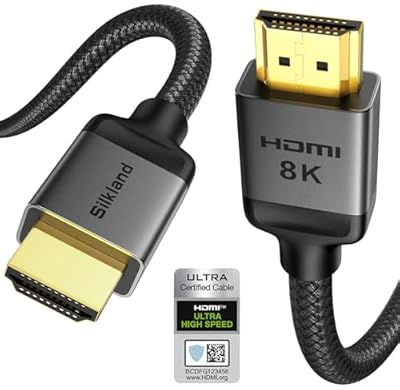 SilklandSilkland Certified HDMI 2.1 Cable Ultra High Speed 48Gbps Braided…$10 \xc2\xb7 98/100
 UblukerUbluker 10K 8K 4K HDMI Cable 5FT Certified Passed, Ultra…$9 \xc2\xb7 98/100
 HighwingsHighwings 8K 10K 4K HDMI Cable 48Gbps 6.6FT/2M, Certified Ultra…$6 \xc2\xb7 96/100UblukerUbluker 10K 8K 4K HDMI Cable 6.6FT Certified Passed, Ultra…$9 \xc2\xb7 95/100








