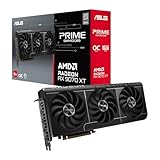
- Top Pick: ASUS Dual GeForce RTX 3050 6GB GDDR6 OC Edition Gaming Graphics Card
- Best Value: MOUGOL AMD Radeon RX 580 8GB GDDR5 Gaming Graphics Card HDMI/DP/DVI – White
- Premium Choice: msi Gaming GeForce RTX 3060 Ventus 2X 12G OC V1 Graphics Card – 15 Gbps GDRR6 Boost Clock: 1807 MHz 192-Bit HDMI/DP PCIe 4 Torx Twin Fan Ampere
Shopping for a graphics card under $500 in 2026 means navigating a market where VRAM capacity, generational performance claims, and inflated retail pricing all pull in different directions. Buyers frequently overspend on a card that looks impressive on a spec sheet, only to discover that 8GB of memory becomes a bottleneck in modern titles at 1440p, or that a “budget” flagship quietly drifts $150 past its advertised MSRP once it reaches checkout.
This guide focuses on cards that genuinely deliver at or below the $500 mark, with an emphasis on real-world value rather than headline benchmark numbers. We cover the current NVIDIA RTX 5060 and 5060 Ti options alongside AMD’s RX 9060 XT, explain which specifications actually matter at this price point, and identify where spending an extra $50 makes sense — and where it absolutely does not.
As an Amazon Associate we earn from qualifying purchases at no extra cost to you. Product prices and availability are accurate as of the date shown and are subject to change.







⚡ Save on Your Next PC — Amazon Prime
Prime members get fast free shipping on the systems above, plus early access to Prime Day & Black Friday PC deals. New members get a 30-day free trial.
Watch: Best Graphics Card Under $500 — Video Review
How to Choose Graphics Card Under $500
- VRAM capacity: Prioritize 16GB over 8GB if you play at 1440p or use texture-heavy mods. Modern titles increasingly exceed 8GB at high settings, causing stutter that no amount of raw GPU horsepower can fix.
- Target resolution: An 8GB RTX 5060 is a strong 1080p performer, while 16GB cards like the RTX 5060 Ti and RX 9060 XT are the sensible entry point for 1440p gaming with headroom to spare.
- Upscaling ecosystem: NVIDIA’s DLSS 4 remains the more mature implementation with broader game support, though AMD’s FSR has narrowed the gap considerably on RDNA 4 hardware.
- Physical dimensions and power: Check slot width and card length against your case before buying. Compact 2 to 2.5-slot designs fit far more builds than triple-slot alternatives, and most cards in this bracket run comfortably on a quality 600W supply.
- Cooling and acoustics: Dual and triple-fan coolers with zero-RPM idle modes keep noise down during light workloads. Warranty length also varies meaningfully between brands and is worth factoring into the total cost.
The Best Picks Reviewed
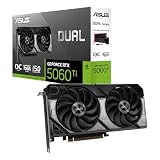
ASUS Dual RTX 5060 Ti 16GB OC
This is the sweet spot of the sub-$500 category, pairing 16GB of GDDR7 with enough compute to hold high settings at 1440p without leaning heavily on upscaling. The 2.5-slot Axial-tech cooler stays quiet under sustained load, and the three-year warranty adds genuine peace of mind for a card you’ll likely keep for several years.
XFX Swift RX 9060 XT 16GB
AMD’s RDNA 4 architecture delivers excellent rasterization performance per dollar here, and the 16GB frame buffer means you won’t be forced to compromise on texture quality anytime soon. The triple-fan cooler is arguably overbuilt for the thermal load, which translates directly into low noise and stable clocks.
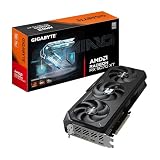
GIGABYTE RX 9060 XT Gaming OC ICE 16G
Functionally similar silicon to the XFX card but in a slimmer two-slot form factor, making it the better choice for compact or airflow-constrained builds. Server-grade thermal gel and a reinforced backplate suggest GIGABYTE expects this card to endure, and the ICE white finish suits lighter-themed builds.
ASUS Dual RTX 5060 8GB OC
A well-executed 1080p card that comfortably clears 60fps in most current titles at high settings, with DLSS 4 available to extend its usable life. The 8GB limitation is real and will constrain you at higher resolutions, so treat this as a targeted 1080p purchase rather than a future-proof investment.
GIGABYTE RTX 5060 WINDFORCE OC 8G
The most affordable route to current-generation NVIDIA features, including DLSS 4 and PCIe 5.0 connectivity, in a straightforward dual-fan package. It’s a sensible pick for budget-constrained 1080p builds or as a drop-in upgrade for an aging system, provided you accept the same 8GB ceiling.
Frequently Asked Questions
Is 8GB of VRAM still enough in 2026?
For 1080p gaming at high settings, yes, in the majority of titles. At 1440p or with ray tracing and high-resolution textures enabled, 8GB increasingly causes frame-time inconsistency, which is why we recommend stretching to a 16GB card if your budget allows.
Should I choose NVIDIA or AMD at this price?
AMD’s RX 9060 XT typically offers stronger raw rasterization per dollar, while NVIDIA’s RTX 5060 Ti has the edge in ray tracing and the more widely supported DLSS 4 upscaling. If you play competitive titles at high frame rates, AMD is compelling; if you value ray tracing and broad upscaling support, NVIDIA is the safer pick.
What power supply do I need?
A quality 550W to 650W unit from a reputable brand is sufficient for every card in this guide when paired with a mainstream CPU. Prioritize a modern ATX 3.x supply if you’re building from scratch, as it will handle transient power spikes more gracefully.
Is the RTX 5080 worth considering?
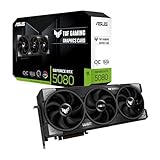
The ASUS TUF Gaming RTX 5080 is an excellent card, but it sits far above the $500 cap this guide targets — typically double the budget. It’s the right choice for 4K high-refresh gaming, but at this price point it’s outside the conversation entirely.
Final Thoughts
For most buyers with $500 to spend, the ASUS Dual RTX 5060 Ti 16GB is the strongest overall recommendation, combining ample VRAM, current-generation features, and a mature upscaling ecosystem in a build-friendly package. The XFX Swift RX 9060 XT 16GB is the value alternative for those who prioritize rasterization performance per dollar, while the ASUS Dual RTX 5060 8GB remains a sensible, cost-effective choice for dedicated 1080p gamers who don’t need the extra memory headroom.