RAM matters a lot for gaming performance, especially with modern CPUs that thrive on fast memory. By 2026, DDR5 is the standard for new builds, bringing high speeds and capacities. Picking the right RAM — the right speed, timings, and capacity — keeps games smooth and your system future-proof. Get the balance wrong and you can leave real frames on the table, particularly on AMD’s Ryzen chips where memory speed feeds the Infinity Fabric directly. This guide covers the best DDR5 gaming kits of 2026 and how to choose the right capacity and speed for your platform.
- Best Gaming RAM of 2026
- Gaming RAM Comparison Table
- Best Overall: G.Skill Trident Z5 RGB DDR5-6000 CL30
- Best Value: Corsair Vengeance DDR5-6000
- Best Budget: Kingston Fury Beast
- Best AMD EXPO Pick: G.Skill Trident Z5 Neo RGB DDR5-6000 CL30
- Best Value CL30 Kit: Patriot Viper Venom DDR5-6000 32GB
- Best RGB Alternative: V-Color Manta XSky DDR5-6000 CL30
- Best for Intel DDR5-6400: Crucial Pro 32GB DDR5-6400 CL32
- Best Low-Profile Pick: Corsair Vengeance RS DDR5-6000
- Best 64GB Option: Kingston FURY Beast 64GB DDR5-6000 CL30
- How Much RAM Do You Need for Gaming?
- Why 32GB Is the New Gaming Standard
- Single vs Dual Channel and Kit Configuration
- RAM Speed and Timings Explained
- Turning Timings Into Real Latency
- Why DDR5-6000 Is the AM5 Sweet Spot
- Two Sticks or Four?
- Which One Should You Buy?
- Troubleshooting a Kit That Will Not Reach Rated Speed
- Confirming the Speed After Installation
- Common Mistakes When Buying Gaming RAM
- Quick Comparison by Platform and Tier
- Capacity Guide: 16GB, 32GB or 64GB
- AMD vs Intel: What Speed Should You Target
- RAM Buying Mistakes to Avoid
- RAM to Skip in 2026
- How to Spot Fake or Mislabeled Memory
- DDR4 vs DDR5 for Gaming
- Frequently Asked Questions
- Related Articles
Best Gaming RAM of 2026
Gaming RAM Comparison Table
| RAM Kit | Capacity | Speed | Best For | Price |
|---|---|---|---|---|
| G.Skill Trident Z5 RGB | 32GB (2×16) | DDR5-6000 CL30 | Best Overall | Varies |
| Corsair Vengeance DDR5 | 32GB (2×16) | DDR5-6000 CL36 | Value | Varies |
| Kingston Fury Beast | 32GB (2×16) | DDR5-6000 CL36 | Budget | Varies |
| G.Skill Ripjaws S5 | 64GB (2×32) | DDR5-6000 CL30 | High Capacity | Varies |
Best Overall: G.Skill Trident Z5 RGB DDR5-6000 CL30
The G.Skill Trident Z5 RGB at DDR5-6000 CL30 is the ideal gaming kit, especially on AMD Ryzen where 6000 MT/s is the Infinity Fabric sweet spot. The tight CL30 timings deliver excellent gaming performance, the build is premium, and the RGB looks stunning. For high-performance builds, it’s the top choice. This kit ships with an AMD EXPO profile and usually an Intel XMP profile too, so a single BIOS toggle gets you full-rated speed on either platform. The tall heat spreaders can clash with very large air coolers, so check clearance if you run a big dual-tower cooler; otherwise it is the memory to beat.
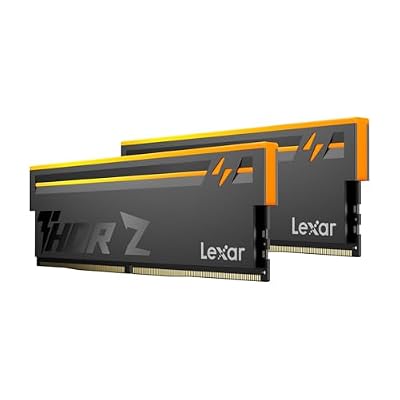
Lexar Thor Z RGB DDR5 RAM 32GB Kit (2x16GB) 6000MHz CL38 DRAM 288-Pin UDIMM | Supports Intel XMP 3.0 & AMD EXPO On-die ECC, PMIC, 1.35V High-Performance PC Computer Memory for Gaming, AI
Included for '10 Best RAMs for Gaming 2026 — Top DDR5 Memory Kits Reviewed' as a representative consumer electronics in this roundup; selection reflects the product set returned for this topic.
View on Amazon
Patriot Viper Venom DDR5 RAM 32GB (2X16GB) 6000MHz CL30 Desktop Memory | Voltage: 1.35v; Supports Intel XMP and AMD EXPO; Module type: UDIMM.
Included for '10 Best RAMs for Gaming 2026 — Top DDR5 Memory Kits Reviewed' as a representative consumer electronics in this roundup; selection reflects the product set returned for this topic.
View on Amazon
G.SKILL Flare X5 Series DDR5 RAM (AMD EXPO & Intel XMP 3.0) 32GB (2x16GB) Up to 6000MT/s* CL36-36-36-96 1.35V Desktop Computer Memory U-DIMM - Matte Black (F5-6000J3636F16GX2-FX5)
Included for '10 Best RAMs for Gaming 2026 — Top DDR5 Memory Kits Reviewed' as a representative consumer electronics in this roundup; selection reflects the product set returned for this topic.
View on AmazonBest Value: Corsair Vengeance DDR5-6000
The Corsair Vengeance DDR5-6000 brings excellent gaming performance at a more accessible price. The CL36 timings are still great for gaming, the low-profile design clears tall coolers, and Corsair’s reliability is well proven. For most builds wanting quality RAM without overspending, it’s an excellent shout. The slightly looser CL36 timings cost only a frame or two versus CL30 in most games, an imperceptible difference in practice, and the low-profile heatsinks guarantee compatibility with nearly any cooler or compact case. It is the safe, sensible pick for the majority of gaming rigs.
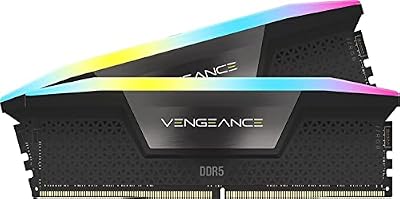
CORSAIR Vengeance RGB DDR5 RAM 32GB (2x16GB) Up to 6000MHz CL36-44-44-96 1.35V Intel XMP 3.0 Computer Memory – Black (CMH32GX5M2E6000C36)
Included for '10 Best RAMs for Gaming 2026 — Top DDR5 Memory Kits Reviewed' as a representative consumer electronics in this roundup; selection reflects the product set returned for this topic.
View on AmazonBest Budget: Kingston Fury Beast
The Kingston Fury Beast DDR5-6000 delivers solid gaming performance on a budget. It runs reliably, takes XMP/EXPO overclocking easily, and keeps a clean design. For value-focused builds where every dollar counts, it covers everything a gamer needs without premium pricing. Kingston’s lifetime warranty and strong reputation for stability make it a low-risk choice for a first build, and the understated heatsinks suit anyone who prefers a stealthy look over RGB. Spend the money you save on a faster GPU or SSD, where it will make a more visible difference to your games.
Best AMD EXPO Pick: G.Skill Trident Z5 Neo RGB DDR5-6000 CL30

G.SKILL Trident Z5 Neo RGB Series DDR5 RAM (AMD EXPO) 32GB (2x16GB) Up to 6000MT/s* CL30-38-38-96 1.35V Desktop Computer Memory U-DIMM - Matte Black (F5-6000J3038F16GX2-TZ5NR)
Included for '10 Best RAMs for Gaming 2026 — Top DDR5 Memory Kits Reviewed' as a representative consumer electronics in this roundup; selection reflects the product set returned for this topic.
View on AmazonThe Trident Z5 Neo RGB is the AMD-tuned sibling of the Trident Z5 RGB above. The listing describes a 32GB (2x16GB) kit rated up to 6000MT/s at CL30-38-38-96 and 1.35V with an AMD EXPO profile. Neo kits are built so that a Ryzen 7000, 8000 or 9000 system on an AM5 board can load a validated profile with one BIOS toggle and reach the DDR5-6000 sweet spot without hand-tuning.
Who it suits: Ryzen gamers who care about tight timings and want a premium look. A CL30 rating means the memory responds a few nanoseconds faster than a CL36 or CL38 kit at the same speed, which shows up mostly in minimum frame rates in CPU-bound games and in simulation titles.
Strengths: low latency at the platform sweet spot, EXPO validation, and a heatsink with RGB lighting for open-case builds. It is also a good fit for X3D processors, which reward quick memory access.
Drawback: tall heat spreaders can collide with big dual-tower air coolers, so measure clearance under the first fan. A CL30 kit also sits in a higher cost tier than CL36 or CL38 kits of the same speed, and the gaming gain is usually small.
How it compares with existing picks: it matches the Trident Z5 RGB on speed but is specifically validated for AMD, which makes it the safer choice on Ryzen. Choose the Corsair or Kingston picks if you want lower-profile heatsinks or a lower cost tier.
Best Value CL30 Kit: Patriot Viper Venom DDR5-6000 32GB
The Patriot Viper Venom puts CL30 timings into a less expensive package. The listing states a 32GB (2x16GB) kit at 6000MHz CL30, 1.35V, with support for both Intel XMP and AMD EXPO. In practice it is one of the few kits that offers the same headline timing numbers as premium RGB brands with a plainer design.
Who it suits: budget-conscious builders who want the Ryzen sweet spot without paying for lighting. It suits mid-range builds around a Ryzen 5 7600X or 9600X, and it works on Intel boards that run DDR5-6000 without trouble.
Strengths: tight timings, dual-profile support, and a low-key heatsink that clears most coolers. It is also easy to buy as a matched kit, which is what you want for dual-channel stability.
Drawback: it has no RGB, and the brand’s support is less widely known than Corsair or Kingston. Exact height is not listed here, so verify clearance if you run a large cooler.
How it compares with existing picks: against the Kingston Fury Beast it offers tighter timings; against the Corsair Vengeance it offers a similar profile at a lower position in the cost range. Pick it when you want CL30 but not a premium price tier.
Best RGB Alternative: V-Color Manta XSky DDR5-6000 CL30
V-Color is a smaller brand that has built a following among overclockers, and the Manta XSky is its gaming-focused RGB line. The listing describes a 32GB (2x16GB) kit at 6000MHz CL30 using SK Hynix memory chips, with RGB lighting and AMD EXPO support. SK Hynix dies are valued by enthusiasts because they tend to handle EXPO and XMP profiles reliably on modern AMD boards.
Who it suits: builders who want RGB lighting and CL30 timings at a mid-range cost tier and who are comfortable buying from a less common brand.
Strengths: tight timings, popular chip choice, and a lighting package that stands out. It is a decent alternative when your preferred G.Skill or Corsair kit is out of stock.
Drawback: the listing lists EXPO explicitly, but Intel XMP support is not clearly stated, so confirm before using it on an Intel board. Warranty length and heatsink height are not listed.
How it compares with existing picks: it is closest to the Trident Z5 Neo, with fewer brand-support resources behind it. Choose it for value on a Ryzen build; choose the G.Skill if you want the most proven support network.
Best for Intel DDR5-6400: Crucial Pro 32GB DDR5-6400 CL32

Crucial Pro DDR5 RAM 32GB Kit (2x16GB), 6400MHz CL32, Overclocking Desktop Gaming Memory, Intel XMP 3.0 & AMD Expo Compatible, White - CP2K16G64C32U5W
Included for '10 Best RAMs for Gaming 2026 — Top DDR5 Memory Kits Reviewed' as a representative consumer electronics in this roundup; selection reflects the product set returned for this topic.
View on AmazonIntel Core platforms handle faster memory than AM5, and the Crucial Pro kit is a clean fit. The listing describes a 32GB (2x16GB) kit at 6400MHz CL32, built for overclocking-style gaming use, with Intel XMP 3.0 and AMD EXPO compatibility. Crucial is the consumer brand of a major memory manufacturer, so the support and RMA experience are usually straightforward.
Who it suits: Core Ultra and 13th or 14th generation Intel builders who want a step above DDR5-6000 without moving into extreme overclocking kits. It is also an easy upgrade for older DDR5-4800 systems.
Strengths: faster speed with a still-modest CL32 rating, low-profile styling, and a dual-profile design. A plain black heatsink keeps the build quiet visually.
Drawback: on AM5 boards, DDR5-6400 often runs at a one-to-two ratio only after tuning, and gains over DDR5-6000 are small, so Ryzen owners should stick with 6000 kits. Voltage and heatsink height are not listed here.
How it compares with existing picks: it is the only Intel-focused speed upgrade in this guide. Choose it for Intel; choose a 6000 CL30 kit for AMD.
Best Low-Profile Pick: Corsair Vengeance RS DDR5-6000
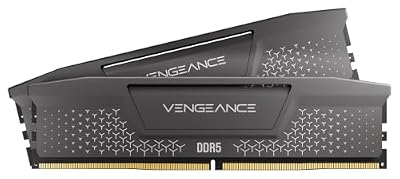
CORSAIR Vengeance RS DDR5 32GB (2 x 16GB) Up to 6000MHz AMD Intel RAM | Desktop Gaming Memory, AMD EXPO & Intel XMP 3.0 Compatible, CL38, Gray, CML32GX5M2D6000Z38
Included for '10 Best RAMs for Gaming 2026 — Top DDR5 Memory Kits Reviewed' as a representative consumer electronics in this roundup; selection reflects the product set returned for this topic.
View on AmazonThe Vengeance RS is the lighting-lite member of Corsair’s family. The listing describes a 32GB (2 x 16GB) kit rated up to 6000MHz, with AMD EXPO and Intel XMP 3.0 compatibility. Timings are not listed in the details used here, so check the exact CL value before comparing it with the CL30 kits above.
Who it suits: small-form-factor and large-air-cooler builders, because Vengeance heat spreaders are known for being shorter than Trident-style designs. It also suits buyers who want a mainstream brand with iCUE support.
Strengths: compatibility with big coolers, brand-wide support, and dual-profile design. It is a safe default for people who do not want to research timings.
Drawback: if the kit uses CL36 or CL38 timings, you give up a small amount of latency compared with CL30 kits. The gap is minor in most games, but it is real in e-sports titles on high refresh displays.
How it compares with existing picks: it is the practical sibling of the Corsair Vengeance pick already covered, with a different lighting and design approach. Choose it for compatibility rather than peak speed.
Best 64GB Option: Kingston FURY Beast 64GB DDR5-6000 CL30

Kingston FURY Beast 64GB (2x32GB) 6000MT/s DDR5 CL30 Desktop Memory | AMD EXPO | Kit of 2 | KF560C30BBEK2-64
Included for '10 Best RAMs for Gaming 2026 — Top DDR5 Memory Kits Reviewed' as a representative consumer electronics in this roundup; selection reflects the product set returned for this topic.
View on AmazonMost gamers do not need 64GB, but streamers, video editors and heavy modders do. The listing describes a 64GB (2x32GB) kit at 6000MT/s CL30 with AMD EXPO, built under Kingston’s FURY brand. Keeping two modules matters because it holds dual-channel operation.
Who it suits: players who stream with a capture program, edit video between gaming sessions, or run large mod lists and virtual machines. It also suits builders who want to avoid a second memory purchase for several years.
Strengths: high capacity at the AM5 sweet spot, tight CL30 timings, and a low-profile, understated heatsink. Kingston’s lifetime warranty on retail kits adds confidence.
Drawback: it sits at the top of the cost range for DDR5, and two 32GB modules can be harder for some boards to run at full speed than two 16GB modules. Update the BIOS and enable EXPO before testing stability. XMP support is not listed in the details used here.
How it compares with existing picks: it is the only 64GB kit in this guide. Choose 32GB for pure gaming; choose this kit only when your workload needs the capacity.
How Much RAM Do You Need for Gaming?
- 16GB: Minimum for gaming in 2026; sufficient for most games but limiting for multitasking
- 32GB: Recommended sweet spot; comfortable for gaming, streaming, and multitasking
- 64GB: For content creators, heavy multitaskers, or future-proofing enthusiasts
For new gaming builds in 2026, 32GB is the capacity to aim for, leaving headroom for modern games and background apps.
Why 32GB Is the New Gaming Standard
A few years ago 16GB was plenty, but modern games have grown hungrier. Titles like Cyberpunk 2077, Star Citizen, and heavily modded games can push past 16GB on their own, and that’s before you account for a browser with dozens of tabs, Discord, a music app, and a stream overlay running in the background. With 32GB you rarely have to think about memory at all — games get what they need and background apps don’t force the system to swap to disk, which causes stutter. Memory pricing has swung widely in 2026, but 32GB is still the sensible default for a build you want to keep for years.
Single vs Dual Channel and Kit Configuration
Always buy RAM as a matched dual-channel kit (two sticks) rather than a single module. Dual-channel doubles the effective memory bandwidth to your CPU and can add 10–15% to gaming frame rates versus a single stick of the same capacity. For most gamers, a 2x16GB kit is ideal because it fills both channels while leaving two slots free for a future upgrade. Avoid mixing kits bought separately if you can — even identical models can have different memory chips that refuse to run stable together at rated speed. If you need 64GB, a 2x32GB kit keeps you dual-channel with room to grow.
RAM Speed and Timings Explained
For gaming, the best DDR5 configuration depends on your platform:
- AMD Ryzen (AM5): DDR5-6000 CL30 is the sweet spot — matches Infinity Fabric for best performance
- Intel Core (LGA1851): DDR5-6400 to 7200 can be beneficial; Intel handles higher speeds well
Always switch on XMP (Intel) or EXPO (AMD) in your BIOS so the RAM runs at its rated speed — leave it off and the memory drops to slower JEDEC defaults.
Turning Timings Into Real Latency
A kit label such as CL30 only makes sense next to its speed. The actual delay in nanoseconds equals the CAS latency multiplied by 2000, divided by the data rate in MT/s. Run that formula and the labels become comparable.
| Kit | Calculation | First-Word Latency |
|---|---|---|
| DDR5-6000 CL30 | 30 x 2000 / 6000 | 10.0 ns |
| DDR5-6400 CL32 | 32 x 2000 / 6400 | 10.0 ns |
| DDR5-6000 CL36 | 36 x 2000 / 6000 | 12.0 ns |
| DDR5-5600 CL36 | 36 x 2000 / 5600 | 12.9 ns |
| DDR5-4800 CL40 (JEDEC base) | 40 x 2000 / 4800 | 16.7 ns |
This covers only the first-word portion of memory delay, not total system latency, so treat it as a quick comparison and not a prediction of frame rates. It does show why a faster kit with loose timings can end up no better than a slower kit with tight ones, and why the gap between CL30 and CL36 at the same speed is a modest 2 ns.
Why DDR5-6000 Is the AM5 Sweet Spot
AMD’s Zen 4 and Zen 5 memory controllers run best when the controller clock and the memory clock match in a 1:1 ratio. That ratio holds reliably up to DDR5-6000 on nearly every chip. Past that speed, many chips drop to a half-speed 2:1 mode, which adds latency and can erase the benefit of faster modules. Testers commonly pair DDR5-6000 with an Infinity Fabric clock of 2000 MHz.
Two Sticks or Four?
- Two sticks: The simplest and most reliable layout. Most AM5 boards reach the rated speed with two modules.
- Four sticks: Boards commonly struggle at full speed with four modules, and a fast pair usually beats four sticks forced to run slower.
- Need 64 GB? A single two-module kit of 32 GB sticks is generally easier on the memory controller than four 16 GB sticks.
Which One Should You Buy?
| If you… | Choose… |
|---|---|
| Want the tightest timings among these kits on a Ryzen build | G.Skill Trident Z5 RGB DDR5-6000 CL30 |
| Run a large air cooler or compact case and want low-profile modules | Corsair Vengeance DDR5-6000 |
| Want a straightforward 32 GB kit at a modest budget | Kingston Fury Beast |
| Edit video or run virtual machines and need more capacity | G.Skill Ripjaws S5 64GB (2×32) |
Troubleshooting a Kit That Will Not Reach Rated Speed
- Update the BIOS. An old BIOS is the most common cause of failed EXPO or XMP profiles on AM5, and most boards offer USB BIOS Flashback.
- Enable the profile. Memory runs at a slow default until you turn on EXPO or XMP in the BIOS.
- Check the slots. With two modules, use the second and fourth slots counted from the CPU, as shown in the board manual.
- Try the conservative profile. Some boards offer an EXPO II option meant for picky memory controllers or four-module builds.
- Be patient on first boot. After enabling a profile, the board retrains memory and may sit on a black screen for a while before reaching Windows.
- Run a memory test. A tool such as MemTest86 can confirm whether errors come from the kit or from another part.
Confirming the Speed After Installation
Do not assume the profile took effect. Check the memory page in the BIOS and the memory tab of a tool such as CPU-Z. Utilities often show half the advertised figure, so a DDR5-6000 kit appears as 3000 MHz because data moves on both clock edges. A reading far below that means the profile is off or the board fell back to a safer setting.
Common Mistakes When Buying Gaming RAM
- Chasing megahertz alone. A kit rated well above 6000 with loose timings may deliver no gain and can push a Ryzen chip out of its 1:1 mode.
- Buying two separate kits. Mixed kits are not validated together. Buy the full capacity as one matched kit.
- Ignoring cooler clearance. Tall heat spreaders can collide with large air coolers, so check the module height.
- Forgetting the profile. A fast kit left at default settings runs at the base speed.
Quick Comparison by Platform and Tier
| Pick | Capacity | Speed and timing | Best platform | Cost tier |
|---|---|---|---|---|
| Trident Z5 Neo RGB | 32GB | 6000 CL30 | AMD AM5 | Premium |
| Patriot Viper Venom | 32GB | 6000 CL30 | AMD or Intel | Mid-range |
| V-Color Manta XSky | 32GB | 6000 CL30 | AMD AM5 | Mid-range |
| Crucial Pro | 32GB | 6400 CL32 | Intel | Mid-range |
| Corsair Vengeance RS | 32GB | 6000 (timing not listed) | Small cases | Mid-range |
| Kingston FURY Beast 64GB | 64GB | 6000 CL30 | Creators and streamers | Premium |
Capacity Guide: 16GB, 32GB or 64GB
| Capacity | Good for | Watch out for |
|---|---|---|
| 16GB | E-sports, older titles, tight budgets | Stutter in large open-world or modded games with browsers open |
| 32GB | Nearly every new gaming PC | Nothing for most players |
| 64GB | Streaming, editing, virtual machines | Higher cost; harder to run at full speed with some boards |
Memory prices have swung widely in 2026, and a 32GB kit now sits in a higher cost tier than it did a year ago. If prices are high when you build, buying a single 32GB kit now is better than buying 16GB and adding later, because mixed kits often fail to run at the rated speed.
AMD vs Intel: What Speed Should You Target
- AMD Ryzen on AM5: DDR5-6000 with CL30 to CL32 is the target. Going above 6000 often forces the memory controller into a slower ratio, which can add latency rather than remove it.
- Intel Core Ultra and recent Core: DDR5-6400 CL32 is a good step up. Kits above 7200 need board support and often manual tuning.
- X3D Ryzen chips: the large cache makes them less sensitive to memory speed, so a CL36 kit is fine if it saves money.
RAM Buying Mistakes to Avoid
- Forgetting to enable EXPO or XMP: the memory runs at a default speed such as 4800 until you switch on the profile.
- Mixing kits: two separate 16GB kits are not guaranteed to work together, even if the models match.
- Ignoring cooler clearance: tall RGB heat spreaders can block large air coolers.
- Chasing high speed: DDR5-7200 and above rarely adds noticeable FPS and often adds instability.
- Buying DDR4 for a DDR5 board: the slots are physically different and not interchangeable.
- Using the wrong slots: with two sticks on a four-slot board, follow the manual, usually slots 2 and 4 from the CPU.
RAM to Skip in 2026
Skip single 16GB sticks on new builds, kits with very high CL ratings at 6000 such as CL40 and above, and DDR5-4800 base kits that cannot reach the rated platform speed. Skip DDR4 unless you are upgrading an older system that already uses it.
How to Spot Fake or Mislabeled Memory
Buy from a seller that clearly ships and is sold by the manufacturer or a recognized retailer. Check that the part number on the label matches the product page, confirm the module’s reported speed and timings with a free tool such as CPU-Z after installing, and look at the sticker quality. If the module reports the wrong capacity, a different brand or speed, return it.
DDR4 vs DDR5 for Gaming
DDR5 is the choice for new builds on AM5 and recent Intel platforms. DDR4 remains useful on AM4 and older Intel boards, and a 32GB DDR4-3600 kit still plays modern games well when paired with a capable GPU. You cannot swap one for the other because the slots and voltages differ.
Frequently Asked Questions
How much RAM do I need for gaming in 2026?
32GB is now the recommended sweet spot for gaming, giving headroom for modern titles, background apps, and browser tabs without stutter. 16GB still runs most games but leaves little room for multitasking or future demands. Only content creators and heavy multitaskers need 64GB. For a new build meant to last, 32GB of DDR5 strikes the best balance of price and performance.
What DDR5 speed should I buy?
For AMD systems, DDR5-6000 is often the performance sweet spot, while Intel benefits from higher speeds too. Faster kits help gaming modestly, but stability and matching your platform’s ideal speed matter more than chasing the highest number. Check your motherboard and CPU support, and buy a well-reviewed kit at the recommended speed rather than an extreme kit that may not run stably.
Does RAM speed and timing affect gaming performance?
Yes, faster RAM and tighter timings improve frame rates, especially minimum frame rates and in CPU-bound scenarios, though the gains are moderate compared to GPU upgrades. AMD Ryzen chips are notably sensitive to memory speed. Enabling the XMP or EXPO profile is essential to run the rated speed; without it, RAM defaults to slower base speeds and you lose the performance you paid for.
What is XMP or EXPO and do I need to enable it?
XMP (Intel) and EXPO (AMD) are one-click BIOS profiles that set your RAM to its advertised speed and timings. Out of the box, memory runs at a slower default, so you must enable the profile to get full performance. It is a simple toggle in the BIOS. Always enable XMP or EXPO after building, or your fast RAM will underperform significantly.
Should I buy one RAM kit or mix modules?
Always buy a matched dual-channel kit, such as two 16GB sticks for 32GB, rather than mixing separate modules. Matched kits are tested together for stability and dual-channel operation, which boosts performance over single-channel. Mixing brands, speeds, or capacities can cause instability or force lower speeds. Buying the full amount as one kit ensures reliability and the best gaming performance.
Is CL30 really better than CL36 for gaming?
CL30 is faster in raw latency, but the difference in frame rate is usually one to three percent in CPU-bound games. It matters most in e-sports titles with high frame rates.
Does RGB RAM perform better?
No. RGB is lighting only. Performance depends on speed, timings and the memory chips, not the lighting.
Can I mix DDR5 kits from different brands?
It is possible but risky. Different chips and timings can force the system to run slower or fail to boot. Buy the full capacity as a single kit.
Will faster RAM help X3D processors?
Only slightly. The large cache reduces memory dependence, so DDR5-6000 is plenty.
Why does my RAM run at 4800 instead of 6000?
The EXPO or XMP profile is not enabled. Open the BIOS, enable the profile and save. If it still does not hold, update the BIOS.
Is 64GB of RAM overkill for gaming?
For gaming alone, yes. It helps when you stream, edit video, run virtual machines or load very large mod packs.