Anyone shopping for DDR4 in 2026 is almost certainly upgrading a machine that already exists: a Ryzen 3000 or 5000 board, a 10th or 11th generation Intel setup, or a prebuilt whose two memory slots are half empty. A cap of under 250 dollars changes the question. At that ceiling you are no longer rationing every gigabyte, so the real decision becomes capacity versus speed: do you take a big 32GB kit at a modest 2666MHz, or a smaller 16GB pair that runs at 3200MHz with tight timings?
This guide is for desktop builders and upgraders who want unbuffered DIMMs that simply work. It covers seven kits and single modules, sorted by what the spec sheets actually promise: capacity, rated speed, CAS latency, voltage and whether the listing is a matched kit or one stick. Laptop SODIMMs, server ECC modules and DDR5 are out of scope.
Quick Picks

G.SKILL RipjawsV Series DDR4 RAM (XMP) 32GB (2x16GB) Up to 3200MT/s* CL16-18-18-38 1.35V Intel AMD Desktop Computer Memory U-DIMM - Black (F4-3200C16D-32GVK)


As an Amazon Associate we earn from qualifying purchases. Product prices and availability are accurate as of the date/time indicated.

DIGIERA 8GB DDR4 Memory Module, 2666MHz DU260 UDIMM RAM 288-Pin Computer Memory, 1.2V CL19 Non-ECC Computer Internal Memory for Desktop


As an Amazon Associate we earn from qualifying purchases. Product prices and availability are accurate as of the date/time indicated.
G.SKILL RipjawsV Series DDR4 RAM (XMP) 16GB (2x8GB) Up to 3200MT/s* CL16-18-18-38 1.35V Intel AMD Desktop Computer Memory U-DIMM - Black (F4-3200C16D-16GVKB)
As an Amazon Associate we earn from qualifying purchases. Product prices and availability are accurate as of the date/time indicated.

Timetec 32GB KIT (2x16GB) DDR4 2666MHz (PC4-2666V) PC4-21300 UDIMM Desktop RAM – 288-Pin 1.2V CL19 Non-ECC Unbuffered DIMM Memory Module Upgrade


As an Amazon Associate we earn from qualifying purchases. Product prices and availability are accurate as of the date/time indicated.

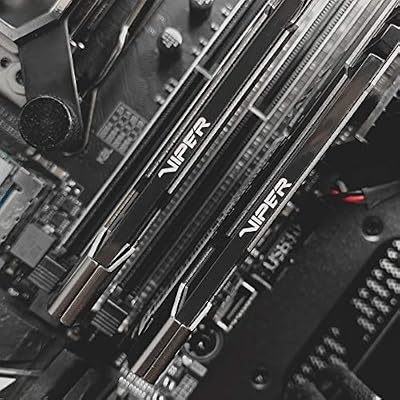
Patriot Viper Steel DDR4 RAM 16GB (1X16GB) 3200MHz CL16 Desktop Memory | Voltage: 1.35v; Supports Intel XMP; Module type: UDIMM.



As an Amazon Associate we earn from qualifying purchases. Product prices and availability are accurate as of the date/time indicated.
Patriot Viper Steel DDR4 RAM 8GB (1X8GB) 3200MHz CL16 Desktop Memory | Voltage: 1.35v; Supports Intel XMP; Module type: UDIMM.
As an Amazon Associate we earn from qualifying purchases. Product prices and availability are accurate as of the date/time indicated.

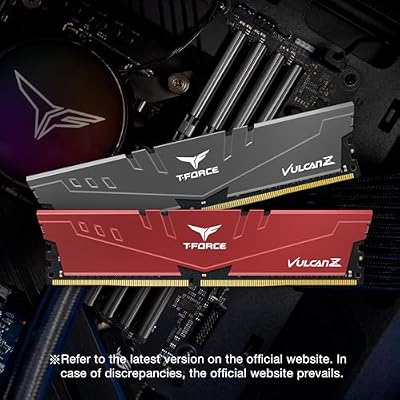
TEAMGROUP T-Force Vulcan Z DDR4 DRAM 16GB Kit (2x8GB) 3200MHz Desktop Memory Module (PC4-25600) CL16 Ram (Gray) - TLZGD416G3200HC16FDC01




As an Amazon Associate we earn from qualifying purchases. Product prices and availability are accurate as of the date/time indicated.
| Product | Best for | Key spec from the title |
|---|---|---|
| G.Skill Ripjaws V 32GB | Heavy multitasking and editing | 2x16GB, up to 3200MT/s, CL16-18-18-38 |
| DIGIERA 8GB | Reviving an office desktop | 2666MHz, 1.2V, CL19, non-ECC UDIMM |
| G.Skill Ripjaws V 16GB | Mainstream gaming builds | 2x8GB, up to 3200MT/s, 1.35V |
| Timetec 32GB | Capacity on an older board | 2x16GB, PC4-21300, 1.2V, CL19 |
| Patriot Viper Steel 16GB | Buying one stick now, adding later | 1x16GB, 3200MHz, CL16, XMP |
| Patriot Viper Steel 8GB | Low-cost speed bump for one slot | 1x8GB, 3200MHz, CL16, 1.35V |
| TeamGroup T-Force Vulcan Z 16GB | Gray-themed gaming rigs | 2x8GB, PC4-25600, CL16 |
How to Choose
Capacity first, then speed
For a current game and a browser with a dozen tabs, 16GB is the working minimum and 32GB is the comfortable target. Video editing, large photo libraries, virtual machines and streaming while gaming all push toward 32GB. If your budget forces a choice, a slower 32GB kit usually serves a heavy workload better than a faster 16GB kit that starts swapping to disk.
Match the kit layout to your slots
A 2x8GB or 2x16GB kit is sold as a matched pair intended for dual-channel use, which roughly doubles memory bandwidth compared with a single stick. A lone 1x8GB or 1x16GB module works fine, but it leaves the second channel idle until you add a matching module. Check your motherboard manual: if it has only two slots, a single 16GB stick limits your upgrade path to one more stick of the same size.
Read the speed and latency line
DDR4-3200 with CL16 is the sweet spot for most Ryzen and Intel desktops. Listings that say “up to 3200MT/s” or “supports XMP” usually need that profile switched on in the BIOS; otherwise the board may fall back to a lower default such as 2133 or 2666. A 2666MHz CL19 kit is perfectly usable for office work but leaves performance on the table for integrated graphics and gaming.
Voltage, form factor and what to ignore
Standard JEDEC modules run at 1.2V, while XMP gaming kits typically need 1.35V. Both are fine on any desktop board that supports DDR4, but confirm the module is a 288-pin unbuffered DIMM, not a SODIMM. Ignore heat spreader color unless your case has a window, and ignore talk of extreme overclocking headroom on budget kits; the rated speed on the label is the number you can count on.
The 7 Best Options
G.Skill Ripjaws V 32GB (2x16GB)
This is the capacity-and-speed pick for builders who edit video, run virtual machines or keep dozens of tabs open next to a game. The title lists a 32GB kit made of two 16GB modules rated up to 3200MT/s at CL16-18-18-38 and 1.35V, with XMP support for Intel and AMD desktops. That combination gives a 16GB-class gaming machine room to grow into heavier work without swapping the kit later.
- Strength: dual-channel pair with enough capacity to avoid memory pressure for years.
- Strength: the 3200MT/s rating keeps Ryzen systems running near their sweet spot.
- Trade-off: needs an XMP profile enabled in the BIOS to reach its rated speed.
Skip it if you only browse and stream video; 16GB will do the same job for less. Also pass if your board has just two slots already filled with smaller sticks, since a full swap is then required and the old modules go unused.
DIGIERA 8GB DDR4-2666
A single 8GB stick at 2666MHz, CL19 and 1.2V, listed as a 288-pin non-ECC UDIMM for desktops. It suits an older office PC or a family computer that needs a modest lift from a 4GB configuration, where the goal is smoother everyday use rather than gaming performance or content creation.
- Strength: plain 1.2V standard voltage means no BIOS tweaking is needed.
- Strength: easy drop-in for a spare slot on a basic desktop.
- Trade-off: 8GB at 2666MHz is tight for current games and heavy multitasking.
Skip it if you are building a gaming PC or plan to run several demanding programs at once. Buyers who want two identical sticks for dual-channel should look at a paired kit, because this listing is one module and the title does not mention a matching second stick.
G.Skill Ripjaws V 16GB (2x8GB)
The sensible middle of the market: two 8GB modules at up to 3200MT/s with CL16-18-18-38 timings and 1.35V. It fits mainstream gaming builds where 16GB is the target and dual-channel bandwidth matters, especially on Ryzen platforms and on Intel boards that support XMP profiles. Because it shares a family with the 32GB kit above, a later upgrade stays simple.
- Strength: matched pair designed for dual-channel operation.
- Strength: 3200MT/s rating with XMP support for Intel and AMD.
- Trade-off: 16GB total leaves less headroom than the 32GB version for content creation.
Skip it if your workload already fills 16GB, or if your board has no free pair of slots. Anyone chasing the lowest possible cost per gigabyte may also prefer the slower 2666MHz kits, which trade clock speed for capacity.
Timetec 32GB (2x16GB) DDR4-2666
This kit pairs two 16GB sticks rated at 2666MHz, PC4-21300, CL19 and 1.2V, described as non-ECC unbuffered. It targets people who need a lot of memory more than they need speed, such as a workstation used for spreadsheets, photo libraries or virtual machines, or an older platform whose BIOS offers few memory options.
- Strength: 32GB of capacity in one matched dual-channel kit.
- Strength: standard 1.2V works with locked or older boards that lack XMP.
- Trade-off: CL19 at 2666MHz is slower than the 3200MHz CL16 kits for gaming.
Skip it if frame rates on integrated graphics are your priority, because memory speed feeds those chips directly. Gamers on Ryzen should favor the 3200MHz kits, and anyone who wants XMP-style tuning will find nothing in this listing that mentions it.
Patriot Viper Steel 16GB (1x16GB)
One 16GB stick at 3200MHz and CL16, with 1.35V and Intel XMP support, in UDIMM format. It is a good first step when you want to buy one module now and add a second identical one later, spreading the spend while still starting with a fast rating. The 1.35V requirement means you should enable the profile after installing.
- Strength: fast 3200MHz CL16 rating on a single large module.
- Strength: leaves a slot free for an upgrade to 32GB.
- Trade-off: runs single-channel until a second module is installed.
Skip it if you want dual-channel performance on day one; buy a two-stick kit instead. It is also a poor fit for boards with a single memory slot, where the upgrade path of adding a second module simply does not exist.
Patriot Viper Steel 8GB (1x8GB)
The smallest of the fast options: a single 8GB stick at 3200MHz, CL16 and 1.35V with XMP support. It makes sense for a budget gaming build that will gain a second stick next month, or for lifting a slow 2400MHz system to a modern rating without a full platform change.
- Strength: 3200MHz CL16 rating at the entry capacity.
- Strength: same family as the 16GB Patriot, so pairing later is straightforward.
- Trade-off: 8GB alone is limiting for modern games.
Skip it if you want to stop at one purchase and never revisit memory again. Anyone running modern open-world games, browser-heavy workflows or creative software should start at 16GB instead and avoid the second round of shopping.
TeamGroup T-Force Vulcan Z 16GB (2x8GB)
A 16GB kit of two 8GB modules at 3200MHz, PC4-25600 and CL16, finished in gray. It competes directly with the G.Skill 16GB kit and suits builders who care about how the case interior looks, or who want a neutral heat spreader that does not clash with white, black or silver parts.
- Strength: matched pair with the popular 3200MHz CL16 rating.
- Strength: gray heat spreaders blend into neutral builds.
- Trade-off: the title does not state voltage, so confirm XMP settings in the manual.
Skip it if you plan to run 32GB or more, since this listing tops out at 16GB. Also look elsewhere if the exact voltage matters for your board, because the title lists speed and latency but leaves that figure out.
Which One Fits Your Situation
Upgrading a Ryzen gaming PC
Take the G.Skill Ripjaws V 16GB or the TeamGroup Vulcan Z 16GB. Both are 2x8GB pairs rated at 3200 with CL16, which is the speed range where Ryzen’s memory controller performs well. Pick whichever matches your case colors.
Editing video or running virtual machines
Go to the G.Skill Ripjaws V 32GB if you want speed with capacity, or the Timetec 32GB if the board is older and you care more about headroom than clock speed.
Spreading the cost over two purchases
Buy the Patriot Viper Steel 16GB now and a second identical stick later. Starting with the Patriot 8GB works too, but you will want to add another quickly.
Reviving a basic office machine
The DIGIERA 8GB at standard voltage is the low-effort option. It asks nothing from the BIOS and fits a spare slot.
Common Mistakes
- Buying a SODIMM or a registered ECC module for a consumer desktop board that needs unbuffered DIMMs.
- Assuming the rated 3200 speed is active without enabling XMP in the BIOS.
- Mixing a new kit with old sticks of different speeds and expecting stable dual-channel behavior.
- Choosing a single module when the board is meant to run a matched pair.
- Paying for fancy heat spreaders while ignoring CAS latency and capacity.
Related guides
- Usb C Kvm Switch For Two Laptops And Two Monitors
- Vertical Laptop Stand For Dual Laptop Desk Setup
- Nvme Enclosure With Active Cooling For Mac Mini
Frequently Asked Questions
Is 16GB enough for DDR4 gaming?
For most titles, yes. If you also stream, edit or keep many apps open, move up to 32GB.
Do I need to enable XMP?
For any kit rated above 2666MHz, yes. Open the BIOS, switch on the XMP or DOCP profile and save; otherwise the memory may run slower than the label.
Can I mix two different DDR4 kits?
It can work but is not guaranteed. Different speeds and timings force the board to use the slowest settings, and some combinations are unstable.
Is a single stick or a two-stick kit better?
A two-stick kit gives dual-channel bandwidth immediately. A single stick is fine as a starting point if you plan to add a matching one.