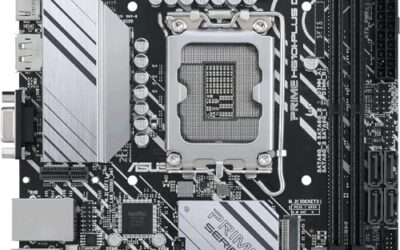
The phrase “micro ATX motherboard under 250 dollars” hides a bigger choice than cost: which socket you commit to. Every board in this guide clears the cap comfortably, but four use AMD’s AM4 platform with DDR4, one uses the newer AM5 socket with DDR5, and one is an older Intel LGA1200 board. Pick the socket first, and the board almost chooses itself. The remaining differences come down to WiFi, M.2 slot count, and the video outputs on the back panel.
These are for builders who want a compact, affordable board without giving up M.2 storage or PCIe 4.0, whether that is a Ryzen 5000 upgrade for an aging desktop or a fresh AM5 machine meant to last through 2026 and beyond. We compared six boards using only what each listing states about sockets, memory, storage, and connectivity.
Quick Picks

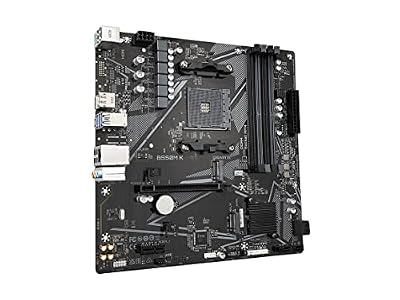
GIGABYTE B550M K AMD AM4 Micro-ATX Motherboard, Supports Ryzen 5000/4000/3000 Series Processors, DDR4, 3+3 Power Phase, 2X M.2, PCIe 4.0, USB 3.2 Gen 1, GbE LAN, Q-Flash




As an Amazon Associate we earn from qualifying purchases. Product prices and availability are accurate as of the date/time indicated.

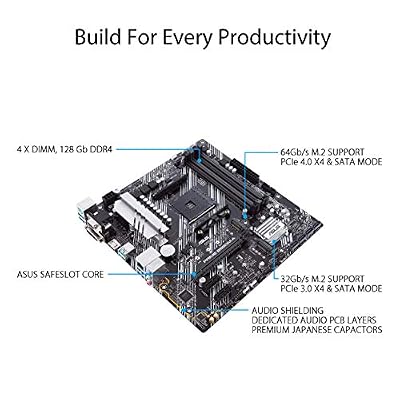
ASUS Prime B550M-A WiFi II AMD Micro ATX DDR4 Motherboard with PCIe 4.0, WiFi 6, ECC Memory, HDMI 2.1, RGB Header

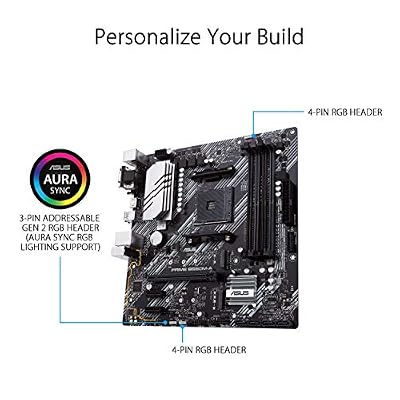


As an Amazon Associate we earn from qualifying purchases. Product prices and availability are accurate as of the date/time indicated.
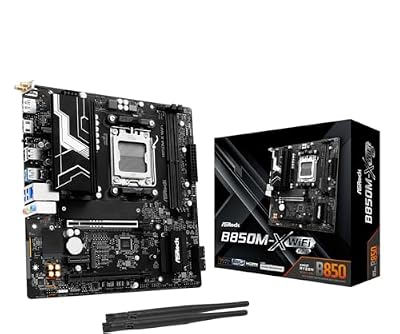
ASRock B850M-X WiFi R2.0 AM5 Micro-ATX Motherboard: Supports AMD Ryzen 9000/8000/7000 CPUs, DDR5 8200+ (OC), PCIe 5.0, Wi-Fi 6E, 2.5G LAN, USB-C, BIOS Flashback


As an Amazon Associate we earn from qualifying purchases. Product prices and availability are accurate as of the date/time indicated.

ASRock B560M-C Micro-ATX Motherboard, Supports 10th & 11th Gen Intel Core Processors (LGA1200), DDR4 4800MHz (OC), PCIe 4.0, Dual M.2, 8 SATA3, Intel Gigabit LAN, WiFi + BT 5.1


As an Amazon Associate we earn from qualifying purchases. Product prices and availability are accurate as of the date/time indicated.

MSI PRO B550M-P Motherboard, mATX - Supports AMD Ryzen 5000/5000 G-Series, 4000 G-Series, 3000 G-Series Desktop Processors, AM4 - DDR4 Memory Boost (4400+ MT/s OC), PCIe 4.0 x16, M.2 Gen4, Micro-ATX


As an Amazon Associate we earn from qualifying purchases. Product prices and availability are accurate as of the date/time indicated.

ASRock B550M Pro4 Micro ATX Motherboard, AMD AM4 Ryzen 3000-5000, DDR4 4733+ (OC), PCIe 4.0, Dual M.2, HDMI/DP/VGA


As an Amazon Associate we earn from qualifying purchases. Product prices and availability are accurate as of the date/time indicated.
| Product | Best for | Key spec from the title |
|---|---|---|
| GIGABYTE B550M K | Lean Ryzen 5000 build | AM4, 3+3 power phase, 2x M.2, PCIe 4.0 |
| ASUS Prime B550M-A WiFi II | Wireless AM4 upgrade | WiFi 6, HDMI 2.1, ECC memory support |
| ASRock B850M-X WiFi R2.0 | Long-lived AM5 build | DDR5, PCIe 5.0, WiFi 6E, 2.5G LAN |
| ASRock B560M-C | Reusing an Intel 10th or 11th Gen CPU | LGA1200, dual M.2, 8 SATA3 |
| MSI PRO B550M-P | Plain AM4 workstation | Ryzen 5000, 4000 G, 3000 G support |
| ASRock B550M Pro4 | Display flexibility | HDMI, DP, and VGA outputs; dual M.2 |
How to Choose
Lock in the socket and the CPU generation
AM4 boards list support for Ryzen 3000, 4000, and 5000 families, though the exact range varies by board, so read the processor line in the title. The AM5 board lists Ryzen 9000, 8000, and 7000 chips. The Intel board is limited to 10th and 11th Gen. Mixing a socket with the wrong chip is the costliest error here, because a processor that does not fit the socket cannot be returned to working order by any BIOS update. Write down your exact CPU model, then match it to the processor line in each title before comparing features.
Decide between DDR4 and DDR5
Five of the six boards use DDR4, which is cheaper to fill. The ASRock B850M-X steps up to DDR5, with a listed 8200+ overclock rating. DDR5 matters if you are building for the long term; DDR4 is the thrifty option when you already own memory, and for an office or light gaming machine the difference in day-to-day speed is small. Never assume a kit transfers between platforms: the notch positions differ, so DDR4 sticks physically refuse to seat in a DDR5 slot.
Count M.2 slots and PCIe generation
Look for at least two M.2 slots if you plan to add drives later, and PCIe 4.0 for current graphics and SSDs. Only the ASRock B850M-X names PCIe 5.0. Boards without a stated slot count may force you to use SATA for extra storage, which is slower and needs cables. Also remember that PCIe 4.0 only helps if the SSD and the processor both support it.
Ignore overclock numbers, check the connectivity you need
Memory speeds in parentheses with “OC” require specific kits and are optimistic. Instead check for WiFi, 2.5G LAN, or display outputs. Budget boards cut corners by dropping WiFi, trimming VRM phases, or limiting rear USB ports. A board with only four or five rear ports can run out quickly once a keyboard, mouse, headset, and webcam are attached.
The 6 Best Options
GIGABYTE B550M K
This is the no-frills entry for AM4, listed with 3+3 power phases, two M.2 slots, PCIe 4.0, and USB 3.2 Gen ports, and support for Ryzen 5000, 4000, and 3000 series. It suits someone upgrading an older Ryzen system who needs fast storage without paying for extras. The listing says nothing beyond storage and power, which tells you the money went into the essentials rather than into wireless or lighting. A builder who already owns a case, a cooler, and memory can slot this board in with minimal fuss.
- Strength: two M.2 slots and PCIe 4.0 on a lean board.
- Strength: broad Ryzen generation support for DDR4 systems.
- Trade-off: the title lists no WiFi, so wireless needs a separate card or dongle.
Skip it if you want built-in wireless or a high-end CPU that wants more than a basic power design. A modest power phase count suits mid-range processors rather than heavy overclocking.
ASUS Prime B550M-A WiFi II
The Prime B550M-A WiFi II adds WiFi 6, HDMI 2.1, an RGB header, and ECC memory support to an AM4, DDR4 micro ATX layout with PCIe 4.0. It is the pick for a builder who wants wireless built in and a mainstream brand behind the board. The HDMI 2.1 output matters for a living-room PC connected to a modern television, and the RGB header lets you add a strip without a separate controller. That combination reads as a polished all-rounder rather than a bare-bones option.
- Strength: WiFi 6 on board.
- Strength: HDMI 2.1 for a modern display or TV.
- Trade-off: it is still an AM4 platform, so there is no DDR5 upgrade path.
Skip it if you are starting a fresh build and want the newest socket. ECC support is a bonus only with compatible memory and processors, so treat it as a nice extra rather than a reason to buy. Anyone who prefers a separate wireless card can save by choosing a board without WiFi.
ASRock B850M-X WiFi R2.0
This AM5 board supports Ryzen 9000, 8000, and 7000 CPUs, with DDR5 up to a listed 8200+ overclock, PCIe 5.0, WiFi 6E, 2.5G LAN, and USB-C. It is the future-facing choice for a new build, especially one that will receive a processor and graphics upgrade in a couple of years. The 2.5G LAN port helps with fast home networks and large file transfers, and USB-C on the board saves a front-panel adapter.
- Strength: the newest platform in the group, with PCIe 5.0.
- Strength: WiFi 6E and 2.5G LAN for fast networking.
- Trade-off: DDR5 memory costs more than DDR4 kits.
Skip it if you already own DDR4 memory and an AM4 processor, since moving to AM5 means replacing both the processor and the memory. Builders on a tight budget may also find DDR5 kits harder to justify for a basic office machine.
ASRock B560M-C
The B560M-C is an LGA1200 board for 10th and 11th Gen Intel Core processors, listing DDR4, PCIe 4.0, dual M.2, and eight SATA3 ports. It makes sense for owners of a compatible Intel chip who want a fresh board, such as a family PC being revived after a failed motherboard. Eight SATA3 ports make it a natural fit for a home server or media library with several drives.
- Strength: eight SATA3 ports for storage-heavy setups.
- Strength: dual M.2 with PCIe 4.0.
- Trade-off: the socket is a dead end, with no newer Intel generations.
Skip it if you are buying a processor fresh, since an AMD board offers a longer upgrade route and avoids tying a new purchase to an older Intel generation. Someone who simply wants more SATA ports for a drive-heavy server is the exception.
MSI PRO B550M-P
The PRO B550M-P is an AM4 board supporting Ryzen 5000, 5000 G-Series, 4000 G-Series, and 3000 G-Series, with DDR4 Memory Boost. It fits an office or integrated-graphics build where a G-Series chip handles display output, such as a reception-desk computer or a student machine. Memory Boost is listed as a DDR4 feature, which points to a board aimed at steady everyday use rather than extreme tuning.
- Strength: explicit G-Series processor support.
- Strength: familiar MSI PRO series for office machines.
- Trade-off: the title lists no WiFi or M.2 count.
Skip it if you need to confirm slot counts before buying, or if you want a headline feature such as WiFi or PCIe 5.0 on the spec line. Office and school builds are where this plain board makes the most sense.
ASRock B550M Pro4
The B550M Pro4 supports Ryzen 3000 through 5000, with DDR4 4733+ (OC), PCIe 4.0, dual M.2, and HDMI, DisplayPort, and VGA outputs. Three video connectors suit an integrated-graphics build that must drive several monitors, for example a trading desk, a classroom, or a retail terminal that still uses an older VGA display. Pairing it with a Ryzen 5000 chip keeps the build current while reusing monitors you already own.
- Strength: three display outputs, including legacy VGA.
- Strength: dual M.2 on a PCIe 4.0 board.
- Trade-off: no WiFi named in the title.
Skip it if you want wireless built in and never plan to use a monitor over VGA, since the extra output then goes unused. Anyone chasing a long upgrade path should look at the AM5 board instead.
Which One Fits Your Situation
Upgrading an older Ryzen desktop
The GIGABYTE B550M K or the ASRock B550M Pro4 keep your DDR4 memory and add PCIe 4.0 storage. Both list two M.2 slots, so an extra drive can go in later without a SATA cable. Check that your Ryzen model appears in the processor line before ordering.
Starting from scratch for the next several years
The ASRock B850M-X WiFi R2.0 offers AM5, DDR5, and PCIe 5.0, along with WiFi 6E and 2.5G LAN. It is the only board here where the platform itself still has room to grow as new processors arrive.
Building a wireless-ready home PC
The ASUS Prime B550M-A WiFi II has WiFi 6 and HDMI 2.1 without adding cards, which keeps a small case tidy. It also lists an RGB header if you want lighting.
Reusing a 10th or 11th Gen Intel CPU
The ASRock B560M-C is the only Intel board here and offers eight SATA3 ports for storage, which suits a media server built around an existing processor.
Common Mistakes
- Choosing a board before confirming the CPU socket and generation.
- Buying DDR5 memory for a DDR4 board, or the reverse.
- Believing overclock memory speeds will run without a matching kit.
- Forgetting that some boards leave out WiFi entirely.
- Pairing an integrated-graphics-only plan with a CPU that lacks a built-in GPU.
Related guides
- Usb C Kvm Switch For Two Laptops And Two Monitors
- Vertical Laptop Stand For Dual Laptop Desk Setup
- Nvme Enclosure With Active Cooling For Mac Mini
Frequently Asked Questions
Is AM4 still worth buying?
It is worth it if you already own DDR4 memory and a compatible Ryzen. For an all-new build, AM5 offers a longer upgrade path.
Does micro ATX limit my graphics card?
The board size does not, but the case does. Check the case’s maximum GPU length and the number of expansion slots. A compact board can still carry a full-size card if the chassis allows it.
Do I need two M.2 slots?
Not at first, but a second slot makes storage upgrades easy later. If a listing does not state the slot count, treat that as a reason to check the specifications before buying.
Are Intel LGA1200 boards a good value now?
Only for reusing an existing 10th or 11th Gen chip, since the platform has no newer processors. For a fresh purchase, AM4 or AM5 gives you more headroom.