A capture card is the bridge between a console, camera, or second PC and the computer that records or streams it. Under 250 dollars you can buy anything from a plain USB dongle that records 1080p at 60 frames to a high-end Elgato card that handles HDR and very high refresh rates. The gap between those tiers comes down to what happens on the pass-through side and how much latency you can tolerate.
This guide is for streamers, video-call hobbyists, and players who want to save footage from a PS5, Xbox, Switch, or camera onto a Windows or Mac computer. Before looking at models, decide two things: whether you want to keep playing at a higher refresh rate than you record, and whether you have a free USB 3.0 port or an open PCIe slot. Those answers narrow the ten listings quickly.
Quick Picks

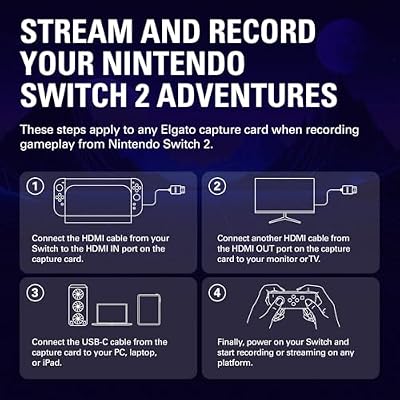
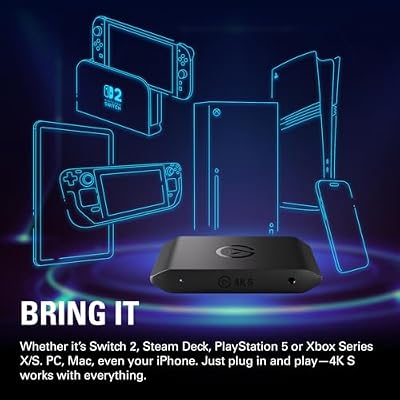
Elgato 4K S Capture Card for PS5, Xbox Series X/S, Switch 2 | 4K60 capture, 1440p120 or 1080p240 passthrough, HDR10 support, Near-zero latency, USB-C, Analog audio input




As an Amazon Associate we earn from qualifying purchases. Product prices and availability are accurate as of the date/time indicated.

Guermok Video Capture Card, 4K USB3.0 HDMI to USB C, 1080P 60FPS & 2K 30FPS | Capture Card for Streaming, Compatible with iPad Mac OS Windows, Quest 3, OBS, PS5/4, Switch2/1, Xbox, Camera (Silver)


As an Amazon Associate we earn from qualifying purchases. Product prices and availability are accurate as of the date/time indicated.

Capture Card 4K HDMI Video Streaming to USB 3.0 1080P 60FPS Capture Device | Audio Video Capture, 4K HDMI Loop-Out, Work for PS5/PS4/Switch/Xbox/PC/Camera/OBS, Game Screen Recorder Streaming Equipment


As an Amazon Associate we earn from qualifying purchases. Product prices and availability are accurate as of the date/time indicated.
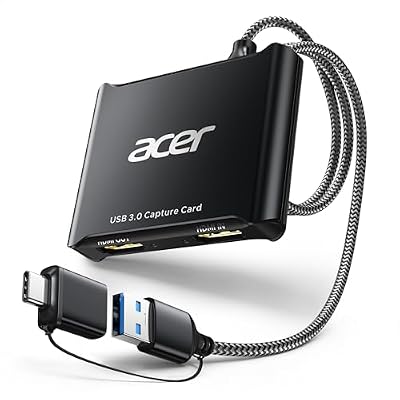
acer USB 3.0 HDMI Capture Card, 4K HDMI Loop-Out, 1080P 60Hz for Streaming | Low-Latency Audio Video Capture, USB Type-A & Type-C Ports, Compatible with Switch 2, PS5/PS4, Cameras, PC, OBS, Xbox


As an Amazon Associate we earn from qualifying purchases. Product prices and availability are accurate as of the date/time indicated.

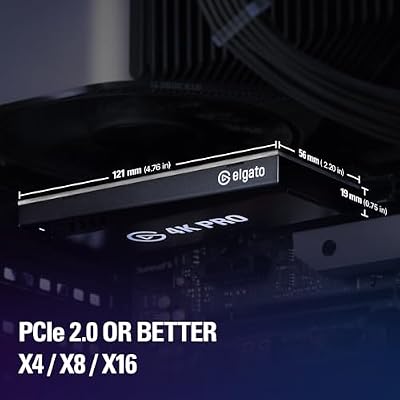
Elgato 4K Pro Internal Capture Card, 8K60 Passthrough | 4K60 HDR10 capture, HDMI 2.1, Up to 1080p240 recording, VRR support, Ultra-low latency, Dual PC setup compatible




As an Amazon Associate we earn from qualifying purchases. Product prices and availability are accurate as of the date/time indicated.

Guermok USB 3.0 HDMI Capture Card, 1080P 60FPS & 2K30 Video Capture Device | 4K HDMI Pass-Through, Mic Input & Audio Output, USB Video Game Capture for OBS Streaming, PS5, Switch 2/1, Xbox1, Camera, PC


As an Amazon Associate we earn from qualifying purchases. Product prices and availability are accurate as of the date/time indicated.

Fifine AmpliGame Video Capture Card, HD 1080 60fps for Audio Video, Gaming, Live Streaming, 4K HDMI to USB Capture Card Compatible with PS4/Windows/Mac OS/Switch/Xbox-V3


As an Amazon Associate we earn from qualifying purchases. Product prices and availability are accurate as of the date/time indicated.

UGREEN 2K@30Hz 1080P 60FPS Video Capture Card 4K Input HDMI to USB 3.0 | 4K HDMI Input, Low Latency, Capture Card for Streaming Game Recording Compatible with Switch 2 Xbox PS4 PS5 PC Camera Usb C


As an Amazon Associate we earn from qualifying purchases. Product prices and availability are accurate as of the date/time indicated.

XIIXMASK USB 3.0 HDMI Capture Card, 1080P 60FPS Capture, 4K Pass-Through | Dual-Port USB-A/USB-C, 2K 30FPS/1080P 60FPS Video Capture & Streaming for PS4/PS5, Switch 1/2, Xbox, PC, Mac, Camera (black)


As an Amazon Associate we earn from qualifying purchases. Product prices and availability are accurate as of the date/time indicated.

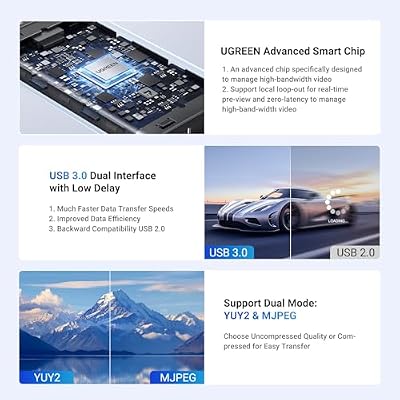
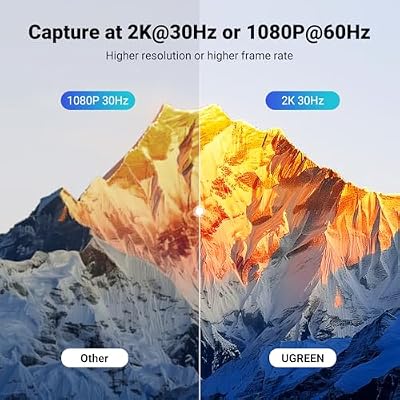
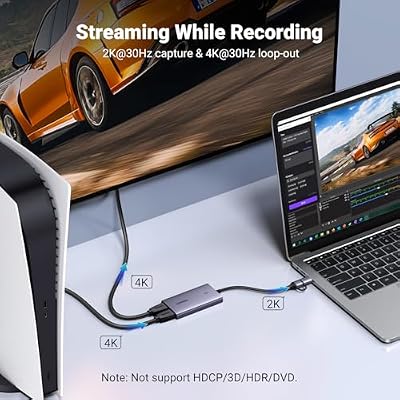
UGREEN 4K@30Hz Loop Out HDMI Capture Card for 2K 30FPS 1080P 60FPS USB 3.0 | 2K@30Hz Record for Video Capture Card for Streaming Gaming with Low Latency Compatible with Switch 2 PS5 Xbox PC Mac



As an Amazon Associate we earn from qualifying purchases. Product prices and availability are accurate as of the date/time indicated.
| Product | Best for | Key spec from the title |
|---|---|---|
| Elgato 4K S | Console streaming with high refresh | 4K60 capture, 1440p120 or 1080p240 passthrough, USB-C |
| Guermok 4K USB-C | Cross-device recording | 1080P 60FPS and 2K 30FPS, USB 3.0 |
| 4K HDMI Loop-Out Capture Card | Budget loop-through setups | 4K HDMI loop-out, 1080P 60FPS |
| acer USB 3.0 Capture Card | Laptop and desktop flexibility | Type-A and Type-C ports, 4K loop-out |
| Elgato 4K Pro Internal | PC builders with a free slot | 8K60 passthrough, 4K60 HDR10 capture |
| Guermok USB 3.0 Capture Card | Streamers needing audio ports | Mic input, audio output, 4K pass-through |
| Fifine AmpliGame | Entry-level game recording | 1080p 60fps, 4K HDMI to USB |
| UGREEN 2K@30Hz | Simple HDMI-to-USB capture | 4K input, 1080P 60FPS |
| XIIXMASK Dual-Port | USB-A and USB-C hosts | Dual-port USB-A/USB-C, 4K pass-through |
| UGREEN 4K@30Hz Loop Out | Gaming with passthrough | 4K@30Hz loop out, 2K 30FPS record |
How to Choose
Capture resolution versus pass-through
Two numbers matter and they are often confused. Capture is what the card records to your computer, such as 1080p at 60 frames. Pass-through is the signal sent on to your monitor while you play. A card can accept 4K input and still record only 1080p, so read the capture figure first. If your monitor runs at a high refresh rate, make sure pass-through supports it.
USB 3.0 or internal PCIe
External USB 3.0 cards are portable and work with laptops, while an internal card sits in a PCIe slot and avoids cable clutter. USB 3.0 needs a dedicated port, preferably not shared with a busy hub. Internal cards suit a fixed desktop streaming rig and tend to be aimed at higher capture quality, but you need an open slot.
Latency and monitoring
Latency is the delay between a real action and what appears on your recording preview. For gameplay that you watch live on the capture window, low latency matters. If you play on the pass-through monitor, the delay only affects the stream view. Look for loop-out or pass-through ports that let you play on a separate display without lag.
Audio, formats, and what to ignore
Some cards add a microphone input and audio output so that you can mix commentary. Check what devices the card supports, because a PS5 and a camera behave differently. Ignore marketing about 4K input if your goal is 1080p streaming. Budget cards often skip HDR, so confirm that the listing mentions it if you play HDR titles.
The 10 Best Options
Elgato 4K S
Elgato’s USB-C card is aimed at PS5, Xbox Series X/S, and Switch 2 owners. The title lists 4K60 capture, 1440p120 or 1080p240 passthrough, HDR10 support, and near-zero latency. That makes it the pick for someone who wants to keep a fast display while recording, such as a competitive player who streams on the side and refuses to accept a laggy monitor feed. It fits console streamers who care about passthrough fidelity as much as the recorded file.
- Strength: High-refresh passthrough lets you play on a fast monitor.
- Strength: HDR10 support covers modern console output.
- Trade-off: It likely sits near the top of the cap, so expect a bigger spend than the generic cards.
Skip it if you only need basic 1080p recording from a single device.
Guermok 4K USB-C
This Guermok card lists a 4K USB 3.0 HDMI to USB-C design, with 1080P 60FPS and 2K 30FPS capture. It is marketed for streaming and lists compatibility with iPad, Mac, and Windows, plus a Quest headset. It suits someone who records from several devices and wants one portable card that moves between a tablet, a laptop, and a desktop without extra adapters.
- Strength: Wide device compatibility is named directly in the title.
- Strength: A portable USB-C design that travels well.
- Trade-off: 2K capture is limited to 30 frames per second.
Skip it if you want 2K recording at 60 frames per second.
4K HDMI Loop-Out Capture Card
This unbranded card handles 4K HDMI input, 1080P 60FPS capture, and a 4K HDMI loop-out. The title lists PS5, PS4, Switch, Xbox, and PC sources, and even mentions cameras. It suits budget streamers who want loop-through so they can play on a separate monitor while the computer records, and who are comfortable buying a generic card to save money.
- Strength: The HDMI loop-out keeps the main display free of capture lag.
- Strength: Broad source compatibility, from consoles to cameras.
- Trade-off: No brand-level driver or software support is implied.
Skip it if you want a recognized brand with an established support channel.
acer USB 3.0 Capture Card
acer offers a USB 3.0 card with a 4K HDMI loop-out, 1080P 60Hz capture, and low-latency audio and video. The listing mentions both USB Type-A and Type-C ports, which is useful when your setup changes. It is a good match for people who switch between a desktop and a thin laptop, or who stream from a coffee-table console one week and a desk the next.
- Strength: Dual connector types ease use across laptops and desktops.
- Strength: A familiar consumer-electronics brand name.
- Trade-off: Capture tops out at 1080p 60 in the title.
Skip it if you want recorded video above 1080p.
Elgato 4K Pro Internal
This is the internal option: HDMI 2.1, 8K60 passthrough, 4K60 HDR10 capture, recording up to 1080p240, VRR support, and ultra-low latency. It is for PC builders who have a free slot and want the most capable card in the group. It suits a desktop streaming rig where cables are routed once and never touched again, and where a console and a gaming monitor share the same desk.
- Strength: The strongest capture and passthrough specs in this lineup.
- Strength: Internal mounting avoids another external box on the desk.
- Trade-off: It needs an open slot, so it is not an option for laptops.
Skip it if you use a laptop or a small-form-factor PC.
Guermok USB 3.0 Capture Card
The second Guermok lists 1080P 60FPS and 2K30 capture, 4K HDMI pass-through, and a mic input plus audio output. It suits streamers who add voice commentary and want a simple audio path without a separate mixer. Podcast-style gaming channels and tutorial makers who talk over footage are the obvious audience for these extra ports.
- Strength: A mic input and audio output simplify commentary setups.
- Strength: 4K pass-through for the display.
- Trade-off: Recorded video is still limited to 1080p 60 or 2K30.
Skip it if you already use a separate audio interface.
Fifine AmpliGame
Fifine’s AmpliGame lists HD 1080 60fps capture and 4K HDMI to USB, with PS4, Windows, and Mac compatibility. It suits newcomers who want an inexpensive way to start recording gameplay or live streams, and who plan to learn broadcasting software before spending on anything fancy. It is a starter card in spirit, built around a simple USB link.
- Strength: A simple entry-level setup with minimal configuration.
- Strength: Windows and Mac support is named in the title.
- Trade-off: No HDR or high-refresh features are listed.
Skip it if you want advanced passthrough for a fast monitor.
UGREEN 2K@30Hz
This UGREEN card accepts 4K HDMI input and records 1080P 60FPS and 2K at 30Hz over USB 3.0. The title stresses low latency. It fits anyone who wants a no-frills HDMI-to-USB recorder from a known accessory maker, such as a teacher recording a camera feed or a hobbyist archiving older console footage to a laptop for editing.
- Strength: 4K input with a low-latency claim.
- Strength: A simple USB 3.0 connection.
- Trade-off: The title lists no loop-out for a second display.
Skip it if you need passthrough to a separate monitor.
XIIXMASK Dual-Port
XIIXMASK offers a USB 3.0 card with dual-port USB-A and USB-C, 1080P 60FPS capture, 2K 30FPS recording, and 4K pass-through. It suits people who connect to different computers, such as a household that shares one card between a desktop and a laptop, and who value simple connection options more than headline specs.
- Strength: Dual connectors fit more computers without adapters.
- Strength: 4K pass-through keeps the display signal clean.
- Trade-off: 2K recording is limited to 30FPS.
Skip it if you want a name with a larger support footprint.
UGREEN 4K@30Hz Loop Out
This UGREEN model adds a 4K@30Hz loop out, 2K 30FPS recording, 1080P 60FPS, and USB 3.0 with low latency. It is for streamers who want loop-through on a second display and who are content with 30Hz at 4K, perhaps because they play slower-paced games or record camera footage instead of fast shooters.
- Strength: A loop out lets a dedicated monitor stay lag-free.
- Strength: Sold by a familiar accessory brand.
- Trade-off: The 4K loop is limited to 30Hz.
Skip it if you play fast games at a high refresh rate.
Which One Fits Your Situation
You stream console games at high refresh
The Elgato 4K S is the choice, thanks to its 1440p120 and 1080p240 passthrough. It keeps the monitor feed fast while the recording runs in the background.
You build a streaming PC
The Elgato 4K Pro Internal gives the strongest listed specs and avoids external clutter. It suits builders who have the slot to spare.
You need a card for a laptop
The acer and the XIIXMASK both list USB-A and USB-C connections, so they work with both older and newer laptops without extra adapters.
You want voice commentary
The second Guermok lists a mic input and an audio output, which makes it the simplest path to commentary in 2026 setups that skip an external mixer.
Common Mistakes
- Confusing 4K input with 4K capture.
- Plugging a USB 3.0 card into a USB 2.0 port.
- Ignoring pass-through limits on a high-refresh monitor.
- Assuming every card captures HDR.
- Skipping audio checks before streaming.
Related guides
- Usb C Kvm Switch For Two Laptops And Two Monitors
- Vertical Laptop Stand For Dual Laptop Desk Setup
- Nvme Enclosure With Active Cooling For Mac Mini
Frequently Asked Questions
Do I need a capture card to stream a PC game?
Not for the PC you play on, since software can record it. A capture card is for a console or a second PC.
What is the difference between loop-out and pass-through?
They both send the video signal on to a second display so you can play without capture delay. Terms vary by maker, so read the description of the port rather than relying on the name alone.
Is USB 3.0 required?
Most of these cards list USB 3.0. Use a dedicated port for best results, and avoid sharing it with other busy devices on a hub, since that can limit the bandwidth available for video.
Will an internal card work in a laptop?
No, it needs a PCIe slot in a desktop. Laptop owners should choose one of the external USB cards instead, which connect through a single cable and can move between machines.