Best budget 32gb ram can mean the lowest purchase cost, the best latency for the money, or simply a kit that avoids compatibility headaches. This roundup compares four current 32GB DDR5 options and explains where each fits, so you can protect the rest of your PC budget without buying memory that clashes with the platform.
- How to Choose 32GB RAM
- Top Picks
- Best Budget 32GB DDR5 RAM for AMD AM5 (Ryzen 7000 and 9000)
- Cheapest 32GB DDR5 RAM for Intel and Plug-and-Play Builds
- Best Budget 32GB DDR4 RAM for AM4 and Older Intel PCs
- Also Consider
- How to Install and Set Up a 32GB RAM Kit
- Mistakes to Avoid When Buying Budget 32GB RAM
- Best Budget 32GB RAM Comparison Table
- How We Chose These Budget 32GB RAM Kits
- Frequently Asked Questions
- Which Budget 32GB RAM Kit Should You Buy?
- Final Thoughts
Updated October 2026 — The best budget 32GB RAM for most new builds is a 2x16GB DDR5-6000 kit: CL30 for AMD AM5, CL36 is fine for Intel. Older AM4 and DDR4 Intel systems should buy a 2x16GB DDR4-3200 CL16 or DDR4-3600 CL18 kit instead.
- Best for AMD AM5: Patriot Viper Venom DDR5-6000 CL30 · 30-40-40-76 · 1.35V · XMP/EXPO
- Cheapest 32GB DDR5: Crucial Pro DDR5-5600 CL46 · 1.1V · runs at rated speed without a profile on many platforms
- Best budget DDR4: Corsair Vengeance LPX DDR4-3200 CL16 · 16-20-20-38 · 1.35V · about 34mm tall
Our top three overall are the Corsair Vengeance DDR5-6000 CL30, the TeamGroup T-Force Vulcan DDR5-6000 CL38, and the Patriot Viper Venom DDR5-6000 CL30. A note on price: memory costs rose sharply through 2025 and 2026 as manufacturers shifted capacity to AI data-center memory, so “budget” now means the best value within a much higher price range. A 32GB DDR4 kit currently costs roughly half as much as a comparable DDR5 kit.
How to Choose 32GB RAM
A 32GB kit looks simple until speed, timings, profiles, and cooler clearance complicate selection. For a best budget 32gb ram choice, prioritize usable capacity and a sensible DDR5 setting that your CPU and motherboard can support instead of chasing the biggest package number and creating unnecessary BIOS troubleshooting.
Speed And Latency
Memory speed is measured in MT/s, while CL measures cycles before data is available. At the same 6000 MT/s, CL30 is tighter than CL36 or CL38. For a best budget 32gb ram pick, timing matters when prices are close, but it should follow capacity, platform support, and overall component balance for beginner-first builds.
Paying heavily for tiny latency gains can leave less budget for the CPU, graphics card, or SSD. Corsair Vengeance 6000 CL30 offers tighter timing, while TeamGroup T-Force Vulcan 6000 CL38 keeps the specification simpler. Either can make sense when the memory choice matches where your build budget is actually constrained.
Capacity And Kit Layout
Thirty-two gigabytes is normally best bought as two 16GB modules, giving the system a matched dual-module kit rather than separate sticks. Manufacturers validate matched modules together at their advertised profile, which reduces configuration uncertainty. This format also simplifies future expansion planning.
G.Skill Flare X5 and Kingston FURY Beast both use 2x16GB configurations, fitting a straightforward 32GB starting point. For a best budget 32gb ram purchase, one 32GB module can preserve a slot, but it changes the memory layout and can reduce bandwidth versus a matched pair on supported desktops. motherboard-compatibility
XMP And EXPO Support
DDR5-6000 is a profile setting, not the guaranteed default speed on these kits. With compatible hardware, XMP or EXPO can load the tested profile in BIOS; without it, memory normally starts at its SPD setting. A first-time builder may therefore see a lower speed than the package figure.
Corsair Vengeance and TeamGroup T-Force Vulcan offer Intel XMP and AMD EXPO on the relevant models, while G.Skill Flare X5 is designed around AMD AM5 and also supports Intel XMP. Corsair suits platform changes, Flare X5 fits AM5 naturally, and Vulcan suits value-focused builds cross-platform-future-proof efficiently.
Module Height
Module height matters when a tower air cooler overlaps the DIMM slots or a compact case leaves limited room above the board. A low-profile heat spreader cannot increase memory speed, but it can prevent an otherwise suitable kit from becoming a best budget 32gb ram installation problem in a dense layout during small-case assembly.
Corsair describes Vengeance as low clearance, while G.Skill lists Flare X5 at 33mm and TeamGroup lists Vulcan at 32.7mm. For a best budget 32gb ram build, those measurements help separate the picks around large CPU coolers, while Kingston FURY Beast reaches 34.9mm and therefore needs more attention to clearance.
Which Speed Does Your CPU Actually Want?
Buying faster memory than your platform can use is the most common way to waste money on RAM. Match the kit to the processor:
| Platform | Memory type | Budget sweet spot | Notes |
|---|---|---|---|
| AMD Ryzen 7000 / 9000 (AM5) | DDR5 | DDR5-6000 CL30-CL36 | 6000 keeps the memory controller at a 1:1 ratio; faster kits often gain little |
| Intel Core Ultra 200S (LGA1851) | DDR5 | DDR5-6000 to 6400 | Officially supports DDR5-6400; CL36-CL40 is fine |
| Intel 12th-14th Gen with DDR5 board | DDR5 | DDR5-5600 to 6000 | Check the board’s memory list for 6000 kits on 12th Gen |
| Intel 12th-14th Gen with DDR4 board | DDR4 | DDR4-3200 CL16 or 3600 CL18 | The board decides DDR4 vs DDR5, not the CPU |
| AMD Ryzen 5000 / 3000 (AM4) | DDR4 | DDR4-3600 CL18 or 3200 CL16 | 3600 suits the Infinity Fabric on most Ryzen 5000 chips |
A practical rule: on AM5, do not pay extra for anything above DDR5-6400. On DDR4 platforms, do not pay extra for anything above DDR4-3600.
Two Sticks, Not Four
Buy 32GB as a 2x16GB kit and leave the other two slots empty. Four DDR5 modules force most boards to lower memory speed, sometimes well below 6000 MT/s, because of the extra electrical load. If you think you will need 64GB later, a 2x32GB kit now is safer than adding a second 2x16GB kit.
DDR4 vs DDR5: Which Should a Budget Build Use?
You cannot choose freely: the motherboard decides. AM5 and Intel Core Ultra boards are DDR5-only; AM4 boards are DDR4-only; Intel 12th-14th Gen boards come in either version. The decision only becomes real when you are choosing a platform.
- Upgrading an AM4 or DDR4 Intel PC: Buy DDR4. A 2x16GB DDR4-3200 CL16 kit extends a working system for a fraction of a platform swap.
- Building new for gaming: Choose DDR5 on AM5. It costs more today, but it is the platform AMD plans to support with future CPUs.
- Building the cheapest possible PC: A used or discounted AM4 or DDR4 Intel board with a DDR4 kit is now the lowest-cost route to 32GB, because DDR4 prices rose less than DDR5.
Top Picks
This best budget 32gb ram roundup covers four 32GB DDR5 kits with distinct spending and platform priorities. Corsair targets balanced specifications, TeamGroup emphasizes value, G.Skill suits AM5, and Kingston offers a conventional mainstream alternative. Prices move, so hardware configuration matters more than a temporary deal.
| Product | Best For | Key Spec | Watch Out For |
|---|---|---|---|
| Corsair Vengeance 32GB (2x16GB) DDR5-6000 CL30 | Best Overall | 6000 MT/s, CL30-36-36-76, 1.40V, XMP/EXPO | Higher tested voltage |
| TeamGroup T-Force Vulcan 32GB (2x16GB) DDR5-6000 CL38 | Best Value | 6000 MT/s, CL38, 1.25V, XMP/EXPO | Looser CL38 timing |
| G.Skill Flare X5 32GB (2x16GB) DDR5-6000 CL30 | Best For AMD AM5 | 6000 MT/s, CL30-38-38-96, 1.35V, 33mm | AMD-focused positioning |
| Kingston FURY Beast 32GB (2x16GB) DDR5-6000 CL36 | Best For Mainstream Intel Builds | 6000 MT/s, CL36-44-44, 1.35V, 34.9mm | Taller modules and CL36 |
Corsair Vengeance 32GB: Best Overall
Corsair Vengeance 32GB (2x16GB) DDR5-6000 CL30 is the Best Overall choice for builders who want balanced specifications without RGB extras. It is rated at 6000 MT/s, 30-36-36-76, and 1.40V, with AMD EXPO and Intel XMP support on the listed model, plus an aluminum low-clearance heat spreader.
The advantage is the combination of CL30 timing, dual-platform profiles, and compact physical design. The drawback is its 1.40V tested voltage, higher than the 1.25V or 1.35V figures on several alternatives. It fits a new gaming or productivity PC well when the motherboard compatibility list supports the exact kit.
TeamGroup T-Force Vulcan 32GB: Best Value
TeamGroup T-Force Vulcan 32GB (2x16GB) DDR5-6000 CL38 earns Best Value for a cost-conscious build targeting DDR5-6000. The black kit is rated at 38-38-38-78 and 1.25V, with a 32.7mm module height and support for Intel XMP 3.0 plus AMD EXPO on the current listing.
Its advantage is a simple package: 32GB, two matched modules, 6000 MT/s, and lower rated voltage than several tighter-timed competitors. The tradeoff is looser CL38 timing than CL30 at the same speed. That makes Vulcan sensible when a tighter latency grade would force a harder compromise elsewhere in the PC budget.
G.Skill Flare X5 32GB: Best For AMD AM5
G.Skill Flare X5 32GB (2x16GB) DDR5-6000 CL30 is the Best For AMD AM5 pick. It is designed for compatible AMD platforms and runs up to 6000 MT/s with 30-38-38-96 timings at 1.35V. It also supports AMD EXPO and Intel XMP 3.0, while the low-profile modules stand 33mm tall.
The advantage is the combination of low-profile construction and a CL30 EXPO setting that suits an AM5-focused system. The drawback is its stronger AMD positioning, so an Intel builder has less reason to prioritize it over a broadly positioned kit. It is most compelling when AM5 support and cooler clearance both matter.
Kingston FURY Beast 32GB: Best For Mainstream Intel Builds
Kingston FURY Beast 32GB (2x16GB) DDR5-6000 CL36 is the Best For Mainstream Intel Builds here. The current black kit uses 36-44-44 timings at 1.35V and stands 34.9mm high, while the FURY Beast family supports Intel XMP 3.0 and AMD EXPO across its DDR5 range.
The advantage is a familiar 6000 MT/s specification with dual profile support and a documented product family. The drawback is CL36 timing and taller module height versus the tighter or shorter alternatives. Choose it when the board supports the exact part number and you prefer a conventional DDR5 kit for an Intel setup.
Best Budget 32GB DDR5 RAM for AMD AM5 (Ryzen 7000 and 9000)
Beyond the four core picks above, these kits cover the AM5 sweet spot of DDR5-6000 at a low CAS latency. What to expect at this tier:
- DDR5-6000 with CL30 to CL36 and EXPO profiles that load in one BIOS setting
- 1.35V rated voltage, which every current AM5 board handles
- No RGB on the cheapest versions; RGB variants cost more for the same performance
- Small real-world gaming differences between CL30 and CL36, usually low single digits
Patriot Viper Venom DDR5-6000 CL30 32GB — Best Value CL30 Kit for AM5
Key specs: 2x16GB · DDR5-6000 · CL30-40-40-76 · 1.35V · XMP 3.0 and EXPO
- Capacity: 32GB as two 16GB modules (PVV532G600C30K)
- Primary profile: DDR5-6000 at 30-40-40-76, 1.35V
- Fallback profile: DDR5-6000 at 36-36-36-76 for boards that will not train CL30
- Default without a profile: DDR5-4800
- Non-RGB aluminum heat spreader, on-die ECC
The Viper Venom delivers the AM5 sweet-spot rating, DDR5-6000 CL30, usually at a lower price than the Corsair and G.Skill CL30 kits. The second, looser profile is a useful safety net if your board struggles with the tight timings.
Pros
- CL30 timing at 6000 MT/s, the target spec for Ryzen 7000 and 9000
- Two profiles give an easy fallback
- Plain heat spreader without RGB cables or software
Cons
- Some retailers flag it as not validated for Intel Core Ultra (Arrow Lake) boards
- Looser secondary timings (40-40) than the TeamGroup T-Create Expert
Skip it if… you are building on Intel Core Ultra 200S; choose a kit on your board’s memory list instead.
Crucial Pro DDR5-6000 CL36 32GB — Best Mainstream Kit From a Memory Maker

Crucial Pro 32GB DDR5 RAM Kit (2x16GB), CL36 6000MHz, Overclocking Desktop Gaming Memory, Intel XMP 3.0 & AMD Expo Compatible, White - CP2K16G60C36U5W
Included for 'Best budget 32gb ram: Top Affordable DDR4 & DDR5 Modules!' as a representative home product in this roundup; selection reflects the product set returned for this topic.
View on AmazonKey specs: 2x16GB · DDR5-6000 · CL36-38-38-80 · 1.35V · XMP 3.0 and EXPO · about 35mm tall
- Profiles: DDR5-6000 CL36 at 1.35V and DDR5-5600 CL36 at 1.25V
- Default without a profile: DDR5-5600
- Single-rank modules built on Micron memory chips
- Black aluminum heat spreader, no lighting
Crucial is Micron’s consumer brand, so it builds the chips as well as the modules. This kit runs DDR5-5600 out of the box and DDR5-6000 CL36 with one profile, which makes it a low-drama choice for both AMD and Intel.
Pros
- Works with both XMP and EXPO, plus a lower-voltage 5600 profile
- Runs at a usable 5600 even before any BIOS changes
- Single-rank modules are easy on memory controllers
Cons
- CL36 is slightly slower than the CL30 kits for AM5
- About 35mm tall, a little taller than the lowest-profile kits
Skip it if… you want the tightest AM5 timings; the Patriot Viper Venom or G.Skill Flare X5 CL30 fit that better.
Cheapest 32GB DDR5 RAM for Intel and Plug-and-Play Builds
If you just need 32GB of DDR5 that works without tuning, these kits trade a little speed for lower cost and simpler setup. What to expect at this tier:
- DDR5-5200 to 6000 speeds with CL36 or looser timings
- Lower voltages and fewer stability issues on older or budget boards
- Gaming performance within a few percent of CL30 kits on Intel platforms
Crucial Pro DDR5-5600 CL46 32GB — Cheapest Way to 32GB DDR5

Crucial Pro 32GB DDR5 RAM Kit (2x16GB), 5600MHz (or 5200MHz or 4800MHz) Desktop Memory UDIMM 288-pin, Compatible with 13th Gen Intel Core and AMD Ryzen 7000 - CP2K16G56C46U5
Included for 'Best budget 32gb ram: Top Affordable DDR4 & DDR5 Modules!' as a representative home product in this roundup; selection reflects the product set returned for this topic.
View on AmazonKey specs: 2x16GB · DDR5-5600 · CL46 · 1.1V · falls back to 5200 or 4800 on older platforms
- Standard JEDEC-style timings at 1.1V
- Runs at 5600 without a profile on platforms that support DDR5-5600 natively, such as Ryzen 9000 and Intel 13th/14th Gen
- Automatically drops to 5200 or 4800 on older processors
This is the “it just works” kit. It does not depend on XMP or EXPO to hit its rated speed on current platforms, which makes it a good fit for office PCs, first builds, and prebuilt upgrades where the BIOS is locked down.
Pros
- Usually the lowest-cost 32GB desktop DDR5 kit from a major brand
- No BIOS tuning needed for rated speed
- Low 1.1V draws less power and runs cool
Cons
- CL46 latency is noticeably looser than 6000 CL30-36 kits
- Leaves some gaming performance on the table on AM5
Skip it if… you are building a gaming PC on AM5, where DDR5-6000 is worth the small premium.
G.Skill Ripjaws S5 DDR5-6000 CL36 32GB — Best Low-Profile Kit for Big Air Coolers

G.SKILL Ripjaws S5 Series DDR5 RAM (Intel XMP 3.0 & AMD EXPO) 32GB (2x16GB) Up to 6000MT/s* CL36-36-36-96 1.35V Desktop Computer Memory U-DIMM - Matte Black (F5-6000J3636F16GX2-RS5K)
Included for 'Best budget 32gb ram: Top Affordable DDR4 & DDR5 Modules!' as a representative home product in this roundup; selection reflects the product set returned for this topic.
View on AmazonKey specs: 2x16GB · DDR5-6000 · CL36-36-36-96 · 1.35V · XMP 3.0 and EXPO · 33mm tall
- Timings: 36-36-36-96 at 1.35V
- Profiles: Intel XMP 3.0 and AMD EXPO on this version
- Height: 33mm low-profile heat spreader
- No RGB
The Ripjaws S5 is one of the shortest DDR5-6000 kits, which matters under large dual-tower air coolers whose front fan hangs over the memory slots. Its even 36-36-36 timings are a reasonable middle ground for both Intel and AMD.
Pros
- 33mm height clears nearly every air cooler
- Dual XMP and EXPO support on this version
- Even primary timings that both platforms handle easily
Cons
- CL36 instead of CL30 for AM5 buyers
- Several Ripjaws S5 versions exist; some are XMP-only, so check the listing title
Skip it if… you use an AIO and clearance is not a concern; a CL30 kit is a better use of the money on AM5.
Best Budget 32GB DDR4 RAM for AM4 and Older Intel PCs
The title promises DDR4 for a reason: millions of AM4 and DDR4 Intel systems are still worth upgrading to 32GB. What to expect at this tier:
- DDR4-3200 CL16 or DDR4-3600 CL18, the two value sweet spots
- 1.35V XMP profiles that every DDR4 board supports
- Roughly half the price of a comparable DDR5 kit in 2026
- A noticeable boost for multitasking and modern games on systems stuck at 16GB
Corsair Vengeance LPX DDR4-3200 CL16 32GB — Best Budget DDR4 Overall

CORSAIR Vengeance LPX DDR4 RAM 32GB (2x16GB) Up to 3200MHz CL16-20-20-38 1.35V Intel XMP AMD EXPO Computer Memory – Black (CMK32GX4M2E3200C16)
Included for 'Best budget 32gb ram: Top Affordable DDR4 & DDR5 Modules!' as a representative home product in this roundup; selection reflects the product set returned for this topic.
View on AmazonKey specs: 2x16GB · DDR4-3200 · CL16-20-20-38 · 1.35V · about 34mm tall
- Timings: 16-20-20-38 at 1.35V with an XMP profile
- Height: about 34mm, low enough for most air coolers and small cases
- Aluminum heat spreader, no RGB
- Broad compatibility with AM4 and Intel 6th-14th Gen DDR4 boards
Vengeance LPX is the default DDR4 recommendation for good reason: it is widely available, conservative on voltage, and short enough to fit under almost anything.
Pros
- Proven compatibility across years of AM4 and Intel boards
- Low-profile height
- DDR4-3200 CL16 is a strong value point for older platforms
Cons
- Ryzen 5000 can use DDR4-3600 for a small extra gain
- Plain look if you want lighting
Skip it if… you have a Ryzen 5000 CPU and can find a 3600 CL18 kit for a similar price.
TeamGroup T-Force Vulcan Z DDR4-3200 CL16 32GB — Lowest-Profile Budget DDR4

TEAMGROUP T-Force Vulcan Z DDR4 32GB Kit (2x16GB) 3200MHz (PC4-25600) CL16 Desktop Memory Module Ram (Gray) - TLZGD432G3200HC16FDC01
Included for 'Best budget 32gb ram: Top Affordable DDR4 & DDR5 Modules!' as a representative home product in this roundup; selection reflects the product set returned for this topic.
View on AmazonKey specs: 2x16GB · DDR4-3200 · CL16-20-20-40 · 1.35V · about 32mm tall
- Timings: 16-20-20-40 at 1.35V via XMP
- Height: about 32mm, among the shortest DDR4 kits
- Gray heat spreader, no RGB
The Vulcan Z matches the Corsair on speed and is a couple of millimeters shorter, which helps in tight mini-ITX builds.
Pros
- Very low profile at about 32mm
- Often priced at or below the Corsair
- Same 3200 CL16 speed class
Cons
- Slightly looser tRAS than the Corsair
- Gray finish will not suit every build
Skip it if… you want the 3600 MT/s speed that suits Ryzen 5000.
G.Skill Ripjaws V DDR4-3600 CL18 32GB — Best DDR4 for Ryzen 5000

G.SKILL RipjawsV Series DDR4 RAM (XMP) 32GB (2x16GB) Up to 3600MT/s* CL18-22-22-42 1.35V Intel AMD Desktop Computer Memory U-DIMM - Black (F4-3600C18D-32GVK)
Included for 'Best budget 32gb ram: Top Affordable DDR4 & DDR5 Modules!' as a representative home product in this roundup; selection reflects the product set returned for this topic.
View on AmazonKey specs: 2x16GB · DDR4-3600 · CL18-22-22-42 · 1.35V · XMP
- Timings: 18-22-22-42 at 1.35V
- Speed: 3600 MT/s, which lines up with the Infinity Fabric on most Ryzen 5000 chips
- Taller heat spreader than the LPX and Vulcan Z, so check cooler clearance
DDR4-3600 lets most Ryzen 5000 CPUs run memory and fabric in sync. The Ripjaws V is the long-standing value kit at that speed.
Pros
- 3600 MT/s suits Ryzen 5000’s 1:1 fabric ratio
- Long track record on AM4 boards
- Same 1.35V as 3200 kits
Cons
- Taller than the low-profile picks
- Little benefit on Intel compared with 3200 CL16
Skip it if… you run a large air cooler that overhangs the memory slots.
Also Consider
TeamGroup T-Create Expert DDR5-6000 CL30 32GB — Tightest Timings for the Money
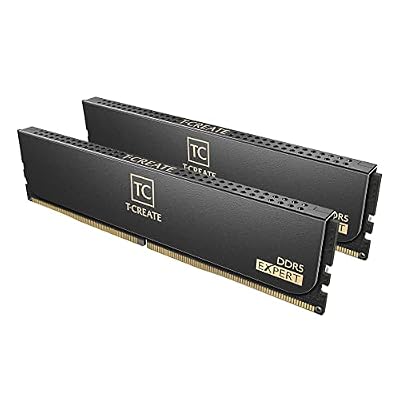
TEAMGROUP T-Create Expert CL30 Overclocking 10L DDR5 32GB Kit (2 x 16GB) 6000MHz (PC5-48000) Intel XMP 3.0 & AMD EXPO Compatible Desktop Memory Module Ram Black - CTCED532G6000HC30DC01
Included for 'Best budget 32gb ram: Top Affordable DDR4 & DDR5 Modules!' as a representative home product in this roundup; selection reflects the product set returned for this topic.
View on AmazonKey specs: 2x16GB · DDR5-6000 · CL30-36-36-76 · 1.35V · 32mm tall
Best for AM5 builders who want tighter secondary timings than most CL30 kits, in a 32mm low-profile package with no RGB. Trade-off: availability varies, and black and white versions use different part numbers.
Silicon Power Value Gaming DDR5-6000 CL30 32GB — Budget-Brand CL30

Silicon Power Value Gaming DDR5 32GB (2x16GB) 6000MT/s (PC5-48000) 288-pin CL30 1.35V UDIMM Desktop RAM Computer Memory SP032GXLWU60AFDJ
Included for 'Best budget 32gb ram: Top Affordable DDR4 & DDR5 Modules!' as a representative home product in this roundup; selection reflects the product set returned for this topic.
View on AmazonKey specs: 2x16GB · DDR5-6000 · CL30-38-38-96 · 1.35V · XMP 3.0 and EXPO
Best for AM5 buyers who want CL30 from a lower-cost brand. Trade-off: a smaller support network than Corsair, G.Skill, or Crucial, and Silicon Power advises against mixing it with other modules.
Patriot Viper Steel DDR4-3200 CL16 32GB — Sturdy DDR4 Alternative

Patriot Viper Steel DDR4 RAM 32GB (2X16GB) 3200MHz CL16 Desktop Memory
Included for 'Best budget 32gb ram: Top Affordable DDR4 & DDR5 Modules!' as a representative home product in this roundup; selection reflects the product set returned for this topic.
View on AmazonKey specs: 2x16GB · DDR4-3200 · CL16 · 1.35V · about 44mm tall
Best for DDR4 builders who like a thick metal heat spreader. Trade-off: at about 44mm it is the tallest kit here, and listed secondary timings vary by batch (16-18-18-36 or 16-20-20-40).
How to Install and Set Up a 32GB RAM Kit
Most “my RAM is slow” complaints come from setup, not from the kit. A budget kit only delivers its rated speed when it is installed in the right slots and its profile is turned on.
- Use the right slots. With two modules on a four-slot board, install them in A2 and B2, usually the second and fourth slots counting from the CPU. The board manual confirms the order.
- Press until both latches click. DDR5 and DDR4 modules need firm, even pressure. A half-seated stick is a common cause of no-boot problems.
- Expect a long first boot on DDR5. AM5 and Intel DDR5 boards train the memory on first power-on, which can take a minute or more with a black screen. Do not power off during this step.
- Enable XMP or EXPO. In the BIOS memory settings, choose the kit’s profile. Without it, DDR5 runs at 4800-5600 MT/s and DDR4 at 2133-2666 MT/s.
- Check the result in Windows. Task Manager, Performance, Memory shows the running speed. If it still shows the default, the profile did not save.
- Run a stability check. A pass of MemTest86 or a few hours of normal gaming will reveal unstable settings. If you see crashes, try the kit’s looser profile or update the BIOS.
Mistakes to Avoid When Buying Budget 32GB RAM
- Buying the wrong generation. DDR4 and DDR5 are physically different and do not fit each other’s slots. Check the motherboard, not just the CPU.
- Buying one 32GB stick for a dual-channel board. A single module halves memory bandwidth. Buy 2x16GB unless you plan to add an identical second stick soon.
- Paying for speed your platform cannot use. DDR5-7200 and faster kits rarely help on AM5 and can be harder to stabilize.
- Ignoring cooler clearance. Kits over about 40mm can collide with large air cooler fans. Low-profile kits at 32-35mm avoid the issue.
- Buying laptop memory by mistake. SO-DIMM kits look similar in listings but only fit laptops and mini PCs. Desktop kits are listed as DIMM or UDIMM.
Best Budget 32GB RAM Comparison Table
| Kit | Type | Speed | Timings | Voltage | Profiles | Height | Best for |
|---|---|---|---|---|---|---|---|
| Corsair Vengeance DDR5-6000 CL30 | DDR5 | 6000 | 30-36-36-76 | 1.40V | XMP / EXPO | Low profile | Best overall |
| TeamGroup T-Force Vulcan DDR5-6000 CL38 | DDR5 | 6000 | 38-38-38-78 | 1.25V | XMP / EXPO | 32.7mm | Best value |
| G.Skill Flare X5 DDR5-6000 CL30 | DDR5 | 6000 | 30-38-38-96 | 1.35V | EXPO / XMP | 33mm | AMD AM5 |
| Kingston FURY Beast DDR5-6000 CL36 | DDR5 | 6000 | 36-44-44 | 1.35V | XMP / EXPO | 34.9mm | Mainstream Intel |
| Patriot Viper Venom DDR5-6000 CL30 | DDR5 | 6000 | 30-40-40-76 | 1.35V | XMP / EXPO | Standard | Value CL30 for AM5 |
| Crucial Pro DDR5-6000 CL36 | DDR5 | 6000 | 36-38-38-80 | 1.35V | XMP / EXPO | About 35mm | Easy cross-platform |
| Crucial Pro DDR5-5600 CL46 | DDR5 | 5600 | 46 (JEDEC-style) | 1.1V | None needed | Standard | Cheapest DDR5 |
| G.Skill Ripjaws S5 DDR5-6000 CL36 | DDR5 | 6000 | 36-36-36-96 | 1.35V | XMP / EXPO | 33mm | Big air coolers |
| TeamGroup T-Create Expert DDR5-6000 CL30 | DDR5 | 6000 | 30-36-36-76 | 1.35V | XMP / EXPO | 32mm | Tight timings |
| Silicon Power Value Gaming DDR5-6000 CL30 | DDR5 | 6000 | 30-38-38-96 | 1.35V | XMP / EXPO | Not listed | Budget-brand CL30 |
| Corsair Vengeance LPX DDR4-3200 CL16 | DDR4 | 3200 | 16-20-20-38 | 1.35V | XMP | About 34mm | Best budget DDR4 |
| TeamGroup T-Force Vulcan Z DDR4-3200 CL16 | DDR4 | 3200 | 16-20-20-40 | 1.35V | XMP | About 32mm | Small DDR4 builds |
| G.Skill Ripjaws V DDR4-3600 CL18 | DDR4 | 3600 | 18-22-22-42 | 1.35V | XMP | Taller | Ryzen 5000 |
| Patriot Viper Steel DDR4-3200 CL16 | DDR4 | 3200 | 16-18-18-36 or 16-20-20-40 | 1.35V | XMP | About 44mm | Sturdy DDR4 |
How We Chose These Budget 32GB RAM Kits
These picks are research-based; the kits were not benchmarked for this guide. We started from the platforms people actually build on in 2026 (AMD AM5, Intel Core Ultra 200S, Intel 12th-14th Gen, and AM4) and the memory speed each one uses best. We then compared rated speed, primary timings, voltage, XMP and EXPO support, and module height from manufacturer spec sheets and part-number listings, and cross-checked them with independent reviews from outlets such as Tom’s Hardware and TechPowerUp. We limited each brand to a few picks, required a matched 2x16GB kit for every main recommendation, and favored kits that are widely stocked so the recommendation stays useful as prices move. Where sources disagreed on a spec, we either noted both values or left the figure out.
Frequently Asked Questions
This best budget 32gb ram guide answers the practical questions that can derail a first build: whether 32GB is enough, whether 6000 MT/s is sensible, whether CL30 justifies extra spend, and whether two 16GB sticks beat one 32GB stick. The answer depends on workload, platform, and the rest of your hardware.
Is 32GB Enough For Gaming?
Yes, 32GB is enough for most gaming PCs, everyday productivity systems, browsing, and many creator workloads. It gives a useful capacity buffer beyond 16GB while keeping the configuration at two common 16GB modules. For a normal desktop, memory capacity is unlikely to be the first limitation in typical daily use.
Heavier workloads are the exception. Virtual machines, serious 3D production, large datasets, or memory-heavy projects can justify more than 32GB. In those cases, extra capacity can matter more than moving from CL36 to CL30 at the same 6000 MT/s speed, especially when memory usage remains near the limit. memory-saturation
Is DDR5-6000 Worth Buying?
Yes, DDR5-6000 is a sensible target for many current desktop builds, but it is not a universal guarantee. The advertised speed depends on the memory profile, motherboard, CPU memory controller, BIOS, and module configuration. A system may boot at a lower JEDEC speed until the selected XMP or EXPO profile is enabled.
If the motherboard or processor is restrictive, a lower rated kit can be the safer match even when the headline speed looks less impressive. Confirm the exact motherboard QVL or manufacturer compatibility information before buying, then treat 6000 MT/s as a target profile rather than an automatic result safely.
Is CL30 Better Than CL36?
CL30 is technically tighter than CL36 or CL38 when the memory speed is identical, so it is useful when the price difference is modest. On these 6000 MT/s kits, that is why Corsair Vengeance and G.Skill Flare X5 use CL30, while Kingston and TeamGroup accept looser timing for different tradeoffs in most current builds.
The catch is that latency is only one part of memory performance. A tighter kit should not consume money needed for a faster CPU or graphics card when those components matter more. For a budget system, CL30 is sensible when the price gap is modest, not as a requirement at any cost, particularly in a typical gaming build with other priorities.
Should I Buy 2x16GB Or 1x32GB?
Yes, two 16GB modules are the normal choice for a 32GB desktop kit because they provide a matched pair for the board’s memory channels. All four picks here use that layout. Buying the required capacity as one matched kit also avoids relying on a later stick that may differ in memory chips, timings, voltage, or revision.
One 32GB module can make sense when a board has limited slots and you expect to add another matching module later, but that plan is less predictable. A matched 2x16GB kit is easier to validate as a set, so it is the cleaner starting point for most first-time desktop builders seeking 32GB without mixing separate memory kits.
Is DDR4 Still Worth Buying in 2026?
Yes, if your motherboard uses DDR4. Upgrading an AM4 or DDR4 Intel PC from 16GB to 32GB with a DDR4-3200 CL16 or 3600 CL18 kit costs far less than a new platform and helps both multitasking and newer games. For a brand-new build, DDR5 on AM5 or Intel Core Ultra is the better long-term choice.
Why Is 32GB RAM So Expensive Right Now?
Memory makers shifted production toward high-bandwidth memory for AI data centers, which tightened supply of regular DDR5 and DDR4 through 2025 and 2026. Prices for 32GB kits rose several times over. Waiting may help eventually, but buying a 2x16GB kit you need now is usually better than running a PC short on memory.
Can I Combine Two Separate 16GB Kits to Get 32GB?
It often works, but it is not guaranteed. Separate kits can use different memory chips or revisions, so the XMP or EXPO profile may not stay stable. If you mix kits, run them at the slower kit’s settings and test stability. A single matched 2x16GB kit avoids the problem.
Does RAM Speed Matter More on AMD or Intel?
It matters more on AMD Ryzen 7000 and 9000, where DDR5-6000 keeps the memory controller at a 1:1 ratio. Intel Core Ultra 200S handles a wider range of speeds well. On either platform, X3D Ryzen chips with large cache are the least sensitive to memory timings.
Which Budget 32GB RAM Kit Should You Buy?
- New AM5 gaming PC: Patriot Viper Venom DDR5-6000 CL30 or G.Skill Flare X5 DDR5-6000 CL30.
- New Intel Core Ultra build: Crucial Pro DDR5-6000 CL36 or Kingston FURY Beast DDR5-6000 CL36; confirm the board’s memory list.
- Lowest cost DDR5: Crucial Pro DDR5-5600 CL46, which needs no BIOS tuning.
- Big air cooler over the slots: G.Skill Ripjaws S5 DDR5-6000 CL36 or TeamGroup T-Create Expert at 32-33mm.
- AM4 Ryzen 5000 upgrade: G.Skill Ripjaws V DDR4-3600 CL18.
- Older Intel or AM4 on a tight budget: Corsair Vengeance LPX DDR4-3200 CL16 or TeamGroup T-Force Vulcan Z DDR4-3200 CL16.
Final Thoughts
When comparing the best budget 32gb ram choices, start with 32GB in a matched 2x16GB kit, then check the platform profile, timings, and cooler clearance. Corsair Vengeance suits a balanced build, TeamGroup T-Force Vulcan favors value, G.Skill Flare X5 fits AM5, and Kingston FURY Beast offers a straightforward mainstream option.
Ready to decide? Our #1 pick for 2026 is the AMD Ryzen 7000 / 9000 (AM5).
Live price & availability on Amazon.