Best 32gb ram for beginners should make an upgrade easier, yet similar listings can hide incompatible memory generations and different setup requirements. A 32GB kit that fits one desktop may be unusable in another. Start with your motherboard, then compare the features that matter before paying for speed your system cannot support.
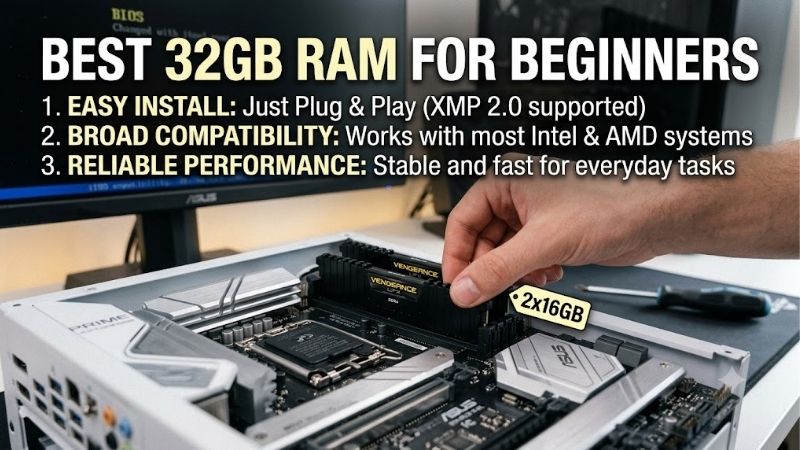
How to Choose 32GB RAM
Finding the best 32gb ram for beginners starts with compatibility, not the largest speed number. This guide compares four matched desktop kits and explains memory generation, performance profiles, timing specifications, and physical clearance. Each recommendation serves a different platform or budget, with its limitations stated upfront.
Memory Generation and Desktop Compatibility
DDR4 and DDR5 have incompatible slot keying and electrical requirements. Motherboards designed for one cannot accept the other, despite identical advertised capacities. These recommendations use desktop UDIMMs; laptops generally require smaller SO-DIMMs, while some computers have soldered memory rather than replaceable modules.
Check your motherboard’s complete model number, supported generation, and maximum capacity before ordering. Prebuilt desktops may impose restrictions through firmware or module specifications. Choose Corsair Vengeance LPX DDR4-3200 for compatible DDR4 desktops, or Kingston FURY Beast DDR5-5600 for supported DDR5 systems.
Performance Profiles and Setup Requirements
The best 32gb ram for beginners should match the motherboard’s profile system. Intel XMP and AMD EXPO store predefined frequency, timing, and voltage settings, simplifying configuration. These are overclocking profiles rather than guaranteed operating conditions; motherboard support and processor memory-controller capability determine results.
After confirming compatibility, activate the supported profile in BIOS, save settings, and verify memory stability before important work. Avoid manual voltage increases when troubleshooting your first build. Choose Corsair Vengeance DDR5-6000 for supported Intel XMP configurations, or G.SKILL Flare X5 DDR5-6000 for compatible AMD EXPO builds.
Transfer Rate and CAS Latency
Transfer rate, expressed in MT/s, describes data transfers per second; CAS latency counts clock cycles for one timing operation. Compare both instead of treating CL numbers as universal speed rankings. DDR5-6000 CL30 has approximately 10 nanoseconds of theoretical CAS latency, while DDR5-5600 CL36 is approximately 12.9 nanoseconds.
For the best 32gb ram for beginners, timings alone cannot predict performance: processor behavior also matters. Faster memory can benefit CPU-limited workloads without guaranteeing particular frame-rate improvements. Choose G.SKILL Flare X5 DDR5-6000 for CL30 timings, or Kingston FURY Beast DDR5-5600 when profile flexibility matters more.
Cooler Clearance and Total Upgrade Cost
Tall heat spreaders can interfere with a tower cooler’s overhanging fan, making module height a practical purchasing criterion. Measure available clearance instead of assuming every desktop kit fits. The G.SKILL Flare X5 DDR5-6000 uses 33mm modules, while the Kingston FURY Beast DDR5-5600 kit measures 34.9mm with its heat spreaders.
Assess value within the platform you already own: changing memory generations may require a motherboard and sometimes a processor replacement. RGB lighting adds appearance rather than capacity, and this shortlist favors unlit kits. Choose Corsair Vengeance LPX DDR4-3200 when retaining a suitable DDR4 system costs less than moving to a new platform.
Top Picks
These selections identify the best 32gb ram for beginners across compatible desktop systems, not one universal upgrade. Every kit contains two 16GB modules. Best Overall favors flexible DDR5 profiles; Best Value concerns an existing DDR4 machine. The remaining picks target AMD and Intel builds with specific performance requirements.
| Product | Best For | Key Spec | Watch Out For |
|---|---|---|---|
| Kingston FURY Beast DDR5-5600 | Best Overall for compatible DDR5 desktops | KF556C36BBEK2-32; 2 x 16GB; 5600 MT/s CL36; XMP and EXPO | Slower specification than the 6000 MT/s picks |
| Corsair Vengeance LPX DDR4-3200 | Best Value for existing DDR4 systems | CMK32GX4M2E3200C16; 2 x 16GB; 3200 MT/s CL16 | Cannot fit DDR5 motherboards |
| G.SKILL Flare X5 DDR5-6000 | AMD EXPO builds | F5-6000J3038F16GX2-FX5; 2 x 16GB; 6000 MT/s CL30 | Rated speed depends on platform support |
| Corsair Vengeance DDR5-6000 | Intel XMP builds | CMK32GX5M2B6000C36; 2 x 16GB; 6000 MT/s CL36 | Higher CAS latency than the Flare X5 pick |
Kingston FURY Beast DDR5-5600: Best Overall
Kingston FURY Beast DDR5-5600, part KF556C36BBEK2-32, suits beginners seeking DDR5 memory with AMD EXPO and Intel XMP 3.0 profiles. Its matched 32GB kit contains two 16GB modules, rated at 5600 MT/s CL36 and 1.25V. Dual profile support accommodates compatible motherboards using either configuration system without manually entering timings.
Its drawback is lower bandwidth than either 6000 MT/s alternative here, reducing its appeal when faster supported kits cost the same. Achieving 5600 requires profile activation; default programming is DDR5-4800. Consider it an all-rounder when compatibility and simpler configuration outweigh the tighter timing specifications available elsewhere.
Corsair Vengeance LPX DDR4-3200: Best Value
Corsair Vengeance LPX DDR4-3200, part CMK32GX4M2E3200C16, serves compatible desktops you intend to retain. It provides 32GB through two 16GB modules, with a tested 3200 MT/s CL16 profile at 1.35V. Low-profile aluminum heat spreaders offer useful clearance beneath bulky air coolers, without decorative lighting or associated customization software.
Its limitation is platform longevity: DDR4 cannot migrate into DDR5-only motherboards. Value depends on selling price and your intended ownership period, rather than the brand alone. If the best 32gb ram for beginners means resolving capacity shortages without replacing your platform, this kit is a sensible candidate instead of a new-build default.
G.SKILL Flare X5 DDR5-6000: Best for AMD EXPO Builds
G.SKILL Flare X5 DDR5-6000, part F5-6000J3038F16GX2-FX5, targets compatible AMD systems with a compact, unlit design. Its two 16GB modules are rated for 6000 MT/s at 30-38-38-96 timings and 1.35V. The CL30 specification provides a tighter primary timing than the other DDR5 picks, while 33mm height helps accommodate overhanging cooler fans.
Reaching 6000 MT/s depends on suitable motherboard firmware and processor memory-controller capability. AMD branding cannot establish compatibility for every configuration. Choose it when the exact kit appears on a support list and tighter timings justify its price; otherwise, prioritize a validated alternative over theoretical performance.
Corsair Vengeance DDR5-6000: Best for Intel XMP Builds
Corsair Vengeance DDR5-6000, part CMK32GX5M2B6000C36, suits compatible Intel desktops needing a matched XMP kit. Two 16GB modules provide a tested 6000 MT/s CL36 specification. Compact aluminum heat spreaders avoid the taller decorative lighting assemblies found on some alternatives, simplifying clearance planning around a large processor cooler.
Its CL36 specification is looser than Flare X5’s CL30 at the same transfer rate, warranting a price comparison before purchasing. Verify the exact Intel motherboard and processor combination before expecting 6000 MT/s. Choose it for supported XMP configurations when availability and total cost justify accepting its less aggressive primary timing.
Frequently Asked Questions
Questions about the best 32gb ram for beginners often involve capacity, module count, and installation rather than brand preference. The answers below separate useful upgrades from unnecessary spending and explain what changes when you replace existing memory. Before handling modules, shut down the computer and disconnect its power supply.
Is 32GB RAM Worth It for a Beginner Gaming PC?
Yes, 32GB can be worthwhile when gaming shares the computer with browsers, voice chat, recording tools, or memory-heavy modifications. Extra capacity creates room for concurrent applications and demanding titles. It does not automatically increase frame rates if your existing memory already accommodates the workload without significant paging.
Monitor memory usage during representative sessions before upgrading. Sustained pressure accompanied by disk paging can indicate insufficient capacity, although stuttering has other causes. Light gaming and basic office work may remain comfortable with 16GB; substantial editing projects or virtual machines can justify exceeding 32GB.
Is Two 16GB Sticks Better Than One 32GB Stick?
Usually, two matched 16GB modules are preferable for these mainstream desktop builds because they can populate both memory channels. One 32GB module leaves the second channel unused on a typical dual-channel platform. DDR5’s internal subchannels do not make a single module equivalent to installing modules across both motherboard channels.
Use the motherboard manual’s recommended slots, commonly A2 and B2 on four-slot boards, instead of placing modules together. One 32GB module preserves expansion flexibility in two-slot systems, but sacrifices immediate channel utilization. These recommendations prioritize matched pairs for balanced memory access at the requested capacity.
Can You Mix New RAM With Your Existing Kit?
Sometimes mixed memory works, but beginners should avoid assuming compatibility. Separate kits can differ in chips, timings, or electrical characteristics despite matching advertised specifications. Combining them may require slower settings and troubleshooting. Replace existing memory with one matched two-module kit for a 32GB starting point.
Choosing the best 32gb ram for beginners cannot eliminate uncertainty from mixing separate kits. Four-module configurations increase memory-controller workload and may reduce achievable frequency. When expansion is necessary, consult motherboard guidance and validate stability rather than assuming matching branding establishes compatibility.
Why Does New RAM Run Below Its Advertised Speed?
New RAM often starts at its default SPD settings rather than the advertised performance profile. That behavior is normal for the kits reviewed here and does not immediately indicate faulty memory. A monitoring utility may also report the memory clock rather than the effective transfer rate, displaying about 3000 MHz for DDR5-6000 operation.
If profile activation causes crashes, restore default settings and consult motherboard support documentation before adjusting settings. Some processors or prebuilt BIOS implementations cannot support advertised profiles. Allow initial DDR5 memory training to finish; repeatedly interrupting startup can complicate hardware diagnosis.
Final Thoughts
The best 32gb ram for beginners balances compatibility with total cost. Choose Kingston FURY Beast for flexible DDR5 profiles, Vengeance LPX for existing DDR4 systems, Flare X5 for supported AMD builds, or Vengeance DDR5 for Intel XMP configurations. Verify the exact part number, motherboard support, and cooler clearance before ordering.