- Top Pick: Mayflash F300 Arcade Stick
- Runner-up: HORI Fighting Stick Mini
- Also consider: 8BitDo Arcade Stick
An arcade stick changes how fighting games feel on PC. A lever and large buttons give you the input style of arcade cabinets, and for many players that layout makes quarter-circle and dragon-punch motions easier to repeat than on a gamepad. The sticks below all work on Windows PC, and each covers a different budget and style, from a compact first stick to a heavy tournament-grade model with genuine arcade parts.
Every stick here is built around a lever and eight main buttons, the standard layout for modern fighting games. Compatibility matters more than brand loyalty: some sticks are licensed for PlayStation and work on PC through a mode switch, while others are built for PC and Switch first. Check the platform switch and the cable before you buy, and match the stick to the games you actually play.
As an Amazon Associate, we earn from qualifying purchases.
Quick Answer
For most PC players, the 8BitDo Arcade Stick is the safest all-round pick, with wireless and wired modes and macro buttons. The Mayflash F300 and HORI Fighting Stick Mini are the budget choices, the first for broad console compatibility and the second for a small desk. For a premium setup, the Qanba Obsidian 2 brings genuine Sanwa parts, while the Nacon Daija adds a customizable front plate.
Mayflash F300 Arcade Stick

The Mayflash F300 is the cheapest way into a proper arcade stick on PC, and its main strength is breadth. One stick covers PlayStation 4, PlayStation 3, Xbox One, Xbox 360, PC, Android, Switch, and NeoGeo mini, so one controller covers several systems. On PC it connects over wired USB and works as a standard game controller.
The layout follows the standard eight-button arrangement, and the lever and buttons use a mounting pattern that accepts Sanwa Denshi parts, so the stick can grow with the player: start with the stock parts, then swap in arcade-grade components later without buying a new case. That upgrade path is the real value of the F300.
The case is light enough to move between a desk and a lap, and the three-metre cable reaches a PC under or beside a desk without an extension. The trade-off is feel: the stock lever and buttons are serviceable rather than premium, and the case is lighter than the tournament sticks below. Stock can vary on this older model, so confirm the listing shows it available before ordering.
Specs
- Model: F300
- Compatibility: PS4, PS3, Xbox One, Xbox 360, PC, Android, Switch, NeoGeo mini
- Joystick: lever, Sanwa-compatible mounting
- Buttons: 8 main buttons
- Cable: 3 m wired USB
- Weight: 2.1 kg
- First available: December 21, 2015
HORI Fighting Stick Mini
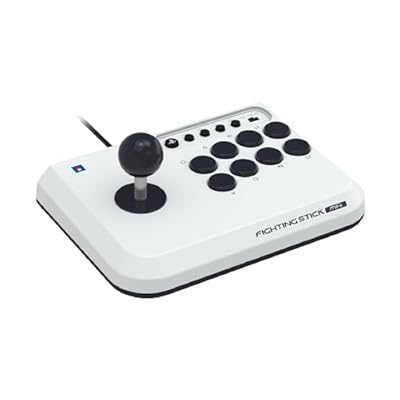
The HORI Fighting Stick Mini is built for players who want a real lever and buttons without giving up half the desk. At roughly eight inches wide and just over one pound, it is the smallest stick here, and it fits on a crowded desk or in a bag for travel. It is officially licensed by Sony and works on PlayStation 5, PlayStation 4, and PC.
The full eight-button layout uses a micro switch activated joystick, so the input feel is closer to a full-size stick than the size suggests. The cable runs about two and a half metres, long enough for a PC setup without sitting close to the screen.
There are two limits to know before buying. The Mini has no touch pad, so games that rely on touch-pad input need another controller for those menus. It also has no switch to change the joystick between D-pad and analog stick modes. For fighting games and retro arcade titles that rarely matters, but players who map the stick to other genres should check their game input options first.
Specs
- Model: SPF-038U
- Compatibility: PS5, PS4, PC
- Dimensions: 5.91 x 8.27 x 3.43 inches
- Weight: 1.03 pounds
- Cable: 8.2 ft (2.5 m) wired USB
- Buttons: 8 main buttons
- Touch pad: No
- First available: December 6, 2023
8BitDo Arcade Stick
The 8BitDo Arcade Stick is the only wireless pick here, and the most flexible. It connects over 2.4G wireless, Bluetooth, or a wired USB cable, and it works on Windows PC and Nintendo Switch. The wireless polling rate is listed at 1000Hz, and the built-in battery is rated for about forty hours over Bluetooth and about thirty hours over 2.4G.
Two macro buttons, labelled P1 and P2, sit on top of the case and can hold a sequence of inputs, useful for practice routines or moves with long input strings. The case opens for part swaps, which keeps the door open for later upgrades.
The trade-off is weight. At under two pounds the case is lighter than the premium sticks below, so it can shift on a lap during fast play unless it sits on a stable surface. It also has no touch pad, which matters only for PlayStation-style menus. For PC-first players who want wireless freedom and a low-maintenance setup, it is the most convenient stick here.
Specs
- Model: 6922621501350
- Compatibility: Windows PC, Nintendo Switch
- Connectivity: 2.4G wireless, Bluetooth, wired USB
- Polling rate: 1000Hz
- Battery: 1000mAh, about 40 hours over Bluetooth, about 30 hours over 2.4G
- Macro buttons: P1 and P2
- Dimensions: 11.9 x 8.4 x 2.5 inches
- Weight: 1.76 pounds
- First available: August 31, 2020
Qanba Obsidian 2 Arcade Joystick

The Qanba Obsidian 2 is the tournament-grade pick here, and the parts list explains why. It ships with a Sanwa Denshi JLF joystick and eight Sanwa Denshi 30mm OBSF buttons, the same components found in Japanese arcade cabinets, and the difference shows up in the consistency of diagonal inputs and the clean return of each button. A tournament lock switch disables the system buttons so a stray press cannot pause a match.
The control panel is unusually complete: a touch pad, L3 and R3 buttons, a turbo function, a mute button for the headset input, a switch for D-pad, left stick, and right stick modes, and a platform switch for PlayStation 5, PlayStation 4, and PC. Both a ball top and a bat top are included, with storage for the spare top and the USB cable.
The cost is size and weight. At over seven pounds and nineteen inches wide, the Obsidian 2 is a desk or lap anchor, not a travel stick. It suits a player who competes or practices daily and wants arcade-grade parts with no further upgrades.
Specs
- Model: Q7
- Compatibility: PS5, PS4, PC
- Joystick: Sanwa Denshi JLF
- Buttons: Sanwa Denshi 30mm OBSF
- Dimensions: 19.1 x 10.2 x 4.6 inches
- Weight: 7.4 pounds
- Connectivity: Wired USB
- Touch pad: Yes
- Headset input: 3.5mm with mute button
- Warranty: 1 year
Nacon Daija Arcade Fight Stick

The Nacon Daija is the premium pick for players who want Sanwa parts and a stick they can make their own. It uses a Sanwa joystick and Sanwa action buttons, and the front plate is customizable, so the artwork can be changed without replacing the whole controller. It is officially licensed for PlayStation and works on PlayStation 5, PlayStation 4, and Windows 10 and 11 PC.
The case is a full-size tournament layout with a three-metre cable, so it sits comfortably on a lap or a desk with room for both hands. The button layout follows the standard eight-button arrangement, and the control panel keeps the system buttons within reach.
The Daija is a heavy, full-size stick, so it needs a stable surface and storage space between sessions. Players who travel light or play on a small desk will find it too large. For a home setup where the stick lives beside the PC and the player wants premium parts with a personal look, it is a strong fit.
Specs
- Model: 50-1619-99
- Compatibility: PS5, PS4, Windows 10 and 11 PC
- Joystick: Sanwa joystick
- Buttons: Sanwa action buttons
- Front plate: customizable
- Cable: 3 m wired USB
- Dimensions: 16.54 x 10.24 x 4.72 inches
- Weight: 4.85 pounds
- First available: October 26, 2023
How to choose
Start with the platform. A stick licensed for PlayStation usually works on PC through a mode switch, but the touch pad and headset jack may behave differently on PC than on console. A PC-first stick avoids that entirely.
Next, weigh the parts. Sanwa Denshi levers and buttons are the arcade standard, and they hold their feel over long sessions. Budget sticks use stock parts that work well for learning, and some accept Sanwa replacements later, a cheaper path than buying a premium stick on day one.
Size and weight matter more than most buyers expect. A light stick moves during fast play, while a heavy stick stays put but needs desk space and storage. Measure before ordering a full-size model.
Finally, decide between wired and wireless. Wired sticks have no battery to charge, while wireless sticks keep the desk tidy and work well for casual play. For ranked matches, a wired connection removes one variable from the setup.
Who should skip
An arcade stick is not for every PC player. If a gamepad already feels natural, a stick is a sidegrade, not an upgrade, and the learning curve lasts weeks rather than days.
Players with very small desks should skip the full-size sticks here, since the Obsidian 2 and the Daija need real surface area and storage space. The Mini or the 8BitDo stick fits better.
Anyone who plays mostly games outside the fighting and retro arcade genres will get less value from a stick, since a lever and eight buttons map poorly to shooters and strategy games. A standard controller covers those genres better.
Frequently Asked Questions
Do arcade sticks work on PC?
Yes. Every stick in this roundup works on Windows PC, either as a native PC controller or through a platform switch on the case. Connect over USB, set the mode switch to PC where the stick has one, and the game should see it as a standard controller. Check the game input settings if a button does not respond.
Do I need Sanwa parts to play well?
No. Sanwa parts are the arcade standard and they feel consistent, but a beginner improves faster by practicing than by changing parts. Budget sticks are fine for learning, and the Mayflash F300 accepts Sanwa parts later.
Are PlayStation arcade sticks compatible with PC?
Most are. PlayStation-licensed sticks here list Windows PC as a supported platform, and the mode switch selects the PC profile. The touch pad and headset jack may not work the same way on PC as on console, so check the product page for PC-specific notes before buying.
Is a wireless arcade stick good for fighting games?
For casual and online play, yes. The 8BitDo stick here uses a 1000Hz wireless link and a wired mode for sessions where a cable is preferred. Players who compete in person usually choose wired sticks, since a cable removes battery and interference concerns entirely.
Final verdict
For most PC players, the 8BitDo Arcade Stick is the best balance of convenience, wireless freedom, and value. Budget buyers should choose between the Mayflash F300 for its upgrade path and broad console support, and the HORI Fighting Stick Mini for a small footprint. Players who compete or practice daily should step up to the Qanba Obsidian 2 for genuine Sanwa parts, with the Nacon Daija as the premium alternative.