Thirty-two gigabytes is the point where memory stops being something you think about. Browser tabs, a game launcher, a video editor and a chat client can all sit open without the system reaching for the page file. The catch with this particular search is the ceiling: under 250 dollars, nearly every 32GB DDR4 kit qualifies, so budget is no longer the filter. What separates the options is form factor, speed grade and latency, and picking the wrong form factor means the memory physically will not seat in the slot.
This guide is for two buyers who tend to get mixed up. One is upgrading a desktop tower and needs full-size 288-pin DIMMs. The other is reviving a laptop or mini system and needs 260-pin SODIMMs. The list below covers both, labeled clearly, so you can jump to the group that fits your machine. Every judgment is based on the listed specs in each product title, the way a spec sheet would read, and the picture is current as of 2026.
Quick Picks

G.SKILL RipjawsV Series DDR4 RAM (XMP) 32GB (2x16GB) Up to 3200MT/s* CL16-18-18-38 1.35V Intel AMD Desktop Computer Memory U-DIMM - Black (F4-3200C16D-32GVK)


As an Amazon Associate we earn from qualifying purchases. Product prices and availability are accurate as of the date/time indicated.

KingBank Computer Desktop Memory Ram DDR4 32GB(2x16GB) 3200MHZ CL16 1.35V XMP2.0 Overclocking with Heatsink for PC Gaming/Office/PS,Silver


As an Amazon Associate we earn from qualifying purchases. Product prices and availability are accurate as of the date/time indicated.

Timetec 32GB KIT (2x16GB) DDR4 2666MHz (PC4-2666V) PC4-21300 UDIMM Desktop RAM – 288-Pin 1.2V CL19 Non-ECC Unbuffered DIMM Memory Module Upgrade


As an Amazon Associate we earn from qualifying purchases. Product prices and availability are accurate as of the date/time indicated.
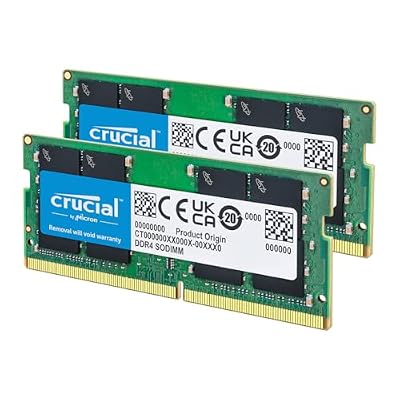
Crucial 32GB DDR4 RAM Kit (2x16GB), 3200MHz (PC4-25600) CL22 Laptop Memory, SODIMM 260-Pin, Downclockable to 2933/2666MHz, Compatible with 13th Gen Intel Core and AMD Ryzen 7000 - CT2K16G4SFRA32A


As an Amazon Associate we earn from qualifying purchases. Product prices and availability are accurate as of the date/time indicated.
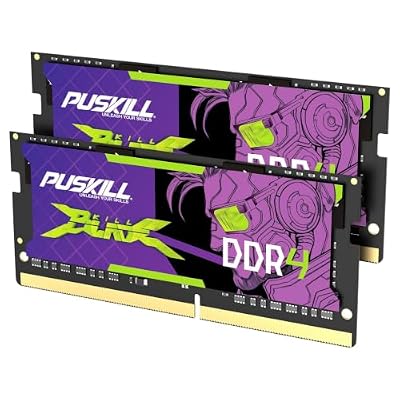
PUSKILL 32GB DDR4 3200MHz RAM (2x16GB) SODIMM CL22 Laptop | 32GB kit, 3200MHz, SODIMM laptop, CL22, 1.2V, plug-and-play, cost-effective dual-channel upgrade


As an Amazon Associate we earn from qualifying purchases. Product prices and availability are accurate as of the date/time indicated.

A-Tech DDR4 RAM 32GB Kit (2x16GB) 2666MHz PC4-21300 SODIMM Laptop Memory | Non-ECC PC4-2666V CL19 260-Pin SO-DIMM 1.2V Notebook Computer Memory Upgrade Modules


As an Amazon Associate we earn from qualifying purchases. Product prices and availability are accurate as of the date/time indicated.

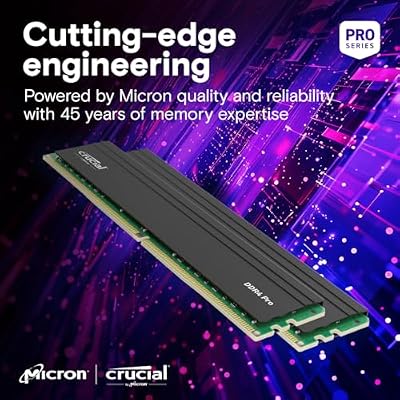
Crucial Pro 32GB DDR4 RAM Kit (2x16GB), High-Performance 3200MHz (or 3000MHz or 2666MHz) Desktop Memory UDIMM 288-Pin, Compatible with Intel and AMD Ryzen - CP2K16G4DFRA32A


As an Amazon Associate we earn from qualifying purchases. Product prices and availability are accurate as of the date/time indicated.
| Product | Best for | Key spec from the title |
|---|---|---|
| G.SKILL Ripjaws V | Desktop gaming builds with XMP | 2x16GB DDR4, up to 3200MT/s, CL16-18-18-38, 1.35V |
| KingBank DDR4 Kit | Desktop builds that want a heatsink | 2x16GB, 3200MHz, CL16, XMP 2.0 |
| Timetec 32GB Kit | Older or office desktops | 2x16GB, 2666MHz, PC4-21300, CL19, 1.2V |
| Crucial 32GB SODIMM | Laptop upgrades on newer Intel platforms | 2x16GB, 3200MHz, CL22, downclockable to 2933/2666 |
| PUSKILL SODIMM | Laptop upgrades on a tight budget | 2x16GB, 3200MHz, CL22, 1.2V, dual-channel |
| A-Tech SODIMM | Older notebooks | 2x16GB, 2666MHz, PC4-21300, CL19, 260-pin |
| Crucial Pro Desktop | Mixed Intel and AMD desktops | 2x16GB, 3200MHz (or 3000/2666), 288-pin UDIMM |
How to Choose
Match the physical module first
Desktop boards take 288-pin UDIMMs; laptops and many mini PCs take 260-pin SODIMMs. They are not interchangeable, and the notch sits in a different place on each. Three of the kits below are SODIMM and four are desktop DIMM. Confirm which your machine uses before comparing anything else, because a brilliant spec on the wrong module is worthless. Also confirm the generation: DDR4 will not fit a DDR5 slot.
Read speed and latency as a pair
DDR4-3200 is the common sweet spot for current Ryzen and Intel desktops, while 2666 is fine for office work and older platforms. Latency matters alongside speed: CL16 at 3200 responds faster than CL22 at the same clock, even though both carry the same headline number. If a board cannot hold 3200, a kit that downclocks gracefully saves you from a no-boot situation.
XMP, voltage and heatsinks
Desktop kits listing XMP at 1.35V need that profile switched on in the BIOS to reach their rated speed; without it they run at a slower default. Standard 1.2V kits run on the JEDEC profile with no tuning. Heatsinks help airflow in cramped cases but add height, so measure clearance under your CPU cooler before buying. Large tower air coolers are the usual culprit, and a bare module avoids the problem entirely.
Kit structure and what to ignore
Two 16GB sticks in dual-channel beat a single 32GB stick for bandwidth, and every kit here uses the 2x16GB layout. Ignore color and lighting claims; they change nothing about performance. Budget kits usually cut corners on the binning behind overclocking headroom, so treat advertised speeds as a ceiling rather than a promise on every board. If your use is mostly office work, spend your attention on compatibility instead of chasing the lowest timing number.
The 7 Best Options
G.SKILL Ripjaws V DDR4 32GB
This is the kit for a gaming desktop on a mainstream Intel or AMD board. The title lists 2x16GB at up to 3200MT/s with CL16-18-18-38 timings at 1.35V, plus XMP support, which is the classic enthusiast profile. It is described as a U-DIMM in black, so it targets standard desktop slots. Paired with a Ryzen or Core processor that supports DDR4, this is a familiar, no-surprises route to 32GB, and the Intel and AMD wording in the title signals broad desktop compatibility.
- Strength: CL16 timings at 3200 give a snappier response than looser kits.
- Strength: XMP support lets one BIOS toggle unlock the rated speed.
- Trade-off: the 1.35V rating means you must enable XMP to get the full speed.
Skip it if you are upgrading a laptop, since this is a full-size desktop module that will not fit SODIMM slots.
KingBank DDR4 32GB With Heatsink
KingBank targets builders who want a visible metal spreader and a tidy silver look without stepping into premium territory. The title shows 2x16GB at 3200MHz, CL16, 1.35V and XMP 2.0, aimed at gaming and office desktops alike, with overclocking mentioned. The title also positions it for PC gaming and office use, which signals a general-purpose kit rather than an enthusiast-only part, and the silver finish suits a light-colored build.
- Strength: CL16 latency and a 3200MHz rating match the better-known kits on paper.
- Strength: the heatsink adds protection during long sessions.
- Trade-off: a lesser-known brand, so the XMP profile deserves a manual check in the BIOS.
Skip it if your CPU cooler hangs close over the RAM slots, or if you prefer a name with a long track record.
Timetec 32GB DDR4 2666MHz
Timetec is the quiet workhorse for a desktop that does not need speed records. The title lists a 2x16GB kit at 2666MHz (PC4-21300), CL19, 1.2V, non-ECC and unbuffered, in 288-pin form. It reads like a plain replacement part, which is exactly its appeal for an office tower or an older family PC. Buyers who mainly browse, run spreadsheets and keep documents open will rarely feel the gap between 2666 and 3200, and the stock voltage means fewer BIOS steps.
- Strength: 1.2V runs on stock settings with no BIOS tuning.
- Strength: 288-pin UDIMM fits ordinary desktop boards.
- Trade-off: 2666 with CL19 is the slowest desktop kit here, which can hold back Ryzen gaming.
Skip it if you are building a new gaming rig and want the headroom of a faster grade.
Crucial 32GB DDR4 SODIMM 3200
This one suits a laptop owner on a recent platform. The title describes a 2x16GB kit at 3200MHz (PC4-25600), CL22, 260-pin, downclockable to 2933 or 2666, and mentions compatibility with 13th Gen Intel systems. The downclocking note is the useful detail, since laptop firmware sometimes caps memory speed below the module rating. It is also a useful choice for anyone who prefers an established memory brand when opening up a laptop chassis, where a failed first boot is more annoying than on a desktop.
- Strength: downclocking support gives a fallback if the firmware caps speed.
- Strength: a widely recognized brand on a SODIMM kit.
- Trade-off: CL22 is looser than desktop CL16 kits.
Skip it if you own a desktop tower, because SODIMMs will not seat in full-size slots.
PUSKILL 32GB DDR4 SODIMM
PUSKILL pitches itself as the cost-conscious laptop upgrade. The title calls out a 32GB kit at 3200MHz, 2x16GB, CL22, 1.2V and plug-and-play dual-channel operation. For someone who just wants a notebook to stop swapping and does not care about brand prestige, that short list is enough to justify a look. The same 3200MHz and CL22 pairing appears on the Crucial kit above, so the comparison comes down to brand comfort and how much fallback you want if the laptop is fussy.
- Strength: 3200MHz in a dual-channel pair for laptop bandwidth.
- Strength: 1.2V means no manual BIOS setup.
- Trade-off: a lesser-known label, so there is less community feedback to lean on.
Skip it if your notebook is a DDR3 or DDR5 model, since this module is strictly DDR4.
A-Tech 32GB DDR4 SODIMM 2666
A-Tech is the pick for an older notebook or small-form-factor system that already runs 2666 memory. The title shows 2x16GB, PC4-21300, CL19, non-ECC, 260-pin at 1.2V, and frames it as a notebook upgrade. Matching the speed your machine shipped with is often the lowest-risk way to double capacity. It also suits a small office machine that runs a handful of heavy applications all day, where steady behavior counts for more than raw clock speed.
- Strength: PC4-2666V is widely supported by earlier DDR4 laptops.
- Strength: non-ECC and standard voltage keep compatibility simple.
- Trade-off: it is the slowest SODIMM in this group.
Skip it if your laptop supports 3200 and you want maximum bandwidth for integrated graphics.
Crucial Pro 32GB DDR4 Desktop
Crucial Pro covers the middle ground for desktop buyers who want a mainstream brand without chasing heatsinks. The title lists 2x16GB at 3200MHz, with the note that it can run at 3000MHz or 2666MHz, in 288-pin UDIMM form for Intel and AMD systems. That flexibility is its main selling point on boards that are picky about memory. If a BIOS refuses to train at 3200, the module can step down to 3000 or 2666 instead of failing to boot, which makes it a sensible safety-first purchase for a first-time builder.
- Strength: the step-down speeds give it flexibility on fussy boards.
- Strength: bare modules fit under tight coolers.
- Trade-off: no heatsink or lighting, so it looks plain.
Skip it if looks matter to you, or if your build needs a laptop-size module.
Which One Fits Your Situation
You are building a new gaming desktop
Go with the G.SKILL Ripjaws V for its CL16 timings and XMP profile. If you want a metal spreader and do not mind a lesser-known name, the KingBank kit is the closest alternative. Both list CL16 at 3200, so the choice comes down to looks and brand comfort, and either one suits a streaming and gaming setup that keeps a lot open at once.
You are upgrading a recent laptop
Choose the Crucial SODIMM kit, especially on an Intel machine where its downclocking range gives a safety net. The PUSKILL kit is the second option if you are willing to trade brand familiarity for the same listed speed. Either way, open the laptop manual first to confirm that two SODIMM slots are user-accessible.
You are extending an older machine
The A-Tech SODIMM suits aging notebooks, and the Timetec kit does the same job in a desktop. Both stick to 2666 and 1.2V, which keeps compatibility high. For a hand-me-down machine meant for a student or a relative, that conservative approach is usually the right trade.
You mix Intel and AMD parts across builds
The Crucial Pro desktop kit is a sensible all-rounder, because the title explicitly names both platforms and offers three speed steps.
Common Mistakes
- Buying SODIMMs for a desktop or full-size DIMMs for a laptop.
- Forgetting to enable XMP, then wondering why a 3200 kit reports a lower clock.
- Comparing speed only and ignoring that CL22 responds slower than CL16.
- Ignoring cooler clearance when choosing a heatsink kit.
- Assuming 32GB will fix a slow system when the real bottleneck is storage or the processor.
Related guides
- Usb C Kvm Switch For Two Laptops And Two Monitors
- Vertical Laptop Stand For Dual Laptop Desk Setup
- Nvme Enclosure With Active Cooling For Mac Mini
Frequently Asked Questions
Is 32GB worth it over 16GB?
For gaming alone, 16GB is still workable, but 32GB removes headroom worries when streaming, editing or running virtual machines. Buyers who keep many apps open will notice the difference first.
Do I need XMP for these kits?
Only the desktop kits listing 1.35V and XMP need it for full rated speed. The 1.2V kits run on standard profiles without any BIOS change.
Can I mix two different 16GB kits?
It is better to avoid it. Mismatched kits often default to the slowest settings and can cause instability, so buy one matched 2x16GB kit instead.
Will DDR4 work in a DDR5 system?
No. DDR4 and DDR5 use different slot keys, so confirm your motherboard or laptop generation before ordering any of these kits.
Top picks from this guide
CrucialCrucial Pro 32GB DDR4 RAM Kit (2x16GB), High-Performance 3200MHz (or…CrucialCrucial 32GB DDR4 RAM Kit (2x16GB), 3200MHz (PC4-25600) CL22 Laptop…A-TechA-Tech DDR4 RAM 32GB Kit (2x16GB) 2666MHz PC4-21300 SODIMM Laptop…KingBankKingBank Computer Desktop Memory Ram DDR4 32GB(2x16GB) 3200MHZ CL16 1.35V…