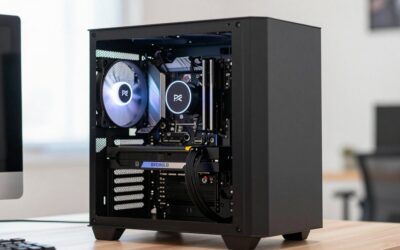
The best Ryzen mini PCs for home offices bring full desktop capability to a box that fits beside a monitor, under a monitor, or mounted behind a display. They suit people who work from home every day and want a tidy desk, fast application switching, and enough headroom for video calls, spreadsheets, documents, and browser tabs running at the same time. A Ryzen processor with eight cores and sixteen threads handles that kind of mixed workload with ease, while integrated Radeon graphics drive crisp displays without a separate graphics card.
A mini PC also changes how a home office feels. There is no large tower under the desk and far less fan noise during a quiet call. The models below focus on that balance: strong everyday performance, reliable connectivity, support for more than one monitor, and memory and storage that leave room to grow.
How to Choose the Best Ryzen Mini PCs for Home Offices
Choosing among the best Ryzen mini PCs for home offices begins with the processor. Look for a Ryzen 7 or Ryzen 9 chip with eight cores and sixteen threads, such as the Ryzen 7 8845HS or the Ryzen 9 7940HS. That core count keeps video conferencing, email, cloud applications, and local documents responsive at the same time, and it gives the machine a longer useful life as software demands grow.
Memory matters just as much. Aim for 32GB of DDR5 memory in a home office machine. That amount allows dozens of browser tabs, a video meeting, a spreadsheet, and a messaging application to stay open together without the system slowing down. Dual-channel memory also helps integrated graphics perform at their best. Storage should be a fast NVMe SSD of 1TB where possible, so the operating system, applications, and working files load quickly and there is space for documents, photos, and project archives. A second M.2 slot is a useful bonus for later expansion.
Display support is another deciding factor. Many home office setups use two monitors, one for the main task and one for reference material or a video call. Look for a combination of HDMI, DisplayPort, and USB4 outputs that supports at least two 4K displays. USB4 is especially valuable because it can carry a display signal and high-speed data through a single cable, which simplifies docking with a monitor or a hub.
Connectivity should cover both wired and wireless work. A 2.5GbE Ethernet port gives a stable wired connection for video calls and large file transfers, while Wi-Fi 6 and Bluetooth 5.2 handle wireless networks, headphones, keyboards, and mice. Front-facing USB ports make it easy to plug in a headset, a flash drive, or a phone charger without reaching around the back of the machine.
Cooling and noise deserve attention in a home office. A mini PC sits close to the person using it, so a design with a well-sized fan, heat pipes, or a vapor chamber keeps temperatures under control without constant fan noise. Finally, check upgrade access. Models with easily accessible memory and storage slots let you add capacity later instead of replacing the whole machine.
Beelink SER8 Ryzen 7 8845HS Mini PC
Beelink SER8 with Ryzen 7 8845HS, 32GB DDR5, and 1TB SSD

The Beelink SER8 is a strong all-round choice for a home office, built around the AMD Ryzen 7 8845HS processor with eight cores and sixteen threads and a boost clock up to 5.1 GHz. Radeon 780M integrated graphics handle everyday visual work, video playback, and multiple displays, while 32GB of DDR5 memory and a 1TB PCIe 4.0 NVMe SSD keep applications and files loading quickly. The metal chassis measures about 135 mm square, so it occupies very little desk space and can sit beside a monitor or on a small shelf.
Display flexibility is a highlight here. The SER8 supports triple 4K display output through HDMI 2.1, DisplayPort 1.4, and USB4, which suits a dual-monitor home office and leaves a third output available for a television or an additional screen. Wi-Fi 6, Bluetooth 5.2, and a 2.5GbE Ethernet port cover wireless and wired networking, and the front panel provides easy access to USB ports and a headphone jack. A vapor chamber cooling design helps the compact chassis stay quiet during long work sessions.
This model suits home workers who want a ready-to-use machine with generous memory and storage, clean triple-display support, and a small footprint. It is a good fit for a permanent desk setup where two monitors, a video conferencing camera, and a full set of peripherals stay connected all day.
View the Beelink SER8 on Amazon
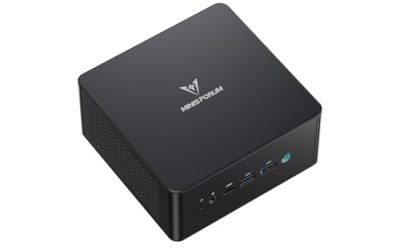
MINISFORUM UM790 Pro Ryzen 9 7940HS Mini PC
MINISFORUM UM790 Pro with Ryzen 9 7940HS, 32GB DDR5, and 1TB SSD

The MINISFORUM UM790 Pro steps up to the AMD Ryzen 9 7940HS processor, also with eight cores and sixteen threads, with a boost clock up to 5.2 GHz. It pairs that processor with Radeon 780M graphics, 32GB of DDR5 memory, and a 1TB PCIe 4.0 SSD, giving it ample headroom for demanding home office workloads such as large spreadsheets, photo editing, local development work, and running several professional applications side by side.
Connectivity is generous. The UM790 Pro includes two HDMI 2.1 ports, two USB4 ports, four USB 3.2 ports, Wi-Fi 6E, Bluetooth 5.3, and a 2.5GbE Ethernet port. That combination supports up to four displays and a wide range of peripherals without an external hub. Two PCIe 4.0 M.2 slots allow storage expansion, and the memory slots accept upgrades as well, which helps the machine adapt as work requirements change.
This model suits home workers who run heavier workloads than basic office tasks, or who want the strongest processor in this group for multitasking and creative work alongside office duties.
View the MINISFORUM UM790 Pro on Amazon
GMKtec NucBox K8 Plus Ryzen 7 8845HS Mini PC
GMKtec NucBox K8 Plus with Ryzen 7 8845HS, 32GB DDR5, and 512GB SSD

The GMKtec NucBox K8 Plus uses the same AMD Ryzen 7 8845HS processor found in the SER8, with eight cores, sixteen threads, a boost clock up to 5.1 GHz, and Radeon 780M graphics. It ships with 32GB of DDR5 memory and a 512GB PCIe 4.0 SSD, which is ample for office documents, cloud applications, and everyday files, especially when larger archives live on an external drive or in cloud storage.
Where the K8 Plus stands out is connectivity for a connected home office. It includes dual 2.5GbE Ethernet ports, an OCuLink port, two USB4 ports, HDMI 2.1, and DisplayPort 2.1, and it supports up to four displays. Dual wired network ports suit a desk that connects to both a home network and a separate work network, or a setup where a wired connection needs a backup path. A VESA mount is included, so the unit can be attached to the back of a monitor for a completely clear desk surface.
This model suits home workers who value flexible networking, four-display support, and a mountable design. It works well in a shared home office, a small room where desk space is limited, or a setup that benefits from mounting the computer out of sight behind a display.
View the GMKtec NucBox K8 Plus on Amazon
Comparison Table
| Product | Key Spec | Best For |
|---|---|---|
| Beelink SER8 | Ryzen 7 8845HS, 32GB DDR5, 1TB SSD, triple 4K display | All-round home office use with a compact footprint |
| MINISFORUM UM790 Pro | Ryzen 9 7940HS, 32GB DDR5, 1TB SSD, dual USB4 | Heavier multitasking and long-term performance headroom |
| GMKtec NucBox K8 Plus | Ryzen 7 8845HS, 32GB DDR5, 512GB SSD, dual 2.5GbE | Dual-network setups and monitor-mounted desks |
Frequently Asked Questions
Are Ryzen mini PCs powerful enough for a full-time home office?
Yes, for most home office work. An eight-core Ryzen 7 or Ryzen 9 processor with 32GB of memory handles video calls, office applications, web browsing, and file management at the same time. Integrated Radeon 780M graphics are sufficient for multiple displays, video playback, and light photo work, so a separate graphics card is not needed for typical office tasks.
How much memory and storage should a home office mini PC have?
Aim for 32GB of DDR5 memory and at least 512GB of fast NVMe storage, with 1TB preferred if you store large documents, photos, or project files locally. That combination keeps the system responsive with many applications open and leaves room for future software and files. Models with accessible memory and storage slots make later upgrades straightforward.
Can a Ryzen mini PC support two monitors?
Yes. All three models in this guide support at least two 4K displays, and each supports more through a mix of HDMI, DisplayPort, and USB4 outputs. Check that your monitors match the available ports, or use a USB4 dock or an adapter for the second display if needed.
Is a mini PC quiet enough for video calls?
A well-designed mini PC with a vapor chamber or a large heatsink and fan stays quiet during typical office work, including video calls. Fan noise usually rises only under sustained heavy load, such as rendering or large file processing. Placing the unit with clear space around its vents helps airflow and keeps fan noise low.
Conclusion
The best Ryzen mini PCs for home offices prove that a small computer can serve as a full-time work machine. The Beelink SER8 is the most balanced pick for everyday office work, with strong performance, generous memory and storage, and triple-display support in a compact metal chassis. The MINISFORUM UM790 Pro adds a faster Ryzen 9 processor and extensive connectivity for heavier workloads and longer-term use. The GMKtec NucBox K8 Plus brings dual wired networking, four-display support, and a monitor-mount option for desks where space and flexibility matter most.
Choose the SER8 for a straightforward, capable home office setup. Choose the UM790 Pro when your work regularly pushes beyond basic office tasks. Choose the K8 Plus when dual networking or a mounted, clutter-free desk is a priority. Any of the three gives a home office a fast, quiet, and tidy desktop that fits modern work without a full-size tower.
Disclosure: As an Amazon Associate, we may earn from qualifying purchases.