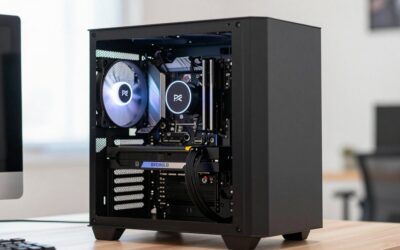
The best Ryzen mini PCs for creative workflows pack serious editing and design capability into a box small enough to sit beside a monitor. Video editing, photo retouching, illustration, motion graphics, and 3D work all benefit from a fast multi-core processor, generous memory, and quick storage, and modern Ryzen mini PCs deliver all three without a full-size tower. For creators working in a home studio, a shared office, or a small desk setup, that combination keeps the workspace tidy while leaving enough performance headroom for demanding projects.
Creative work is different from general office work. Timelines scrub more smoothly with more cores, large image files open faster with more memory, and exports finish sooner with a fast SSD and a capable integrated GPU. The models below focus on those needs: eight- and twelve-core Ryzen processors, 32GB of fast DDR5 or LPDDR5X memory, 1TB or 2TB of NVMe storage, and support for multiple high-resolution displays. Each one runs Windows 11 Pro and connects to the monitors, tablets, drives, and audio gear that creative setups already use.
How to Choose the Best Ryzen Mini PCs for Creative Workflows
Choosing among the best Ryzen mini PCs for creative workflows begins with the processor. Look for a Ryzen 9 chip with eight cores and sixteen threads, such as the Ryzen 9 8945HS, or a twelve-core Ryzen AI 9 HX 370 for heavier timelines and larger projects. More cores help when an editor renders a frame, exports a file, or runs several creative applications at once, while a high boost clock keeps single tasks such as applying a filter or opening a large document feeling responsive.
Memory is the next priority. Aim for 32GB as a minimum for photo and video work, and consider a model that accepts 64GB or more if you work with 4K footage, large layered files, or several applications open together. Fast DDR5 memory also supports integrated Radeon graphics, which handle timeline playback, colour work, and light 3D tasks. Storage should be a 1TB PCIe 4.0 NVMe SSD at minimum, with a second M.2 slot for project archives or a scratch drive. A 2TB drive is useful when raw footage and project files accumulate quickly.
Display support matters for creative accuracy. Look for HDMI 2.1, DisplayPort, and USB4 outputs that can drive at least two 4K displays, so a main editing monitor and a second screen for timelines, bins, or reference material can run side by side. USB4 is valuable for fast external SSDs and docks, which many creators rely on for project storage and peripherals.
Cooling and connectivity round out the decision. A compact machine sits close to the creator, so a design with a large fan, heat pipes, or a dual-fan system keeps noise low during long editing sessions. Dual 2.5GbE Ethernet, Wi-Fi 6E, and Bluetooth help with network storage, wireless headphones, and drawing tablets. Finally, check upgrade access: models with accessible memory and storage slots adapt as projects grow, instead of forcing a full replacement.
MINISFORUM UM890 Pro Ryzen 9 8945HS Mini PC
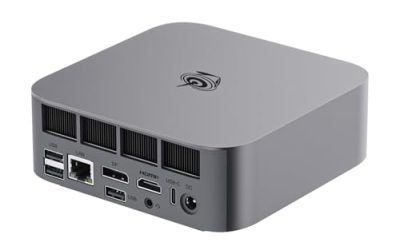
MINISFORUM UM890 Pro with Ryzen 9 8945HS, 32GB DDR5, and 1TB SSD

The MINISFORUM UM890 Pro is built around the AMD Ryzen 9 8945HS processor, with eight cores and sixteen threads and a boost clock up to 5.2 GHz, plus Radeon 780M integrated graphics. It ships with 32GB of DDR5 memory and a 1TB PCIe 4.0 SSD, a combination that handles photo editing, 1080p and 4K timeline work, and running an editor alongside a browser, music application, and file manager. Memory can be expanded, and a second M.2 slot adds storage for project archives.
Connectivity suits a creative desk. The UM890 Pro includes two USB4 ports, HDMI, DisplayPort, dual 2.5GbE Ethernet, Wi-Fi 6E, and Bluetooth, and it supports quad-display output. An OCuLink port allows an external graphics enclosure to be added later for heavier 3D or rendering work, which gives the machine a clear upgrade path without replacing the whole system.
This model suits creators who want a strong all-round editing machine with room to grow. It fits a photo editor, a video editor working in 1080p and 4K, and a designer who keeps several creative applications open through the working day.
View the MINISFORUM UM890 Pro on Amazon
GEEKOM A8 Max Ryzen 9 8945HS Mini PC
GEEKOM A8 Max with Ryzen 9 8945HS, 32GB DDR5, and 2TB SSD

The GEEKOM A8 Max uses the same AMD Ryzen 9 8945HS processor, with eight cores, sixteen threads, a boost clock up to 5.2 GHz, and Radeon 780M graphics. It pairs that processor with 32GB of DDR5 memory and a generous 2TB SSD, so large photo libraries, video projects, and asset collections can live on the internal drive instead of an external disk. That capacity is a real advantage for creators who work with raw footage or high-resolution images every day.
The A8 Max supports up to four displays through HDMI, DisplayPort, and USB4, and it includes dual 2.5GbE Ethernet, Wi-Fi 6E, Bluetooth, and an SD card slot. The card slot is handy for photographers who move images from a camera to the computer several times a day, while the compact metal chassis and quiet cooling keep the desk calm during long sessions.
This model suits photographers and video creators who need ample internal storage and straightforward media handling. It is a good fit for a creator whose project files are large, whose camera cards need a fast reader, and whose desk benefits from a small, quiet machine.
View the GEEKOM A8 Max on Amazon
Beelink SER9 Pro Ryzen AI 9 HX 370 Mini PC
Beelink SER9 Pro with Ryzen AI 9 HX 370, 32GB LPDDR5X, and 1TB SSD

The Beelink SER9 Pro moves to the twelve-core AMD Ryzen AI 9 HX 370 processor, with twenty-four threads, a boost clock up to 5.1 GHz, and Radeon 890M integrated graphics. It ships with 32GB of LPDDR5X memory and a 1TB NVMe SSD. The extra cores help with rendering, exporting, and running several demanding applications together, while the newer integrated graphics handle timeline playback and visual work with more headroom than earlier designs.
Display and I/O support includes triple-display output through HDMI, DisplayPort, and USB4, plus Wi-Fi 6, Bluetooth 5.2, and a 2.5GbE Ethernet port. A built-in microphone and speakers suit quick voice notes and calls, and the compact chassis fits easily beside a monitor or under a shelf. Two M.2 slots allow storage expansion as project libraries grow.
This model suits creators who want the most cores in this group for rendering and multitasking, including video editors, motion designers, and creators who use AI-assisted features in their software. It is the pick for a workflow where export times and simultaneous applications matter most.
View the Beelink SER9 Pro on Amazon
Comparison Table
| Product | Key Spec | Best For |
|---|---|---|
| MINISFORUM UM890 Pro | Ryzen 9 8945HS, 32GB DDR5, 1TB SSD, OCuLink | All-round editing with a clear upgrade path |
| GEEKOM A8 Max | Ryzen 9 8945HS, 32GB DDR5, 2TB SSD, SD slot | Photographers and creators with large libraries |
| Beelink SER9 Pro | Ryzen AI 9 HX 370, 12 cores, 32GB LPDDR5X, 1TB SSD | Rendering, multitasking, and heavier timelines |
Frequently Asked Questions
Can a Ryzen mini PC handle video editing?
Yes, for most editing work. An eight-core or twelve-core Ryzen processor with 32GB of memory handles 1080p and 4K timelines, colour work, and exports in common editing software. Integrated Radeon graphics support timeline playback and multiple displays, so a separate graphics card is not needed for typical editing, though an OCuLink enclosure can add one later for heavier 3D work.
How much memory do creative workflows need?
Aim for 32GB as a minimum, and more if you work with 4K footage, large layered image files, or several creative applications at once. Memory that can be expanded later is valuable, because project sizes tend to grow over time. Fast DDR5 or LPDDR5X memory also helps integrated graphics perform at their best.
How many displays can these mini PCs support?
All three models in this guide support at least three displays, and two support four. That allows a main editing monitor plus a second screen for timelines, bins, or reference material. Check that your monitors match the available HDMI, DisplayPort, and USB4 outputs before choosing a model.
Is 1TB of storage enough for creative projects?
It is enough to begin with, especially when finished projects move to external or network storage. A 2TB drive, as in the GEEKOM A8 Max, gives more room for active projects and raw footage. Models with a second M.2 slot let you add a project or archive drive later without replacing the machine.
Conclusion
The best Ryzen mini PCs for creative workflows show that a small machine can carry a serious editing and design workload. The MINISFORUM UM890 Pro is the most balanced pick, with a fast Ryzen 9 processor, generous connectivity, and an OCuLink path for future graphics expansion. The GEEKOM A8 Max adds a 2TB drive and an SD card slot for photographers and creators with large libraries. The Beelink SER9 Pro brings twelve cores and newer integrated graphics for rendering and heavy multitasking.
Choose the UM890 Pro for a versatile editing setup that can grow. Choose the A8 Max when storage capacity and camera media handling matter most. Choose the SER9 Pro when rendering speed and simultaneous applications are the priority. Any of the three gives a creative desk a fast, quiet, and compact workstation.
Disclosure: As an Amazon Associate, we may earn from qualifying purchases.