An Arduino starter kit is the fastest way to go from zero to a blinking LED, a buzzing sensor, or a small gadget that reacts to the room. Each kit here pairs a microcontroller board with the parts and lessons a beginner needs: a breadboard, sensors, motors, LEDs, jumper wires, and a tutorial path from the first Blink sketch to real projects. The five kits below cover the full range: a classic UNO R3 clone kit with 22 guided lessons, the official Arduino Starter Kit with its printed projects book, a kit built around a 72-page color manual, a Wi-Fi-ready UNO R4 kit with 50 projects, and a budget kit with labeled parts. Clone boards work with the Arduino IDE, and this guide says plainly which board is official and which is a compatible clone.
As an Amazon Associate, we earn from qualifying purchases.
How to Choose an Arduino Starter Kit
Board: official or compatible clone? The official Arduino Uno R3 comes from Arduino itself and supports the project behind the platform. Compatible clones use the same ATmega328P chip and pin layout and run the same sketches through the Arduino IDE, so for learning, a clone is fine. Two kits here carry original Arduino boards: the Official Arduino Starter Kit and the SunFounder Elite Explorer Kit, with its original Arduino UNO R4 WiFi board.
UNO R3 or UNO R4 WiFi? The UNO R3 is the classic 8-bit board with the largest tutorial library in existence — nearly every beginner walkthrough on the web assumes an R3. The UNO R4 WiFi is a 32-bit board with more memory and built-in Wi-Fi and Bluetooth, which opens up connected projects and the Arduino IoT Cloud. The trade-off is that most third-party walkthroughs still assume the R3, so an R4 kit needs strong included lessons — which the SunFounder kit provides.
Tutorials: book, PDF, or video? The official Arduino kit ships a 170-page printed projects book, and the Vilros kit includes a 72-page full-color printed manual — both suit learners who like paper on the bench. ELEGOO and DFRobot use downloadable PDF tutorials with example code. SunFounder pairs online tutorials with 60 or more video lessons.
Parts count versus parts quality. A high component count looks good on a listing, but resistors and LEDs are cheap filler. Look for the parts that unlock real projects: an LCD screen, a servo and a stepper motor, an ultrasonic sensor, a relay, and a breadboard power module. Four of the five kits here include an LCD. The DFRobot kit keeps its count modest at 83 components but bags and labels each one, which is worth more to a first-timer than a loose pile of 300 parts.
1. ELEGOO UNO R3 Project Super Starter Kit

The ELEGOO Super Starter Kit is the best all-round pick for most beginners: the most complete lesson set at this level. The board is an UNO R3-compatible clone — Elegoo’s own board, which the listing states is fully compatible with official Arduino software, sensors, and code. The 22 or more guided lessons come as a downloadable PDF tutorial with example code, not a printed book, and they walk through the LCD1602 display, the ultrasonic and DHT11 sensors, the joystick, the IR remote, the servos and motors, and the relay. The LCD1602 ships with its header pre-soldered, and nothing in the kit needs soldering. The breadboard power module lets projects run from a 9V battery.
Specs
- Board: UNO R3-compatible clone (Elegoo’s own board, compatible with Arduino IDE, sensors, and code)
- Lessons: 22+ guided lessons, downloadable PDF tutorial with example code (no printed book)
- Display: LCD1602 with pre-soldered header; 1-digit and 4-digit 7-segment displays
- Sensors: Ultrasonic sensor, DHT11 temperature and humidity sensor, joystick, IR receiver and remote
- Motors: SG90 servo, stepper motor, DC motor with fan blade, relay
- Breadboard: Breadboard plus breadboard power module (9V or below input)
- Wiring: 65 jumper wires, resistors, LEDs, buttons, 9V battery and DC lead, USB cable
- Soldering: None needed
- Storage: Organized packaging, no storage case
- Weight: 1.2 lb
2. Official Arduino Starter Kit [K000007]
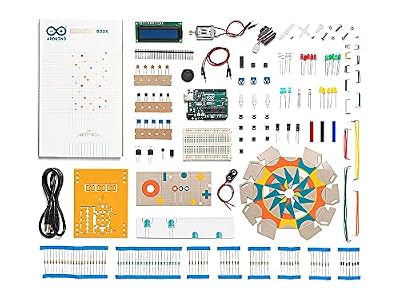
This is the real thing: an official Arduino Uno R3 board, built around the ATmega328P chip with 2 KB of SRAM, in a kit from Arduino itself. What sets it apart is the 170-page printed projects book, which teaches electronics concepts alongside the wiring — it explains why a circuit works, not just how to plug it together. The listing bullets describe 15 different projects, and the book itself has long contained 15; the listing title still says 12, which is stale copy rather than the real count. The kit includes more than 100 components. It has been on sale since October 2012 and the listing confirms it is not discontinued.
Specs
- Board: Official Arduino Uno R3 (ATmega328P, 2 KB SRAM)
- Book: 170-page printed projects book
- Projects: 15, per the listing bullets (the listing title says 12, which is stale)
- Components: 100+ electronic components
- First available: October 22, 2012; not discontinued by the manufacturer
- Size: 6.3 x 9.06 x 1.77 in
- Weight: 1.8 lb
3. Vilros Arduino Uno Starter Kit

The Vilros kit earns its place with the best printed manual in this guide and a small piece of hardware that makes a real difference on a crowded bench. The 72-page full-color manual is printed, not a PDF, and it explains each circuit before the code. The board-and-breadboard holder keeps the Uno and the breadboard bolted together as one unit, so the project does not slide around while you wire it. The listing describes the board as an Arduino Uno R3 board, and this guide does not add any stronger claim: the listing itself never calls the board official or genuine, so neither do we. The kit includes more than 190 components. One honest caveat: some boxes have arrived short a component or with a board that would not power up, so check the contents against the parts list and test the board on arrival. No weight is stated on the listing, so none is given here.
Specs
- Board: Arduino Uno R3 board, per the listing (the listing does not call it official or genuine)
- Manual: 72-page full-color printed manual, step-by-step, circuit explained before code
- Holder: Board-and-breadboard holder keeps the Uno and breadboard bolted together
- Components: 190+ electronic components
- Motors and parts: DC motor, servo, relay, resistors, LEDs, transistors, breadboard, jumper wires
- Weight: Not stated on the listing
4. SunFounder Elite Explorer Kit

The SunFounder Elite Explorer Kit is the most advanced kit in this guide and the only one built around the UNO R4 WiFi. The board is an original Arduino UNO R4 WiFi, in the listing’s own words — a 32-bit board with more memory and built-in Wi-Fi and Bluetooth. The kit includes more than 300 components and 50 projects, split into 30 basic, 13 fun, and 8 IoT projects, plus more than 60 free video lessons co-created with educator Paul McWhorter. An LCD1602, an OLED display, and a rechargeable battery module are in the box. Two honest notes: the listing title mentions ESP32, but the listing’s own bullets name no separate ESP32 board, so this guide makes no claim that one is included. And because most third-party walkthroughs still assume the R3, the included course carries more weight than it would in an R3 kit. No weight is given: the listing’s item weight figure is a data error.
Specs
- Board: Original Arduino UNO R4 WiFi (32-bit processor, more memory, built-in Wi-Fi and Bluetooth)
- Components: 300+ components
- Projects: 50 (30 basic, 13 fun, 8 IoT)
- Lessons: 60+ free video lessons co-created with educator Paul McWhorter, online tutorials, open-source code
- Displays: LCD1602 and OLED
- Power: Rechargeable battery module for portable projects
- Cloud: Arduino IoT Cloud integration
- Compatibility: Compatible with Uno R3 and Nano boards
- Compliance: RoHS compliant; ages 8+
- First available: December 29, 2023
- Size: 9.84 x 6.57 x 2.56 in
5. DFRobot Basic Electronics Starter Kit

The DFRobot kit is the budget pick of this set, and the best choice for a first-timer or a classroom that wants a short, ordered path rather than a mountain of parts. The board is a DFRduino UNO R3, a clone compatible with the Arduino UNO R3 and the Arduino IDE. The kit holds 83 components, each individually bagged and labeled. The 12 step-by-step tutorials build in order, and the prototyping shield is included in the box. The jumper wires are 22-gauge, sturdier than the thin wires in most entry kits. Twelve guided projects is the fewest in this guide, and that is the honest trade-off for the smaller box: this kit teaches the fundamentals and then hands the learner off to the wider world of Arduino projects.
Specs
- Board: DFRduino UNO R3, compatible with Arduino UNO R3 and Arduino IDE (clone)
- Components: 83, individually bagged and labeled
- Tutorials: 12 step-by-step tutorials that build in order
- Shield: Prototyping shield included
- Wiring: 22-gauge jumper wires; M/M jumper cables x18
- Parts: Resistors 220R x20 and 10K x20; 5mm LED x9 and 5mm RGB LED x1
- Model: DFRobot Beginner Kit For Arduino-Lite
Arduino Kits Compared
| Kit | Board | Projects | Tutorials | Standout |
|---|---|---|---|---|
| ELEGOO Super Starter | UNO R3-compatible clone | 22+ lessons | PDF with code | Broadest lesson set at this level |
| Official Arduino Starter Kit | Official Uno R3 | 15 | 170-page printed book | Genuine board plus a real book |
| Vilros Starter Kit | Arduino Uno R3 board | 190+ parts | 72-page printed manual | Manual plus board holder |
| SunFounder Elite Explorer | Original UNO R4 WiFi | 50 | 60+ video lessons | Wi-Fi, Bluetooth, and IoT projects |
| DFRobot Basic Electronics | DFRduino UNO R3 clone | 12 | 12 ordered tutorials | Labeled parts, budget pick |
ELEGOO is the default recommendation for most beginners. The official Arduino kit is the pick for the genuine board and a printed book. Vilros suits a classroom. SunFounder is the step up for Wi-Fi and IoT projects. DFRobot is the right first kit when the budget is tight.
Frequently Asked Questions
Do I need an official Arduino board, or is a compatible clone fine?
A compatible clone is fine for learning. Clones use the same ATmega328P chip and pin layout as the Uno R3 and run the same sketches through the Arduino IDE. An official board supports the Arduino project and guarantees compatibility, which is why the official Starter Kit and the SunFounder kit are worth considering.
What is the difference between the UNO R3 and the UNO R4 WiFi?
The UNO R3 is the classic 8-bit board, and nearly every beginner tutorial on the web assumes it. The UNO R4 WiFi is a 32-bit board with more memory and built-in Wi-Fi and Bluetooth, which opens up connected projects and the Arduino IoT Cloud. If you are following guides from around the web, the R3 is the simpler starting point; if you want IoT projects, the R4 WiFi is the better board.
Do Arduino starter kits need soldering?
No. All five kits in this guide are solder-free: parts plug into a breadboard, and headers such as the LCD1602 header on the ELEGOO kit come pre-soldered. Soldering becomes useful later, when a project moves from a breadboard to a permanent board, but it is not part of getting started.
What should I check when my kit arrives?
Count the parts against the included parts list, and test that the board powers up and accepts a sketch before the first lesson. A small number of Vilros boxes have arrived short a component or with a board that would not power up. Then install the Arduino IDE and upload the Blink example: a blinking onboard LED confirms the board, the cable, and the software all work.
Conclusion
The ELEGOO Super Starter Kit is the best first Arduino kit for most beginners: 22 or more guided lessons, a strong parts list, and a breadboard power module, all without soldering. The Official Arduino Starter Kit is the pick for the genuine board and a 170-page printed book. The Vilros kit pairs a 72-page color manual with a holder that keeps the build tidy. The SunFounder Elite Explorer Kit is the step up, with an original UNO R4 WiFi board, 50 projects, and video lessons for connected builds. And the DFRobot kit is the budget pick, with labeled parts and 12 ordered tutorials.