A PC build generates a lot to keep straight: SATA cables, fan headers, front-panel connectors, spare screws, M.2 drives, and the parts bins they live in. Masking tape and a marker work for a day, then the ink smudges and the tape curls off. A handheld label maker fixes that in seconds, printing clean labels you can stick on a cable, a drive caddy, or a drawer front and still read a year later.
This guide covers five handheld label makers for a PC building bench. All five are portable, run on batteries or a rechargeable cell, and print labels up to about half an inch wide. None is a desktop shipping-label printer, and none prints from a desktop computer.
As an Amazon Associate, we earn from qualifying purchases.
How to Choose a Label Maker for PC Building
Tape width sets what you can label. Every pick here tops out at 12 mm tape except the Phomemo D30, which takes labels up to 15 mm wide. A 12 mm strip fits two lines of small text, enough for a cable name plus a port number. Print resolution is a minor factor at this size: the Brother and DYMO units print at 180 dpi, the D30 at 203 dpi, and both are easy to read on a 12 mm label.
Print method decides how long a label lasts. The two Brother picks use laminated TZe tape, where the print sits under a clear protective layer that resists smudging, moisture, and handling. The DYMO LabelManager 160 uses thermal transfer onto D1 tape, which is also durable. The LetraTag 100H and the Phomemo D30 use direct thermal printing, which needs no ink or ribbon but fades faster, especially in warm air. For a label inside a case near a GPU exhaust, laminated or thermal-transfer tape holds up better.
Keyboard or app changes how fast you work. Three picks have a full QWERTY keyboard on the unit, so you type a label and print it without touching your phone. The LetraTag 100H uses an ABC keyboard layout, slower for longer text but fine for short cable names. The Phomemo D30 has no keyboard or screen; you design labels in a phone app over Bluetooth, which is slower to start but gives you fonts, icons, and barcodes a keyboard unit cannot match.
Power matters on a bench. Four picks run on disposable batteries: six AAA for the Brothers and the LabelManager 160, four AA for the LetraTag. The Phomemo D30 has a built-in rechargeable battery and charges over USB, but it cannot print while charging, so a dead D30 means a wait.
1. Brother P-touch PT-D210 — Best Overall
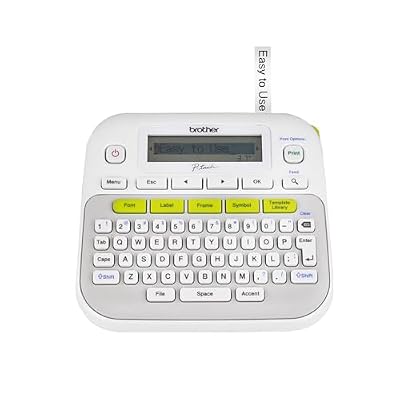
The PT-D210 is the most complete handheld labeler in this lineup, and the one to buy if you only want to own one. It prints on Brother TZe laminated tape in 3.5, 6, 9, and 12 mm widths, so the same unit covers narrow cable flags and wider bin labels. The laminated tape survives handling, and the print stays readable after months inside a case.
Typing is fast thanks to the QWERTY keyboard and one-touch keys for fonts, symbols, frames, and templates. With 14 fonts, 97 frames, more than 600 symbols, and 27 templates, you can give drive bays, fan headers, and cable runs distinct looks. The 15-character LCD shows what you are about to print, though longer text scrolls.
The PT-D210 is standalone. It does not connect to a PC, so every label is typed on the keyboard. It runs on six AAA batteries, sold separately, and an optional AC adapter is available for bench use. It takes the full TZe range, including cable-and-wire tapes that wrap around a cable and flag out for easy reading.
Specs
- Tape: Brother TZe laminated, 3.5, 6, 9, and 12 mm
- Print resolution: 180 dpi
- Keyboard: QWERTY with one-touch keys
- Display: 15-character, 1-line LCD
- Fonts and frames: 14 fonts, 97 frames, 600+ symbols, 27 templates
- Power: 6 AAA batteries, not included; optional AC adapter
- Connectivity: Standalone, no PC connection
- Size: 6.2 x 5.9 x 2.7 in
- Weight: 16 oz
- Warranty: 1-year limited warranty
- ASIN: B013DG2FNW
2. Brother P-touch PT-H110 — Best Compact Pick

The PT-H110 is the PT-D210’s smaller sibling, and it makes sense when bench space is tight or you want a labeler that lives in a tool bag. It uses the same TZe laminated tape in the same four widths, so tapes are interchangeable between the two machines.
The trade-off for the smaller body is a simpler feature set: 3 fonts, 14 frames, and more than 250 symbols, against the D210’s 14 fonts and 97 frames. For cable names, drive labels, and bin tags, that is plenty. The QWERTY keyboard keeps typing quick, the 16-character graphic LCD shows your text, and a manual cutter trims each label. A memory feature saves up to 15 labels for reprinting, handy for a full set of fan headers or a row of identical drawers.
Like the D210, the H110 is standalone, runs on six AAA batteries not included, and takes an optional AC adapter. It prints at 180 dpi and handles the same TZe range, including cable-and-wire tape.
Specs
- Tape: Brother TZe laminated, 3.5, 6, 9, and 12 mm
- Print resolution: 180 dpi
- Print speed: 20 mm/s
- Keyboard: QWERTY with one-touch keys
- Display: 16-character, 1-line graphic LCD
- Fonts and frames: 3 fonts, 14 frames, 250+ symbols
- Memory: Up to 15 saved labels
- Cutter: Manual
- Power: 6 AAA batteries, not included; optional AC adapter
- Connectivity: Standalone, no PC connection
- Size: 109 x 202 x 55 mm
- Weight: 400 g without batteries or tape
- Warranty: 1-year limited warranty
- ASIN: B01J3WQ360
3. DYMO LetraTag 100H — Best Bundle Value

The LetraTag 100H arrives as a three-tape bundle, which makes it the easiest pick to start with: the box includes one paper cassette and two plastic cassettes, all 12 mm black-on-white or black-on-clear, so you can print right away without buying tape separately. It is the only pick here that takes a single tape width, 12 mm LetraTag LT cassettes, which rules out narrow 6 mm and 9 mm cable flags.
This is a direct thermal labeler, so there is no ink or ribbon to replace. The print is crisp on day one, and the plastic cassettes hold up well on bins and drawers. Inside a warm case, direct thermal print fades sooner than laminated TZe or thermal-transfer D1, so reserve this one for parts storage and desk-side labeling.
The ABC keyboard is the main compromise. Typing a short name like “SATA 2” is quick, but longer text takes more hunting than on a QWERTY unit. The 13-character LCD shows your text, five text styles cover bold, underline, and size changes, and a nine-label memory stores repeats.
Specs
- Tape: DYMO LetraTag LT cassettes, 12 mm only
- Print method: Direct thermal, no ink or ribbon
- Print speed: 6.8 mm/s
- Keyboard: ABC layout, not QWERTY
- Display: 13-character LCD
- Text styles: 5 styles, with bold and underline
- Memory: 9 saved labels
- Power: 4 AA batteries
- Connectivity: Standalone, no PC connection
- Size: 95 x 210 x 65 mm
- Weight: 280 g
- Included: 1 paper cassette, 2 plastic cassettes
- ASIN: B01BD6DRI6
4. DYMO LabelManager 160 — Best for Durable Tape

The LabelManager 160 is the pick for labels that need to survive. It prints with thermal transfer onto DYMO D1 tape in 6, 9, and 12 mm widths, and the same machine takes DYMO Durable tape, built for rougher handling. A cable label tugged during a rebuild, or a bin label that gets wiped down, holds up better here than on a direct thermal print.
Typing is comfortable thanks to the computer-style QWERTY keyboard and one-touch Smart Keys that jump straight to formatting. The large LCD shows more of your label at once than the smaller screens on the other keyboard units. Six font sizes, eight text styles, and 228 symbols and clip art give you room to distinguish categories.
The LabelManager 160 does not connect to a Mac or PC, so all labels are typed on the unit. It runs on six AAA batteries, not included, and an optional AC adapter is sold separately. At 180 dpi, text is sharp at every tape width, and the 12 mm tape fits two lines for a name plus a port or date.
Specs
- Tape: DYMO D1 and Durable, 6, 9, and 12 mm
- Print method: Thermal transfer
- Print resolution: 180 dpi
- Keyboard: QWERTY with one-touch Smart Keys
- Display: Large LCD
- Font sizes and styles: 6 font sizes, 8 text styles, 228 symbols and clip art
- Cutter: Manual
- Power: 6 AAA batteries, not included; optional AC adapter
- Connectivity: Standalone, not Mac or PC compatible
- Weight: 350 g
- Auto power-off: Yes
- ASIN: B005X9VZ70
5. Phomemo D30 — Best App-Based Pick
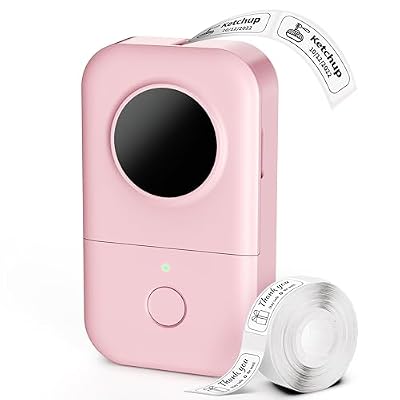
The Phomemo D30 takes a different approach: there is no keyboard and no screen on the unit at all. You design labels in the Print Master app on your phone, send them over Bluetooth, and the D30 prints them. That sounds like a drawback until you want a barcode, a QR code, a small icon, or a saved template, none of which a keyboard labeler handles well.
The D30 prints direct thermal at 203 dpi, the sharpest output in this lineup, in black only. Labels come in 6, 12, 14, and 15 mm widths, as pre-cut stickers or continuous tape, and the box includes 80 pre-cut 12 by 40 mm labels.
The limits are real. The built-in rechargeable battery charges over USB, and the D30 cannot print while charging, so a flat battery stops a labeling session. Direct thermal print fades faster than laminated tape, so use it for bins, drawers, and desk-side storage rather than labels inside a warm case.
Specs
- Label widths: 6, 12, 14, and 15 mm, pre-cut and continuous
- Print method: Direct thermal, monochrome, black text only
- Print resolution: 203 dpi
- Print speed: 40 mm/s
- Keyboard and display: None, app-based design
- Connectivity: Bluetooth 4.0, Print Master app for iOS and Android
- Power: Built-in rechargeable lithium battery, USB charging
- Cannot print while charging: Yes
- Continuous printing: About 2 hours per charge
- Size: 131.5 x 75.5 x 29 mm
- Weight: About 160 to 180 g
- Included: 80 pre-cut 12 x 40 mm labels
- ASIN: B08HVMF9QL
Comparing the Five
The two Brother picks share the TZe tape system, so choose between them on size and features: the PT-D210 has more fonts, frames, and templates, while the PT-H110 is smaller and lighter with the same tape range. The DYMO LabelManager 160 is the strongest choice for labels that take abuse, thanks to thermal transfer and Durable tape. The LetraTag 100H is the simplest way to start, with three tapes in the box. The Phomemo D30 has no keyboard or screen, but the sharpest print and the most design freedom through its app.
FAQ
Can I use a handheld label maker on cables inside a PC case?
Yes, with the right tape. Laminated TZe tape and DYMO D1 or Durable tape hold up to heat and handling better than direct thermal print, which fades faster in warm air. Wrap-around cable-and-wire tape works best.
Do any of these label makers print from a computer?
No. The two Brother units and both DYMO units are standalone and print only from their own keyboards. The Phomemo D30 prints from a phone app over Bluetooth, not from a desktop. If you need to print labels from a PC, look for a desktop label printer with USB or network support instead.
What tape width should I use for PC cables?
A 9 mm or 12 mm tape fits a cable name and a port number on one line, which covers most uses. Use 6 mm tape for thin fan wires and front-panel leads where a wide flag would crowd the connector. For parts bins and drawers, 12 mm tape fits two lines and is easier to read from across the room.
How long do printed labels last on parts bins?
Laminated and thermal-transfer labels last for years on bins and drawers kept indoors. Direct thermal labels also last well on a shelf, but they fade sooner in heat and sunlight, so keep them away from windows and hot air vents.
Conclusion
A handheld label maker is a small tool that pays for itself the first time you trace a cable without guessing. The Brother PT-D210 is the best all-rounder for a PC bench, with laminated tape and the widest feature set. The PT-H110 covers the same tape range in a smaller body, the DYMO LabelManager 160 is the toughest option for labels that get handled, the LetraTag 100H is the simplest bundle to start with, and the Phomemo D30 adds app-based design and the sharpest print.