Soldering is a two-handed job that really needs three hands: one for the iron, one for the solder wire, and one to hold the work still. A helping hands tool supplies that missing hand, and for PC building it earns its place fast. You solder fan headers, LED strips, custom cable connectors, keyboard switches, and the occasional repair on a control board, and every one of those jobs gets easier when the workpiece sits still at a comfortable angle instead of sliding across the bench.
The tools in this guide all do the same core job — flexible arms with alligator clips on a weighted base — but they differ in ways that matter. Some arms are fixed to the base, others ride on magnets you can slide anywhere. One pick adds a magnifying lens and a light for small-pitch work. The right one depends on how much repositioning you do and how small the parts are.
As an Amazon Associate, we earn from qualifying purchases.
How to choose helping hands for soldering
Arm count and reach. Four arms is the practical standard: two to hold the board or cable, one for a wire, and one spare for a heat-shrink tube or a second lead. Five arms help when you join several wires at once, such as a fan splitter or a custom LED run. Longer arms reach over taller work, while shorter arms give finer control for small boards. Arms that bend and stay put are what you are paying for — cheap arms creep back toward straight the moment you let go.
Fixed arms or magnetic arms. Fixed arms screw into the base at set sockets, which is simple and secure. Magnetic arms stick to any steel surface, so you can slide them to a new spot, add arms from another set, or move the whole arrangement onto a steel bench. Magnetic arms suit builders who change setups often; fixed arms suit a permanent bench station.
Base weight and footprint. A helping hands tool is only useful if the base stays put. Look for a steel base of at least 2 lb for small work, and more if you solder thick cables that pull against the clips. A wide base resists tipping when an arm leans out past the edge. Rubber feet keep the base from skating and protect the desk surface.
Clips that protect the work. Alligator clips should rotate a full 360 degrees so you can present a joint at the angle your iron needs. Silicone or rubber sleeves on the jaws keep the teeth from scratching a PCB finish or nicking wire insulation. Clips that detach from the arm are handy for cleaning and for swapping in a fresh clip when the teeth wear.
Magnifier and light. A 3X lens is enough for most through-hole joints, header pins, and wire splices. It does not replace a proper magnifying lamp for surface-mount work, but it turns a fiddly joint into a comfortable one. A built-in LED that runs off USB is a bonus when your bench lamp cannot reach under a cable bundle. If you already own a magnifying lamp, a plain four-arm station is the better buy.
What helping hands cannot do. These tools hold small boards, wires, and connectors. They will not hold a full-size motherboard, a graphics card, or a heavy power supply steady — those need a proper PCB holder or a bench vise. They also do not replace a soldering iron stand; keep the iron in its own holder between joints.
1. QuadHands Classic Workbench (QH4)

The Classic Workbench is the fixed-arm version of the QuadHands system, and it is the pick for a builder who wants a permanent soldering station that never needs rearranging. Four gooseneck arms are fixed to an X-shaped steel base, so the layout stays exactly where you set it. The arms bend smoothly and hold their shape under the weight of a cable or a small board, and the 360-degree rotating clips let you turn a joint toward the iron instead of twisting your wrist. Silicone covers on the clips protect board finishes and wire insulation from teeth marks.
The 8 by 8 inch base is compact enough to live on a crowded bench next to a soldering iron, yet heavy enough at 3.85 lb to stay planted when you pull a wire taut. The powder-coated steel shrugs off solder splashes and flux, and the whole unit is made in the USA. If you solder in one spot and want a tool that is ready the moment you sit down, this is the one to leave on the bench.
Specs
- Arms: 4 fixed gooseneck arms with 360-degree rotating stainless steel alligator clips
- Base: 8 x 8 in powder-coated steel X-shaped base
- Weight: 3.85 lb
- Clips: Stainless steel with removable silicone covers
- Dimensions: 8 x 8 x 16 in
- Model: QH4, made in USA
- ASIN: B00GIKVP5K
2. QuadHands Workbench (Magnetic)
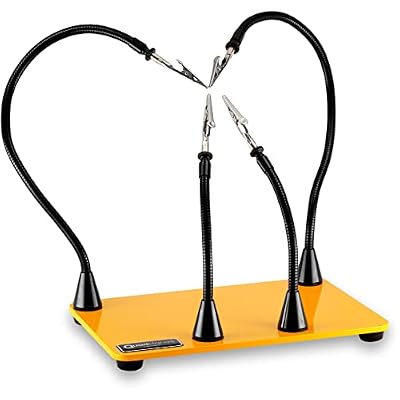
The magnetic Workbench is the same idea with a different philosophy: instead of arms fixed at set sockets, four arms sit on rare-earth magnets that grip the steel base anywhere you place them. Slide an arm to the edge for a long cable, cluster all four around a small board, or pull one off and stick it to a steel bench or a tool cabinet. The 6 by 9 inch rectangular base gives more layout room than the Classic’s X-shaped base, which suits wider work such as a keyboard PCB or a long LED strip.
The arm set mixes two 16 inch arms with two 8 inch arms, so you can reach over taller parts with the long arms and keep fine control with the short ones. The clips rotate 360 degrees and carry silicone covers, just like the Classic. Magnetic arms can be knocked loose by a hard tug on a heavy cable, so this pick suits builders who reposition often and work with light to medium parts.
Specs
- Arms: 4 magnetic gooseneck arms, 2 x 16 in and 2 x 8 in, with 360-degree rotating clips
- Base: 6 x 9 in powder-coated steel rectangular base
- Magnets: Rare-earth magnets at each arm base, repositionable anywhere on the base
- Clips: Stainless steel alligator clips with silicone covers
- Model: QH-WB-68, made in USA
- ASIN: B01MTWLF2Q
3. KOTTO Helping Hands, Four Arms

The KOTTO four-arm station is the straightforward choice: four flexible gooseneck arms, stainless steel alligator clips that rotate 360 degrees, and a non-slip weighted steel base. The arms screw into the base and hold their position under a small board or a bundle of wires.
At 1.26 kg, about 2.8 lb, the base is heavy enough for typical PC soldering — fan wires, headers, connectors, and small control boards — while staying light enough to move around the bench or tuck into a drawer. The clips are rated for high heat, with an upper temperature rating of 450 degrees Celsius, so a slip of the iron near a clip is not a disaster. This is the pick for a first soldering station or a second set for a portable repair kit.
Specs
- Arms: 4 flexible gooseneck arms with 360-degree rotating stainless steel alligator clips
- Base: Non-slip weighted steel base with rubber feet
- Weight: 1.26 kg (about 2.8 lb)
- Clips: Stainless steel, upper temperature rating 450 degrees Celsius
- Included: Alligator clips, helping hands station
- ASIN: B07MDKXNPC
4. KOTTO Third Hand Professional, Five Arms

The Professional adds a fifth arm to the KOTTO formula, and that extra arm is more useful than it sounds. Joining three wires into one splice, holding a board while you feed solder and steady a heat-shrink tube, or keeping a connector shell open while you tin two leads — all of these jobs run short of hands at four arms. The five arms are the same flexible gooseneck design with 360-degree rotating clips, screwed into a 2 lb weighted steel base with anti-slip feet.
The base is a little lighter than the four-arm KOTTO, so it suits light and medium work. The station is sold by F.Stop Labs, the same seller behind the four-arm model, and it carries the same 30-day satisfaction guarantee. Listings for this one have shown intermittent availability, so check the listing before ordering. If your projects regularly involve three-way splices or multi-wire connectors, the fifth arm is worth having.
Specs
- Arms: 5 flexible gooseneck arms with 360-degree rotating stainless steel alligator clips
- Base: Non-slip weighted steel base with anti-slip feet
- Weight: 2 lb
- Sold by: F.Stop Labs
- Model: Helping hands station new
- ASIN: B07C577S21
5. NEWACALOX Third Hand Helping Arms Tool, 3X
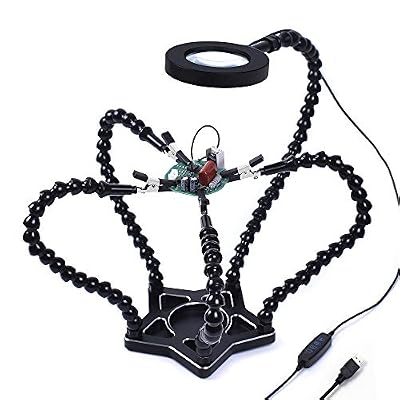
The NEWACALOX is the only pick here with a magnifier and a light built in, which makes it the choice for small-pitch work. A 3X magnifying lens on its own flexible arm swings over the joint, and a USB-powered 5W LED inside the lens housing lights the work from close range. The light has three brightness levels and three color modes, so you can match the light to the bench instead of fighting glare on a shiny solder joint.
The station has four clip arms plus the magnifier arm, all on a pentagram-shaped aluminum alloy base with rubber-coated feet. The alligator clips rotate 360 degrees, detach from the arms, and come with removable rubber sleeves that protect delicate surfaces. The package includes the base, the magnifier with its flexible arm, four adjustable clip arms, and a user guide, and the tool carries a 2-year warranty. The USB adapter is not included, so you will need a spare USB port or adapter. For header pins, small connectors, and any joint you need to see clearly, the lens and light make a real difference.
Specs
- Arms: 4 flexible gooseneck clip arms plus 1 magnifier arm
- Magnifier: 3X lens with USB-powered 5W LED, 3 brightness levels, 3 color modes
- Base: Pentagram-shaped aluminum alloy base with rubber-coated feet
- Clips: Detachable 360-degree rotating alligator clips with removable rubber sleeves
- Warranty: 2 years, 30-day money-back guarantee
- ASIN: B082W8V3TS
Which helping hands should you buy?
If you solder at one bench, the QuadHands Classic is the set-and-forget choice. If you rearrange your bench for every project, the magnetic QuadHands Workbench gives you layout freedom no fixed station can match. The KOTTO four-arm station covers the basics at a sensible weight and size, and the five-arm Professional is the better KOTTO when your joints involve three wires or more. The NEWACALOX is the pick when small joints and tired eyes are the problem — the 3X lens and LED light turn a squinting job into a comfortable one.
For most PC building, four arms and a heavy base are enough. Add a magnifier if you solder headers and small connectors often, and a fifth arm if you splice multi-wire harnesses.
FAQ
How many arms do I need for soldering PC parts?
Four arms cover most PC soldering: two to hold the board or cable, one for the wire, and one spare. A fifth arm helps with three-way splices, fan splitters, and multi-wire connectors, where you need to hold several leads at once while you feed solder.
Are magnetic arms better than fixed arms?
Magnetic arms win when you change setups often, because you can slide them anywhere on a steel base or stick them to another steel surface. Fixed arms win for a permanent bench station, because they cannot be knocked loose by a tug on a heavy cable. Both hold small boards and wires equally well once positioned.
Do I need a magnifying lens for soldering?
A 3X lens helps with header pins, small connectors, and any joint under about 2 mm. It is not required for fan wires, LED strips, or other large joints, and it does not replace a proper magnifying lamp for surface-mount work. If your eyes tire during fine soldering, a lens and a built-in light are worth having.
Can a helping hands tool hold a full motherboard?
No. Helping hands are built for small boards, wires, and connectors. A full-size motherboard or graphics card is too large and too heavy for gooseneck arms, and the clips cannot grip a board edge safely at that size. Use a proper PCB holder or bench vise for full-size boards.
Conclusion
A helping hands tool is a small purchase that changes how soldering feels. The QuadHands Classic and magnetic Workbench are the sturdy, long-lasting options, the two KOTTO stations cover the basics with four or five arms, and the NEWACALOX adds a magnifier and light for fine work. Pick the one that matches how you solder, and the third hand you have been missing will be waiting on the bench.