An ultrawide monitor changes the way a desk feels and the way a workday flows. The extra horizontal space makes split-screen multitasking easy and gives timelines, spreadsheets, and code room to breathe. At the same time, a wide curved screen exposes every weakness in the rest of the setup. A loud keyboard echoes across the bigger desk surface, cables that once hid behind a smaller monitor now sprawl into view, and a webcam balanced on top of the screen sits at an awkward angle. The accessories around the monitor matter just as much as the monitor itself.
This guide collects five accessories that round out an ultrawide desk for work, play, and calls. The list includes a silent keyboard and mouse set for focused hours, a gaming keyboard and mouse bundle for after hours, a short quick release rail for mounting a camera or light above the screen, a USB C audio cable for clean sound routing, and a microphone shock mount for clear meeting and recording audio. Each pick solves a specific problem that wide-monitor owners run into, and together they turn a big screen into a complete, tidy workstation.
As an Amazon Associate, we earn from qualifying purchases.
What to look for in PC accessories for ultrawide setups
Desk width and reach come first. An ultrawide monitor takes up a large share of the desk, and its stand often pushes the keyboard farther from the screen than a standard setup would. Look for input devices that stay comfortable at that distance, and consider whether a compact keyboard layout frees up room for a notebook or a second device beside it. Wireless gear reduces the cable runs across a wide desk, while wired gaming gear avoids any worry about battery or signal during long sessions.
Noise is the second factor. Bigger desks tend to sit in shared rooms, home offices, and living spaces, so quiet switches and silent clicks help keep the peace during calls and late-night work. The third factor is mounting. The top of an ultrawide screen is a natural place for a camera or a small light, but the curved back and thin bezels make clamps awkward, so a proper rail or mount gives a safer, more adjustable perch. Finally, think about cable routing and compatibility: check that your devices have the ports your cables assume, confirm microphone thread sizes before buying a mount, and plan cable runs so the clean look of the setup survives.
1. Dell KM555 Silent Keyboard and Mouse

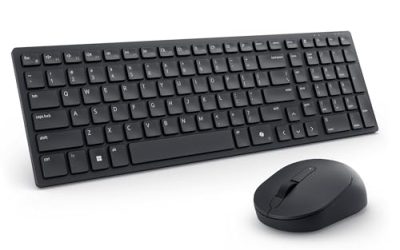
The Dell KM555 is a wireless keyboard and mouse combo built around quiet operation, which makes it a natural anchor for an ultrawide desk used for work. The keyboard uses silent keys and the mouse uses silent clicks, so typing and clicking do not fill the room with noise. On a wide desk that doubles as a meeting space, that quietness keeps calls comfortable.
The full-size keyboard includes a number pad, which suits the spreadsheet work that ultrawide screens encourage, and the mouse can travel across the wide display without constant lifting. Wireless connectivity keeps the desk surface clear of cables, an important detail when a large monitor stand already claims the center of the desk. The combo connects through a USB receiver or Bluetooth, so it can pair with a desktop tower tucked under the desk or a laptop docked beside the monitor.
For anyone whose ultrawide setup is primarily a productivity station, this is the calm, tidy option: it favors comfort and silence over flash, and keeps the focus on the screen rather than the gear in front of it.
Specs
| Detail | Value |
|---|---|
| Product type | Wireless keyboard and mouse combo |
| Key and click style | Silent keys and silent mouse clicks |
| Connectivity | USB receiver and Bluetooth |
| Layout | Full-size keyboard with number pad |
| Intended use | Office work, study, and everyday computing |
2. TMKB Falcon M1SE Mouse and T61SE Keyboard Bundle

The TMKB Falcon bundle pairs the M1SE gaming mouse with the T61SE keyboard, giving an ultrawide desk a matched gaming set for the hours when work ends and play begins. The T61SE uses a compact 60 percent layout, which is a smart match for a wide monitor: the smaller footprint leaves generous room for wide mouse sweeps during games, even with a large screen and stand in the middle of the desk.
The M1SE mouse is a lightweight wired gaming mouse with an adjustable sensor, suited to the fast, broad movements that ultrawide gaming resolutions encourage. Wide screens show more of the game world at once, and a mouse that tracks smoothly across a big pad helps you use that extra view. The wired connections keep input consistent during long sessions with no charging breaks.
As a bundle, the Falcon set works well for a desk that serves two roles: run it as the dedicated gaming corner of a dual-setup desk, or keep it as the main set and slide it forward for games. It complements a quiet office combo nicely, giving one workspace both a calm work mode and a lively play mode.
Specs
| Detail | Value |
|---|---|
| Product type | Gaming keyboard and mouse bundle |
| Keyboard | T61SE compact 60 percent layout |
| Mouse | Falcon M1SE wired gaming mouse |
| Connectivity | Wired USB connections |
| Intended use | Gaming on wide and ultrawide displays |
3. SMALLRIG Quick Release Safety Rail 4cm

The SMALLRIG Quick Release Safety Rail is a short 4cm rail in the NATO style, designed to give cameras and accessories a secure, standardized mounting point. On an ultrawide desk, its best job is holding a small camera or compact light above the monitor in a stable position. Wide screens are tall targets for mounting, and their curved backs leave few flat surfaces, so attaching gear through a rail-based arm or clamp is far more reliable than balancing it on the bezel.
The rail is machined from aluminum alloy and includes safety pins at the ends, which stop a sliding accessory from slipping off the rail accidentally. That detail matters when the mounted item hangs over an expensive curved panel. Because the rail follows a common standard, it works with a wide range of clamps, handles, and arms, so it can anchor a camera for streaming one week and a small fill light for video calls the next.
It is a small part, but it solves a real ultrawide problem: adding a camera or light to a big screen setup without wobble or guesswork. If your desk doubles as a streaming station, this rail becomes the foundation the rest of the mounting gear builds on.
Specs
| Detail | Value |
|---|---|
| Product type | Quick release safety rail |
| Length | 4cm |
| Standard | NATO-style rail with safety pins |
| Material | Aluminum alloy |
| Intended use | Mounting cameras, lights, and small accessories |
4. JSAUX USB C to 3.5mm Audio Cable

The JSAUX USB C to 3.5mm audio cable connects modern devices that dropped the headphone jack to speakers, headsets, and audio gear that still use a standard 3.5mm plug. On an ultrawide desk, its value is tidy routing: instead of adapters dangling from a laptop, a single cable runs from the computer to your speakers or headset in one clean line.
The cable uses a braided nylon jacket, which resists tangling and fraying better than plain rubber cables, an everyday benefit on a wide desk where cables travel longer distances and slide across more surface. The connectors are built for frequent plugging and unplugging, so moving between a headset for calls and speakers for music stays simple. It carries audio only, which keeps it focused: plug it in and sound routes where you want it.
For ultrawide owners who dock a laptop beside the monitor or use a phone and tablet at the same desk, this cable removes a common annoyance. Many current devices rely on USB C for audio, while most desk speakers and wired headsets still speak 3.5mm. One sturdy cable bridges that gap and keeps the wide, minimal look of the setup intact.
Specs
| Detail | Value |
|---|---|
| Product type | USB C to 3.5mm audio cable |
| Connector A | USB C plug |
| Connector B | 3.5mm audio plug |
| Jacket | Braided nylon |
| Intended use | Connecting USB C devices to speakers and headsets |
5. Boseen Microphone Shock Mount

The Boseen Microphone Shock Mount suspends a microphone inside an elastic mounting frame, isolating it from the desk. That isolation matters more on an ultrawide desk than most people expect: a wide desk surface carries vibrations from typing, clicks, and bumps straight into a microphone stand, and those thumps end up in recordings and streams. A shock mount absorbs much of that movement before it reaches the capsule.
The mount uses a standard threaded connection that fits many common microphone arms and stands, and its adjustable design suits a range of popular condenser microphones. Positioned beside an ultrawide monitor, it lets a boom arm hold the microphone close to your voice while the screen stays unobstructed, which is exactly the arrangement streamers, podcasters, and remote workers aim for.
If your wide-screen desk hosts meetings, voiceovers, or game chat, this is a simple way to sound noticeably cleaner. Voices come through with less desk rumble, and the mount keeps the microphone steady when the desk gets bumped during an animated conversation. Paired with the mounting rail above, it completes the call-and-recording side of an ultrawide workstation.
Specs
| Detail | Value |
|---|---|
| Product type | Microphone shock mount |
| Suspension | Elastic shock-absorbing frame |
| Mounting | Standard threaded connection for arms and stands |
| Compatibility | Many common condenser microphones |
| Intended use | Calls, streaming, podcasting, and voice recording |
FAQ
Do ultrawide setups need different accessories than regular desks?
Mostly, the priorities shift rather than the products themselves. A wide monitor leaves less desk depth, pushes input devices farther away, and makes cable runs longer, so quiet wireless gear, compact keyboards, and tidy cable routing matter more. Curved screens also offer fewer flat surfaces for cameras and lights.
How can a wide desk serve both office work and gaming?
A dual input approach works well. A silent wireless combo handles focused work and calls, while a compact gaming bundle takes over for play. The compact keyboard frees mouse space during games, and the quiet set keeps the room calm, so one ultrawide desk can cover both roles without re-cabling.
Where should a camera go on an ultrawide monitor?
Centered above the screen is the natural spot for calls and streaming, but curved backs and thin bezels make direct balancing risky. A short quick release rail combined with a clamp or arm gives a stable, adjustable mounting point, and the rail standard lets you swap between a camera and a small light as needed.
Why does a microphone need a shock mount on a desk setup?
Desks transmit vibration. Typing, clicking, and small bumps travel through the surface and into a microphone, where they become thumps in recordings and calls. A shock mount suspends the microphone on elastic, which absorbs much of that movement, so your voice sounds cleaner with no change to your microphone.
Final verdict
A great ultrawide setup is built around the screen, not just on it. The Dell KM555 keeps work quiet and cable-free, the TMKB Falcon bundle gives the same desk a proper gaming mode, the SMALLRIG rail provides a safe mounting foundation for a camera or light, the JSAUX cable routes audio in one clean line, and the Boseen shock mount keeps your voice free of desk noise. Add these five accessories to a wide monitor and the result is a workstation that looks tidy, sounds clear, and handles work, play, and calls with equal ease.
Product and ASIN Reference
| Product | ASIN |
|---|---|
| Dell KM555 Silent Keyboard and Mouse | B0DFMXBS7V |
| TMKB Falcon M1SE Mouse and T61SE Keyboard Bundle | B0F8VQ64G1 |
| SMALLRIG Quick Release Safety Rail 4cm | B00LHD8484 |
| JSAUX USB C to 3.5mm Audio Cable | B085VVTJK3 |
| Boseen Microphone Shock Mount | B01C5DCW2I |